dsh-offpeak-job 🌙
English · 简体中文
Off-peak scheduling for DeepSeek Harness — park chats until cheaper hours, pause at peak if you want, and keep an eye on waiting work from the sidebar.
📸 Screenshots
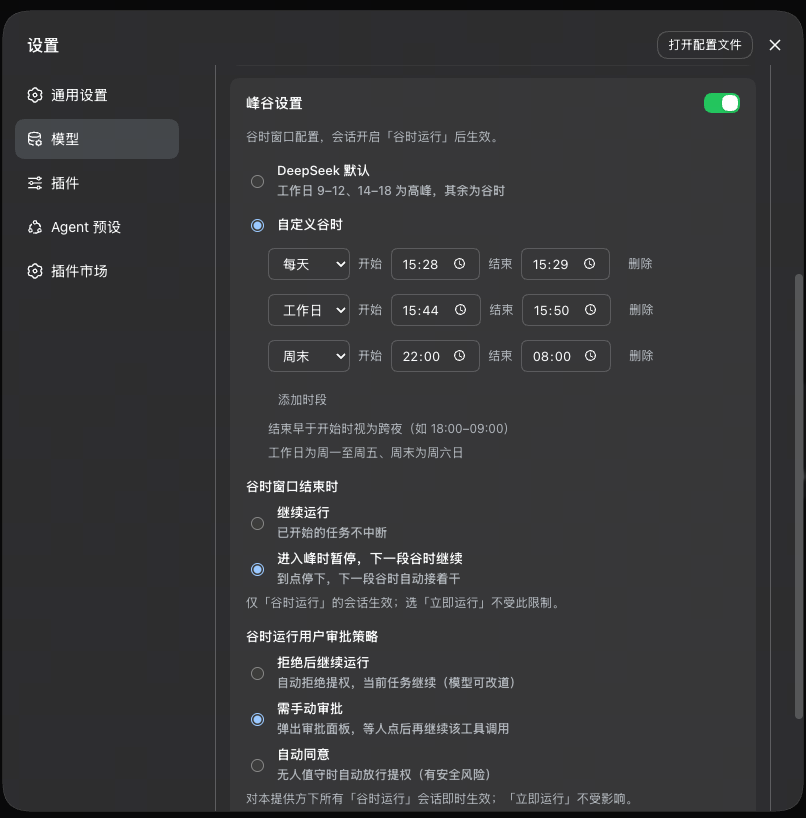 |
⚙️ Peak / off-peak settings — per provider: custom windows, what to do when peak starts, and how escalations behave on overnight runs |
✨ Feature tour
⚙️ Peak / off-peak per provider
- Lives under Settings → Models on each provider card
- DeepSeek can use the official peak calendar; or define your own windows (every day / weekdays / weekends), including overnight spans like 18:00–09:00
- Turn peak / off-peak off entirely when you do not want waiting at all
- Optional: pause when peak begins, resume next off-peak — or keep a started turn running through peak
- Optional: overnight escalation policy — reject and continue / wait for you / auto-allow (Off-peak run only)
💬 Run timing per chat
- Composer control: Off-peak run / Run now (same place as access mode; hideable from provider settings)
- Outside the window, messages wait instead of spinning the chat the whole time
- Start now on the wait bar runs the queued turn immediately without flipping the chat back to Run now
- Waiting messages and “continue later” work survive Host restart
📋 Off-peak overview
- Sidebar entry above Settings (hidden when every provider has peak / off-peak off)
- Cross-chat board of Off-peak-run sessions: waiting, paused for later, needs you, session unavailable
- Start now / discard from one place when something is waiting for a window
At a glance
| 🧩 Plugin type | Cordis plugin — host routes + web client, pure additive (no official plugin replaced) |
| 🌙 What it gates | Admission of sends on Off-peak-run chats; optional pause at window end |
| 💬 Chat UX | Wait bar in the conversation; run-timing control in the composer |
| 📡 Status board | Sidebar Off-peak overview with badge for items that need attention |
| 💾 State | Under $DSH_HOME/offpeak-job/ (provider schedules, per-chat flags, waiting queues) |
| 🎨 UI | TypeScript + React (host externals) + CSS, follows host chrome |
Quick start
Install (pick one):
A · one-liner (recommended) — straight from the GitHub Release tarball, no Git needed:
dsh plugin --profile web add "https://github.com/ganningniang/dsh-offpeak-job/releases/latest/download/dsh-offpeak-job.tgz"B · local clone (for hacking on the source) —
link:accepts a local absolute path only (no spaces in the path):git clone https://github.com/ganningniang/dsh-offpeak-job.git cd dsh-offpeak-job npm install && npm run build dsh plugin --profile web add "link:<absolute path of the cloned dsh-offpeak-job directory>" # e.g. cloned into D:\tools → dsh plugin --profile web add "link:D:/tools/dsh-offpeak-job"Either way the
addcommand registersdsh-offpeak-jobin the profile bundle list (writes to~/.dsh, may ask for authorization). If thedshcommand is missing, usenpx @deepseek-ai/dshinstead.Restart the DSH web process, refresh the GUI
Configure a provider: Settings → Models → edit a provider → Peak / off-peak → pick windows / pause policy / approval policy → Save
Use it in a chat: choose Off-peak run in the composer; send as usual — work waits until the next open window (or use Start now when you cannot wait)
Architecture
One package ships the host Cordis plugin and the web client:
- host:
/api/offpeak-job/*routes for health, provider/session config, overview, release / discard / send-conflict resolve; wraps agent send paths so Off-peak-run work can wait without opening a busy turn - client: injects the Models peak / off-peak panel, composer run-timing control, conversation wait bar, and sidebar overview
- persistence: schedules and waiting queues live under
$DSH_HOME/offpeak-job/; Host restart rehydrates queues and re-arms release timers when the chat agent is live again
Development & testing
cd dsh-offpeak-job
npm install
npm run build     # lib/index.js + lib/client.js
npm run check
npm run test:offpeak
- Build in this package directory — output is
lib/next tocordis.patch.yml - Tests cover schedules, wait persistence, approval policy, overview, and locale freeze
Troubleshooting
Q: How do I reinstall / get the latest release?
Re-run the install command (always installs the latest Release), then restart dsh web and refresh:
dsh plugin --profile web add "https://github.com/ganningniang/dsh-offpeak-job/releases/latest/download/dsh-offpeak-job.tgz"
Queues and peak / off-peak config live under $DSH_HOME/offpeak-job/; reinstalling the plugin usually leaves them alone.
Q: The run-timing control is gray / missing?
The provider has peak / off-peak turned off (or set to “no restriction”), or Show run timing in chat is off in that provider’s peak / off-peak panel. Turn the schedule on and save; enable the composer control if you want it visible.
Q: Off-peak time arrived, but nothing ran?
DeepSeek Harness (and the machine) must still be awake. Sleep, lid close, or quitting the web process means queued work will not start by itself. After restart, waiting items should still show in the wait bar / overview once the chat is available again.
Q: I paused at peak — will it pick up exactly where a long tool left off?
No. Resume means “continue this task” in the next off-peak window, not a full mid-tool freeze. If you hit Stop yourself, nothing auto-resumes.
Known limits
- The Host must be up during off-peak for queued work to actually run
- Pause-and-continue is a follow-up to keep going — not an exact checkpoint of mid-tool work
- Default overnight escalation is reject and continue (change per provider if you want approvals or auto-allow)
- Only Off-peak run chats follow the calendar and the off-peak approval policy; Run now uses the normal flow
- Sending a new message while a resume is waiting asks you to finish the resume first or drop it
- Standalone plugin: does not patch DeepSeek Harness core; if a host extension point is missing, the plugin works around it locally or documents the gap
Privacy
No telemetry. Config and waiting queues stay on disk under $DSH_HOME/offpeak-job/. Network use is only what DeepSeek Harness already does for model calls — this plugin does not phone home.
License
MIT
No comments yet. Be the first to write one.