Codex Connect

English | 中文
Connect your ChatGPT subscription to DeepSeek Harness with OAuth, user-controlled defaults, Harness-native approvals, diagnostics, and reliable session recovery.
dsh-codex-connect adds the openai-codex model catalog and a separate ChatGPT OAuth login. Models run through Harness's normal LLM service, so streaming, tool calls, reasoning replay, compaction, filesystem controls, permission gates, and approval prompts remain Harness-owned. It does not turn a ChatGPT subscription into an OpenAI Platform API credential.
Installation is additive. The bundle does not replace the current default model or search route, and its standalone search provider and view_image tool are disabled until explicitly enabled.
Every UI screenshot in this English guide is captured from the English-localized Harness UI. The Chinese guide uses a Chinese capture of the same state. Model and provider identifiers keep their canonical spelling in both languages.
Quick start (about five minutes)
This guide uses the web profile. Replace web with the name of the Harness profile you already use. You need a working dsh installation; from a DeepSeek Harness source checkout, prefix the commands with pnpm.
1. Install the plugin into one profile
dsh plugin --profile web add dsh-codex-connect@alpha
Expected result: the package is added to that profile. This does not change the profile's default model or global search route.
To reproduce this release exactly, use dsh plugin --profile web add dsh-codex-connect@0.1.0-alpha.4.7. If npm is unavailable after the matching GitHub prerelease exists, use dsh plugin --profile web add 'github:franksong2702/dsh-codex-connect#v0.1.0-alpha.4.7'. A local checkout can be installed as link:/absolute/path/to/dsh-codex-connect.
2. Start Harness
dsh web
Expected result: the Harness web UI opens for the selected profile.
3. Find the Codex Connect card
Open Settings → Plugins → Plugin configuration → Codex Connect.
Expected result: a fresh installation shows Not signed in and a Sign in with ChatGPT button. The card is where you later manage optional capabilities too.

4. Sign in with ChatGPT
Click Sign in with ChatGPT and complete the browser approval yourself. Do not copy an authorization URL, code, token, or account identifier into an issue, log, or configuration file.
Expected result: the account area changes to Signed in. The screenshot below is the successful end state after this step; it is not the initial sign-in screen.

5. Choose a model and make one safe check
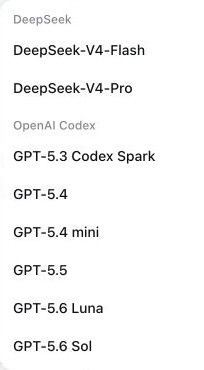
Open Harness's normal model picker and select an openai-codex model for the agent or session you are using. This selection is separate from writing the profile's default model or global search route.
The picker groups the available entries under OpenAI Codex. Model identifiers such as GPT-5.6 Luna are canonical names, so they intentionally remain un-translated.
To confirm the configured plugin row locally, run:
dsh --profile web --dump-config
Expected result: the configuration has exactly one llm-openai-codex row. Keep this configuration dump local; it may include unrelated profile settings.
For secret-free status and diagnostics that do not start OAuth, run:
dsh plugin --profile web exec dsh-codex-connect status --json
dsh plugin --profile web exec dsh-codex-connect doctor --json
Expected result: status --json reports signed-in and exits 0, while doctor --json prints one secret-free JSON document. A signed-out status --json exits 1; return to step 4 instead of treating that as a plugin failure.
Optional capabilities (off by default)
The installed bundle is intentionally inert beyond model-provider registration:
- id: llm-openai-codex
  config:
    enableSearch: false
    enableImageTool: false
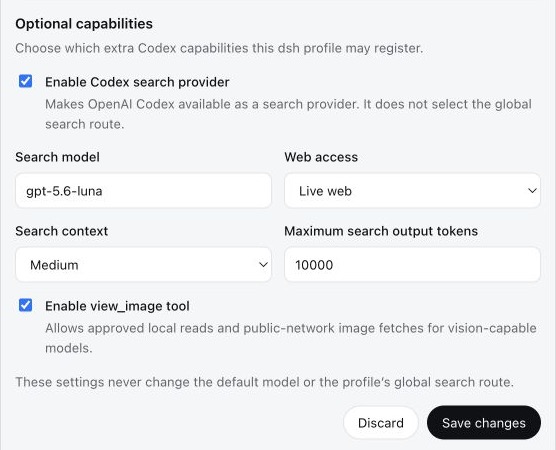
Open Settings → Plugins → Plugin configuration → Codex Connect to manage the account and these options in one card. Save changes affects only this plugin's capability section and applies live. It never selects a default model or a global search route.
Enable only the capability you intend to use
enableSearch: trueregisters Codex as an available search provider. It does not select the profile's global search route.enableImageTool: trueenablesview_imagefor approved local reads and public-network image fetches on vision-capable models.
The screenshot below is an example after someone has explicitly enabled capabilities. It does not show the fresh-install default. This English guide uses the English-localized capture; the Chinese guide shows the matching Chinese-localized state.
Change a default model or global search route separately
To make a Codex model the default for new agents, add or update the separate Harness row yourself:
- id: agent-default-model
  config:
    provider: openai-codex
    model: gpt-5.6-sol
Selecting Codex as the profile's global search route is another explicit change:
- id: llm-openai-codex
  config:
    enableSearch: true
    searchMode: live
    searchContextSize: medium

- id: web
  config:
    searchProvider: openai-codex
| Field | Default | Values |
|---|---|---|
enableSearch |
false |
boolean |
enableImageTool |
false |
boolean |
searchModel |
gpt-5.6-sol |
Codex model id |
searchMode |
cached |
cached, indexed, live |
searchContextSize |
medium |
low, medium, high |
searchMaxOutputTokens |
10000 |
positive integer |
Reauthentication, diagnostics, and conflicts
- If the card says Sign in again or the server asks for reauthentication, click that action and complete the same safe browser flow. It preserves this plugin's capability settings and does not silently change your default model or global search route. Do not run
logoutjust to renew a session. doctorreads process and filesystem metadata only.doctor --jsonemits exactly one secret-free JSON document with schema version 1, package/version/Node metadata, credential-file state and safe mode, capabilities, conflict status, and hints. It omits the absolute credential path and OAuth, account, and expiry data.status --jsonemits only signed-in or signed-out state with package metadata.status --jsonreads the credential only to determine sign-in state, but never prints credential contents or starts OAuth.- OAuth is stored separately at
$DSH_HOME/.openai-codex-auth.json(~/.dshby default).~/.codex/auth.jsonis never copied or modified. The parent directory and file use owner-only permissions where supported, writes are atomic, and refresh writes use a cross-process file lock. - If startup reports an
openai-codexcollision, an olddsh-codexbundle or manual provider row may already own the adapter. Inspect the effective configuration and remove only the confirmed conflicting owner. Do not delete auth files or unrelated providers. - Removing the package does not delete OAuth state. Run
logoutonly when credential removal is intended.
Compatibility and security boundary
- Alpha compatibility targets the current Harness
0.1.0-rc.5main-line composition and compatible0.1.0-rc.6plugin APIs, Node.js^22.19.0 || >=24.0.0, and the pinned@earendil-works/pi-aiCodex provider. - ChatGPT plan eligibility, model access, quotas, and backend behavior are controlled by OpenAI and may change.
- The Codex endpoint does not enforce the ordinary Responses
max_output_tokensfield. Harness compaction still works, but that summary cap cannot be imposed server-side on this route. - Shell, filesystem, skills, MCP, subagents, approvals, permissions, attachments, session persistence, compaction, and recovery continue to come from the active Harness profile.
- Remote
view_imageURLs are limited to public HTTP(S) destinations. Every DNS result and redirect is checked, and the connection is pinned to the validated address so localhost, private networks, link-local services, and cloud metadata endpoints remain unreachable. - No real OAuth operation is required for installation, build, tests, doctor, or package validation.
See INSTALL.md for the idempotent agent runbook, RELEASING.md for the Alpha release checklist, MIGRATION.md for migration from dsh-codex, and docs/design.md for architecture details.
Development
pnpm install --frozen-lockfile
pnpm run check
Legal / Acknowledgements
Copyright 2026 Frank Song for the modifications and additional work in Codex Connect. This project includes software derived from Yan-Zero/dsh-codex; Copyright 2026 Yan-Zero is retained for the upstream material. Both are distributed under Apache-2.0, with details in NOTICE. This project is not affiliated with or endorsed by OpenAI, ChatGPT, Codex, DeepSeek, or DeepSeek Harness.
License
Apache-2.0
No comments yet. Be the first to write one.