dsh-input-prediction
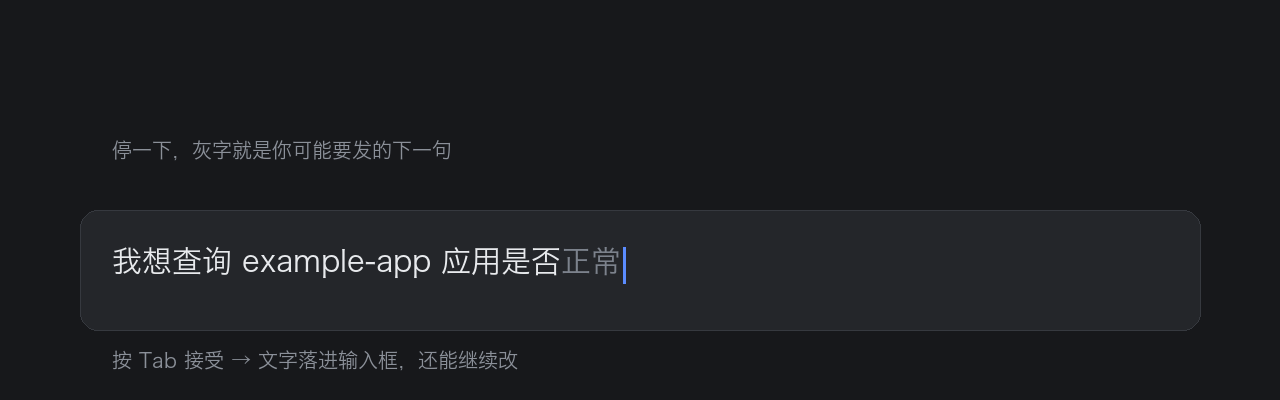
在 DSH 的输入框上做两件事:灰字续写(Tab 接受)和回复后推荐(点一下就发)。
English
A DSH plugin that predicts what you are about to type, using the current conversation and your own writing style as context.
- Ghost completion — while you pause in the composer, the most likely continuation of your draft is rendered as grey text behind the caret. Press Tab to accept it; the text lands in the input box as a normal, undoable edit and you can keep editing.
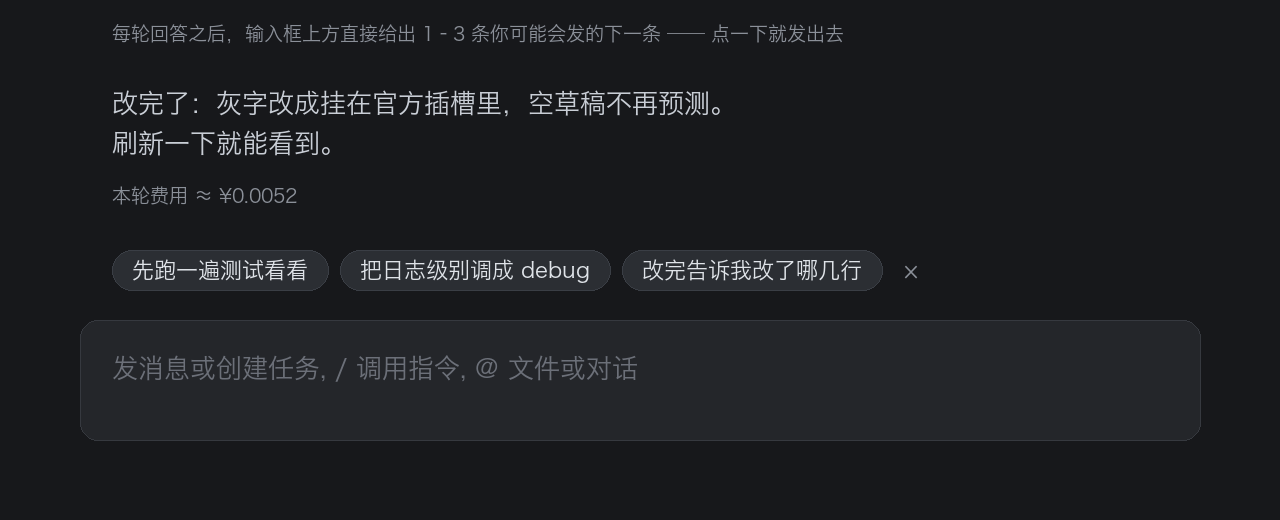
- Follow-up suggestions — after each assistant turn, 1–3 candidate next messages appear
just above the input box (in the official
conversation.input.dockslot). Click one to send it directly. - Settings panel — Settings → Built-in plugins → “输入预测”: toggle ghost completion,
toggle suggestions, choose how many suggestions (1–3). Choices are stored in
$DSH_HOME/input-prediction.settings.jsonand apply immediately.
Install
# from the plugin marketplace: Settings → Plugin marketplace → search “input-prediction”
dsh plugin --profile desktop add dsh-input-prediction
# or straight from GitHub
dsh plugin --profile desktop add https://github.com/fishcg/dsh-input-prediction
Both halves hot-reload; no build step, no dependencies. Requires DSH >= 0.2.0-rc.2.
Configuration
Everything has a working default. The most common knob: reasoningEffort must stay off
(a completion is a dozen characters long — reasoning tokens would eat the whole budget and
return empty text). See the Chinese section below for the full config table.
License
MIT © 2026 fishcg
它做什么
两件事,都围着输入框转:
- 灰字补全 —— 在输入框里用灰字补上你接下来最可能打的那句话,按 Tab 接受,文字落进输入框,还能继续改。
- 回复后推荐 —— 每轮回答写完,在输入框正上方给 1–3 条你可能要发的下一条,点一下直接发送。
┌──────────────────────────────────────────────────────────┐
│ 我想查询 example-app 应用是否正常                         │  ← 「正常」是灰字
└──────────────────────────────────────────────────────────┘
   ↑ 你打到这里                ↑ 模型续写的,Tab 一下就到手

        ┌──────────────────────────────────────────┐
        │ 顺便把日志级别调成 debug  然后跑一遍看看   │  ← 点一下直接发送
        └──────────────────────────────────────────┘
┌──────────────────────────────────────────────────────────┐
│ 发消息或创建任务, / 调用指令, @ 文件或对话                  │
└──────────────────────────────────────────────────────────┘
- 灰字只画在光标后面,不动你的草稿;点推荐等价于你自己打完按 Enter(同一条提交链,可撤销地写进草稿再提交)。
- 预测依据是当前会话上下文 + 你平时说话的口吻(把你最近几条消息单独喂给模型当样本)。
- Tab 走 DSH 官方的插入通道(
captureInsertion+insertText,带版本守卫),所以是一次可撤销的普通编辑,不是替换草稿。 - 拿不准时模型会输出空串——宁可不提示,也不猜一句驴唇不对马嘴的。
安装
# 从插件市场:设置 → 插件市场 → 搜「输入预测」
dsh plugin --profile desktop add dsh-input-prediction          # npm
dsh plugin --profile desktop add https://github.com/fishcg/dsh-input-prediction   # GitHub

# 本地开发(本机就是这样装的)
dsh plugin --profile desktop add link:/Users/fish/dsh-input-prediction
插件由两个半区组成:
| 半区 | 文件 | 职责 |
|---|---|---|
| 宿主 | lib/index.js |
注册 /dsh-input-prediction/{hello,predict,suggest,settings,telemetry,transcript} 路由;从 sessionQuery 读会话、调 llm.stream 做流式补全、生成推荐候选、读写用户偏好 |
| 客户端 | lib/client.js |
找到 composer 的 Lexical 输入框,停顿后请求预测,把灰字画在光标处;回答结束请求推荐并画在输入框上方;接管 Tab;注册「插件设置」里的标签页 |
客户端半区是手写 CJS + 纯 DOM(不 import 任何 @deepseek-ai 的值,只经 exports.inject 取服务、require('react') 取平台 React),零构建。
回复后推荐(建议气泡)
- 时机:这一轮回答结束之后(内核
uiSession.sessionStatus的running从 true 变 false)且草稿为空时请求一次;页面刚打开、草稿为空时也会为最近一轮补一次。 - 回答进行中不出候选:还在思考、正在跑工具、正在流式输出时,候选(
renderChips()/requestChips()里的turnRunning())一律收起、不请求。灰字不受这条限制,见下节。 - 点一下 = 直接发送:候选按钮 →
setDraft(text)→ 等编辑器投影落地(60ms 轮询,最多 1.5s)→submit()。不成功会记client:chip-send-failed,不会发出空消息。 - 收起:右下角的
×收起本批(记client:chips-dismissed);开始打字、正在回答、切换会话也会自动隐藏。 - 一轮一次:同一「对话版本」只请求一次,结果按
contextEpoch校验,过期结果直接丢弃(不会把上一轮的候选贴到新对话上)。 - 候选文本不超过
chipMaxChars(默认 40 字),最多chipCount条。
设置面板
入口:设置 → 内置插件 → 「输入预测」标签页(客户端注册到官方槽 settings.plugins.tab,order: 20)。
| 项 | 默认 | 说明 |
|---|---|---|
| 输入框灰字补全 | 开 | 关掉后不再请求预测、不画灰字、Tab 也不接管 |
| 回复后推荐 | 开 | 关掉后不再请求推荐,已有气泡立即收起 |
| 推荐条数 | 3 | 1 / 2 / 3 分段按钮 |
- 面板里改的值写进
$DSH_HOME/input-prediction.settings.json(settingsFile可改路径),立即生效,不用刷新页面,也不用重启桌面端。 - 优先级:用户偏好文件 > patch 里的默认值。也就是说
cordis.patch.yml里的completionEnabled/chipsEnabled/chipCount只是「出厂默认」,用户在面板里选过之后以文件为准(删掉那个 json 就回到默认)。 - 写盘是「写
.tmp再renameSync」,不会写坏。
怎么确认它在跑
tail -f /tmp/dsh-input-prediction.log # 把 debugLog 打开时才有
日志按行 JSON,看到这些就说明链路是通的:
| 事件 | 含义 |
|---|---|
client:ready |
客户端半区已加载(页面里) |
client:host-contact |
客户端拿到了宿主路由与三个开关 |
client:settings-tab |
设置标签页注册结果({ok:true} = 已挂进「插件设置」) |
client:settings-updated |
用户在面板里改了设置 |
client:chips |
拿到了推荐候选(带 visible 与屏幕矩形,能看出有没有真的画出来) |
client:chips-failed / client:chip-send / client:chip-send-failed |
推荐请求失败 / 点了候选并发送 / 发送没成功 |
predict |
收到一次预测请求(带草稿) |
context / suggest-context |
从会话里取了多少条上下文 |
stream-done |
模型这一次的 finish 原因、思考增量、原文 |
predict-done / suggest-done |
最终建议 / 推荐候选与耗时 |
client:accept |
用户按了 Tab,detail.how 为 insertText(官方通道)或 setDraft(回退) |
settings / settings-updated |
宿主侧读到的偏好与落盘结果 |
页面控制台(如果开着 DevTools)另有一份:[input-prediction] 前缀。
配置
配置写在 cordis.patch.yml 里(或 profile 的 cordis.patch.yml 里同 id 覆盖):
- insert:
    - id: dsh-input-prediction
      name: dsh-input-prediction
      config:
        enabled: true
        provider: ''
        model: ''
        reasoningEffort: 'off'
        maxTokens: 160
        temperature: 0.3
        contextMessages: 16
        contextChars: 600
        maxSuggestionChars: 60
        styleHint: ''
        # —— 下面这些是「出厂默认」,用户偏好文件优先 ——
        completionEnabled: true
        chipsEnabled: true
        chipCount: 3
        chipMaxChars: 40
        chipsMaxTokens: 320
        chipsTemperature: 0.7
        settingsFile: ''
        debugLog: ''
| 键 | 默认 | 说明 |
|---|---|---|
enabled |
true |
总开关。false 时客户端拿到 hello 后直接不工作 |
provider / model |
'' |
留空 = 跟随「默认模型」设置(agent-default-model) |
reasoningEffort |
off |
off/low/high/max,'' = 跟随 provider。别改成 high:修补全是「续写十几个字」,一开思考 maxTokens 全被吃光,返回空文本 |
maxTokens |
160 |
灰字建议都很短,够用 |
temperature |
0.3 |
想更放飞就调高 |
contextMessages |
16 |
喂给模型的最近消息条数 |
contextChars |
600 |
单条消息截断长度 |
maxSuggestionChars |
60 |
灰字建议文本上限(超出会被砍) |
styleHint |
'' |
追加到系统提示词的口吻要求,比如「简短、别用问号」 |
completionEnabled |
true |
出厂默认:灰字补全(面板里可改,改了以文件为准) |
chipsEnabled |
true |
出厂默认:回复后推荐 |
chipCount |
3 |
出厂默认:推荐条数(夹到 1–3) |
chipMaxChars |
40 |
单条候选的长度上限(夹到 8–120) |
chipsMaxTokens |
320 |
生成候选的 token 预算(夹到 64–1024) |
chipsTemperature |
0.7 |
生成候选的温度(夹到 0–1.5);比灰字更发散一点 |
settingsFile |
'' |
用户偏好文件路径,空 = $DSH_HOME/input-prediction.settings.json |
debugLog |
'' |
诊断日志路径(默认关);超 1MB 自动清空 |
配置改动要重新载入一次 patch 层才生效:动一下 profile 的 cordis.patch.yml(保存即触发一次 live reload,已验证会重新读入本插件的 bundle patch),或者重启 DSH 桌面端。
交互细节
- 触发(灰字):草稿至少打了一个字、停顿约 320ms 后发一次预测;相邻请求至少间隔 650ms;切换会话/发送消息/回答结束都会重新评估。
- 回答进行中也预测灰字:内核
uiSession.sessionStatus的running为真时(思考、跑工具、流式输出),只要草稿非空就照常预测、照常画——用户打了第一个字就该看到提示,不必等回答写完;草稿为空的那条门禁仍然生效,所以回答期间不会凭空猜「下一条」。turnRunning()拿不到内核状态时退回[data-streaming]。 - 展示(灰字):只有「光标在草稿末尾 + 草稿非空 + 输入框已聚焦 + 没开斜杠菜单 + 不在中文输入法组合中 + 建议非空」时才画;灰字会换行:光标这一行写满(右边剩不到 24px)就从下一行行首接着画,最多占
MAX_GHOST_LINES(3)行或到卡片下沿为止;塞不下的部分不显示——显示多少就插入多少。草稿空着时那块地方归占位文案和推荐候选,不画灰字。 - Tab:仅当上面这些条件都成立时才被接管(
preventDefault),否则 Tab 保持原样。斜杠/@菜单打开时 Tab 仍然是「选中菜单项」。 - 切换会话:
tick()发现当前会话变了就bumpContext()——灰字、候选、缓存、上下文版本全部作废,不会把上一个会话的推荐带过来。 - 缓存:同一「会话 + 上下文版本 + 草稿」60 秒内不重复请求;空结果同样进缓存,所以对着空输入框发呆不会反复问模型;请求失败有 15 秒冷却。
- 上下文版本(
contextEpoch):草稿从非空变空(发出去了)、回答开始/结束、页面重新绑定会话时都会 +1,旧提示与旧候选一并作废。
排障
| 现象 | 先看什么 |
|---|---|
| 完全没有灰字 | client:ready 有没有出现;没有就是客户端 bundle 没加载(重启桌面端 / 硬刷新页面) |
client:ready 有、但从不预测 |
client:host-contact 是否成功;失败说明路由不可达,或灰字开关被关掉了 |
predict 有、predict-done 的 suggestion 是空串 |
看同一条 stream-done 的 rawChars:0 且 reasoningChars>0 = 思考吃掉了预算(reasoningEffort 应为 off);0 且都为 0 = 模型这次选择不说 |
| 回答写完了但没有推荐气泡 | client:chips 有没有出现:没出现 = 请求没发(草稿非空/正在回答/开关关了);出现了但 visible:false = 槽位与卡片都不可用(看 client:chips-dock 是不是 {ok:false}) |
| 气泡和别的面板叠在一起 | client:chips 的 rect 宽度接近卡片宽度(≈卡片宽-24)= 走的是兜底浮层,说明 client:chips-dock 没注册成功(slots 服务不可用) |
| 点了候选没发出去 | client:chip-send-failed 的 reason:no input shell = 拿不到输入壳;draft not set = setDraft 没落地(在 1.5s 内) |
| 「插件设置」里没有「输入预测」 | client:settings-tab:{ok:false,reason:'slots unavailable'} = ctx.get('slots') 一直拿不到(设置 UI 未加载) |
报 DeepSeek Messages transport failed |
消息 content 必须是内容块数组([{type:'text',text}]),传字符串会在 transport 里炸成这个笼统错误 |
| 灰字压在正文上 | 光标矩形退化(Lexical 选区停在块级边界)——lastCharRect() 就是为这个兜底的 |
开发
两个半区都能热重载,不必重启桌面端:
客户端:
lib/client.js是每次请求现取的(no-cache),改完约 1 秒页面就会加载新版本(client:ready会再报一次)。热重载会留下旧实例,所以代码里有「实例卫生」(INSTANCE_SLOT令牌 +sweepStaleDom()+sweepForeignDom()+isStale()),新实例上线时会清掉旧实例画的浮层。宿主:默认不监听模块改动。要让
lib/index.js改完即生效,在 profile 的cordis.patch.yml里加:- id: hmr name: "@deepseek-ai/dsh-hmr" config: base: /Users/fish/dsh-input-prediction root: ["."]它靠
@deepseek-ai/dsh-hmr的partialReload():插件模块既是改动文件又是入口模块,于是apply()会重跑。这台机器上开发完已经删掉了(profile 里不留开发期配置);要再改宿主半区,把这段加回去、或者重启一次桌面端即可。安全:所有路由都走同源 + 回环 Host + 宿主信任栅栏(
ctx.connection.requestRejection),所以只能从页面里调用——用 curl 打永远是401(这也正好可以当「路由有没有注册」的探针:404= 没注册,401= 注册了但被拦)。
卸载
dsh plugin --profile desktop remove dsh-input-prediction
rm -f ~/.dsh/input-prediction.settings.json    # 顺手删掉用户偏好
已知边界
- 灰字只在光标位于草稿末尾时预测;光标在中间时不打扰。
- 灰字一次只预测「紧接着的后续文字」,不做多行/多候选。
- 输入法(IME)组合期间不显示、不接管 Tab。
- 灰字超长时按可用宽度截断显示,Tab 插入的是截断后的文本。
- 推荐气泡挂官方槽位
conversation.input.dock(composer 卡片正上方、卡片外、占布局),用一个 5 行的 React 壳(ChipsDock)当挂载点,气泡本身仍是命令式 DOM。所以它不会和同位置的面板(genui / btw / 排队条)叠在一起;槽位没挂上时(slots服务拿不到)会退化成自绘浮层,这时才可能重叠。 - 推荐候选只按当前对话生成,不读你的历史会话库。
License
MIT © 2026 fishcg
No comments yet. Be the first to write one.