dsh-session-icons





DSH(DeepSeek Harness)Web 界面的会话标题图标插件:当模型为一次新会话生成标题时,宿主半用同一条路由发起一次辅助小请求,让模型按标题画一枚 24×24 单色 SVG 隐喻图标;浏览器半把它注入到左侧会话列表每行标题的左侧,跟随主题色。
图标带磁盘缓存($DSH_HOME/session-icons/cache.json):重启 dsh、刷新页面、重开浏览器都不丢;重启后看到列表里尚无图标的标题,浏览器半会主动上报,宿主半按最近一次标题调用的路由补画。
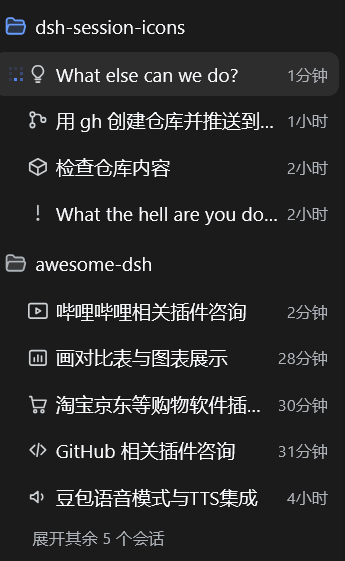
安装
前提:已安装 dsh 并使用 Web 界面(即 dsh web 的 web profile)。
在本机任意目录执行:
dsh plugin --profile web add dsh-session-icons
包从 npm registry 安装,自带预构建产物(lib/),无需本地构建、无需构建授权(allowBuilds)。本包声明了官方 dsh.bundle manifest(package.json 的 dsh.bundle.patch 指向根目录 cordis.patch.yml),dsh plugin add 会把它安装进 profile 并挂载到插件树。
也可以从 GitHub 源码安装(会在本地构建,若 dsh 请求构建授权,确认后继续):
dsh plugin --profile web add fengb3/dsh-session-icons
安装完成后重启 DSH 使其生效:
dsh web
之后每次新会话自动生成标题时,左侧列表该行的标题前就会多出一枚小图标;旧的、还没图标的历史标题会在启动后被自动补画。
更新 / 停用 / 卸载
# 更新到 npm 最新版本
dsh plugin --profile web update dsh-session-icons

# 卸载
dsh plugin --profile web remove dsh-session-icons
临时停用(保留安装,重启后不再加载):编辑 ~/.dsh/profiles/web/cordis.patch.yml,加上
- id: dsh-session-icons
  disabled: true
删除该行(或改回 disabled: false)并重启即恢复。
配置
默认配置开箱即用。要覆盖时,在 ~/.dsh/profiles/web/cordis.patch.yml 里给同 id 行写 config:
- id: dsh-session-icons
  config:
    maxCachedIcons: 500
    timeoutMs: 45000
| 键 | 默认 | 说明 |
|---|---|---|
maxCachedIcons |
500 |
图标缓存上限(内存与磁盘同步裁剪) |
timeoutMs |
45000 |
单枚图标生成超时 |
iconProvider / iconModel |
'' / '' |
可选固定路由;须成对设置,留空 = 跟随最近一次标题调用的路由 |
工作原理
- 宿主半 以
{ global: true }监听llm/stream瀑布(与官方dsh-session-title服务相同的注册方式,绕过 Service isolate 过滤;监听器保持同步返回,不破坏瀑布契约)。只匹配purpose === 'session-title'的辅助调用:转发流的同时镜像其文本,流正常结束后取规范化标题(与官方逐字节一致:控制符剥离、空白折叠、80 字节 UTF-8 截断),并记录该次调用的 provider/model 路由。 - 图标生成 是一次独立的
ctx.llm.stream()调用(单并发、每标题至多重试 2 次、45s 超时、maxTokens2048),输出经消毒:只取<svg>…</svg>片段,拒绝 script / 事件属性 / href / text / 动画 / 外链 / 超 6KB。 - 浏览器半 不占任何 slot:
MutationObserver盯侧边栏,用结构锚点([class*="sessionRow"]行、[class*="title"]子元素,不依赖 CSS-module 哈希前缀)按标题逐字匹配,在标题前插入 16px、currentColor的图标;每 2 秒轮询一次图标表增量,缺失标题去重后上报宿主补画。
从源码开发
git clone https://github.com/fengb3/dsh-session-icons
cd dsh-session-icons
pnpm install
pnpm run dev:link   # 从 ~/.dsh/profiles/node_modules 链接 @deepseek-ai 类型包(不发布到 npm,仅供本地类型解析)
pnpm run build      # tsc(宿主半)+ tsdown(client bundle)
pnpm run test:client-bundle
pnpm run test       # 不变量测试:normalizeTitle 与官方包逐字节对拍(需先 dev:link)、双端消毒器同步等
把 profile 指向本地工作副本开发:编辑 ~/.dsh/profiles/web/package.json,dependencies 加
"dsh-session-icons": "link:C:/path/to/dsh-session-icons"
dsh.profile.bundles 已含 dsh-session-icons 即可(首次安装过 dsh plugin add 的 profile 无需改动),然后在 profile 目录 pnpm install 并重启 dsh web。
已知边界
- 侧边栏没有逐行官方 slot,注入走结构 DOM 锚点 —— DSH 大改列表结构时需要更新选择器。
- 同名标题共享同一枚图标(按标题文本索引)。
- 图标调用没有日志事件(独立于标题管线,不写会话日志)。
No comments yet. Be the first to write one.