
Presence
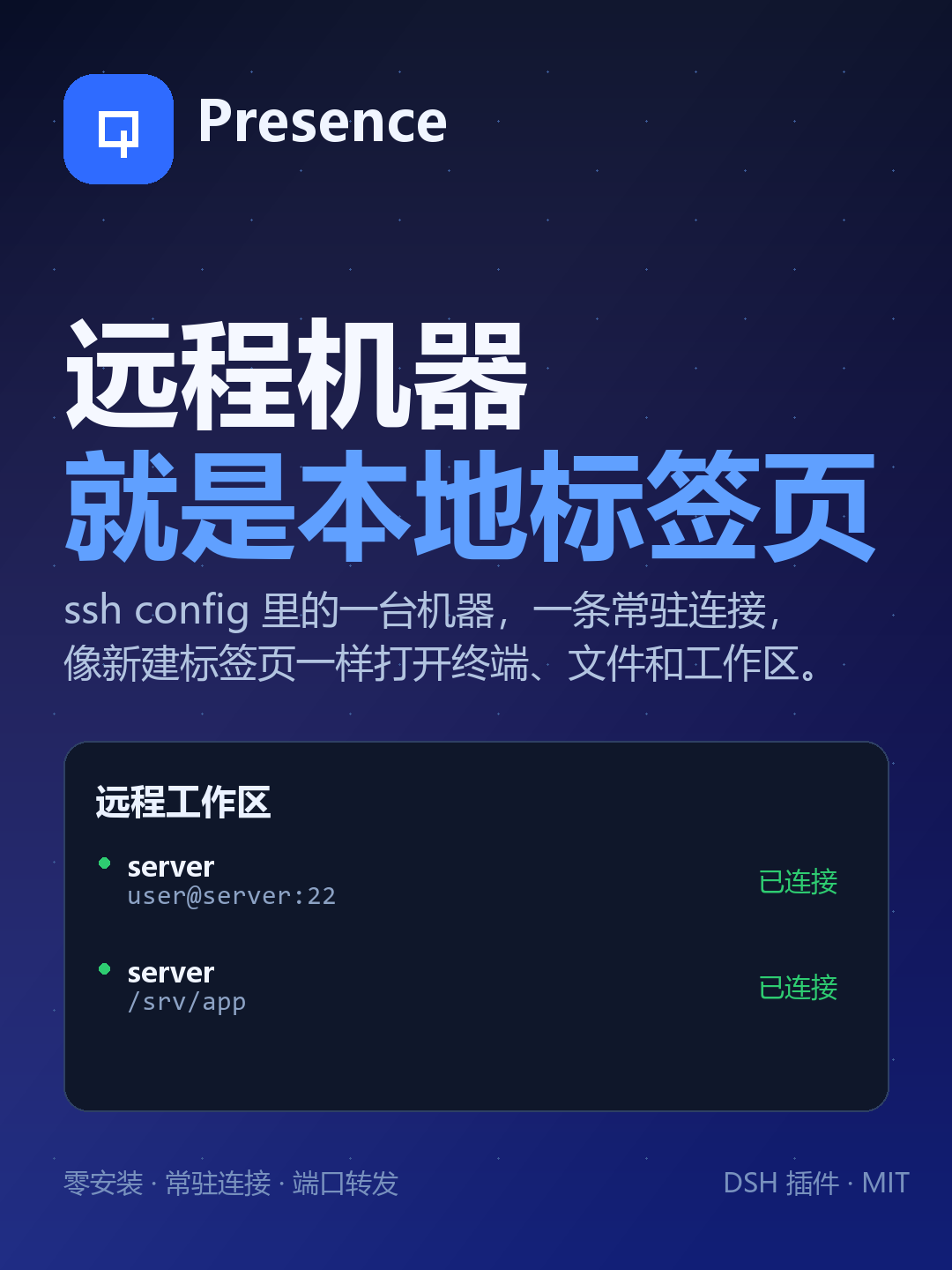
Your SSH hosts, as local tabs.
Persistent remote workspaces, native file editing, search, exec, terminals and port forwards for coding agents — with nothing installed on the remote host.
English · 简体中文 · Releases · MCP server




⚠️ A local session is not bound to a remote workspace. Opening a remote workspace in Presence does not turn a local agent session into a remote one. When your session's working directory is outside the presence mounts root,
presence_execand every otherpresence_*tool require an explicithost(orPRESENCE_HOST); without one they refuse with the session's cwd instead of silently running on the last-activated machine. Sessions started inside a remote workspace resolve to that machine automatically. See Known limits.
Why
Running an agent on every remote machine means installing it N times, upgrading it N
times and configuring proxies per host. Running ssh host '<command>' from the local
agent means a new handshake per command, no native file tools and no continuity.
Presence keeps the agent local and extends its reach through one persistent SSH
connection per host. The remote side is still plain sshd: SFTP, exec and a PTY.
| Approach | Cost |
|---|---|
| Install the agent on every host | N installs, N upgrades, per-host proxying |
ssh host '<command>' per call |
Handshake per command, no file tools, no sessions |
| Presence | One connection per host, native tools, nothing installed remotely |
Features
- Remote zero-install — uses only
sshdbuilt-ins: the SFTP subsystem, exec channels and a PTY. - One handshake — a pool keeps one connection per host; every later call is a request on it.
- Native remote tools —
rg/grepruns on the target, commands run in the target shell; path, permission and encoding semantics are the remote ones. - Local-like edits — atomic writes, mode preservation, ambiguity refusal, read-before-write guard,
presence_editwith dry-run diffs. - Real workspaces — a remote directory becomes a normal DSH workspace with a file tree and terminals that open on the remote machine.
- Sessions are scoped (0.20 hotfix) — a local session no longer silently borrows the last-activated remote workspace:
presence_*needs an explicithostorPRESENCE_HOST, and the system prompt tells each session whether it is local or remote. - Conditions instead of sleeps —
presence_waitblocks on a file (exists/minBytes/mtimeAfter), a grep match count, a process (pid/pattern), a port state or a job id; a timeout ismet:false, not an error. - Jobs that survive a restart — background jobs are persisted to
~/.dsh/presence/jobs.jsonwith pid/pgid.logPathis the job log to tail;commandLogPathis the command's own log and equalslogPathon current kernels (a separate wrapper log only exists when a kernel records one) — usecommandLogPath ?? logPath. After a restart their state isunknownuntil probed — never a falserunning, and an exit code may be missing. - Batch transfer and append —
presence_import/presence_exporttakepaths[](1–50) or a glob and return per-file results;presence_write { mode:"append" }appends without rewriting the file. - Recoverable deletes — destructive shell commands dry-run first;
presence_trashmoves paths to a remote trash with restore. @completes remote files — inside a remote workspace, file-reference completion indexes the machine itself (rg --files,findfallback), not a local mirror.- File operations, not just reads —
presence_mkdir/move/copy/chmodplus a right-click menu in the file tree; deletes go to the recoverable trash. - Diff and live logs — unified diff between two remote files or a remote file and a local one; follow a log file from the panel without keeping a
tail -fjob around. - Ports that come back — save forwards with auto-restore on reconnect, and let the Ports panel discover newly listening ports and forward them with one click.
- Job notifications — a toast (and desktop notification) when a background job finishes, plus an optional local
notifyCommandfor daemons and phones. - Two shells, one kernel — the DSH plugin and a standalone MCP server (
presence-mcp, 20 core tools) share the same kernel.
Screenshots
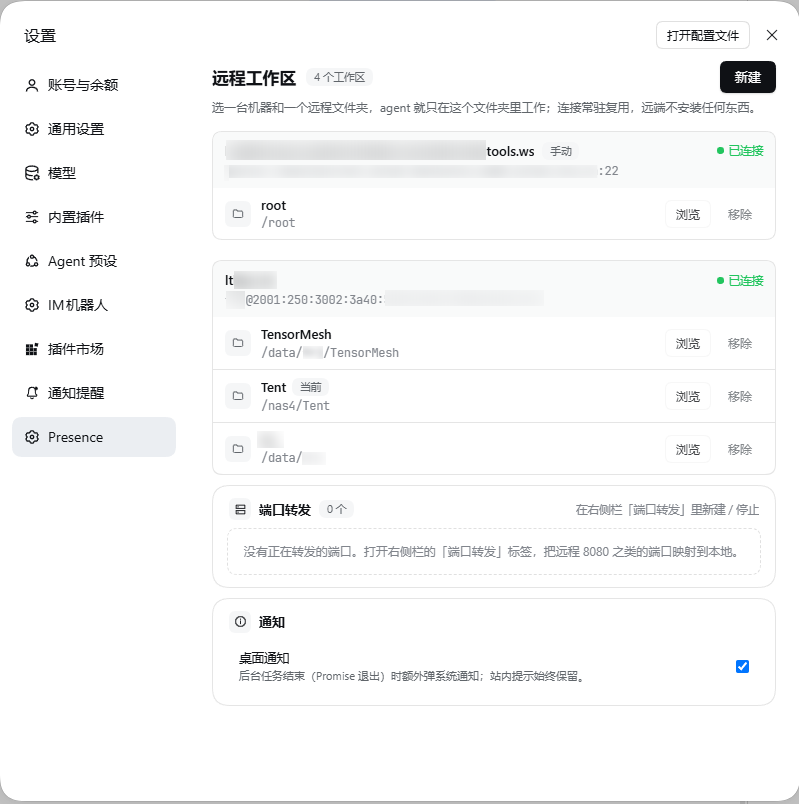 |
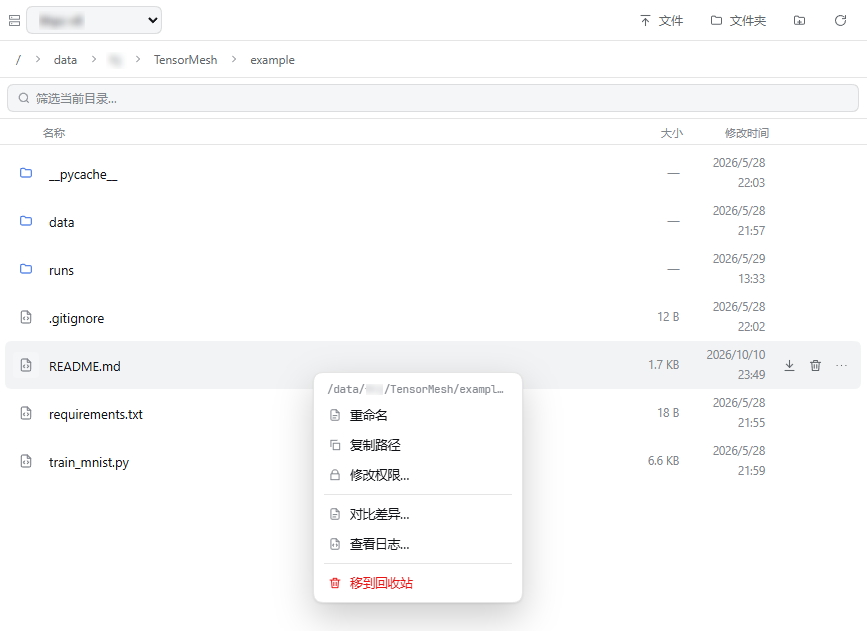 |
| Settings — every host and folder is a local tab | Remote workspace — the file tree and editor are on the host |
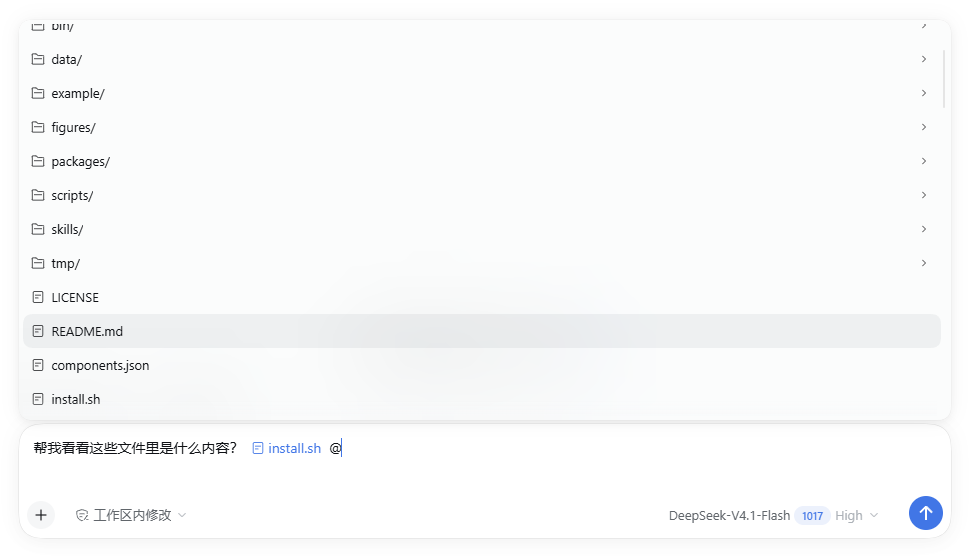 |
 |
| @ files — completion indexes the remote machine itself | Terminal — the shell runs on the host, not locally |
A real trajectory
These three figures are rendered from a recorded 22-call session: train an MNIST classifier twice on a remote 64-core host, compare two learning rates, and export the result. Every row is one tool call with its measured duration; red rows are real failures kept verbatim.
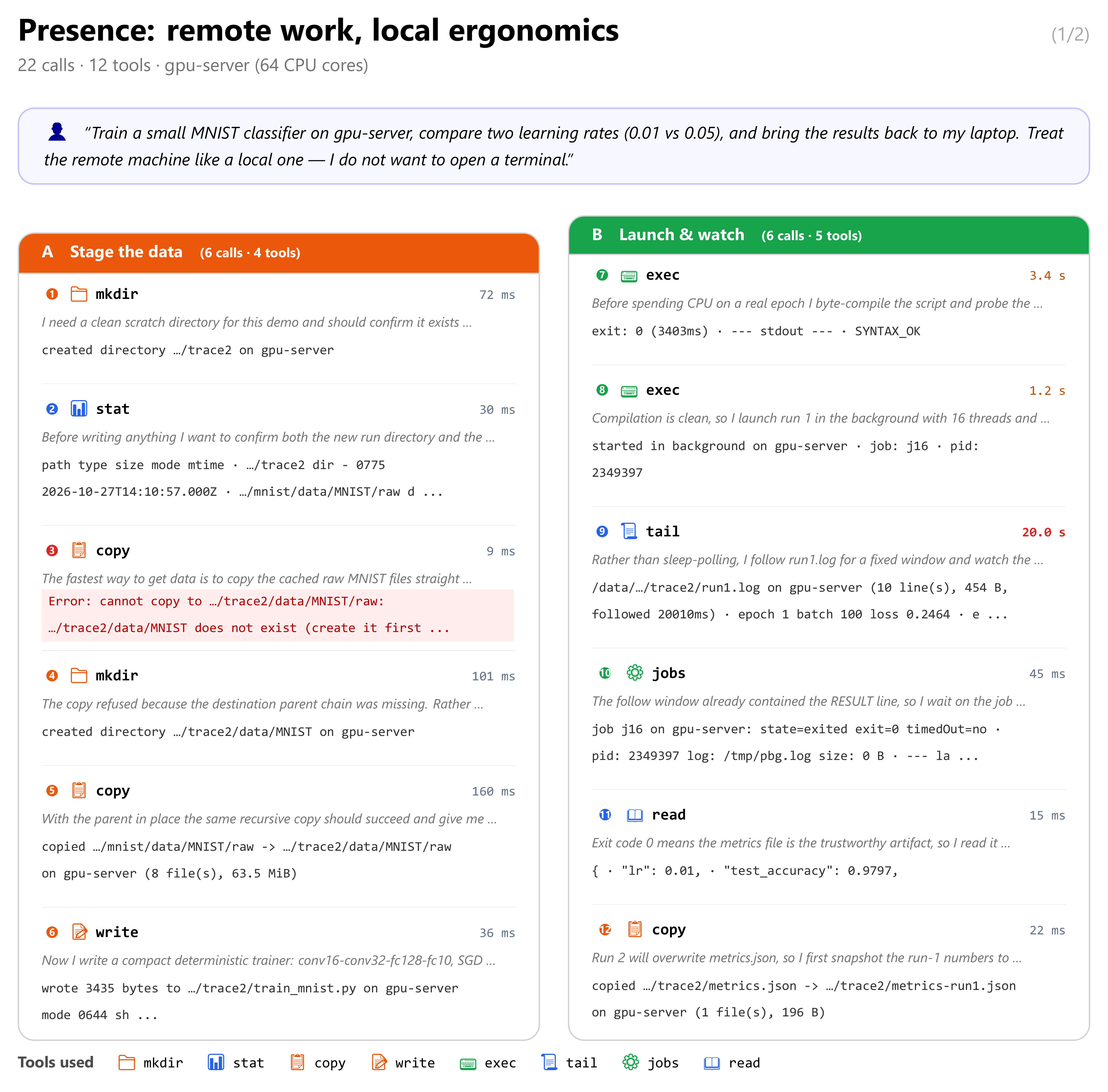
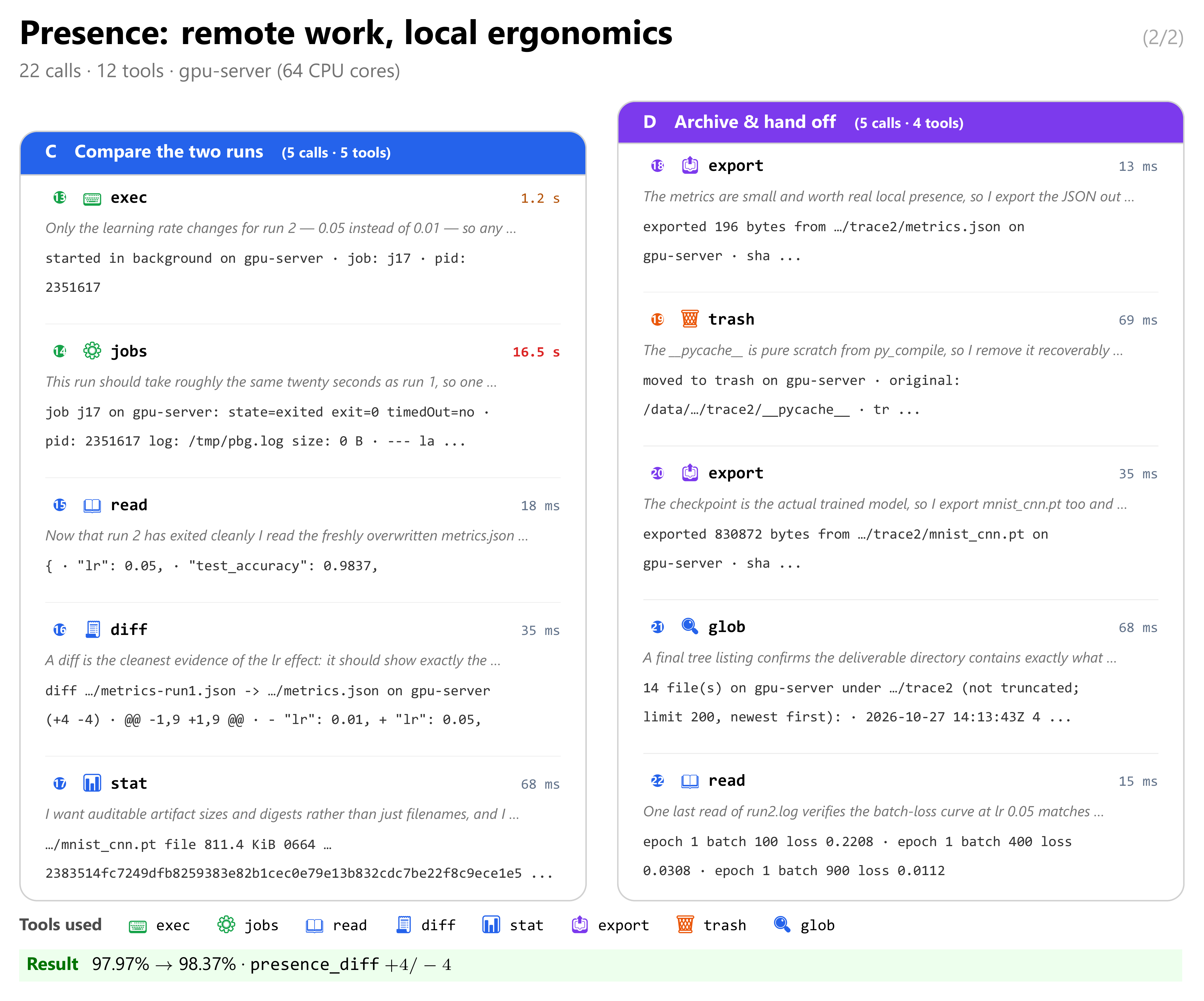
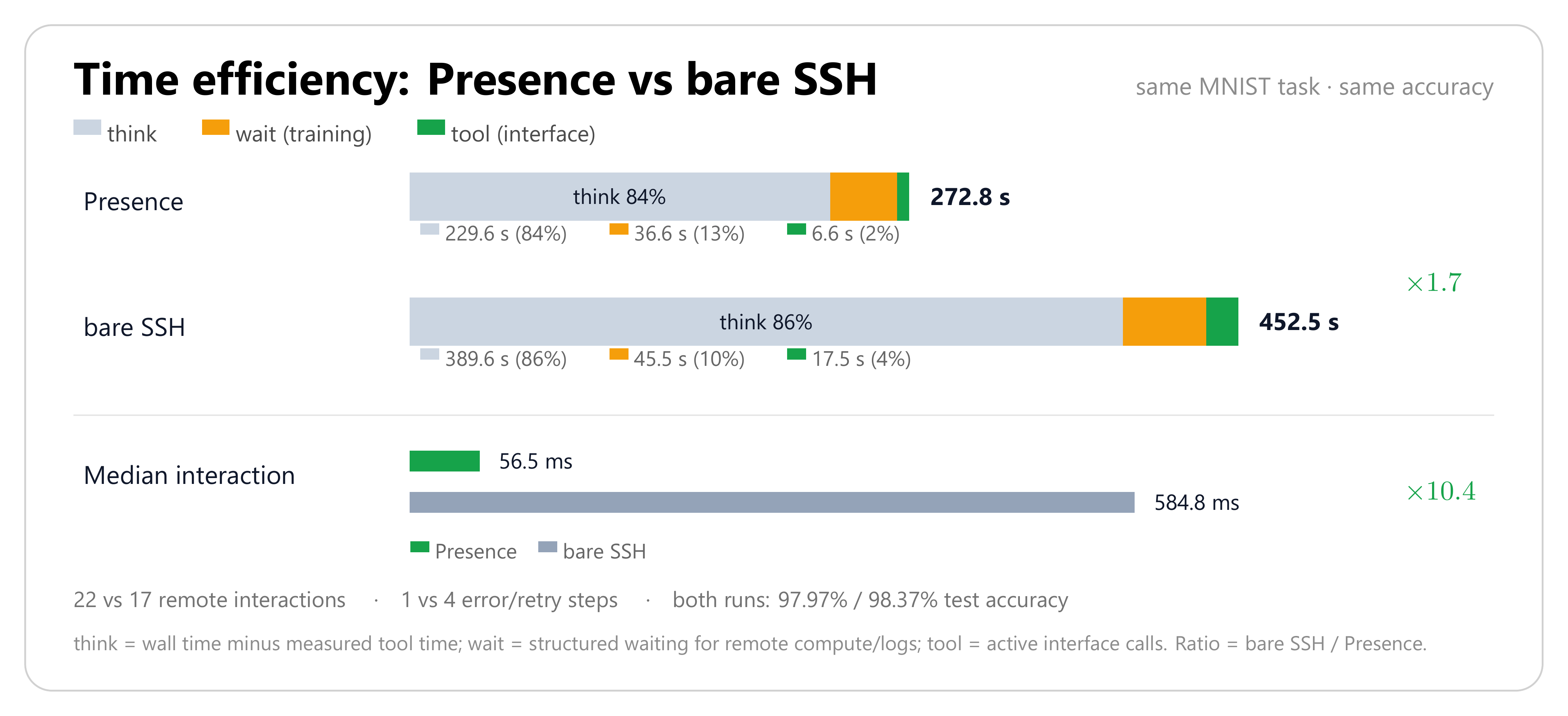
Figure 3 stacks end-to-end time into think / wait / tool. The same task through
bare ssh/scp takes 452.5 s versus 272.8 s, with a 10.4×
higher median interaction latency.
Quick start
1. Install the DSH plugin
dsh plugin add @rjfan/dsh-presence@0.21.2
From a source checkout:
dsh plugin add /path/to/dsh-presence
2. Pick a host and open a workspace
Open Settings → Presence → New, choose a host from ~/.ssh/config (or paste a
manual ssh command), then pick a remote folder. It appears as a workspace; the
left sidebar, file tree, terminal and agent tools all use that remote directory.
A session started in that workspace is remote. A session started anywhere else (for
example a normal local project) stays local: it must pass host explicitly — or set
PRESENCE_HOST — before calling presence_exec / presence_*.
3. Work
You: 把远程 8000 端口转发到本地,然后打开看看
Agent: presence_forward { remotePort: 8000 }
       → http://127.0.0.1:8000
MCP server
The same kernel is available to agents that cannot install DSH plugins (Codex CLI, Claude Code, OpenCode, Cursor, …).
npx -y presence-mcp # 20 tools over stdio
// Claude Desktop / OpenCode style
{
  "mcpServers": {
    "presence": {
      "command": "npx",
      "args": ["-y", "presence-mcp"],
      "env": {
        "PRESENCE_HOST": "server",
        "PRESENCE_WORKSPACE": "server:/srv/app"
      }
    }
  }
}
See mcp/README.md for Codex TOML, Claude Code, OpenCode and Cursor/Windsurf examples.
How it works
┌───────────────────────────────┐
│  DSH plugin  /  MCP server    │  two shells, one kernel
└──────────────┬────────────────┘
               │
        Presence kernel
        ├── ssh-config   hosts, ports, users, keys, jumps from ~/.ssh/config
        ├── connection   one persistent connection: SFTP / exec / PTY + pool + cancel
        └── host pool    one connection per host, created on demand, idle-collected
               │
        SSH (your existing keys, known_hosts, jumps, proxies)
               │
        target: Linux / macOS, stock sshd
| Agent operation | Channel | Remote dependency |
|---|---|---|
| read / write / edit / list / stat | SFTP subsystem | sftp-server (stock sshd) |
exec, search (rg/grep), git |
exec channel | commands already on the host |
| interactive terminal | shell channel + PTY | the host's login shell |
Measured on a Linux host:
| Operation | Latency |
|---|---|
ssh host '<cmd>' (new connection every time) |
520–540 ms |
| Presence connect (one handshake, key auth) | 145 ms |
Presence sftp stat |
p50 0.6 ms / p95 0.9 ms |
Presence exec true (new channel + shell) |
p50 7.6 ms |
| 8 concurrent exec channels | 15 ms total |
Keep TCP_NODELAY on: without it, request/response hits delayed ACK and p95 goes from 0.9 ms to 48 ms.
Tools
The DSH plugin exposes 25 tools. Inside a remote-workspace session relative paths
resolve against that workspace and host is optional; a local session must pass
host explicitly (or configure PRESENCE_HOST) — there is no fallback to the globally
last-activated workspace. Argument aliases are accepted at execute time
(path/file_path/filePath, old/oldString, new/newString, cwd/workdir, …),
so an agent's habitual spelling still works.
| Tool | What it does |
|---|---|
presence_hosts |
List SSH hosts, connection state and default host (format:"json" supported); workspace:true marks this session's machine and degraded rows carry the last error. default is session-scoped: this session's mounted host or PRESENCE_HOST, never a global last-active workspace. |
presence_connect |
Open/reuse a host connection and report the remote identity. |
presence_exec |
Run a remote command; pipefail, background, waitForPort, structured JSON, saveStdout; timeout defaults to 300 s; progress normalizes \r progress bars; long output spills to a remote file whose path is returned (tailLines); text reports start with host: <alias> remote cwd: <abs>; destructive commands dry-run first — confirm:true runs the whole command, confirm:"partial" runs only the safe segments. A local session must pass host. |
presence_jobs |
Background jobs: list, status, wait (with timedOut), stop (with alive/verified/portReleased), purge. Jobs persist to ~/.dsh/presence/jobs.json with pid/pgid; logPath is the job log to tail (the command's stdout/stderr on current kernels) and commandLogPath the command's own log — equal to logPath on current kernels, so use commandLogPath ?? logPath. After a restart, state is unknown until a liveness probe succeeds and the exit code may be missing. /presence/api/state job rows also carry pid, pgid, commandLogPath and persisted. wait accepts label/description/task (a short description of the actual task; the wait dock shows it), progressPattern (two capture groups, done and total, e.g. "Epoch\s+(\d+)/(\d+)") and progressUnit; the running wait appears in the floating wait dock with elapsed, progress, ETA and the last log line. |
presence_wait |
Block until exactly one remote condition is true: file {path, exists?, minBytes?, mtimeAfter?}, grep {path, pattern, count?}, process {pid|pattern, alive?}, port {port, state:"open"|"closed"} or job {jobId} (a job condition needs no host — the registry knows where it ran). Returns { met, timedOut, elapsedMs, observed, condition, polls }; a timeout is met:false and never an error. timeoutMs default 120 s (cap 1 h), pollMs/intervalMs default 1000 ms. Optional label/description/task (task summary), progressTotal and progressUnit feed the same wait dock (file bytes, grep matches, process/port state). |
presence_read |
Read a remote file with line numbers, offset/limit, or raw:true for verbatim content. |
presence_read_many |
Read 1–50 remote files in one call, with per-file byte/line caps. |
presence_write |
Atomic write; preserves mode; returns real mode, size and full sha256; ifMatchSha256 optimistic lock; mode:"append" appends at EOF and reports appended bytes + total size (ifMatchSha256 is overwrite-only and append rejects it); mode also accepts an octal string such as "755" to set permissions on an overwrite. |
presence_edit |
Exact-text replacement or line-range replacement, with compact diff, dryRun, JSON fields. |
presence_stat |
Batch stat for 1–100 paths: type, size, mode, mtime, optional sha256; missing paths return exists:false. |
presence_mkdir |
Create a remote directory (recursive by default); idempotent when it already exists. |
presence_move |
Rename or move a path inside the same machine; refuses to replace an existing file unless overwrite:true. |
presence_copy |
Copy a remote file (SFTP stream, or cp -p for large files) or a directory with recursive:true. |
presence_chmod |
Change permissions with an octal mode (755, 0644), optionally recursive. |
presence_diff |
Unified diff of two remote files, or a remote file against a local one; context lines and JSON stats. |
presence_tail |
Read the last N lines of a remote file, or follow it for a bounded time (follow:true, timeoutMs). |
presence_search |
Remote rg/grep search, count-only mode, JSON matches. |
presence_glob |
Find remote files by glob with size/mtime. |
presence_import |
Local → remote binary-safe upload with mode and sha256; batch paths[] (1–50) and/or a local glob into a to directory, with one result per file. |
presence_export |
Remote → local real file (content-addressed), for preview or native apps; batch paths[] or a remote glob; the local name defaults to the basename and a collision becomes name-<sha8>.ext; one result per file. A batch skips files recorded in the export manifest (~/.dsh/presence/exports/manifest.json) when the remote path, size and mtime still match (skipExisting:false re-exports); live progress goes to ~/.dsh/presence/exports/latest.json, reads use parallel SFTP requests, and each read times out after 30 s instead of hanging the call. |
presence_forward |
Forward a remote port to 127.0.0.1; open/list/close with JSON. |
presence_port_probe |
Check listeners and TCP reachability for up to 20 ports; `expect:open |
presence_http_probe |
Wait for port → forward → local HTTP assertions → close → verify the local port was released. |
presence_terminal |
Persistent PTY: open with cwd/command, write (ackOnly), read, close; tmux-backed sessions survive reconnects. |
presence_trash |
Recoverable delete: move to remote trash, list/restore; batch paths[]; returns sourceRemoved and restoreHint. |
Batch transfer and append
presence_export { paths: ["/data/a.pt", "/data/b.pt"] }      # files:[{remotePath, localPath, bytes, sha256}]
presence_export { glob: "/data/ckpt-*.pt" }                   # every match; name-<sha8>.ext on collision
presence_import { glob: "dist/*.whl", to: "/data/wheels" }    # local → remote, one result per file
presence_write { path: "/data/train.log", mode: "append", content: "epoch 6 done\n" }
Single-path calls keep the existing path/to behaviour, so none of this is required for
one file.
Which tool for which path
| Where the path lives | Use | Why |
|---|---|---|
under the workspace mount (~/.dsh/presence/mounts/...) |
built-in read / write / edit / grep / glob |
they reach the remote machine; grep/glob are routed to it automatically |
remote absolute path outside the workspace (/data, /scratch, GPFS) |
presence_read / write / edit / stat / search / glob (list a directory with presence_exec) |
the built-in tools only see the mount, not the rest of the machine |
| local file, for preview or Office | presence_export first, then present / native open |
the mount path is virtual; only a real local file can be opened natively |
In a local session (cwd outside the mounts root) the built-in tools only touch local
files; every presence_* call needs host explicitly, or configure PRESENCE_HOST once.
Long-running tasks
presence_exec waits for the command, so it is the wrong tool for a training run, a
build or a server. The recipe:
1. presence_exec { command: "python train.py --lr 3e-4", background: true, label: "train-3e-4" }
   → { id: "j7", pid: 4242, pgid: 4242, logPath: ".../job.log", commandLogPath: ".../job.out" }
2. presence_jobs { action: "wait", jobId: "j7" }      # or presence_wait { job: { jobId: "j7" } }
3. presence_tail { path: <logPath>, follow: true }    # watch progress
   presence_wait { grep: { path: <logPath>, pattern: "epoch 6", count: 1 } }   # readiness
presence_jobs { action: "status" }gives a snapshot;stopterminates the process group and verifies the port was released. Jobs persist to~/.dsh/presence/jobs.json: after a DSH restart a job showsunknownuntil a liveness probe succeeds (never a falserunning) and its exit code may be missing.logPathis the job log to tail — the command's stdout/stderr on current kernels.commandLogPathis the command's own log; it equalslogPathunless the kernel records a separate wrapper log, so tailcommandLogPath ?? logPath.presence_waitreplaces hand-written sleep+tail loops: wait for a port (presence_wait { port: { port: 8000, state: "open" } }), a checkpoint (presence_wait { file: { path: "/data/ckpt.pt", minBytes: 1000000 } }), a log line or a process. A timeout returnsmet:false— a normal answer, not an error.- While a wait runs, the wait dock floats at the bottom right of the chat: elapsed time,
done/total unit, an ETA computed from the sample rate, the last log line, and a click-through detail view (job id, log path, samples). It polls/presence/api/waits; an older host simply hides it. PassprogressPattern/progressUnittopresence_jobs waitorprogressTotal/progressUnittopresence_waitwhen you want a bar and an ETA. - Interactive work:
presence_terminal { action: "open", session: "train" }— the tmux-backed session survives a reconnect. - Do not start
nohup,tmux new-sessionor a trailing&inside a foregroundpresence_execfor long jobs: when the login-node session ends, the cluster may clean up what it left behind.background: truealready detaches throughsetsid; on scheduler-managed clusters start the job with the cluster's own launcher (rlaunch -d …,salloc/sbatch) so the scheduler owns it.
Safety and recovery
- Destructive commands never run unconfirmed.
rm -r/-f,git clean -fdx,find -delete,shred,truncateanddd of=are first replayed with no-op shims to expand their real targets; unset variables and protected paths (workspace root, home,/,.git) are refused. A second call withconfirm:trueis required to execute. A rejected mixed command also lists the segments that are safe on their own (Safe segments you can run separately:);confirm:"partial"runs only those. Removing one file with a literalrm -f <path>inside the workspace is exempt — it cannot remove a tree. - Prefer
presence_trashfor anything under a workspace: it moves the path to~/.dsh/presence-trash/<timestamp>/and returns a restore hint. - Writes are atomic and keep the original file mode;
presence_editrefuses ambiguous anchors instead of guessing. - Read before write: built-in
read/write/editshare a read-before-write guard. Path keys are canonicalised acrosspresence://, mount paths, workspace-relative and absolute remote paths, and successfulpresence_read/presence_write/presence_editcalls count as a read (a write counts too).presence_execrunningcat filedoes not count — the guard cannot see shell output; read withpresence_reador the built-inreadbefore editing.
Configuration
The plugin reads these environment variables on the host process:
| Variable | Default | Meaning |
|---|---|---|
PRESENCE_HOST |
— | Default SSH host for local sessions (explicit opt-in; also used by the MCP server). Remote-workspace sessions ignore it in favour of their mounted host. |
PRESENCE_WORKSPACE |
— | host:/abs/path to bind a remote workspace. |
PRESENCE_JOBS_FILE |
~/.dsh/presence/jobs.json |
Override the persisted background-job registry path. |
PRESENCE_PASSWORD_<ALIAS> |
— | Password for a host; <ALIAS> is uppercase with non-alphanumerics replaced by _. |
PRESENCE_MAX_CHANNELS |
8 | Concurrent channels per connection. |
PRESENCE_CONNECT_TIMEOUT_MS |
25000 | Connection attempt timeout. |
PRESENCE_IDLE_TIMEOUT_MS |
900000 | Idle connection timeout (connections with terminals are kept). |
PRESENCE_READ_ONLY |
false | Refuse writes/edits; reads, search and exec still work. |
PRESENCE_SFTP_TIMEOUT_MS |
30000 | Per-SFTP-request timeout; a stalled connection becomes an error instead of a pending call (1–300 s). |
PRESENCE_SFTP_RETRIES |
1 | Extra attempts for read-only SFTP requests on transient failures (0–3). |
Full configuration and the path/permission matrix are in docs/VERIFICATION.md and docs/HANDOFF.md.
Development
npm install
npm install --prefix .dev --ignore-scripts rollup @rollup/plugin-node-resolve \
  @rollup/plugin-commonjs @rollup/plugin-terser codemirror @codemirror/language-data \
  @codemirror/theme-one-dark
node scripts/build-client.mjs
powershell -NoProfile -ExecutionPolicy Bypass -File scripts/package.ps1 -Version 0.21.2
# → dist/presence-plugin-0.21.2.zip
After a DSH update, prove the plugin still activates against the shipped runtime (Electron-as-Node; this is what caught the 0.2.1-rc.5 tool-schema tightening):
$env:ELECTRON_RUN_AS_NODE = '1'
& 'C:\...\DeepSeek Harness.exe' scripts\host-compat-check.mjs   # ACTIVATED OK with 25 tools
Tests need one SSH-reachable host unless noted:
node scripts/regression.mjs server     # transport, symlinks, timeouts, binary
node scripts/job-probe.mjs server      # jobs + port forwarding
node scripts/feature-probe.mjs server  # wait, sessions, pgid, readiness, search
node scripts/import-probe.mjs server   # local→remote binary, mode, sha256
node scripts/safety-probe.mjs server   # destructive guard + observation store
node scripts/p0-guard-probe.mjs        # guard split/partial/single-rm (no host needed)
node scripts/p1-docs-probe.mjs         # README/zh/RELEASE anchors (no host needed)
Known limits
- Local sessions. A local session calling
presence_*withouthostnow raisesthis session is local (cwd=...); pass an explicit host .... That is the intended 0.20 behavior, not a bug: the old silent fallback to the last-activated remote workspace could run commands on another session's machine. Passhostper call, or setPRESENCE_HOSTonce as the explicit opt-in default; a local session still never inherits another session's workspace, andpresence_hosts'defaultis session-scoped for the same reason. - The read-before-write guard cannot observe shell output:
presence_exec { command: "cat file" }(orsed -n) does not mark the file as read;presence_readand the built-inreaddo, andpresence_write/presence_editcount as reads. A guarded built-ineditafter onlyexec catcan still fail. - The mount path (
~/.dsh/presence/mounts/...) is virtual: it works throughctx.fs/ agent tools, but native apps (Explorer, Office, host Python) cannot see it — usepresence_exportfirst. presence_execdefaults to a 300 s timeout; longer work must usebackground: true(foreground output over the cap is spilled to a remote file, andtailLineskeeps the end of a long report). Background jobs persist to~/.dsh/presence/jobs.json; after a DSH restart their state isunknownuntil a liveness probe succeeds — never assume a persisted job is still running, and its exit code may be missing. TailcommandLogPath ?? logPath(logPathholds the command output on current kernels).- Fast tools fail fast: every SFTP request is bounded (30 s by default,
PRESENCE_SFTP_TIMEOUT_MS), read-only tools retry once on a transient error, and the fast tools carry a hard tool timeout (stat/chmod/mkdir/tail 30 s, write/edit/read 60 s, search/glob 120 s). A dead connection thus returns an error the agent can retry instead of an indefinitely pending call. Backgroundpresence_exec, waits, export and import keep their own long-running semantics. presence_exportmoves at most 64 MiB per file and processes a batch sequentially. Progress is written to~/.dsh/presence/exports/latest.jsonwhile it runs, a stalled read fails after 30 s instead of hanging the call, and a re-run skips files recorded in the export manifest with the same remote path, size and mtime (~/.dsh/presence/exports/manifest.json). For multi-GB transfers over a slow WAN usescp/rsync/tarfrom a shell instead of a single export call.- A login node may clean up processes left behind when a session closes: do not rely on
nohup/tmux new-session/&started inside a foregroundpresence_execfor long jobs. Usebackground: true(detached withsetsid) orpresence_terminal(tmux), and let the cluster scheduler own the job where required (rlaunch -d,salloc/sbatch). - Argument aliases are accepted (
path/file_path/filePath,old/oldString,new/newString,replaceAll/replace_all,dryRun/dry_run,cwd/workdir); the canonical name is what the tool schema documents. - SSH
MaxSessions(default 10) bounds concurrent channels; the pool uses at most 8. - PTY terminals follow the connection; cross-reconnect shells need
tmuxon the target (used automatically bypresence_terminal { session }). - ProxyJump/ProxyCommand are parsed and warned about, but not used for dialing yet.
@file completion indexes the remote tree lazily (about 10 s per workspace); on a very large tree the first query can take a few seconds.- Port auto-restore runs when the connection is re-established; a forward whose saved local port is already taken falls back to another free port.
Contributing
Issues and PRs are welcome. For a feature, open an issue describing the remote
workflow you want; for a fix, keep the diff focused and add a probe under
scripts/ when behavior changes.
License
Star History

No comments yet. Be the first to write one.