latex-look — teach an agent to see your LaTeX



English · 简体中文
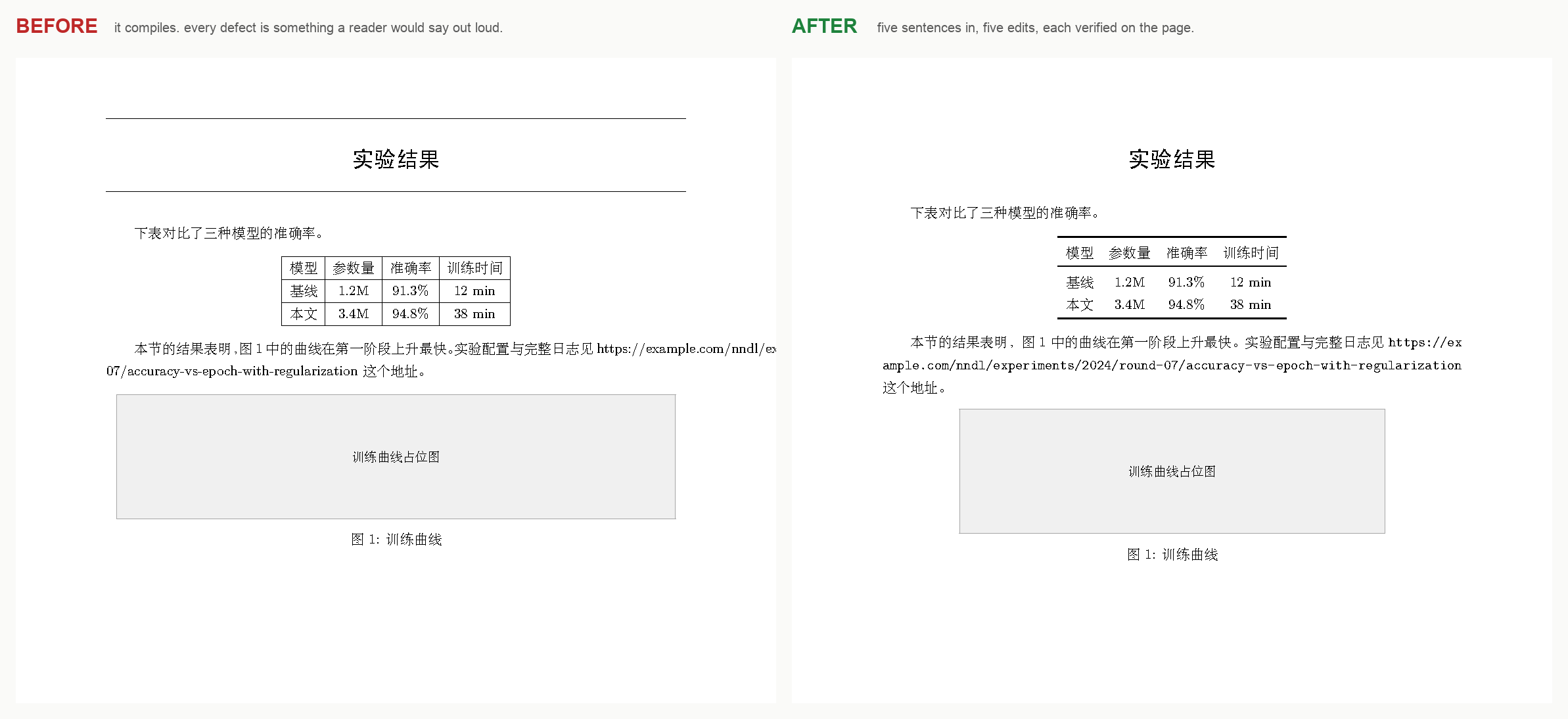
Left: compiles with zero errors. Right: after five sentences a reader could say out
loud — "remove the rules around the title", "this table is a grid, make it a
booktabs table", "that link runs off the page", "the figure is too wide". Try it
yourself in examples/broken-layout.
A DeepSeek Harness plugin that adds exactly one tool: latex_look.
An agent that only reads .tex source is blind: a document can compile with zero errors and still look wrong. latex_look compiles the document, renders the page as an image, maps any spot on that page back to the exact source line, and diffs what your last edit changed — in a single call.
        ┌─────────────┐   latex_look   ┌──────────────┐
        │   agent     │ ─────────────► │  pdf → png   │
        │ (edits .tex)│                │  synctex     │
        └─────────────┘ ◄───────────── │  pixel diff  │
              ▲          image + line  └──────────────┘
              └─────────────── verification ───────────┘
Read the case study: a 215-page LaTeX book, read the way a reader reads it — 163 figures, 129 equations, six classes of defect that compile cleanly.
Why one tool, not three
Rendering, locating, and diffing are the implementation. The agent needs one coherent verb — "look at this page" — the same way a person does. latex_look compiles, renders, resolves, and diffs in a single call, so the loop is:
look → diagnose → edit .tex → look again → confirm the change → report
Install
Requires Node ≥ 18, a TeX engine (xelatex/lualatex/pdflatex/latexmk or tectonic), synctex, and ghostscript.
This repository is the bundle: package.json declares dsh.bundle.patch, and cordis.patch.yml inserts one row.
git clone https://github.com/fangchenghao/latex-look
Then install it into the current profile (in the Harness, via the plugin manager):
plugin_manager action: install_bundle target: /absolute/path/to/latex-look
That adds the row latex-look and registers the latex_look tool. Replacing the sources of an already-installed package needs a Harness restart to load a fresh module generation.
Published on npm as @fffangchenghao/dsh-latex-look, so the same row also installs straight from the registry:
plugin_manager action: install_bundle target: @fffangchenghao/dsh-latex-look
Updating
The plugin checks the registry once a day, in the background, and appends a single line to a tool reply when a newer release exists — no repeated nagging, and an offline machine sees nothing at all. To upgrade, install the same bundle again:
plugin_manager action: install_bundle target: @fffangchenghao/dsh-latex-look
On a live profile the upgrade applies immediately; the harness reloads the module generation on the next start, because core.mjs (unlike index.js) is not hot-reloaded.
From a checkout, the check is available directly:
npx latex-look --version
npx latex-look --check-update
Releasing
Tagging v* runs the test suite on Ubuntu with TeX and Ghostscript installed, verifies the tag matches package.json, and publishes to npm. The token comes from the NPM_TOKEN repository secret.
Optional: the knowledge skill
The tool gives the agent eyes. SKILL.md gives it the LaTeX knowledge to act on what it sees — a symptom → cause → fix playbook (a rule you want gone is usually \pagestyle/fancyhdr, not a stray \hline). Copy or symlink it into the skills root:
mkdir -p ~/.dsh/skills/latex-look
ln -sf "$PWD/SKILL.md" ~/.dsh/skills/latex-look/SKILL.md
CLI, for humans and for testing
node bin/latex-look.mjs book.tex --page 37
node bin/latex-look.mjs book.tex --text "表3.1"
node bin/latex-look.mjs book.tex --page 12 --compare previous --json
node bin/latex-look.mjs book.tex --page 1 --audit   # what did the last edit break, anywhere?
The CLI runs the same engine as the plugin and needs no Harness, which makes it the fast way to check a change without reloading anything.
MCP server, for Claude Desktop, Cursor and Codex
The same engine ships as a Model Context Protocol server, so a client that has never
heard of DSH can use it. It is the same look() and the same words in the reply — the
plugin is the Harness shape, this is the universal one.
{
  "mcpServers": {
    "latex-look": {
      "command": "npx",
      "args": ["-y", "@fffangchenghao/dsh-latex-look", "mcp"]
    }
  }
}
Put that in claude_desktop_config.json (Claude Desktop), ~/.cursor/mcp.json
(Cursor), or as a TOML block in ~/.codex/config.toml:
[mcp_servers.latex-look]
command = "npx"
args = ["-y", "@fffangchenghao/dsh-latex-look", "mcp"]
It exposes one tool, latex_look, with the same parameters as everywhere else:
file, page, text, pointX/pointY, compare, audit, sequence, dpi.
Pages come back as image content blocks, so the model sees the page itself.
Requirements are the usual ones — a TeX engine and ghostscript on PATH:
brew install --cask mactex-no-gui ghostscript     # macOS
sudo apt install texlive-xetex ghostscript        # Debian/Ubuntu
Nothing is uploaded: every call compiles the document that is already on your disk.
Tests
Three suites run on a clean checkout — they create their own fixtures and compile real documents, so expect a few minutes:
node test/smoke.mjs           # unit level: problem parsing, PPM, raster diff, aux detection
node test/scenarios.mjs       # 52 end-to-end cases driven through index.js
node test/scenarios-deep.mjs  # 29 cases: multi-file papers, beamer, twocolumn, images,
                              #   engine switching, the build cache, hostile inputs
node test/book-scenarios.mjs  # 15 cases against a real 208-page book (164 .tex files)
node test/book-tasks.mjs      # 18 real editing tasks on the same book (see below)
LATEX_LOOK_BOOK=/pristine/copy node test/book-tasks.mjs   # point it at an unedited copy
The book suite needs a real book and is skipped unless you point it at one:
LATEX_LOOK_BOOK=/path/to/book node test/book-scenarios.mjs
These two suites matter most, because a real book is root → \input{main} →
\input{chap1}, with a custom .sty, 181 figures, a glossary and fancyhdr page
furniture.
book-scenarios checks the machinery on that book. book-tasks checks the
requests: each case is a sentence a user would say, applied to the copy and then
verified the way an agent verifies it — look, diff against the previous build, and
confirm the change is where the edit acts:
| user says | measured |
|---|---|
| 把页眉那条横线去掉 | 0.09%, bbox y=52 h=1 (a thin band at the top) |
| 页眉的线太细,加粗到 2pt | 0.27%, bbox y=52 h=3 |
| 链接的蓝色去掉 | 0.29%, bbox over the contents page |
| 行距调大一点 | 10.53%, 208 → 248 pages |
| 表格行距加大 | 9.07% |
| chap2 那个总结框太窄,放宽 | 7.39% |
| chap1 那个图太小,放大 | 10.57% |
| chap4 那组图对齐时右边空着 | 8.81% |
| 段落首行不要缩进 | 14.07% |
| 页边距太窄 | 13.32%, 208 → 226 pages |
| 正文字号改成 12pt | 11.63%, 208 → 226 pages |
| 目录只显示到章 | 2.19%, 208 → 207 pages |
Nothing in these cases is asserted about how the change looks — that is what the image is for. The assertions are: the build succeeded, a diff exists, and its bounding box is in the region the edit acts on.
Both end-to-end suites stub only @deepseek-ai/dsh-tools (it exists solely inside
the Harness) and call the real execute with real arguments, so they exercise the
argument handling and the exact text the model reads — not just lib/core.mjs.
That matters: several bugs found this way lived only in the formatting layer.
The page SyncTeX names is not always the page it is on
SyncTeX records the page a box was built on. A float that TeX moves to the next
page gets the previous page's number, so text: "Version 0.5" used to answer
"page 205" for a table that ships on 206 — and page 205 is a different chapter.
The tool now checks the PDF's own text layer (gs -sDEVICE=txtwrite, ~0.12 s a page)
and looks one and two pages either side; when it overrules SyncTeX it says so.
One picture, not two
A compare call writes three images, but the one to show the user is
images.sideBySide: the page before on the left, the page after on the right, one
PNG. Finding the difference by eye across two separate files is the hardest part of
the job for someone who cannot read the source.
Writing a PNG needs no dependency — a signature, IHDR, one zlib IDAT, IEND, and
node:zlib supplies the compression. The composite costs about 0.3 s on an A4 page at
140 dpi, and only runs when there is something to compare.
Performance
Verifying an edit always costs a real compile; there is no way around that. But browsing pages of the same build should not:
| operation | 208-page book |
|---|---|
| first look (3 passes + glossary) | ~17 s |
| every look after that, sources unchanged | ~0.2 s |
A build is reused when the document, everything it \input/\includes (three
levels), its \includegraphics files and its aux files are unchanged (mtime and
size). A failing build is never reused. Pass fresh: true to bypass it.
Two consequences worth knowing:
- The before-snapshot belongs to the build, not to the call. After an edit, the first look records what the page looked like before it; every later look at that same build reuses the same snapshot, so an agent inspecting three pages of its own edit still sees a diff on the second and third. (It used to be consumed by the first call, which is exactly the wrong way round.)
- One build per document at a time. Two compiles of the same file share its
.aux/.tocand corrupt each other — racing two processes on the 208-page book, one of them died with no error message at all. Builds are now serialised in-process by a promise queue and across processes by a lock file that carries the owner's PID, so a killed run cannot wedge the document.
-draftmode on the intermediate passes was measured and rejected: it saves about
2%, because the time is typesetting, not PDF writing. The ~16 s is TeX itself.
The tool
latex_look({
  "file": "book.tex",       // main .tex (required)
  "page": 37,               // optional, defaults to 1
  "text": "表3.1",          // optional: locate this string, show its page
  "pointX": 240,            // optional, with pointY: PDF points → source line
  "pointY": 610,
  "compare": "previous.pdf",// optional: diff against an earlier PDF
  "dpi": 200,               // optional, 50-300
  "engine": "xelatex",      // optional
  "maxPasses": 3,           // optional
  "timeoutSeconds": 300,    // optional
  "fresh": false,           // optional: ignore the build cache
  "audit": false,           // optional: whole-document layout audit vs the last run
  "auditBlankMm": 30        // optional: how deep a bottom hole must be to count,
  "sequence": "图"            // optional: check that numbered labels stay in reading order
})
Returns:
- compile status, pass count, page count, and structured
problems— each withfile,line,message warnings: LaTeX/Package/Class warnings plus Overfull/Underfull boxes, the usual cause of an ugly pagetoc: whether the document declares\tableofcontentsand how many entries it actually produced (an empty TOC is reported as a problem, not a success). The declaration is found across\input/\include, so a one-line root that wraps\input{main}still worksaux: external tools it ran —makeglossaries,makeindex,biber,bibtex— chosen from the artifacts the first pass produced, not from the root file's text, so multi-file projects that keep\makeglossariesin an included preamble are handled too- PNG path(s) for the rendered page — hand these to an image reader
located:{ file, line, page }for the text anchor or point you asked aboutdiff:changedRatioplus the bounding box of the change in PDF points, ready to feed back intopointX/pointYsequence: reading order of labels that start a line ("图 1-1", "Figure 3.2", …). A float is placed later than an inline object that follows it in the source, so floating one member of a numbered run makes the numbers go backwards — the one defect a per-page diff can never showaudit: page-level layout findings — pages that stop short of the deepest text in the book, pages that start low, nearly empty pages — compared with the baseline the previous audit left behind, sonewFindingsis exactly what the latest build broke. Running heads, rules and page numbers are detected and excluded first; otherwise a page number becomes "the lowest ink in the book" and every page looks broken
How the locating works
latex_look compiles with -synctex=1, so every glyph carries a link to its source line. Then:
- point → source:
synctex edit -o page:x:y:file.pdf - text → source: search the
.texsources for the string, thensynctex vieweach hit to get its page and coordinates - diff bbox → source: pass the bbox centre as
pointX/pointY
Coordinates are PDF points (72/inch) with the origin at the top-left of the page.
Honest limits
pageis the PDF page index, not the number printed on the page. In the test book those differ by 10 (printed 130 = index 140), and the offset is different again in the roman-numbered front matter. PDF page labels would let the tool translate, but LaTeX only writes them on request, so an agent that takes a page number from a user must confirm it against the rendered page first.- SyncTeX resolves to the nearest text position. A decorative rule drawn by a page style (
\pagestyle{headings},fancyhdr) has no glyph of its own, so it resolves to nearby text. Combine the coordinates with LaTeX knowledge — that is whatSKILL.mdis for. - Multi-pass convergence is checked by hashing
.aux/.toc/.out/… — a document with\tableofcontentsneeds ≥ 2 passes, andlatex_lookreports a problem if the TOC comes out empty. - Multi-file detection follows
\input/\includethree levels deep.\import/\subfile, unusual custom.latexmkrcrecipes, and\includeonlyare not understood. - Cross-engine pixel parity is impossible: TeX vs Word, or two different TeX engines, have different line-breaking engines. This tool verifies your engine's output, not another format's.
- A
%in a file name defeats the TeX engine itself (! Emergency stop.), so no tool can help there. A%in a directory name is fine. - If the compile fails without writing a new PDF, the stale PDF on disk is not rendered and no diff is reported — the tool says so instead. Otherwise an unchanged file would read as "0% changed", i.e. "your edit did nothing".
engineaccepts only the engines in this tool's list (autoor a known name); it is never passed tospawnunchecked.- Rendered PNGs stay under
TMPDIR/latex-look-<pid>/because the agent opens them after the call returns. Nothing prunes that directory. - The build cache tracks the document, its
\input/\includetargets, its\includegraphicsfiles and its aux files. A.stythat changed, or a file pulled in through a macro rather than a literal\input{...}, is not tracked — passfresh: trueif you suspect a stale build. maxPasses: 1on a document with\tableofcontentsis reported as an error when no.tocexisted before, and as a warning otherwise: the.tocfile is written after the TOC page is typeset, so one pass reliably produces a blank TOC page.
License
MIT
No comments yet. Be the first to write one.