Clippy Companion for DSH
English · Русский
A draggable companion that lives inside the DeepSeek Harness chat area, with switchable sprite packs. Two packs ship in the box: Clippy (OpenClippy sprites) and Doomguy (DOOM II status-bar faces, meme faces included). The drag area is measured from the conversation column itself, so the companion stays out of the sidebar and the presented-files panel and follows layout changes (sidebar collapse, right panel, window resize, composer growth).
| Clippy | Doomguy |
|---|---|
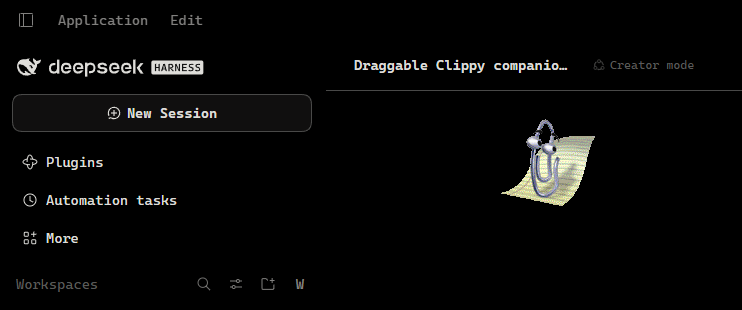 |
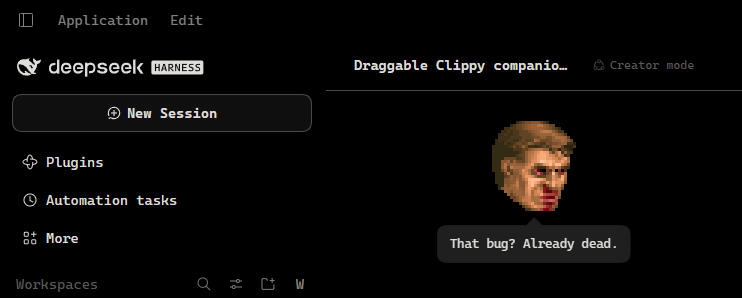 |
Features
- Draggable. Grab the companion and move it anywhere inside the chat column.
The position is clamped to that column and saved in
localStorage, so it survives reloads and adapts to a resized window. - Presets. Right-click the companion (or long-press on touch) to switch between packs, or use Settings → General → Companion. The choice is remembered.
- Per-preset voice. Idle loops, greetings, reactions and the random lines
all come from the pack's
preset.json, including its own set of comments. - Context damage. The DOOM pack reads the live context pressure from the token meter and picks a beaten-up variant of the current face once the window fills: healthy below 35%, wounded from 35%, badly hurt from 65%. When no bloodied variant exists the healthy frame stays.
- Agent-aware. During a turn the companion reflects thinking, the active
tool (editing, reading, shell, or a generic tool), tool success or failure, a
pending decision, a message queued for the next turn (a raised-hand beat, no
bubble), a tool call that runs past ten seconds (
IdleFingerTap, orAngryfor Doomguy), and the end of a turn. A speech bubble takes over briefly and the activity animation resumes afterwards. - Meme faces. The pack also carries 22 high-res Reddit meme faces, scaled down to the same 24×29 face size. Some have their own quote; otherwise one shows up at random between idle animations.
- Animated. Idle loops, a greeting on load, and a reaction for every comment, all played at the frame durations declared by the sprite manifest.
- Pokeable. Click the companion (or press Enter while it has focus) for a short comment in a themed speech bubble. Keep poking and it gets annoyed; a double-click throws one of the pack's meme faces instead.
- Naps. After five quiet minutes it dozes off with a
Zzzbubble, swapping to the pack's sleep animation where one exists. Any turn activity, click, keypress or comment wakes it with the pack's wake-up animation. - Keyboard accessible. Focus the companion with Tab, move it with the arrow keys (hold Shift for bigger steps), speak with Enter or Space, open the preset menu with the Menu key or Shift+F10, dismiss with Escape.
- Theme-aware. The speech bubble, menu and settings row use the host theme tokens; only the artwork keeps its own colours.
- Reduced motion.
prefers-reduced-motion: reducekeeps the companion in its rest frame instead of looping animations.
Install
The package is a normal pnpm dependency, so a GitHub ref or a local checkout both work. In the Desktop app, use the Plugins page; from a shell (Windows, Linux, macOS):
# from GitHub
dsh plugin --profile desktop add github:extreme-russian-dsh-fandom/dsh-clippy-companion

# from a local checkout
dsh plugin --profile desktop add C:\path\to\dsh-clippy-companion

# same on Linux or macOS
dsh plugin --profile desktop add /path/to/dsh-clippy-companion
Replace desktop with your profile name (web, tui, ...). dsh plugin
forwards its arguments to pnpm, so github: is pnpm's GitHub shorthand; append
#<branch-or-commit> to pin a revision. Repository:
https://github.com/extreme-russian-dsh-fandom/dsh-clippy-companion.
Installing a local directory links it, so later edits need only a plugin re-enable. Installing the GitHub spec copies the package: push first, then reinstall to pick up changes. No build step is needed.
Restart the Harness, then reload the page. The plugin appears as Clippy Companion in the Plugins settings.
Uninstall
Remove the bundle in the Harness Plugins page, or:
dsh plugin --profile desktop remove @local/dsh-clippy-companion
Preset packs
Each pack is a directory under assets/ with the following files:
assets/<pack>/
  preset.json        pack descriptor (see below)
  sprite-data.json   frameWidth, frameHeight, animations[{duration, position}]
  <sheet>.png        sprite sheet referenced by preset.json
  LICENSE | LICENSE.md
preset.json:
{
  "id": "openclippy",
  "version": 1,
  "sprite": "clippy-map.png",
  "manifest": "sprite-data.json",
  "scale": 1,
  "pixelated": false,
  "greeting": "Greeting",
  "rest": "RestPose",
  "idle": ["Idle1_1", "LookLeft", "..."],
  "speech": [{ "key": "clippy.line1", "anim": "Thinking" }],
  "poke": [{ "key": "clippy.poke1", "anim": "Hearing_1" }],
  "pokeMad": { "key": "clippy.pokeMad", "anim": "Alert" },
  "sleep": { "anim": "IdleSnooze" },
  "wake": { "anim": "Hearing_1" }
}
scalemultiplies frame size and background position;pixelatedswitches on nearest-neighbour rendering for pixel art.versioncache-busts the sprite and manifest URLs. Bump it whenever a pack's images change, otherwise the browser keeps the old sheet for its cache lifetime (preset.jsonitself is always fetched fresh).greetingplays once after load,restis used for reduced motion and as a fallback,idleis sampled at random between pauses, andspeechmaps a locale key to a reaction animation.- Optional
memeIdle(animation names) andmemeChance(0–1) make an idle loop occasionally show a random joke face instead of the regular idle set; the same list feeds the double-click meme burst. - Optional
poke(a list of{ key, anim }) answers a click,pokeMadanswers the third poke in a row, andsleep/wakename the dozing and waking animations. Missing entries fall back to compatible animations from the pack. - Damage variants are ordinary manifest animations suffixed by tier:
Angry,AngryHurt,AngryBad. The client prefers the highest tier that exists for the requested base name. - Add a pack by dropping its directory under
assets/and adding one row toPRESETSinclient.js. No Host change is needed: the asset route is a prefix over the whole directory.
Rebuilding the DOOM pack
python tools/build-doom-pack.py
The script keys the classic sheet, flood-fills the meme sheets' black
backgrounds, scales meme faces into 24×29, packs every frame into 32×32 cells,
and writes faces.png plus the damage-tier manifest. Run it from the repository
root after changing any of the source sheets.
The classic sheet stores five health levels per expression (100/80/60/40/20 percent), and the three damage tiers use 100/60/20. The build asserts that no generated animation mixes health levels, so a clip never changes bloodiness partway through.
How it works
index.js(Host) exposesassets/read-only on/clippy-companion/assets/<pack>/..., with traversal, extension and content type checks.client.js(Client) registers a hidden probe inconversation.input.dockthat measures the chat column and forwards thecontextPressureandinboxprojections plus the session's activity (running, active tool, latest tool result, pending input, queued messages), the companion inshell.overlay, and a preference row insettings.general.item.- Sprite frames are drawn by shifting
background-positionon the single sheet; timings come straight from each pack'ssprite-data.json.
Layout of the package
index.js            Host half: read-only asset route
client.js           Client half: probe, companion, presets, menu, settings row
cordis.patch.yml    Bundle patch inserting the plugin row
locale/             Plugin-manager display metadata (en, ru, zh)
icon.png            Plugin icon cropped from the sprite sheet
media/              README screenshots (Clippy and Doomguy)
assets/openclippy/  clippy-map.png + sprite-data.json + MIT licence
assets/doom/        faces.png + sprite-data.json + classic + meme source sheets
tools/              build-doom-pack.py (regenerates the DOOM sheet + manifest)
Licence
Plugin code: MIT, see LICENSE.
assets/openclippy/: MIT, © 2026 OpenClippy Contributors, see assets/openclippy/LICENSE.assets/doom/: the DOOM II status-bar faces are © 1994 id Software LLC / ZeniMax Media and are not covered by the MIT licence. The meme faces come from the Reddit posts listed in assets/doom/LICENSE.md; that file also records the shareware-distribution note. Review it before redistributing this directory or a package that contains it.
No comments yet. Be the first to write one.