dsh-session-usage
English | 中文
A session usage view: one "Usage" tab in the session, one session total, and two tables.
- Model usage (default): one row per model used, ordered by total tokens descending.
- Message usage: one row per turn, orderable by any figure column.
This is a plugin installed into a profile on its own. It does not modify any source of
deepseek-harness (packages/ is untouched).
The two leaves
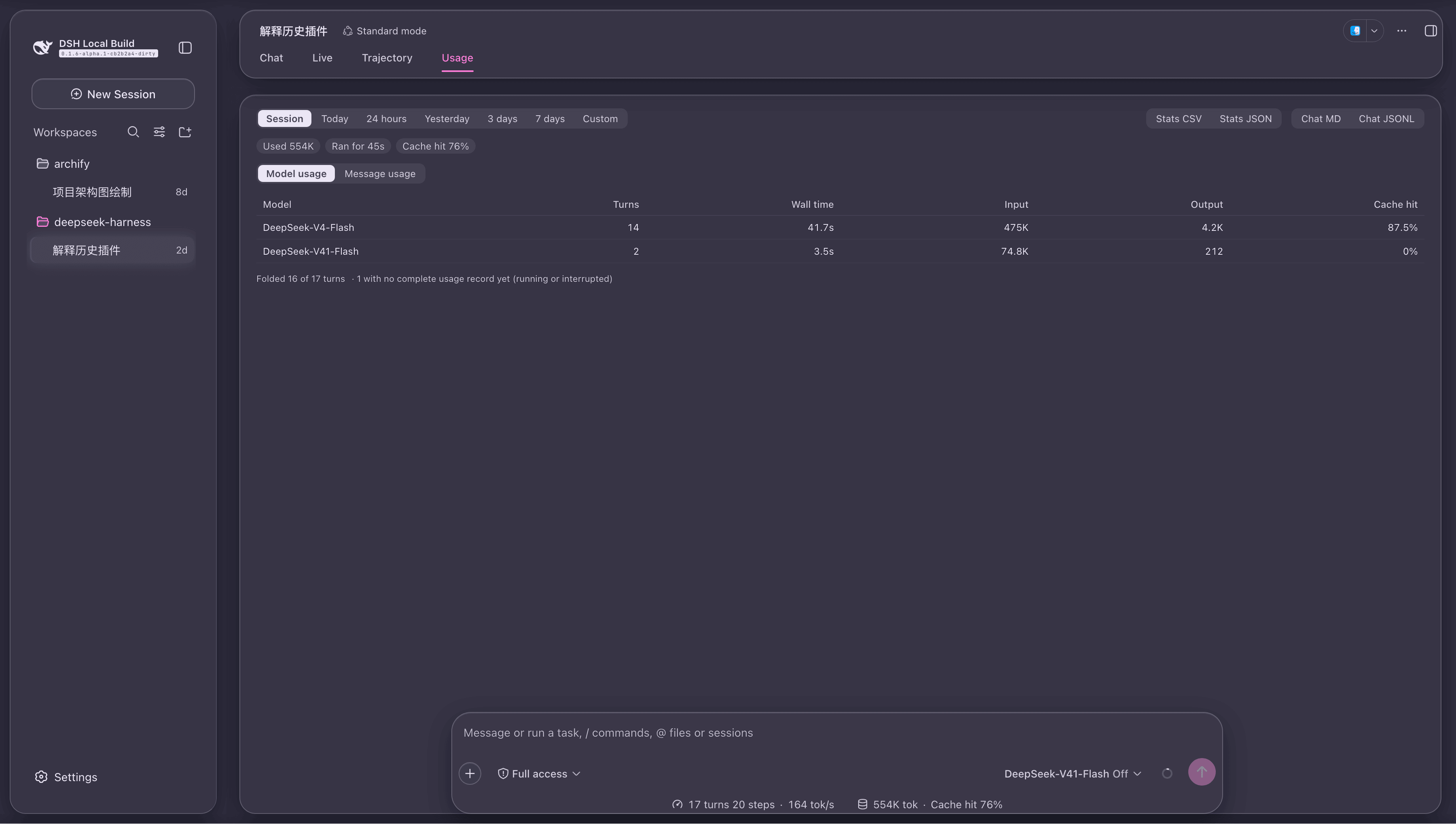
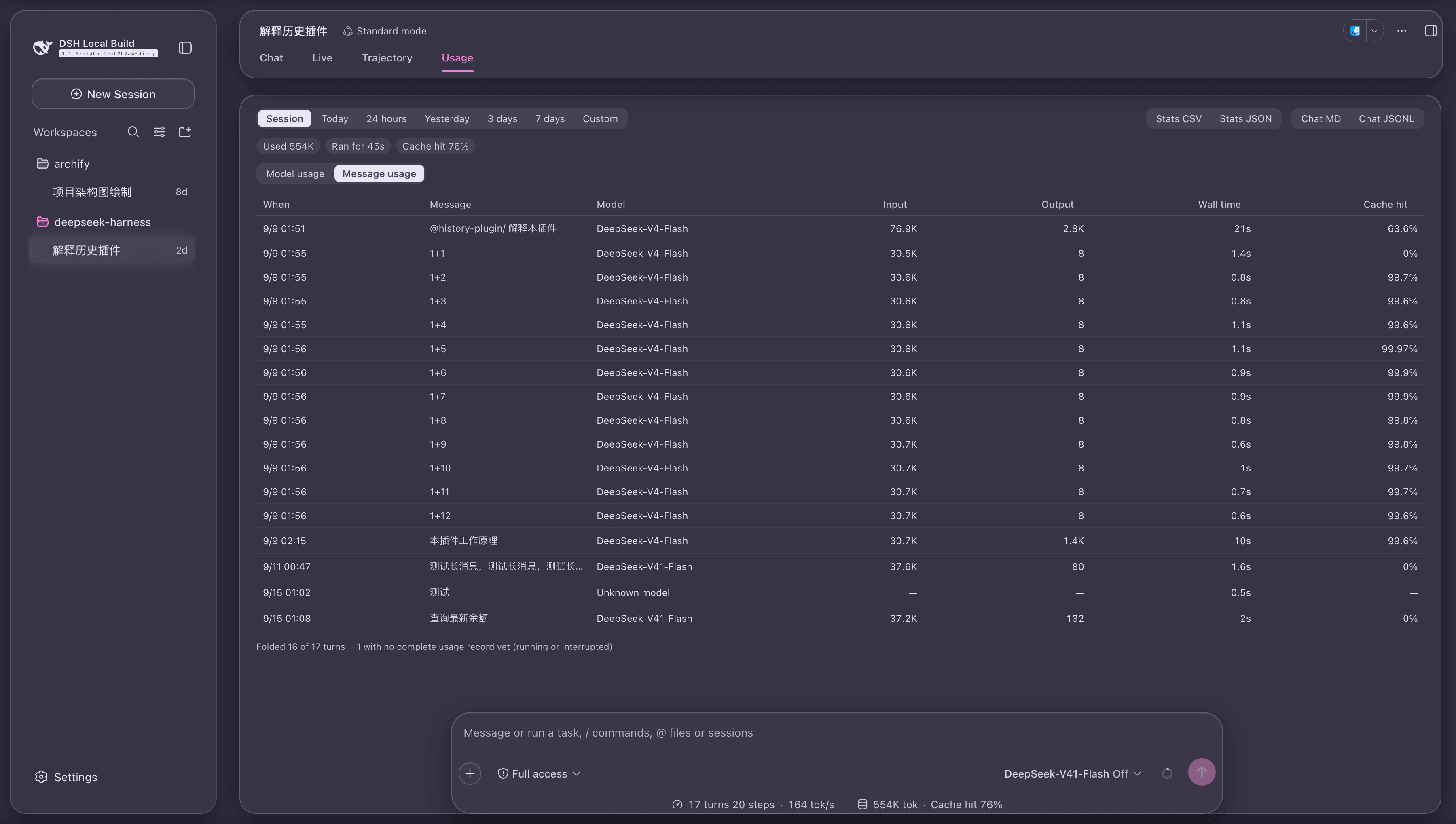
| Model usage | Message usage | |
|---|---|---|
| One row is | a model | a turn (not a message) |
| Columns | Model · Turns · Input · Output · Wall time · Cache hit | When · Message · Model · Input · Output · Wall time · Cache hit |
| Ordering | fixed, total descending | click a header to change |
| Coverage | turns inside the loaded window | same |
A row is a turn, not a message. An assistant reply belongs to the same turn as the prompt that asked for it and shares its usage, so listing messages individually would count every token once per message in the exchange — the one arithmetic mistake a usage table cannot afford. A row is therefore identified by the prompt that started the turn. A turn that switched models is credited to the model that produced the reply.
The three pills above the tables come from ISession.projections (the host computes them over
the whole log), so paging the window in or compacting it cannot move them.
Where the figures come from
| Figure | Source |
|---|---|
| Session tokens / wall time / cache hit | the client projections tokenUsage, sessionStats — whole log |
| Per-turn usage | the session's own event window, folded by the host's deriveTurnTokenUsage (@deepseek-ai/dsh-token-meter/client) |
| Per-turn model | the turn's routing metadata, falling back to message.source of its assistant/message |
| Per-turn wall time | the two ends' own timestamps, turn/start to turn/end (no clock is read) |
| Model display name | remote.session.modelCatalog(), the same spelling the composer's picker uses |
Usage is not aggregated here. Which events count, that a final message supersedes a
streaming sample, that retries add, that an incomplete turn yields nothing — those rules are
fine-grained and already settled by the host in deriveTurnTokenUsage (the function ui-chat
builds a turn's tail with). A second implementation would keep its first disagreement
invisible until someone compared two surfaces.
The cache share is ported, not re-derived. formatCacheHitPercent in format.ts is a port
of ui-chat's token-format.ts: same projection, same algorithm, so this plugin, the composer's
session pills and the status bar print the same percentage character for character. One host
rule is worth spelling out — a near-perfect partial hit is not clamped to 99.9; it gains
decimal places (the 99.6 / 99.95 shape), which is both honest and visibly not full.
Three deliberate conventions
① Input is the sum of three disjoint buckets. uncachedInputTokens + cacheReadTokens + cacheWriteTokens. The host counts inputTokens as the uncached part alone, and passing it
as a total makes the fold reject the whole turn.
② What cannot be computed stays a dash — and stays a row. Hiding it would make the row count disagree with the turn count the coverage line reports. And a dash is not a small number: sorting by any column puts it last in either direction, because a descending column filling its top with "—" reads as "these cost the most".
③ Ties — and turns that are both unknown — fall back to seq. A sort therefore never
shuffles equal rows arbitrarily, and stating it as seq rather than "the input order" keeps
the rule true outside this plugin too.
Coverage and "Load the full history"
The detail can only fold the loaded event window, so the coverage line reports two numbers together:
Folded 12 of 22 turns · 10 outside the loaded window
"Load the full history" goes through the host's own jump loader
(binding.session.loadThrough(SessionSeq(0))): it carries a no-progress guard (an empty page
that still claims history ends the loop instead of spinning it) and its pages are 200 messages —
four times this plugin's own paging, so the whole session arrives in a quarter of the round
trips. The cost is stated in the button's hint: the load does not shrink back — it holds
until the page is reloaded, and it cannot be cancelled.
Time ranges
A row of range buttons sits above the tables, defaulting to "Session" — the behaviour described above, unchanged:
| Range | Span |
|---|---|
| Session | no bounds: the whole session, read from the projection |
| Today | local midnight → now |
| 24 hours | a rolling 24 hours: this moment minus a day |
| Yesterday | local midnight yesterday → local midnight today (half-open) |
| 3 days | local midnight three calendar days back → now |
| 7 days | local midnight seven calendar days back → now |
| Custom | the two ends you pick (your own zone; an empty end means "until now") |
The shapes are deliberately different, and each is the reader's own words: "today" names a calendar day, while "the last day" is spelled out as from this time yesterday — not yesterday's midnight, which would under-count a morning reading by most of a day.
Yesterday is the only fixed range with both ends set. Every other fixed range runs to the present ("the last three days" includes today), while yesterday is a closed calendar day — with a lower bound alone it would quietly swallow today as well. The upper bound is exclusive, so a turn starting exactly at midnight belongs to today: the two ranges meet without either claiming that instant twice.
Custom is yours to set, through two native date-time fields that read and write in your own zone (UTC would show a time hours away from the one you picked). An empty end means "until now". With no start chosen the table is empty, not everything — showing the whole session halfway through filling the form would read as the custom range being ignored. It is also the one range that remembers instants: every other range is computed relative to now, while this one stores two fixed moments.
Once a range is chosen the pills above the tables are no longer the projection. No projection carries a time dimension, so they are summed from the turns inside the range instead, and the cache share is the share of those SUMS (cache reads and billed input summed first, then run through the host's own formatter). The share of a sum is not the average of shares: averaging per turn would weigh a 3-token turn the same as a 300k one.
Ranges are within the session. This plugin reads one session's projections and one event window, and a client plugin cannot reach the rest — the host-side session query has no remote endpoint — so "Today" means how much of this conversation was spent today.
Picking a range loads nothing by itself. The window only holds the newest part of a
session, so "7 days" over a session that has run for a month opens with whatever the window
happens to cover. The coverage line states the gap outright — · older turns are not loaded yet — because "Folded N of N turns" cannot show that anything is missing when N is the
window itself.
Closing the gap is a button ("Load the older turns in this range"). It is the exact loader: it pages backwards (50 messages at a time, through the Session Controller's own pager) and stops as soon as the oldest loaded turn is older than the range rather than overshooting to the session's beginning. It is capped at 40 pages (2000 messages), with the one-shot full load beside it for the sessions that need more.
Why it is not automatic: a page brings MESSAGE BODIES, and the host cannot unload them — the window only ever grows. The real cost of "show me 7 days" is the loading it triggers, not the tables it draws, so whoever chooses it pays it.
The range is remembered too (below), and it is the one preference whose meaning moves: "Today" always answers for today when the view is opened, not for the day it was picked.
Export
Four buttons sit under the range row, in two pairs: the first two hand back the figures, the second two the conversation.
| Button | What you get |
|---|---|
| Stats CSV | the table's own columns; compact figures (8.2K, 1m12s), one summary row at the end |
| Stats JSON | raw numbers — seq, the whole usage bucket, the route source — for a program |
| Chat MD | every turn's full prompt and replies, as Markdown |
| Chat JSONL | every turn's raw events, one JSON per line, the shape the host writes |
Three deliberate trade-offs:
- CSV carries compact figures, JSON carries raw ones. The first is read by a person in a
spreadsheet (
8.2Kscans better than8214); the second by a program, which cannot undo formatting. The cache column drops its%in CSV — a figure that still needs its suffix stripped before it can be summed is not a figure, it is a label. - The CSV summary row does not pretend to split the buckets. The range's split between billed input and output is not something this view computes anywhere, and inventing it would put a number in the export that no surface in the app agrees with. It states the four things that do agree: turns, tokens, wall time, cache share.
- Markdown uses the full text. The table shows a truncated preview, and truncation is a view concern — a reader who asks for the conversation wants the conversation, not what fitted in a cell.
What you export is what is on screen: same range, same order, same turns — and the same honesty about the gap, so turns older than the loaded window are absent from the file exactly as they are absent from the table. On an empty range all four buttons are disabled: a file with a header and nothing else is not a better answer than "nothing to write".
CSV fields are quoted the way RFC 4180 says (quoted when they carry a comma, a quote or a newline; inner quotes doubled). Prompts contain all three as a matter of course, and an unquoted one does not merely look wrong — it shifts every later column of that row, and the spreadsheet quietly reads a different set of figures than the table did.
Remembering where you were
Five reader preferences, all in localStorage under a dsh-session-usage. prefix:
| Key | What it remembers |
|---|---|
…message-sort |
the message table's sort column and direction |
…leaf |
which leaf you were on |
…scroll |
how far down the page you had read |
…range |
which time range you were on |
…custom-range |
the two ends of the custom span |
Two layers, and both are load-bearing: a module-level value covers the unmount (the leaves
are conditionally rendered, so switching leaves unmounts the table and a useState would
silently reset the sort to the window's own order), and localStorage covers a reload.
- Storage is optional. Every access is guarded (a host profile can run without web storage), and the in-memory value still covers the page — there, a forgotten sort is a missing nicety rather than a broken table.
- Stored values are validated. Something hand-edited, or written by a version whose columns
differ, is recognised and treated as "no preference at all". An unknown sort column would
turn every comparison into
NaNand shuffle the rows — which looks like a sorting bug and is not one. - These preferences are global: switching sessions does not reset them (they describe the reader, not the conversation).
Shape: composer overlay
This view declares the host's data-conversation-composer-overlay — the same mode the
trajectory view uses. One attribute buys three things:
- The transcript's width handles stop rendering. They are anchored to the content column with a hit strip up to 40px wide, landing exactly on the usage table's right-hand figures — a pointer that was only reading numbers kept summoning one, and a drag would have resized the content column.
- The composer floats at the bottom, so the page leaves room for it using the host's own
published
--dsh-composer-height— without it, the last rows of a long table sit underneath. - Scrolling is handed to the view, done by its root element: one scroller for the pills, both leaves and the coverage line together.
The mode is declarative: the attribute goes away with the view, and the shell cleans up after itself.
Language
The plugin's own copy ships zh and en (the two the shell carries), all in
src/client/locales.ts. Both dictionaries are typed Record<MessagesKey, string>: a key added
to MessagesKey fails to compile until both carry it, so a key can never be silently
missing and fall back through the en chain. That guarantee matters more than the fallback
chain itself.
Figures and durations go through this plugin's own dictionary too (12.2K / 1.2M,
45.2s / 2m42s), because every language spells them its own way — they are not constants
to be copied.
Layout
session-usage-plugin/
  package.json        dsh.bundle + dsh.client declarations, exports map
  cordis.patch.yml    layer patch: one insert, registering the Loader row (no config block)
  build.mjs           build script (tsdown programmatic interface)
  tsconfig.json       type resolution for the IDE and npx tsc (noEmit, read-only)
  src/
    index.ts                 Node half: no services, no config, it just lets the Loader row resolve
    client/
      index.ts               browser half: registers the "Usage" view and the model-name lookup
      UsageView.tsx          container: session total, two leaves, coverage line, preferences, shape
      ModelUsageTable.tsx    the per-model table; falls back to raw ids
      MessageUsageTable.tsx  the per-turn table; ordering rules and where unknown values go
      turn-facts.ts          event window → per-turn facts (model, usage, cache, wall time, prompt)
      usage-by-model.ts      per-turn facts → one row per model
      format.ts              compact numbers/durations + the ported cache-hit format
      preferences.ts         the five reader preferences (sort / leaf / scroll / range / custom span)
      model-names.ts         display names: host catalog → id lookup
      Coverage.tsx           the coverage line and "Load the full history"
      table-styles.ts        table chrome shared by both tables, and the page root style
      time-range.ts          fixed ranges, their local calendar bounds, and the custom span's local time
      locales.ts             the zh / en dictionaries
  lib/                build output (index.js / client.js)
Install
From npm (the published tarball already carries lib/):
pnpm dsh plugin --profile web add dsh-session-usage
Or from a checkout — here the build is yours to run, and rerun after any src change:
# 1. Build (rerun after any src change) — all from the repository root
cd session-usage-plugin && npm run build && cd ..

# 2. Install into the profile (back at the repository root)
pnpm dsh plugin --profile web add ./session-usage-plugin
The build also runs as node_modules/.bin/tsx session-usage-plugin/build.mjs (from the
repository root, no need to enter the directory). Note that this relies on the shell shim in
node_modules/.bin/, which Windows does not have — use npm run build above.
Then restart pnpm dsh web (a new bundle layer, and any change to bundle contents, needs a
restart).
To remove it:
pnpm dsh plugin --profile web remove dsh-session-usage
Development
cd session-usage-plugin
npx tsc -p tsconfig.json                     # type check (no output = 0 errors)
npm run build                                # writes lib/index.js and lib/client.js
typescript is a devDependency, so the type check runs from inside the plugin and needs no
host checkout. oxlint is the host repository's own linter and is not installed here; it is
available when this plugin sits in a dsh checkout:
cd .. && node_modules/.bin/oxlint session-usage-plugin
After the restart, "Usage" appears among the session's view tabs — it is a tab, not a dialog, sitting beside "Conversation" and "Trajectory" and filling the conversation area.
Known limitations
- The detail covers the loaded event window only. The coverage line says so
(
Folded N of M turns), and the older part comes in through "Load the full history" — which does not shrink back, holds until the page is reloaded, and cannot be cancelled. A turn still running shows its usage once it ends. - The cache share is per turn, at the per-turn dialog's precision; a running turn has none (the host fails closed for it) and the cell stays a dash.
- Model display names need the
remotelayer. Without it the tables print raw ids (such asdeepseek-flash); nothing else changes. zhandenonly. Where a language pack makes other locales selectable, this plugin's copy falls back throughen.- Preferences are global, not per session: a remembered scroll offset is clamped by the browser in a session with shorter content.
- The composer is made inert in this view with a reason shown (the shell's
conversation.blocksis a single slot a view cannot hide — that registry is the only lever the contract offers).
Implementation notes
- One fold serves both leaves. The container owns the event window's fold (memoised on the window's own revision), the coverage and the totals; the tables are presentational — so they cannot end up describing different slices of the session.
- A poll, not a subscription: over an idle session one tick costs a single integer comparison, and a dashboard has no interaction that a live push would improve.
- Two kinds of state, two homes: per-turn facts come from the event window (session data), the three preferences from the store (reader data). They share neither storage nor lifecycle.
- The Node half is empty on purpose: a
dsh.bundlelayer inserts a Loader row by package name and that row has to resolve, while the plugin's whole work happens on the other half.
No comments yet. Be the first to write one.