Remote Subagent (dsh-subagent-remote)
中文 | English



Cross-machine (remote) subagent provider for DeepSeek Harness (DSH). A delegation
issued from a local DSH session runs one one-shot subagent task on a DSH acp
profile living on another machine, over SSH, and returns that remote agent's
closing message to the local parent session.
Version status. The repository is at
0.9.2-rc.8(session-header run indicator + Windows remote + visible unsettled runs). npm has0.9.2-rc.8on bothlatestandnext;dsh plugin ... add dsh-subagent-remotenow installs rc.8 (or pin@0.9.2-rc.8). Uselink:from a checkout for local development. Compatibility window:engines.dsh: ">=0.2.0-rc.2 <0.3.0",engines.node: ">=22". Verified on DSH0.2.1-rc.5(Windows desktop parent → a Linux host, a macOS host, and a localacpprofile) and DSH0.2.2-rc.1(macOS parent → Windows remote; Web UI indicator running → done).
Contents
- Requirements
- Screenshots
- Capabilities
- Installation forms
- Files
- How it works
- Configuration
- Permission model
- Failure behavior
- Diagnostics
- Security & boundaries
- Development & verification
- Install / uninstall / rollback
- Known limits (V1/V2)
- Compatibility
- License
Requirements
| Side | Requirement |
|---|---|
| Local Host | DSH >=0.2.0-rc.2 <0.3.0 (desktop app or a dsh CLI profile); Node >=22 |
| Local UI (optional) | Web/Desktop for the plugin page, the session-header indicator and /remote-host; headless/ACP profiles keep dispatch, diagnostics and results without UI |
| Remote machine | its own DSH installation exposing the acp profile, reachable over SSH with a key/agent the local machine can use; POSIX sh or Windows OpenSSH (cmd.exe carrier) |
| Remote workspace | cwd must be an existing absolute path on the remote machine |
The plugin has no third-party runtime dependencies (index.js + lib/*, Node
built-ins only). SSH credentials are never stored by the plugin — they follow your
local ssh config/agent; remote DSH credentials stay on the remote machine.
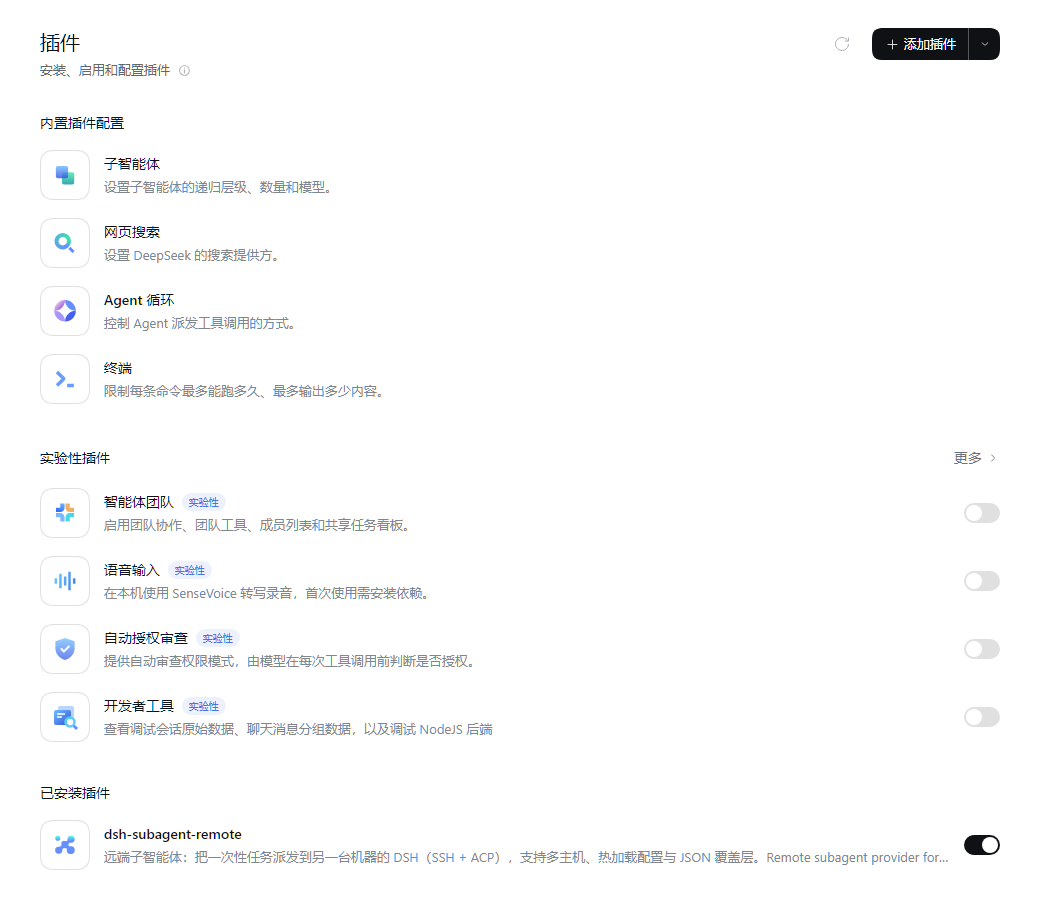
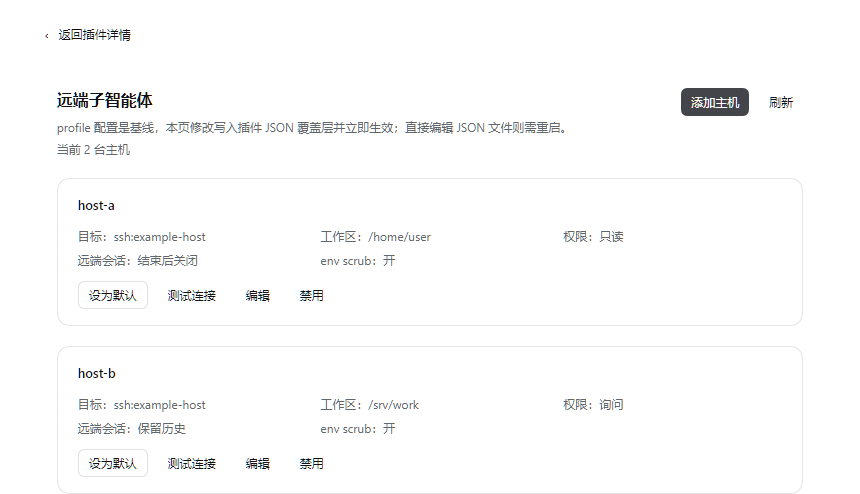
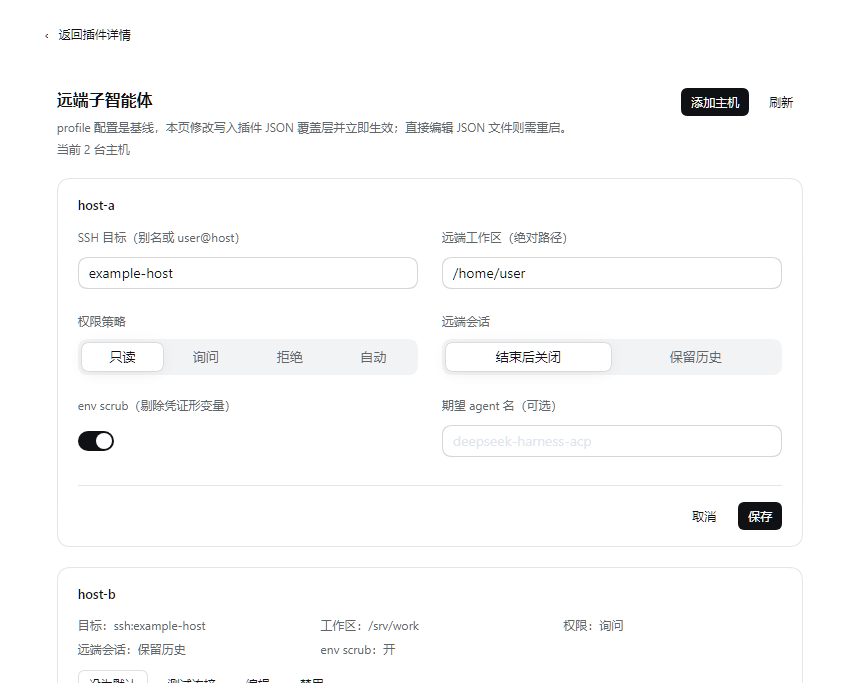
Screenshots
| Plugins page (installed plugin) | Configuration page | Host editor |
|---|---|---|
 |
 |
 |
Capabilities
- Cross-machine one-shot delegation — a local DSH session delegates a self-contained task to another machine's own DSH runtime (its tools, workspace, model and credentials); only the remote closing message comes back. Nothing about the local session is migrated or exposed over the network.
- Windows remote — when the host
cwdis a drive-letter path (e.g.C:/Users/me/work) the plugin automatically uses acmd.execarrier: the remote command goes straight to Windows OpenSSH'scmd.exe, so no Git Bash is required on the target. The POSIX pid probe is unavailable on that carrier, so remote reaping becomes best-effort (ACP itself does not depend on the pid). - Unified multi-host tool — one model-facing
remote_subagenttool with ahostargument; adding a machine is a configuration change, not a new tool row. An explicit legacy mode (@deepseek-ai/dsh-tool-subagentper host) is also supported. - Fail-closed permission policy —
read-only(default heuristic),ask(one in-turn run-scoped approval at dispatch),deny,auto. With no answer, a risky remote tool call is refused, never allowed. - Configuration page with hot reload — the Plugins page lists hosts, probes SSH connectivity, edits field overrides and sets/clears the default host; page writes are persisted in a JSON overlay (a delta on the profile patch) and applied immediately — no restart for page edits.
- Conversational host switching —
/remote-hostlists hosts and switches the current session's target host. - Session-header run indicator — after a dispatch, the conversation header shows the remote host, status and elapsed time (after the official subagent/background indicators); settled runs keep a short result/tool summary that expands into detail.
- Automatic delegation hint (system prompt) — every new session gets a dynamic
system-prompt section describing the remote hosts and when to use them, so the model
can choose
remote_subagentwithout the user naming the plugin or tool. A plugin-page switch can turn the injection off (the tool remains available for manual reminders). - Visible unsettled runs (P0) — a run still in-flight when the local Host restarts is
recovered as
orphaned(not failed) and shown in the plugin page and header with host, time and remote session id for manual reconciliation; never silently dropped. No automatic retry/resume yet. - Structured diagnostics — fixed failure facts (
stage=/category=), canned hints, permission decisions,agent=, env-scrub and peer-exit facts; raw remote text stays debug-gated. - Zero-dependency ESM Cordis plugin —
index.jspluslib/*; no third-party dependencies, and the whole package is dependency-free to test offline.
Installation forms
All forms mount the same DSH bundle: cordis.patch.yml inserts one
subagent-remote row with no hosts, so a fresh install can never point at a wrong
machine. None of them stores SSH credentials (those follow your local ssh
config/agent).
npm registry
Install a published build into a profile (dsh plugin forwards to pnpm inside
the profile directory, so any pnpm spec works):
dsh plugin --profile <profile> add dsh-subagent-remote          # latest = 0.9.2-rc.8
# or pin the exact version
dsh plugin --profile <profile> add dsh-subagent-remote@0.9.2-rc.8
npm dist-tags: latest = next = 0.9.2-rc.8 (the publish workflow maps
-rc.N versions to next; rc.8 was promoted to latest after release).
0.9.2-rc.5–rc.7 were repository pre-releases that were never published.
Plugins page (Web/Desktop)
Recommended on desktop/Web. Open 插件 → 添加插件, enter
dsh-subagent-remote and confirm. The plugin appears under 已安装插件; open it
and use 打开配置. The plugin card and configuration page are shown in the
screenshots above.
Bundle install
The package is a DSH bundle (dsh.bundle.patch → cordis.patch.yml). Agent
tooling and non-UI flows can install it through the plugin manager's
install_bundle action with the package name/spec as target — the same action
the Plugins page uses. Use this form for a local build (for example a tarball
produced by npm pack) or a catalog/bundle spec. It inserts the patch into the
profile exactly like the CLI form; restart DSH afterwards.
Local checkout (link:)
For development, link the checkout directly (the working tree is resolved as-is,
so files is irrelevant):
dsh plugin --profile <profile> add "link:/path/to/dsh-subagent-remote"
On Windows: dsh plugin --profile <profile> add "link:C:\path\to\dsh-subagent-remote".
Activation conditions
- Start the profile after installing:
dsh <profile> --port <n> --no-open. The bundle patch inserts one row with no hosts; open 插件 → dsh-subagent-remote (or 已安装插件 → dsh-subagent-remote → 打开配置) and add the target machines. - Host half: plugin code is loaded by the Host process — an install, an upgrade
or any
index.js/lib/**change needs a DSH restart (desktop app restart or profile process restart) to take effect. - Client bundle: a
lib/client.jschange only needs a Web page refresh.dsh.clientdeliberately has noimmediately: true: this is a configuration-page client, loaded lazily when the Plugins page/settings opens, so the normal chat boot path pays nothing. It still declares its web platform and allinjectpackages the bundle reads. - Headless / ACP deployments have no
connection/commandsservices: the plugin still loads and dispatch works; only the UI surfaces are absent. - A fresh bundle install starts empty, so nothing is dispatched until you add and enable a host.
- The plugin row also works path-loaded from a profile patch (development workflow), but the configuration page only exists for bundle installs.
Path-loaded overlay
The package can also be mounted directly from a checkout without a bundle install
(useful while iterating on the plugin itself). Point the insert row at this
folder's index.js; a relative name is resolved against the patch file:
- insert:
    - id: subagent-remote
      name: ../path/to/dsh-subagent-remote/index.js
      config: { ... }
Then dsh --profile headless --patch <patch> "…". The Plugins-page configuration
UI only exists for bundle installs.
Files
| File / directory | Purpose |
|---|---|
package.json |
npm manifest: exports (., ./client, ./locale/*.json, ./icon, ./package.json), files, engines.node/engines.dsh, the dsh.bundle.patch and dsh.client blocks, and the top-level icon |
cordis.patch.yml |
bundle patch inserted into the profile; adds the subagent-remote host row with an empty config (zero hosts by default, so a fresh install can never point at a wrong machine) |
index.js |
Host half entry: Cordis plugin that registers one out-of-process subagent provider per host, the unified tool/command, and the /api/dsh-subagent-remote RPC used by the page |
lib/acp.js |
ACP-over-stdio transport: initialize/session/new/session/prompt/session/update, permission correlation, bounded teardown, remote-pid reaping |
lib/policy.js |
permission classification and fail-closed decisions for read-only/ask/deny/auto |
lib/tool.js |
the unified remote_subagent tool definition and dispatch/default-host resolution |
lib/settings.js |
JSON overlay storage (atomic temp+rename writes), host selection, RPC envelope and hot-apply payload |
lib/runs.js |
in-memory run registry behind the session-header indicator (bounded to 64 records, ~10 min after settle) |
lib/journal.js |
durable run journal ($DSH_HOME/storages/dsh-subagent-remote/runs.json); restores runs interrupted by a Host restart as orphaned |
lib/client.js |
Client half (Web/Desktop): Plugins-page configuration panel, Settings-section fallback, locale registration; loaded lazily |
locale/en.json, locale/zh.json |
display metadata for the Plugins page (meta.title / meta.description) |
assets/icon.png |
plugin icon (PNG, ≤256 KiB), referenced by the top-level icon and the ./icon export |
assets/icon-128.png |
the larger icon used in the README header |
assets/screenshots/ |
README screenshots (sanitized) |
README.md, README.zh.md |
user documentation (English / Chinese) |
CHANGELOG.md |
version history |
SECURITY.md |
trust model, reporting, security caveats |
LICENSE |
MIT |
test/ |
zero-dependency offline selftests plus the mock ACP peer; kept in the repository/CI and not shipped in the npm tarball (repo/CI only) |
.github/workflows/ |
CI (Ubuntu + Windows + macOS, Node 22/24, packaging check) and the npm publish workflow |
The Plugins page shows the plugin title, description and icon read from
locale/en.json + locale/zh.json (meta.title / meta.description) and the
package top-level icon (./assets/icon.png). Without a locale file the page falls
back to the package name and description — that long text is for humans, the
locale files are what the UI actually renders.
How it works
local DSH parent (Lead session stays local)
  └─ model calls the delegation tool (`<toolName>` with a `host` argument, or one
     official `@deepseek-ai/dsh-tool-subagent` row per host in legacy mode)
       └─ dsh-subagent-remote registers one out-of-process provider per host
            └─ ssh <host> -- sh -c 'exec <remote dsh> --profile acp'
                 initialize → session/new{cwd: remote path} → session/prompt
                 → session/update* → (session/request_permission → local policy)
                 → closing message → session/close → teardown
The plugin is a zero-dependency ESM Cordis plugin: index.js + lib/acp.js
(transport), lib/policy.js (permission), lib/tool.js (V2 unified tool).
Why
DSH's official out-of-process ACP subagent backend is deliberately local-only:
session/new.cwd is the local working directory and there is no remote workspace
mapping. This plugin supplies that missing transport: it starts the remote DSH
itself and sets the ACP session workspace to a remote absolute path, so the
remote agent uses its own machine's tools, sandbox, model, and credentials while
the local Lead session never moves.
This is not a shared workspace and not a remote IDE session: the remote side is one subagent activation of the local conversation.
Positioning vs the official "remote & mobile" roadmap
Official DSH is working on remote and mobile access: reaching the same local session from another device. This plugin solves a different problem: cross-machine compute delegation. The parent session stays on the local machine, and a different machine's own DSH runtime (its tools, workspace, model, SSH target) executes a one-shot task. Nothing about the local session is migrated or exposed over the network by this plugin.
That distinction matters when choosing between them: use official remote access to continue your session elsewhere; use this plugin to run work on another machine's DSH (cloud Linux box, a Mac with GUI apps, a colleague's build machine) and bring back only the closing message.
Two ways to expose delegation to the model
V2 unified tool (recommended)
One model-facing tool with a host parameter; adding a machine is a config
change, not a new tool row:
- id: subagent-remote
  name: dsh-subagent-remote
  config:
    tool:
      name: remote_subagent            # optional, default remote_subagent
      description: 'optional custom description'   # optional
    hosts:
      - name: host-a                  # the value the model passes as host
        provider: remote-host-a       # registered subagent provider name
        ssh: example-host
        cwd: /srv/work
        permission: read-only
        timeoutMs: 180000
      - name: mac
        provider: remote-mac
        ssh: example-host
        cwd: /home/user
        permission: ask
        remoteCommand: ssh
        remoteArgs: ['-T', '-p', '2222', 'user@127.0.0.1', '<mac dsh command>']
Legacy: one official tool row per host
Useful when the strict official tool wording/schema is preferred:
- insert:
    - id: subagent-remote
      name: dsh-subagent-remote
      config:
        hosts:
          - name: host-a
            provider: remote-host-a
            ssh: example-host
            cwd: /srv/work
            permission: read-only
    - id: tool-remote-host-a
      name: '@deepseek-ai/dsh-tool-subagent'
      config:
        provider: remote-host-a
        toolName: remote_host_a
        maxDepth: provider-managed
Configuration
Host fields
| Field | Default | Meaning |
|---|---|---|
name |
host<N> |
label the model passes (unified tool) and used in diagnostics |
provider |
remote-<name> |
registered subagent provider name |
ssh |
— | SSH destination (~/.ssh/config alias, user@host, or a relay host); must not start with - or contain whitespace |
description |
— | optional one-line host capability note (e.g. “Windows 11 + PowerShell”); surfaced in the tool description and the system-prompt host list; also accepted by the JSON overlay |
cwd |
— | remote absolute workspace passed to session/new |
permission |
read-only |
read-only / ask / deny / auto (see below) |
remoteSession |
close |
close sends ACP session/close before teardown; keep skips it so the target keeps the persisted session history (ACP has no delete API, so nothing is removed) |
timeoutMs |
600000 |
prompt budget; on expiry the run is cancelled |
sshArgs |
[] |
extra ssh options |
remoteCommand |
dsh |
remote executable; an app-bundle install needs an absolute path + env wrapper |
remoteArgs |
['--profile','acp'] |
remote arguments |
remoteShell |
auto from cwd |
SSH remote shell carrier: posix (sh -c, with pid probe) or cmd (Windows OpenSSH; the command line goes straight to cmd.exe). A drive-letter cwd selects cmd automatically; rarely needs to be written by hand |
profile / local / localCommand / localArgs |
— | run a local dsh --profile acp instead of SSH |
spawnCwd |
— | local cwd for the ssh/dsh child (defaults to the harness cwd) |
scrubEnv |
true for SSH, false for local |
remove credential-shaped variables (*_API_KEY, *_KEY, *_TOKEN, *_SECRET, *_PASSWORD, *_AUTH, *_COOKIE, *_SESSION, *_DSN, DATABASE_URL, …) from the child environment before spawning; SSH_AUTH_SOCK is kept for agent forwarding. A local DSH peer usually needs the parent's provider env, so scrubbing is opt-in there |
env |
{} |
explicit variables layered after scrubbing (an intentional escape hatch). In SSH mode these are only forwarded if the remote sshd accepts them (SendEnv); local mode passes them directly |
disposeGraceMs |
5000 local / 10000 SSH |
teardown grace per termination tier; capped at 60000 |
expectAgentName |
— | fail the run during initialize when the peer's agentInfo.name differs (identity/version gate); the observed name is always reported as agent= in the diagnostic |
Windows remote
Use a Windows absolute path for cwd; the plugin selects the cmd carrier
automatically:
- name: win
  ssh: win-host            # ~/.ssh/config alias or user@host
  cwd: C:/Users/me/work    # must exist on the remote Windows machine
  permission: read-only
The remote needs dsh on the PATH of its SSH session (default
remoteCommand: dsh, resolved by cmd.exe); if PATH resolves an old build, point
remoteCommand at the desktop dsh.cmd absolute path. The cmd carrier does not
need Git Bash. The remote pid probe is unavailable there; teardown still closes the
ACP session and ends the ssh child.
Relay to a machine the workstation cannot authenticate to
If host A can ssh to host B but the workstation's key is not authorized on B, use A as the SSH endpoint and run a nested ssh as the remote command:
- name: mac
  provider: remote-mac
  ssh: example-host
  cwd: /home/user
  remoteCommand: ssh
  remoteArgs:
    - '-T'
    - '-p'
    - '2222'
    - user@127.0.0.1
    - 'ELECTRON_RUN_AS_NODE=1 "/Applications/DeepSeek Harness.app/Contents/MacOS/DeepSeek Harness" --expose-internals "/Applications/DeepSeek Harness.app/Contents/Resources/app.asar/dsh/node_modules/@deepseek-ai/dsh-desktop-host/lib/cli.js" --profile acp'
Local mode (no SSH)
local: true runs a second DSH acp profile on this machine instead of over
SSH. Useful to exercise the same delegation path without a network, and on a
machine whose DSH is only reachable as an app-bundled binary:
- name: local-dsh
  provider: remote-local
  local: true
  profile: acp
  cwd: C:/Users/me/workspace        # absolute; the parent's cwd wins when it is an absolute path
  permission: read-only
# optional: localCommand: C:/path/to/dsh.cmd   (explicit launcher wins over auto-detection)
Verified: the local child reports the local hostname and the parent workspace;
stopReason=completed; the model-listing line the ACP profile prints to stdout is
tolerated as stdoutNoise.
Installed-plugin page (Web/Desktop) and JSON overlay
In the Web or DSH Desktop UI, 远端子智能体 appears on the 插件 (Plugins)
page as a card; opening it shows the full configuration page. This is the official
placement for per-plugin configuration (plugins.item slot, the same surface the
official subagent/shell settings pages use). The page is a small module-loader
bundle plus a Host /api/dsh-subagent-remote RPC — no official client packages are
required, and the bundle falls back to a plain Settings section when optional client
services or plugin-page slots are missing (it never breaks the boot path):
- lists the effective hosts (name, endpoint, workspace, permission, remote-session policy, env-scrub state, which one is the default);
- 设为默认 persists the default host (applies immediately, including to tools
that omit
host); - 测试连接 runs a real
ssh -T -o BatchMode=yes -o ConnectTimeout=10 <host> -- echo okprobe with a 25 s per-attempt timeout and one automatic retry (spawned withstdin: 'ignore'; local peers report immediately). Slow or transient SSH handshakes no longer surface as a misleading failure; - 编辑 writes the field overrides to the plugin's own JSON overlay and 恢复 YAML 值 removes them again;
- 添加主机 appends a new host to the overlay; the page header shows a live
当前 N 台主机,默认 Xstatus line; - 禁用 takes a host offline without deleting its baseline definition (the card stays visible, marked 已禁用; 启用 brings it back). Overlay-added hosts also offer 删除; a YAML host cannot be deleted — only disabled — because the profile patch stays the single source of truth.
Every write from this page is applied immediately (hot reload): the plugin
disposes/re-registers the affected ctx.subagents.registerProvider effects (the
subagent seam is effect-scoped and HMR safe — removing a provider only blocks new
starts, it does not revoke runs already returned). The card shows a transient
"已生效:更新 …" badge, and no restart is needed. Editing the JSON file directly
by hand is picked up on the next restart; the page then shows a "检测到外部文件
改动,重启后生效" banner instead.
The overlay is $DSH_HOME/subagent-remote.json (atomic temp+rename writes). It is
a delta on top of the profile patch, never an edit of the patch itself:
{
  "defaultHost": "mac",
  "hosts": {
    "host-a": { "permission": "ask", "cwd": "/srv/work" },
    "extra":   { "ssh": "user@host", "cwd": "/home/user", "remoteSession": "keep" }
  }
}
Resolution order when a delegation omits host: session selection
(/remote-host <name>) → overlay defaultHost → profile defaultHost → the only
configured host. Both the default selection and host definitions edited from
the page are live: the next delegation uses the new values (no restart). Headless
and ACP deployments have no connection/commands services: the plugin still
loads and dispatch works, only the UI surfaces are absent.
The same switcher is available conversationally:
/remote-host            # list hosts and mark the current one
/remote-host mac        # use mac for this session
/remote-host reset      # clear the session selection
Session-header run indicator
On Web/Desktop deployments a compact ⇄ <host> indicator appears in the conversation
header after a remote dispatch, positioned after the official subagent and background-job
surfaces (conversation.session.header.actions, slot order 30):
- Running: host, status and elapsed seconds; expand for endpoint, permission, tool count and the last tool.
- Completed / failed / cancelled: retained for ~10 minutes with duration, tool count, a truncated result preview and the error category.
- Data comes from an in-memory Host registry (
lib/runs.js, capped at 64 records); it never writes session events and is cleared on a DSH restart. - Headless/ACP deployments have no
connectionslot, so the indicator is absent while delegation, diagnostics and results are unaffected.
Automatic delegation hint
The plugin registers a tool:remote-subagent section in ctx.systemPrompt (same order
as the official TOOL_SUBAGENT section, 2800). Its text is dynamic: host names, platform
(Windows/POSIX), cwd, description, permission, and when-to-use / when-not-to-use
guidance. With no enabled host the section is empty.
A new session therefore does not need the user to name the plugin or the tool: when a
task needs another machine (Windows-only command, a machine's workspace/files/credentials,
etc.) the model can pick remote_subagent itself. The unified tool description also
carries host capability notes and the same usage guidance. The prompt also states that
after dispatching the model must not poll (list_agents/job_list) or sleep — it should
end the turn and wait for the runtime completion notice.
Switch: the plugin page has an “Auto-inject delegation hint” toggle (default on,
persisted as autoPrompt in the JSON overlay). Off skips the prompt section entirely;
the tool, host config and /remote-host remain available for manual reminders.
Interrupted runs (P0)
A one-shot remote task may be completed or interrupted on the remote side when the local
Host restarts or crashes; the plugin cannot know which. lib/journal.js persists a
bounded run snapshot to $DSH_HOME/storages/dsh-subagent-remote/runs.json (begin/finish
writes synchronous, progress debounced by 1 s).
- On restart, records still
runningbecome orphaned (interrupted — verify), retained for 7 days instead of being reported as failed or silently dropped; - the plugin page shows an "unsettled remote runs" banner with host, startedAt, remote session id and a Clear button;
- the session-header indicator marks orphaned runs and exposes their details;
- this is visibility/reconciliation only: no automatic retry, reconnect or resume.
Permission model
ACP asks the client (session/request_permission) before a remote tool call that
needs approval. DSH's ACP server sends only the tool-call id, so this plugin
correlates the prompt with the preceding tool_call update and classifies the
tool by name/arguments (DSH's ACP kind is always other).
| Mode | read-only remote tools | write/execute remote tools |
|---|---|---|
read-only (default) |
allowed | denied; diagnostic records the reason |
ask |
allowed | one in-turn run-scoped approval at dispatch; granted → allowed, otherwise denied |
deny |
denied | denied |
auto |
allowed | allowed (explicit opt-in; documented risk) |
Why ask approves at dispatch: DSH's approval seam (ctx.approval.request) is
turn-enclosed, and a remote subagent run outlives the delegating turn. A
permission prompt that arrives after the turn ended cannot reach a human, so a
per-tool prompt would always fail closed. The plugin therefore asks once, while
the turn is still open, for authorization of the whole run; if nobody can answer
(headless, approval disabled), the run starts not granted and every risky
remote tool call is refused. Fail-closed is the only outcome without an answer.
read-only is a heuristic, not a security boundary. The classification is
based on the peer-reported tool title plus a conservative shell write-pattern
scan; a malicious or compromised peer can mislabel tools, and the scan does not
catch everything (redirection, python -c, curl -X POST, nested ssh, …).
The allowlist also includes network tools (web_fetch) and env. For untrusted
targets use deny or a remote sandbox; treat the remote closing message as
untrusted input to the parent model (it is not provenance-wrapped).
Failure behavior
- The task is validated before any process is spawned: text blocks only, at
least one non-blank block. Anything else settles as
invalid-requestinstead of making the remote answer a different question. - Spawn/SSH/initialize/session failures settle the subagent as
errorwith fixed failure facts and canned hints; the parent keeps running. - Protocol integrity is fail-closed: an unknown server request, or a
session/updatenaming a different session, fails the whole run (the peer is answered/cancelled first, then torn down) instead of being ignored. - A remote turn that ends
cancelled(the peer stopped it, not this client) is reported asaborted, so a partial answer is never mistaken for a completion. - Timeout or parent cancellation sends
session/cancel, waits a bounded grace period (disposeGraceMs), then closes the session and kills the transport (taskkill /Ton Windows,SIGTERM/SIGKILLelsewhere), then reaps the remote pid if the SSH handshake captured one. - Non-JSON lines on the peer's stdout are tolerated and counted; the raw lines are debug-only (see below).
- The remote workspace path: the manager always injects the parent's absolute
cwd. For SSH hosts the plugin uses it only when it is a POSIX path; otherwise it
falls back to the host's
cwd. When the hostcwdis a drive-letter path (a Windows remote) it is the only valid value — a POSIX parent path would fail the remotesession/new. - The diagnostic also carries
peerExit(code/signal/pid) on failures, so a dead transport is distinguishable from a remote task failure.
Diagnostics
Failures are reported with fixed facts first: failure: stage=… category=…
(stages: dispatch/spawn/initialize/session-new/prompt; categories:
invalid-request/protocol/transport/auth/host-key/dns/remote-workspace/
credential/product-error/invalid-result/process/teardown/unknown),
plus canned hints, permission decisions, agent=name/version, envScrubbed,
peerExit. Raw error text, stderr tail and stdout noise are debug-only:
# POSIX: prefix the normal dsh command
DSH_SUBAGENT_REMOTE_DEBUG=1 <your dsh command>   # then dispatch again; the raw payload appears
# PowerShell
$env:DSH_SUBAGENT_REMOTE_DEBUG = '1'
The remote is a different trust domain. Default diagnostics carry fixed facts,
canned hints and counters; remote-authored values that do appear (the agent=
name/version and tool titles in remoteTools) are cleaned of control characters
but should still be treated as untrusted text, like the closing message itself.
Raw stderr/stdout (which may contain remote paths or hostnames) are debug-only:
DSH_SUBAGENT_REMOTE_DEBUG=1 puts remote text into the parent session, so do not
enable it for untrusted targets or paste it publicly. stderr is decoded defensively:
remote command stderr is UTF-8, while
Windows OpenSSH's own localized messages are GBK — and when its stderr is a pipe it
spells non-ASCII text as C octal escapes (\262\273\326\252…). The plugin decodes
both, so a zh-CN Windows error reads as 「不知道这样的主机。」 instead of octal
noise (visible in debug mode).
Security & boundaries
- The remote machine is trusted: the plugin runs DSH and its tools there. Only configure machines you control.
- No built-in hosts, accounts or keys: hosts come from the profile patch or the
plugin's JSON overlay; SSH credentials stay entirely with your local
sshconfiguration (agent/keys). - Credential env scrubbing is on by default for SSH peers (
scrubEnv: true) and preservesSSH_AUTH_SOCKfor agent forwarding; explicitenvis layered after scrubbing (send it only when the remotesshdacceptsSendEnv). - Host keys follow your local ssh config;
BatchMode=yesmakes an unknown host key fail closed.StrictHostKeyChecking=accept-newis TOFU — verify the fingerprint afterwards. read-onlyis not a security boundary (see the permission model above); for untrusted targets usedenyor a remote sandbox.- Remote output is untrusted: the closing message and remote-authored diagnostic values can carry prompt injection into the parent session; treat them as external input.
- Remote session history is not deleted:
remoteSession: closeonly closes the ACP session (ACP has no delete API). - Debug flag:
DSH_SUBAGENT_REMOTE_DEBUG=1exposes raw remote stderr/stdout (which may contain remote paths/hostnames) to the parent session; use it only on machines you control and never paste the output publicly. - No telemetry. Full trust model and vulnerability reporting: SECURITY.md.
Development & verification
Contributions are welcome: keep npm run check && npm test green, and report
vulnerabilities privately as described in SECURITY.md.
Tests
# pure unit tests (no DSH, no network, no credentials) — also what CI runs
node test/policy-selftest.mjs     # permission policy
node test/tool-selftest.mjs       # unified tool definition + dispatch + default-host resolution
node test/config-selftest.mjs     # config, discovery prompt, ssh validation, task validation, failures, diagnostics, stderr decoding, env scrub
node test/settings-selftest.mjs   # overlay merge/atomic state, host selection, RPC envelope, hot-apply payload
node test/runs-selftest.mjs       # run registry, restore/snapshot, orphan retention (prints failures only)
node test/journal-selftest.mjs    # durable journal roundtrip, orphan recovery, corruption, atomic writes
node test/transport-selftest.mjs  # ACP transport against a mock peer
node test/client-contract-selftest.mjs  # client bundle `inject` contract (every ctx.<service> declared)
npm run check                     # node --check on every source file
npm test                          # all eight suites (395 printed checks + runs-selftest, ~4 s)
Latest evidence: npm run check and npm test pass on macOS (Node 26.13.0) at
0.9.2-rc.8, 2026-11-09 — all eight suites, including PASS client-contract-selftest; engines.dsh was verified against the local DSH
0.2.1-rc.5 and 0.2.2-rc.1 installs. runs-selftest.mjs prints only failures, so a
green run ends with its PASS runs-selftest line.
The end-to-end and Playwright acceptance harnesses live in the maintainer checkout,
not in the published package. The npm tarball excludes test/ entirely (the eight
offline suites stay in the repository/CI); files controls that split.
The transport suite spawns test/fixtures/mock-acp-peer.mjs (behaviour selected by
MOCK_MODE=ok|permission|hang|noise|crash|unknown-request|session-mismatch|env) and
asserts: normal completion, permission allow/deny/fail-closed, timeout,
AbortController cancellation, stdout noise tolerance, a crashing peer, fail-closed
unknown requests, foreign-session rejection, credential env scrubbing,
remote-session close vs keep, and expected-agent mismatch — plus an orphan audit
that every mock peer exited.
Upgrade checklist
Protocol facts here were measured against DSH 0.2.1-rc.2 and have not changed through the 0.2.2-rc.1 verification pass. After upgrading DSH on either side:
npm test(all eight suites) — catches config/protocol contract drift.- Run one read-only delegation against each configured host (maintainers keep the end-to-end harness in their local checkout; it is not part of this package).
- Check the completion notice's
agent=line: the ACP server'sagentInfo.versionis not the DSH version, so a real version gate needs an out-of-band check (ssh <host> dsh --version);expectAgentNameonly pins the agent identity. - Before adding new protocol interactions: unknown frames are meant to fail, not
to be skipped. Host-key verification follows the local ssh config;
BatchModemakes an unknown key fail closed. If you addaccept-new, you accept TOFU.
Backend norms
This provider follows the official out-of-process backend norms: provider
capabilities all false, result never rejects, publish-before-return with async
settlement, fixed failure categories, credential env scrubbing, fail-closed unknown
protocol frames, and debug-only raw payloads. The deliberate difference is that our
start() returns immediately and settles asynchronously, because a remote ACP run
cannot be handshaked inside the publishing call.
Releasing
- Bump
versioninpackage.jsonand add aCHANGELOG.mdentry. npm run check && npm test.- Commit the bump, then tag the same version and push (or run the publish
workflow manually from the UI):
git tag v0.9.2-rc.8 && git push origin main --tags. The workflow rejects a tag whosevX.Y.Zdoes not matchpackage.json. .github/workflows/publish.ymlpublishes with npm provenance (OIDC); pre-release versions go to thenextdist-tag, final releases tolatest. It needs anNPM_TOKENrepository secret;prepublishOnlyre-runs the checks locally.
CI
.github/workflows/ci.yml runs on every push/PR on Ubuntu, Windows and macOS
(Node 22 and 24): npm run check plus all eight offline suites, and a separate
packaging job that runs npm pack --dry-run and asserts the tarball contains no
test/, .git* or .tgz files. The Playwright settings-UI acceptance is
intentionally not part of CI (it needs a running Web UI).
Install / uninstall / rollback
Install
Use one of the installation forms above: the official
Plugins page with the npm package name, or
dsh plugin --profile <profile> add dsh-subagent-remote. Restart DSH afterwards
(the Host half loads at profile boot); a client-resource-only change needs just a
page refresh.
Uninstall
dsh plugin --profile <profile> remove dsh-subagent-remote
or remove it from the Plugins page, then restart DSH. Optional cleanup: delete the
overlay $DSH_HOME/subagent-remote.json — it holds page-added hosts and the
default-host selection (keep it if you plan to reinstall) — and the run journal
directory $DSH_HOME/storages/dsh-subagent-remote/ (bounded run snapshots,
including orphaned records). Remote persistent sessions are not deleted (see
known limits).
Rollback
- Registry install: pin the previous published build and restart:
dsh plugin --profile <profile> add dsh-subagent-remote(latest = rc.8). - Link/development install:
git checkout <previous-commit-or-tag>in the checkout, then restart DSH. - Configuration-only rollback: restore/delete the JSON overlay (or the profile patch backup); a hand-edited overlay needs a restart, page edits are hot.
Known limits (V1/V2)
- One-shot only: no follow-up messages, no cold resume, no
list_agentsvisibility (external activations have no local session). This is the same contract as the official ACP subagent backend. - A profile-patch (YAML) host can only be disabled, never deleted from the page; an overlay-added host can be deleted. Host definitions still live in the profile patch: the page edits a JSON overlay (a delta, not a second source of truth). Page edits are hot; only a hand-edited JSON file needs a restart, and the page reports that state.
- Remote tasks leave a persistent DSH session on the target; the plugin reports its id in the diagnostic and closes it, but does not delete history.
- The read-only classification is a conservative heuristic (tool-name allowlist + shell write-pattern scan), not a complete static analysis.
- The run journal is a local snapshot: it makes an interrupted run visible, but it cannot tell whether the remote side finished. Reconciliation stays manual, and there is no automatic retry/resume.
Compatibility
| Component | Supported / verified |
|---|---|
| Host DSH | engines.dsh: ">=0.2.0-rc.2 <0.3.0"; verified on 0.2.1-rc.5 and 0.2.2-rc.1 |
| Host Node | engines.node: ">=22" (CI matrix Node 22 and 24) |
| Local parent UI | Web / DSH Desktop for the plugin page, session-header indicator and /remote-host; headless/ACP profiles work without UI |
| Remote OS | POSIX (sh -c, pid probe) or Windows OpenSSH (cmd.exe carrier, drive-letter cwd) |
| Published npm builds | 0.9.2-rc.3, 0.9.2-rc.4, 0.9.2-rc.8 (latest/next); 0.9.2-rc.5–0.9.2-rc.7 were never published |
- The only compatibility gate is
engines.dsh: ">=0.2.0-rc.2 <0.3.0"(next toengines.node: ">=22"); DSH's plugin tooling treatsengines.dshas the authoritative DSH version window. The olderdsh.compatibility/dsh.compatibility.dshReleases/dsh.pluginmanifest fields were removed in0.9.2-rc.5— DSH 0.2.1-rc.5 never consumed them, so they were never a real gate. - The client half is self-contained plain HTML/CSS. DSH 0.2.1-rc.5 client-plugin
guidance forbids plugins from importing Harness Client packages
(
@deepseek-ai/dsh-client-*) as modules; the former guardeddsh-client-ui-primitivesrequire (and itsdsh.client.injectentry) was removed in0.9.2-rc.5. On DSH 0.2.1-rc.5 the rendered plugin page is unchanged (the require already threw there and the plugin's own plain-HTML controls ran); on older releases the page now uses those self-contained controls instead of the Harness primitives. - Verified on the local DSH 0.2.1-rc.5 desktop install (2026-11-04; Windows
desktop parent → Linux, macOS and local
acptargets) and on DSH 0.2.2-rc.1 (2026-11-05; macOS parent → Windows remote via the cmd carrier; the remote agent executed a Windows-only PowerShell task and returned the closing message). The same build verified the Web UI session-header indicator after the official “N subagents” chip, including running → done and the detail menu.rc.7adds that indicator;rc.8adds the durable journal/orphaned visibility on top of the unchanged dispatch protocol, and all eight offline suites were re-run (2026-11-09).
| Plugin | DSH | npm | Status |
|---|---|---|---|
| 0.9.2-rc.8 | 0.2.2-rc.1 |
published (latest/next) |
P0: run journal + orphaned visibility (visibility/clear; no automatic recovery) |
| 0.9.2-rc.7 | 0.2.2-rc.1 |
not published | verified (macOS parent → Windows remote; Web UI session-header indicator running → done) — delegation hint + session-header run indicator |
| 0.9.2-rc.6 | 0.2.2-rc.1 |
not published | verified (macOS parent → Windows remote via cmd carrier; Windows parent → Linux/macOS targets) — Windows remote support |
| 0.9.2-rc.5 | 0.2.1-rc.5 |
not published | verified (desktop Windows host; Linux/macOS targets) — packaging/display pass |
| 0.9.2-rc.4 | 0.2.1-rc.3 |
published | verified (desktop Windows host; Linux/macOS targets) — desktop boot hotfix |
| 0.9.2-rc.4 | 0.2.1-rc.2 |
published | verified |
| 0.9.2-rc.3 | 0.2.1-rc.3 |
published | marketplace polish, plugin page + icon |
License
MIT — see LICENSE. Copyright © 2026 Xingchen Zhao.
No comments yet. Be the first to write one.