dsh-plugin-wallpaper-engine
🆕 没用过命令行?先看这里:小白向使用指南(新手快速上手)→ —— 给完全没接触过命令行的用户准备的简化说明。
一个 DSH bundle,把你电脑上的 Wallpaper Engine 壁纸变成 DSH 网页界面(dsh web)的背景。
✅ 已优化:沉浸式全屏窗口偶尔全屏闪白(v0.6.4,保留完整毛玻璃) 早期版本在桌面快捷方式打开的沉浸式全屏窗口(独立应用 / kiosk 窗口)里,点击对话或输入文字时可能整屏闪白一下——这是该窗口 + 硬件加速下,Chromium 合成器对壁纸重绘时偶发把整屏画白。 v0.6.4 继续按「减少合成层」处理:仓库面板关闭时懒加载、拉绳无永久滤镜、壁纸媒体默认下不再强制一个变换合成层——同时完整保留毛玻璃;普通浏览器标签页完全不受影响,保持完整毛玻璃与硬件加速。 插件更新后会弹一次提示,告知此优化(每个新版本仅出现一次)。
它会自动发现你本机的 Wallpaper Engine 安装,列出你的壁纸,并把可移植的类型渲染到 DSH 对话界面的后方,配以 iOS 风格液态玻璃效果:Video(.mp4)动态播放、Web/HTML 以 iframe 加载,Scene(场景)由内置渲染器输出完整场景帧(对象树/纹理/粒子/shader 效果)。v0.2 起还支持:
- 壁纸选择弹窗:缩略图网格收纳进独立弹窗,设置页不再被长列表占满;
- 隐藏 / 恢复:不想看的壁纸一键隐藏(软删除),随时恢复,不碰源文件;
- 视频倍速:0.5x – 2x 六档原生调速,即时生效、不重载;
- 水平翻转:镜像画面(视频 / 网页 / 上传图片均适用);
- 自定义壁纸:直接上传本地 JPG / PNG / MP4 当壁纸,可选存储位置与画面适配模式;上传的 MP4 自动生成抽帧缩略图;
- 场景壁纸完整场景帧(v0.6):Scene 壁纸由纯 JS 场景渲染器完整重放(对象树/纹理/粒子/shader 效果),不再是主纹理静态帧。
- 液态玻璃设置页(v0.3.1):设置页升级为一级设置页(参照 dsh-web-ui-all 皮肤中心的设计),整页是可自定义的液态玻璃卡片 —— 配色(6 种预设 + 自定义取色)与玻璃透明度(0–60%)即时生效、持久保存。
- 整个设置窗口液态玻璃化(v0.3.2):一键把 DSH 原生设置窗口整体(对话框 + 左侧导航 + General / 模型 / 插件等全部原生分区)换成液态玻璃 + 自定义配色 —— 开启「设置窗口液态玻璃」开关后,窗口背景、导航选中/悬停、按钮、开关、链接等全部跟随 配色 与 玻璃透明度,关闭则恢复原生样式。
- 玻璃调节统一(v0.3.3–v0.3.5):设置窗口的玻璃模糊与对话栏共用同一套调节参数(「玻璃」滑动条 0–60 px 同时控制设置窗口与输入栏/气泡的模糊半径,饱和度/亮度/对比度配方一致);新增「玻璃颜色」—— 设置窗口玻璃的底色色调可自定义(6 预设 + 自定义取色,默认浅色白 / 深色深夜蓝,选定后两种主题统一使用该色),与「配色」(交互元素)分工:配色管控件、玻璃颜色管玻璃本身。
- 设置持久化到宿主端文件(v0.4.0):全部设置(已选壁纸、配色、透明度、布局、轮播、隐藏、倍速/翻转等)改存
~/.dsh-wallpaper-engine/config.json,不再依赖浏览器 localStorage —— 重启、换端口(含 DSH Desktop 的随机端口)、清浏览器数据、换浏览器都不再丢失;旧版 localStorage 配置首次启动自动迁移。 - Edge 兼容渲染:Edge(且仅 Edge)会在页面里任何"可见的
<video>"上绘制浏览器自带的「下载 / 投屏」悬浮工具栏,且没有官方开关可以关闭;插件因此在 Edge 中默认把视频壁纸改为 canvas 渲染来规避。「紧凑布局」同一行右侧新增「Edge 兼容」开关(默认开启),关闭后所有浏览器一律回退到原生<video>。 - 媒体流句柄修复 + 扫描提速(v0.4.1):媒体/预览/场景帧流在客户端断开时立即释放文件句柄(修复反复切壁纸/刷新累积句柄、Windows 上壁纸文件被锁无法删除/移动的问题);壁纸库扫描改全异步(fs.promises 线程池),不再阻塞事件循环(WSL / 大壁纸库下启动明显更快);WSL 支持:自动探测
/mnt/<盘符>挂载的 Windows Steam 库,WSL 里也能发现壁纸。 - 遮挡暂停(省电三档):类似 Wallpaper Engine 的「被遮挡时暂停」——最小化 / 切页、窗口失焦、使用电池供电时自动暂停视频壁纸,解码引擎直接归零;回到界面 / 接通电源自动继续(网页壁纸仅随页面隐藏被浏览器节流)。三档开关均持久保存。
- 解码帧率上限(抽帧转码):高帧率源(如 4K120 H.264)的硬解是 GPU 占用大头(4060 实测 1.0x 达 ~60% Video Decode)。「壁纸效果」区设置 帧率上限(无限制 / 60 / 48 / 30 / 24 fps),宿主端用 ffmpeg 一次性重编码为上限帧率(时间线保持 1.0x 正常速度、与倍速完全解耦),输出 4K 保留 + AV1,带下载 / 转码实时进度条;实测 4K120→24fps 后占用从 ~60% 降至 ~15%。ffmpeg 三档供给:显式指定 → 自动下载(npmmirror + GitHub 双源竞速,跨平台资产表已验证)→ 系统 PATH。
- 壁纸效果调节条扩充(v0.6.x):「壁纸效果」区新增 亮度 / 对比度 / 饱和度 三个滑动条(作用于壁纸媒体滤镜),与壁纸模糊 / 暗化等配合,任意壁纸都能调到与界面融合舒服的状态;全部即时生效、持久保存。
- 字体自定义(v0.6.7):设置新增「字体」分区——总开关默认关闭(即 dsh 原生外观),开启后可调 字体颜色 / 字重(100–900) / 字体族(默认 · 雅黑 · 楷体 · 宋体 · 黑体 · 行楷 · 等宽,选项按钮以各自字体实时预览);报错红字不受染色影响,关闭总开关即一键恢复默认。
- 壁纸透明度(#82):「效果」区新增 壁纸透明度 滑动条(0–90%,越大越透)——把壁纸整层淡出、融向页面底色,即 IDEA 背景图式的「看得见但不喧宾夺主」;与暗化互补,文字可读性不受影响。
- 输入光标颜色(#83):「字体」页签新增 输入光标 分区——光标颜色与壁纸相近看不清时,可从 6 种预设或自定义取色器里挑一个高对比颜色(也可选「自动」恢复 dsh 原生表现);作用于所有输入框与可编辑区域,独立于字体自定义开关。
- 自定义上传壁纸可用性 + 播放状态如实显示(#84):修复「自己上传的视频壁纸一片空白、也找不到继续按钮」——① 自上传内容在
uploads/.meta.json里从不写contentrating,过去算「未分级」而内容分级默认是 Everyone,于是所有自上传壁纸默认被过滤掉(网格里看不到、被上传流程自动应用时直接拒绝 → 壁纸层空白 + 播放按钮变灰);现在未标注分级的自上传内容按 Everyone 处理,自己的文件开箱即用,显式标注 G / PG13 / R 的照常过滤。② 视频play()被拒(自动播放策略、浏览器解不了的编码如 HEVC/10-bit、被紧接着的 src 切换打断)时过去静默吞掉,面板继续写「播放中」、卡片上只有「暂停」—— 壁纸冻在首帧却无「继续」可点;现在按<video>的真实状态显示,按钮回到「播放」可重试并给出原因(如「无法解码这段视频,建议改用 H.264」),并在媒体就绪后自动补一次播放(play() 被换源打断是最常见的冻结原因)。③ 被过滤条件丢弃的当前壁纸不再是无解释的空白,卡片上会写明是哪一项过滤挡住的。
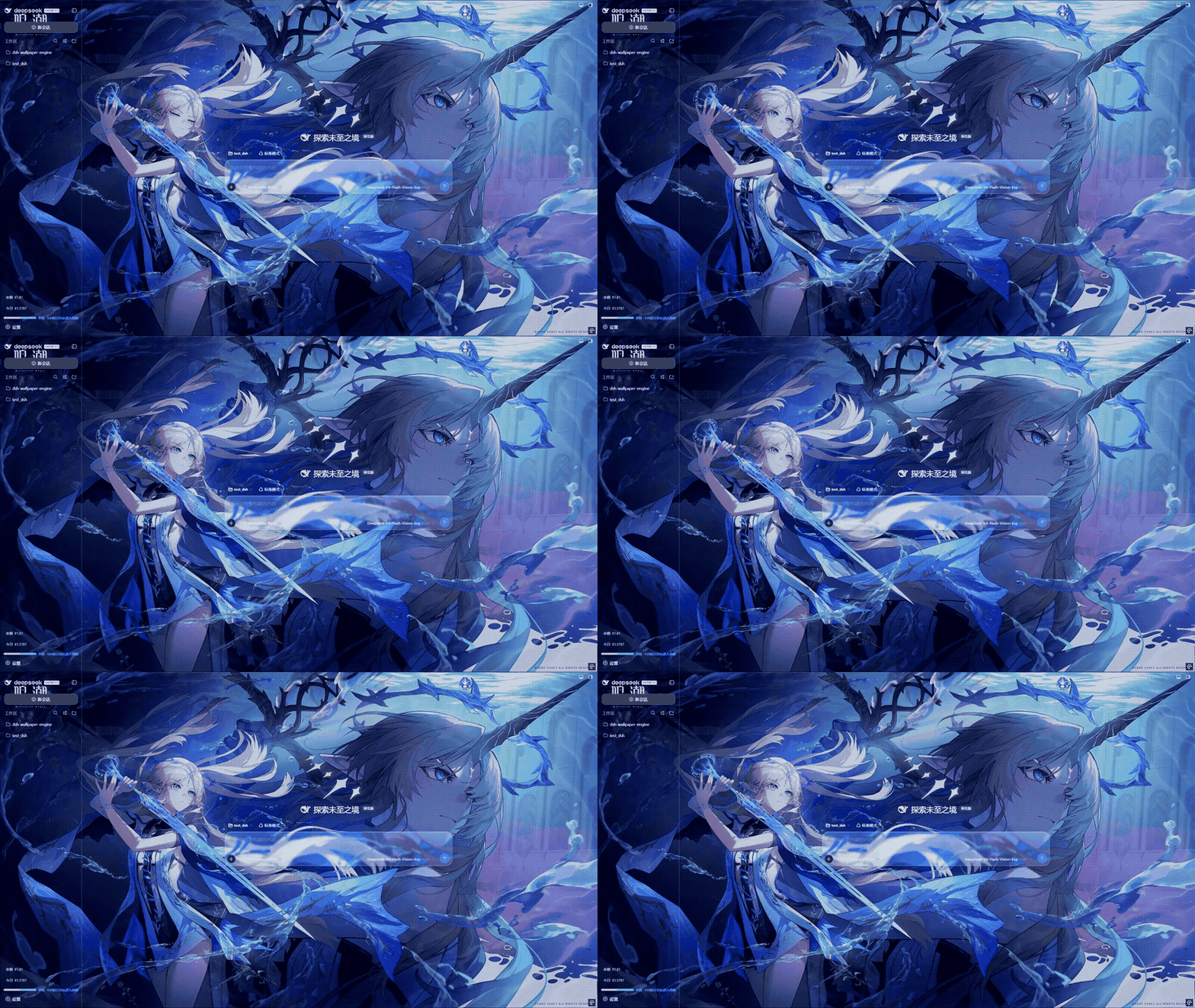
壁纸 + 磨砂遮罩 + iOS 液态玻璃,渲染在 DSH 界面后方。
⚠️ 更新前置条件:① DSH 内核最新 ② better-sidebar 最新(v0.7.2 起)
两个前置条件都满足之前,请勿更新本插件。 v0.7.2 适配 DeepSeek Harness 0.1.5-rc.1(对应 DSH Desktop ≥ 2.0.7),并要求 dsh-better-sidebar ≥ 0.19.0(0.19 起右侧栏接入 DSH 0.1.5 的官方原生侧栏;仍停留在 0.1.2-rc.1 旧内核的用户请保持 better-sidebar 0.18.x,不要混搭)。正确的更新顺序:
- 先把 DeepSeek Harness / DSH Desktop 更新到最新版:DSH Desktop 在「顶部导航栏 → 版本信息」检查更新,或到 GitHub Releases 下载对应平台安装包;
- 再把 dsh-better-sidebar 更新到 0.19.0+:
dsh plugin --profile web add dsh-better-sidebar@latest; - 最后更新本插件:
dsh plugin --profile web add dsh-plugin-wallpaper-engine(或插件市场里点更新)。
💡 同时建议把其它 DSH 插件也一并更新:旧版插件在 harness 0.1.5 下可能直接加载失败(实测旧版 dsh-better-sidebar 在 0.1.5 下会因 API 变更异常)。
顺序反了时,把内核与 better-sidebar 各自更新到匹配版本即可恢复;无需回滚本插件。插件更新后会在界面里弹一次提示(每个新版本仅出现一次),漏看也没关系。
🐛 v0.7.2 修复「右侧栏完全透明」并把玻璃扩展到官方原生右侧栏:harness 0.1.5 的官方原生右侧栏面板直接绘制
--dsw-alias-bg-base——这正是本插件为露出壁纸设成透明的 token,且官方面板没有自己的毛玻璃,导致升级 better-sidebar 0.19 后右侧栏整体透明。v0.7.2 起官方原生右侧栏纳入「侧栏液态玻璃」适配:同一组侧栏模糊 / 透明度 / 玻璃颜色滑杆生效,总开关关闭时回退主题面板色(不再透明)。
✅ v0.7.1 已在 DSH Desktop v2.0.5(harness 0.1.2-rc.1)上完成实测:壁纸宿主路由(inventory / media / scene-frame)、设置一级分区、选择器弹窗、视频与场景壁纸播放、拉绳抽屉、液态玻璃在「兼容模式」与「增强模式」下均正常。本插件依赖的 slots / webserver / 主题变量等 API 在 0.1.2-rc.1 → 0.1.5-rc.1 之间经实测同样稳定。
🐛 v0.7.1 修复 rc.1 的「色板 / 黑胶唱片变圆角矩形」(#74):rc.1 主题层新增
corner-shape.css,给所有元素统一加了corner-shape: superellipse(1.5)(方圆形角),任何border-radius:50%的正圆都被渲染成圆角矩形。插件现已对自身绘制的全部正圆 / 胶囊控件(色板、黑胶唱片、滑杆圆点、开关滑块、字体 chip 等)显式重置corner-shape: round,在旧版 harness 上该声明会被自动忽略、无副作用。
支持哪些壁纸类型?
Wallpaper Engine 的壁纸分四种类型:
| 类型 | 由谁渲染 | 能否搬到 DSH |
|---|---|---|
| Scene(场景) | Wallpaper Engine 自带的 3D 引擎 | ✅ 完整场景帧 — 纯 JS 场景渲染器(对象树/纹理/粒子/shader 效果),见下文 |
Scene 壁纸的 3D 场景由本插件内置的纯 JS 场景渲染器(lib/scene-renderer.js,参考 linux-wallpaperengine / repkg 逆向成果)完整重放:解析 scene.pkg 的对象树,渲染全部 image 层(含 waterwaves/waterripple/shake 等 shader 效果的 CPU 实现)、puppet 骨骼网格(绑定姿态)、以及粒子系统(发射器/初始化器/运算符/精灵绘制)。选择器里场景卡片带有「静态帧」徽标,可与动态壁纸区分。
展现效果:渲染器输出 3840×2160 完整场景帧(背景+水+后发+人物+伞+粒子),对摄影、插画、动画截图类场景壁纸效果接近原版;渲染失败(纯 shader 生成类/特殊纹理格式)时自动回退旧的主纹理提取,再失败回退工坊预览图(
preview.jpg),属预期行为,不视为缺陷。
场景渲染:怎么工作的
- 对象树:解析
scene.pkg(PKGV 容器 + LZ4 条目链)或松散scene.json目录,按 dependencies/parent 拓扑排序全部对象(image / particle / text / sound)。 - image 层:加载材质主纹理(RGBA8888 / DXT1/3/5 等),按 scene 坐标定位(origin/scale/angle 父链累积),应用 alpha/brightness。
- puppet 网格:MDL(MDLV)网格 + 绑定姿态光栅化(软件光栅 + 双线性 UV 采样 + 透明合成),人物/后发等骨骼模型正确显示。
- shader 效果链:waterwaves(含 DUALWAVES 双波乘积)/ waterripple / shake 按 shader 精确数学在 CPU 实现;mask 纹理支持。
- 粒子系统:boxrandom/sphererandom 发射器、color/size/alpha/lifetime/velocity/rotation 等初始化器、movement/alphafade/sizechange/turbulence/oscillate* 等运算符、sprite 精灵绘制。
- 缓存:渲染结果按
<版本>_<路径>_<mtime>缓存到~/.dsh-wallpaper-engine/cache/frames/(可用DSH_WE_CACHE_DIR覆盖),工坊更新后自动失效重建;首次渲染约 3-4 秒,之后秒级命中。
工作原理
- Host 端(
lib/index.js):一个 Cordis 插件,负责- 通过读取 Steam 的
libraryfolders.vdf定位 Wallpaper Engine 安装位置(所以 Steam 装在非默认盘也能用); - 从
projects/defaultprojects、projects/myprojects以及steamapps/workshop/content/431960/*枚举壁纸; - 在 DSH webserver 上注册同源 HTTP 路由,让浏览器端直接获取数据和流式加载媒体:
GET /wallpaper-engine/inventory→ 壁纸 JSON 列表GET /wallpaper-engine/media/<token>→ 视频 / HTML(支持 Range)GET /wallpaper-engine/preview/<token>→ 预览图GET /wallpaper-engine/video-preview/<token>→ 自上传 MP4 的按需抽帧缩略图(ffmpeg,磁盘缓存)GET /wallpaper-engine/scene-frame/<token>→ 场景壁纸完整场景帧(纯 JS 渲染器输出 3840×2160,失败回退主纹理提取,PNG 磁盘缓存)POST /wallpaper-engine/upload→ 上传自定义壁纸(JPG / PNG / MP4,原始字节流)POST /wallpaper-engine/remove→ 移除已上传的壁纸POST /wallpaper-engine/upload-dir→ 更改上传目录(持久化到~/.dsh-wallpaper-engine/config.json,自动迁移已有文件)GET /wallpaper-engine/settings→ 读取插件设置(v0.4.0)PUT /wallpaper-engine/settings→ 保存插件设置(v0.4.0,写入~/.dsh-wallpaper-engine/config.json)GET /wallpaper-engine/media-info/<token>→ 媒体元数据(分辨率 / 编码 / 帧率 / 时长,moov 探测)GET /wallpaper-engine/transcoded/<token>?fps=N→ 抽帧转码流(ffmpeg 一次性重编码,磁盘缓存)GET /wallpaper-engine/transcode-progress/<token>?fps=N→ 下载 / 转码进度(进度条轮询)
- 通过读取 Steam 的
- Client 端(
lib/client.js):一个浏览器模块,拉取壁纸列表,把选中壁纸渲染到应用三列后方的固定图层,并在「设置」里注册一个一级设置页「Wallpaper Engine」(含液态玻璃卡片、选择弹窗、隐藏/恢复、倍速/翻转、配色/透明度与自定义壁纸管理)。 - 自定义壁纸存储:上传的文件写入插件管理的本地目录(默认
~/.dsh-wallpaper-engine/uploads,可在设置里改到任意盘符),经同一套/media、/preview路由服务(视频缩略图另走/video-preview)——与 WE 媒体走完全相同的管道,天然跨重启持久、无浏览器配额限制。
设置持久化(v0.4.0)
你的全部设置(已选壁纸、配色、透明度、布局、轮播、隐藏、倍速/翻转等)从 v0.4.0 起保存在宿主端文件里,不再依赖浏览器 localStorage。
- 存在哪里:
~/.dsh-wallpaper-engine/config.json(与「上传目录」的配置是同一个文件)。具体位置:- Windows:
C:\Users\<你的用户名>\.dsh-wallpaper-engine\config.json - WSL / Linux / macOS:
~/.dsh-wallpaper-engine/config.json
- Windows:
- 为什么改:此前设置存在浏览器 localStorage,而 localStorage 按「地址 + 端口」隔离——DSH Desktop 每次启动用随机端口,等于每次进入一个全新的存储空间,配置全部恢复默认(Web 端固定端口则无此问题)。改存宿主端文件后与端口无关。
- 带来的好处:重启 / 换端口 / 清浏览器数据 / 换浏览器 / 无痕模式都不再丢失配置。
- 旧数据迁移:老版本存在 localStorage 里的配置会在首次启动时自动迁移到该文件,无需任何手动操作。
- 需要知道的行为变化:同一台电脑上,多个浏览器(如 Chrome 和 Edge)或手机等设备访问同一个 dsh 时,共享同一份配置(此前各存各的);如果你回滚到旧版本,它仍会读取 localStorage 里的缓存副本,配置不会丢。
- 配置文件的读写:每次修改设置会自动写入(200ms 防抖合并);文件损坏时插件回退默认值且不会覆盖你的文件。
安装
普通用户(安装已发布版本,推荐)
如果你只是想用这个插件,直接装 npm 上已发布的包即可:
dsh plugin --profile web add dsh-plugin-wallpaper-engine
装完重启 dsh web,打开 设置 → Wallpaper Engine 就能用。
macOS 用户:macOS 没有 Wallpaper Engine 客户端,本插件的 macOS 版(WaifuX + 散装媒体支持)由社区维护者 Jerry 维护,发布为独立 npm 包:
dsh plugin --profile web add dsh-plugin-wallpaper-engine-mac
开发者(运行你本地的一份代码)
大多数读者可以跳过本节。 只有当你打算自己改这个插件的代码时才需要。下面的步骤假定你已了解命令行、以及「仓库 / repository」是什么(一份用 Git 做版本管理的代码文件夹)。
第 1 步:取得源码(checkout)
这里 checkout 的意思很简单:就是「把源代码下载/复制一份到你电脑的某个文件夹里」。通常在这个 GitHub 页面点 Code → Download ZIP 下载并解压,或用 Git 克隆:
git clone https://github.com/elysia395/dsh-wallpaper-engine.git完成后你会得到一个包含
package.json、lib/、src/、cordis.patch.yml的文件夹。下文把这个文件夹称作插件文件夹。
第 2 步:用文件夹路径安装(link:)
这里的
link:表示:告诉dsh(它会把命令转发给 pnpm)去连接你本地那个插件文件夹,而不是从网上下载一个包。好处是:你改完代码并重新构建后,改动能直接生效,不用反复重装。
把下面命令里的 <插件文件夹绝对路径> 替换成你插件文件夹的完整路径(就是你在资源管理器/文件管理器里打开那个文件夹时,地址栏显示的那串路径):
dsh plugin --profile web add link:<插件文件夹绝对路径>
具体示例——假设你的插件文件夹路径像 D:\dev\dsh-wallpaper-engine 这样:
dsh plugin --profile web add link:D:\dev\dsh-wallpaper-engine
如果你已经用命令行 cd 到了插件文件夹的上一级,也可以用相对路径:
dsh plugin --profile web add link:./dsh-wallpaper-engine
该填哪个确切的路径? 必须是包含
package.json的那个文件夹——不是package.json文件本身的路径,也不是它里面任何单个文件的路径。它就是你在资源管理器地址栏里打开那个文件夹时显示的那串路径。
为什么推荐
link:而不用file:?link:是和你的源码文件夹建立实时连接,改完src/client.js并npm run build后直接生效,无需重装;file:则是打包成一份静态快照,每次改动都要重新 add。首次安装两者都可以。
然后重启 dsh web。host 端会成为 bundle 层,client 端会自动加载(dsh.client.immediately: true)。
如果 Steam 装在非标准位置,host 会通过 libraryfolders.vdf 自动探测,无需额外配置。
安装失败排查
dsh plugin --profile web add ... 会把命令转发给 pnpm。如果你遇到下面的错误:
[ERR_PNPM_UNEXPECTED_VIRTUAL_STORE] Unexpected virtual store location
dsh: pnpm failed in profile directory C:\Users\xxx\.dsh-desktop\profiles\web
这不是插件本身的问题(换任何一个插件安装都会失败),而是该 profile 目录的 pnpm 依赖状态失效了:pnpm 在 node_modules\.modules.yaml 里记录了安装时的虚拟存储位置(绝对路径),一旦 profile 目录被移动 / 复制 / 备份恢复过,或 pnpm 版本 / virtual-store-dir 配置发生变化,记录值与当前路径不一致,pnpm 就会拒绝继续安装任何插件。
修复(Windows PowerShell):
# 1) 先退出 DSH 桌面端
# 2) 删除该 profile 的依赖目录(只删 node_modules 即可,配置/已装插件名不会丢)
Remove-Item "$env:USERPROFILE\.dsh-desktop\profiles\web\node_modules" -Recurse -Force
# 3) 重新安装本插件
dsh plugin --profile web add dsh-plugin-wallpaper-engine
只删除
node_modules\.modules.yaml一个文件也能修复(pnpm 会自动重建并继续),删除整个node_modules更彻底。如果.dsh-desktop被 OneDrive / 云同步 / 迁移工具动过,建议把它加入同步排除,避免复发。
如果遇到下面的错误:
[ERR_PNPM_GIT_DEP_PREPARE_NOT_ALLOWED] ... The git-hosted package "dsh-plugin-wallpaper-engine@0.6.8"
needs to execute build scripts but is not in the "allowBuilds" allowlist.
说明你用了 github: 形式的安装命令(例如 dsh plugin --profile web add github:elysia395/dsh-wallpaper-engine)。pnpm 11 出于供应链安全,默认拒绝从 git 安装的包执行构建脚本,而本插件的 git checkout 需要 prepare 脚本构建 client,因此 github: 直装必然失败。请改用 npm 包名安装(npm 发布包已预构建,无需安装时编译):
dsh plugin --profile web add dsh-plugin-wallpaper-engine
如果你的插件中心(dsh-plugin-hub)生成的是
github:命令,请把它升级到 v1.4.1+——新版会自动反查 npm 包名并切到 npm 通道。
使用
- 打开
dsh web,进入 DSH 界面。 - 打开 设置,左侧导航里找到 Wallpaper Engine(一级设置页,侧边栏独立入口)。
- 点击 选择壁纸 打开选择弹窗,在缩略图网格里点选一张 Video/Web 壁纸(或上传的图片/视频),它会出现在界面后方;点遮罩、按 ESC 或点「关闭」收起弹窗。Scene/Application 无法内嵌网页,不显示在网格中。
- 用 暂停/播放 暂停视频壁纸,用 关闭 清除壁纸。
选择会保存在浏览器的
localStorage(键dsh-wallpaper-engine:selection)中。
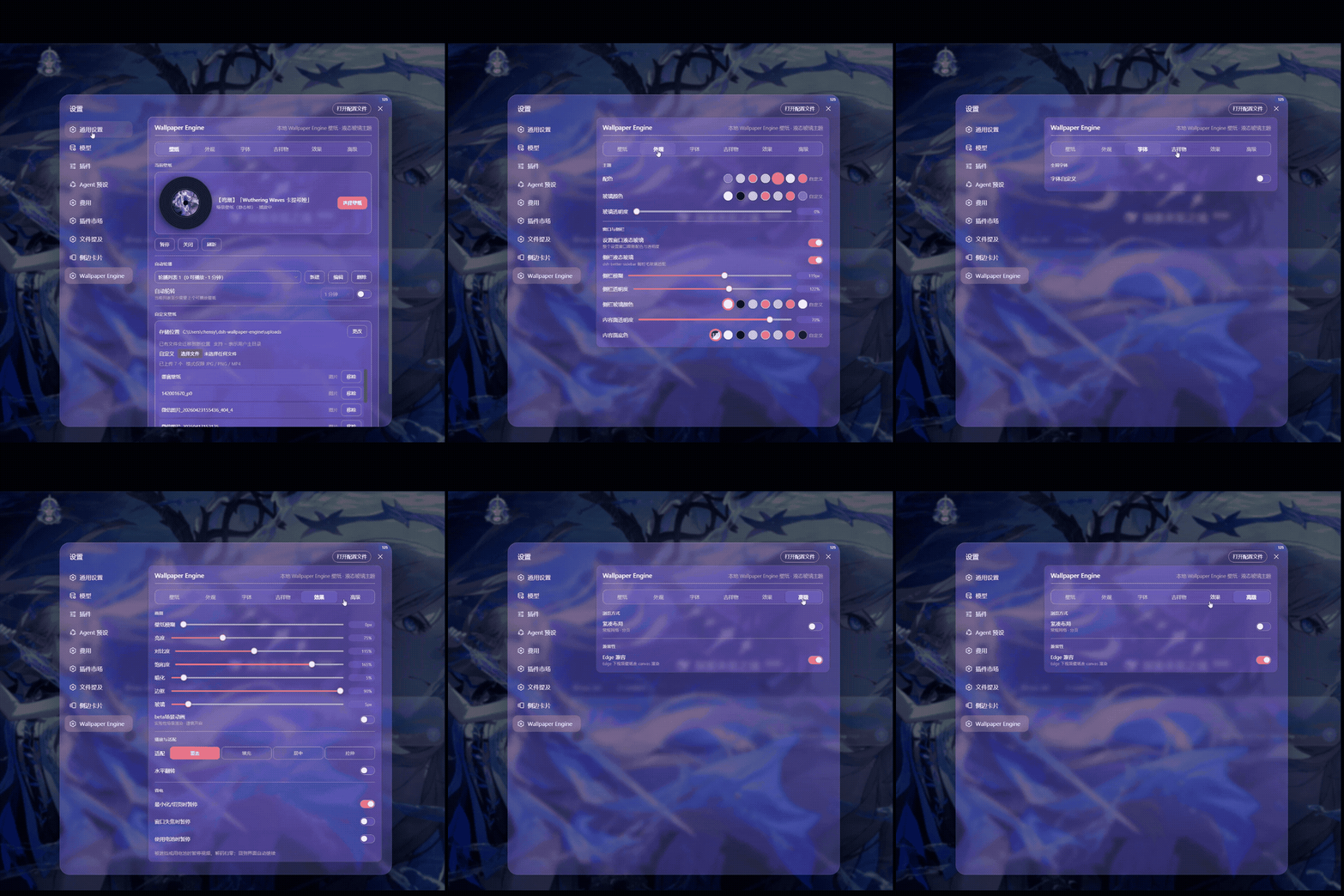
设置界面:液态玻璃卡片、六页签分区(壁纸 / 外观 / 字体 / 吉祥物 / 效果 / 高级)。
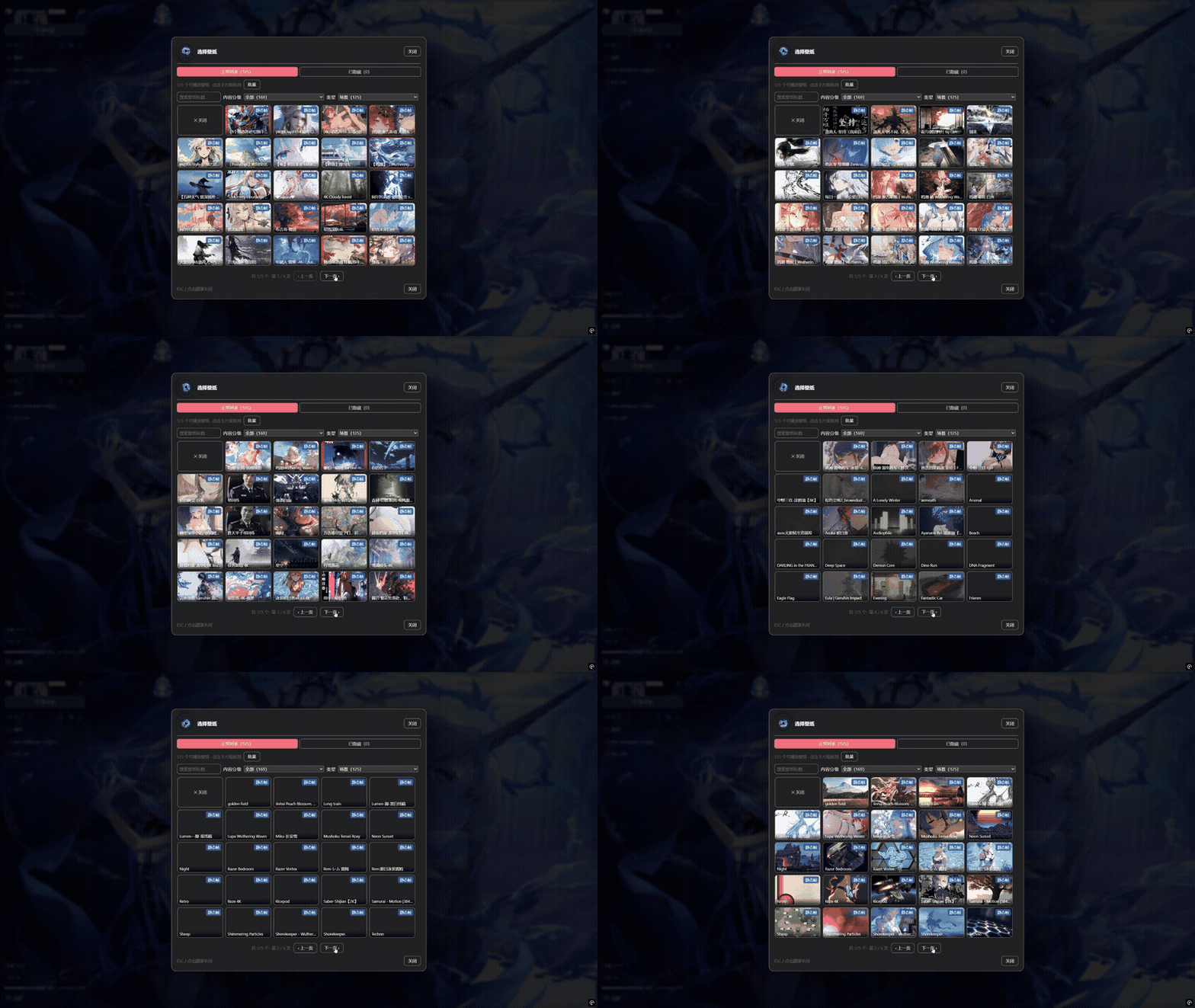
选择弹窗:浏览全部壁纸缩略图,支持批量隐藏与已隐藏恢复。
六大调节页签
设置页与吉祥物抽屉共用同一套顶部分类页签——所有调节项按用途归入六个域,每页只保留 3–8 个相关控件,不再是一列三十项的长滚动:
| 页签 | 收录内容 |
|---|---|
| 壁纸(默认) | 当前壁纸卡片(黑胶 + 选择壁纸 + 暂停/关闭/刷新)、自动轮播、自定义壁纸 |
| 外观 | 配色、玻璃颜色、玻璃透明度、设置窗口液态玻璃、侧栏玻璃与内容面 |
| 字体 | 字体自定义开关与颜色 / 字重 / 字体族、输入光标颜色 |
| 吉祥物 | 显示开关、形态卡片(立绘即实时预览)、大小滑条 |
| 效果 | 壁纸模糊 / 亮度 / 对比度 / 饱和度 / 壁纸透明度 / 暗化 / 边框 / 玻璃、倍速、帧率上限、适配、水平翻转、遮挡暂停(未启用壁纸时显示引导空态) |
| 高级 | 紧凑布局、Edge 兼容 |
页签指示胶囊随选中项平滑滑动;设置页与壁纸仓库抽屉的页签各自独立记忆(存在浏览器 localStorage,不进配置文件)。长说明一律收进控件悬停提示(tooltip),行内只保留一句话简述。
隐藏与恢复(软删除)
每张壁纸卡片右上角有「隐藏」按钮——只是从列表移除,不删除任何源文件。需要时在弹窗的「已隐藏」标签里单张恢复或全部恢复;弹窗工具栏的「批量」进入多选模式,可一次隐藏多张。隐藏状态保存在浏览器 localStorage,刷新 / 重启不丢;隐藏当前正在播放的壁纸不会打断播放,自动轮转也会跳过被隐藏的壁纸。
内容分级与类型过滤
选择壁纸弹窗的网格上方有两个下拉框,复刻 Wallpaper Engine 自己的分类方式:
- 内容分级 —— 读取每张壁纸的
contentrating字段(WE 壁纸读project.json,自上传内容读uploads/.meta.json,即 WE workshop 的 G / PG13 / R 三档标签):全部 / Everyone(G,默认) / PG13(家长指导级) / Mature(R) / 未分级(没有该字段的壁纸,通常是本地项目)。自上传内容未标注分级时按 Everyone 处理(#84:否则默认过滤会把用户自己的文件全部藏起来,网格里看不到、也无法被选中)。 - 类型 —— 按可内嵌类型筛选:全部 / 视频 / 网页 / 图片(自上传)。
每个选项都带当前可播放壁纸数量;被过滤的壁纸会从网格、轮播编辑器和轮播候选中整体剔除,也不会被自动选中或轮换。选择保存在浏览器 localStorage;默认 Everyone 对应 WE 保守的首启立场。
说明:分级读取自壁纸文件里的
contentrating字段,与 WE 客户端界面显示的分级一致,但不会跟随 WE 客户端里成人内容开关的状态(插件直接扫描磁盘,不读 WE 的配置)。
卡片样式与黑胶唱片
- 紧凑布局:「高级」页签里有一个滑动开关。开启后为 CD 架效果 —— 卡片像 CD 盒一样纵向层叠(下排上沿盖住上排下沿、左右不遮挡),鼠标悬停放大置顶;网格更紧凑(每行约 7 个)且一页到底不翻页。关闭则为常规网格(固定高度防重叠 + 分页,默认)。选择保存在浏览器
localStorage。 - 黑胶唱片:选择壁纸界面旁边有一个旋转的黑胶唱片,把当前选中壁纸的封面当作唱片标签展示 —— 播放时旋转、暂停即停(系统开启「减少动态效果」时停用动画)。弹窗头部也保留小号黑胶。该效果在经典与新版两种卡片样式下都显示。
视频倍速与水平翻转
选中视频壁纸后,「效果」页签出现 倍速 档位(0.5x / 0.75x / 1x / 1.25x / 1.5x / 2x)——基于浏览器原生 playbackRate,即时生效、不重载不黑屏(壁纸视频本就静音,无需担心音画同步)。水平翻转 开关对视频、网页与上传的图片/视频都生效,镜像通过 CSS scaleX(-1) 完成,零主线程开销。
遮挡暂停(省电三档)
类似 Wallpaper Engine 的「被遮挡时暂停」——桌面端大部分时间 GPU≈0 的主因。浏览器无法直接探测"被窗口遮挡",插件用三个最接近的信号(「效果」页签开关,即时生效、持久保存):
| 开关 | 默认 | 行为 |
|---|---|---|
| 最小化/切页时暂停 | 开 | 页面隐藏(窗口最小化 / 切走标签页)时暂停视频,解码引擎直接归零——浏览器对后台页的节流并不保证停解码,显式 pause 才彻底 |
| 窗口失焦时暂停 | 关 | 切到其它应用(壁纸很可能被遮挡)时暂停 |
| 使用电池时暂停 | 关 | navigator.getBattery 判定在电池供电时暂停(不支持的浏览器自动无操作) |
恢复可见 / 聚焦 / 接通电源后自动继续(除非用户手动暂停过)。仅对视频壁纸生效——网页(iframe)壁纸无法从外部暂停,仅随页面隐藏被浏览器节流。
解码帧率上限(抽帧转码)
高帧率源(如 4K120 H.264)的硬解是 GPU 占用大头(4060 实测 1.0x 可达 60% Video Decode 占用)。「壁纸效果」区的 帧率上限(无限制 / 60 / 48 / 30 / 24 fps)通过宿主端一次性抽帧重编码解决:ffmpeg 把源视频转为上限帧率(时间线保持 1.0x 正常速度,与倍速完全解耦),输出 4K 保留 + AV1(NVDEC 上 AV1 解码吞吐约为 H.264 的两倍)并缓存到 ~/.dsh-wallpaper-engine/cache/transcodes/。
- 播放时先播原片、转好自动切换;设置页显示实时进度条(下载 ffmpeg % → 转码 % 含预计剩余秒数 → 收尾 → 自动切换),首次约几十秒(含可能的 ffmpeg 下载),之后同壁纸秒开
- 源帧率 ≤ 上限自动跳过;转码失败自动回退原片,不影响任何现有功能
- 实测 4K120 → 24fps AV1 后 GPU 占用从 ~60% 降至 ~15%
- 转码按 路径+mtime+上限帧率 缓存,轮转里每张壁纸只付一次成本
ffmpeg 供给(三档,按顺序自动探测):
| 档位 | 说明 |
|---|---|
| 显式指定 | 环境变量 DSH_WE_FFMPEG 指向任意 ffmpeg 可执行文件;或把 ffmpeg 放进插件目录的 ffmpeg/(如 ./ffmpeg/ffmpeg.exe),两者优先 |
| 自动下载 | 无本地 ffmpeg 时,首次使用自动从双源竞速下载对应平台单文件(Windows x64 / Linux x64·arm64 / macOS x64·arm64 等,资产表已验证):npmmirror(国内快)与 GitHub release(海外快)并发下载、先完成者胜,流式落盘 + 魔数/体积校验 + 每源 5 分钟超时,缓存到 ~/.dsh-wallpaper-engine/ffmpeg/ 后复用。可用 DSH_WE_FFMPEG_URL 环境变量替换下载源(自建镜像 / 代理加速) |
| 系统 PATH | 以上都没有时使用系统 ffmpeg;仍不可用则该壁纸静默保持原片 |
转码使用 NVENC(
av1_nvenc,自动回退h264_nvenc),要求 NVIDIA 显卡与驱动;无 NVIDIA 时功能自动关闭(或回退 H.264 纯软件编码,速度较慢)。本机无 ffmpeg 或转码失败时功能自动关闭,无副作用。
自定义壁纸
在「自定义壁纸」区可以上传本地图片(JPG / PNG)或视频(MP4)作为壁纸:
- 存储位置:上传文件默认保存在
~/.dsh-wallpaper-engine/uploads(用户主目录,通常是 C 盘)。点「更改」可把存储位置改到任意盘符(绝对路径,支持~),已有文件会自动迁移过去,选择会持久化、重启不丢——不想让壁纸数据占 C 盘的用户建议改到其他盘。 - 格式限制:仅 JPG / PNG / MP4;浏览器与宿主端双重校验,格式不符会给出明确提示。
- 视频缩略图:上传的 MP4 在壁纸选择器里按需用 ffmpeg 抽一帧作为缩略图(跳过开头 1 秒,避免黑场),缓存到
~/.dsh-wallpaper-engine/cache/video-previews/;ffmpeg 不可用时回退「无预览」占位,不影响播放。 - 适配模式:覆盖 / 填充 / 居中 / 拉伸 四种画面适配(仅对自定义壁纸生效,WE 壁纸保持原设计构图)。
- 管理:已上传列表可单独移除(二次确认后删除本地文件);上传的壁纸同样支持隐藏 / 恢复、倍速与翻转。
- 重复去重:重复上传同一文件会自动识别(按内容校验),直接选择已有的那张,不会在仓库里堆积副本。
自动轮转(轮播列表)
轮转基于自定义轮播列表(「壁纸」页签的自动轮播分组)。用 新建 可以创建任意多个列表,从库存里勾选 Video/Web 壁纸加入每个列表,并为每个列表单独设置切换间隔(1、5、10、30、60 或 120 分钟)和播放顺序(顺序/随机),勾选 自动轮转 后只在该列表内循环。列表保存在浏览器 localStorage,完全在客户端维护——轮转不再依赖 Wallpaper Engine 自己的 config.json 播放列表路径。
每个列表至少需要 2 个可播放壁纸;手动切换壁纸会重新计算下一次轮转时间;不同列表可以有不同的间隔(比如一个每 5 分钟、一个每 30 分钟)。首次使用时,插件会自动把第一个可播放的 WE 播放列表导入成一个轮播列表,开箱即用;编辑列表时也可以用 从 WE 播放列表导入 把其它播放列表导入当前编辑的列表。Scene 和 Application 壁纸不能嵌入网页,会自动从轮转候选和选择器中剔除。
液态玻璃外观(整个设置窗口 + 配色 + 透明度)
「外观」页签控制整个 DSH 原生设置窗口的观感(参照 dsh-web-ui-all 皮肤中心的设计):
| 控件 | 作用 | 范围 | 默认 |
|---|---|---|---|
| 设置窗口液态玻璃 | 总开关:把设置窗口整体(对话框 + 左导航 + 全部原生分区)换成液态玻璃 | 开 / 关 | 开 |
| 配色 | 主题色:窗口内的按钮、开关、链接、导航选中、滑块与玻璃高光统一跟随 | 6 预设 + 自定义取色 | #4f8cff 经典蓝 |
| 玻璃颜色 | 设置窗口玻璃的底色色调:玻璃本身的颜色(不只是透明度) | 6 预设 + 自定义取色 | 浅色白 / 深色深夜蓝 |
| 玻璃透明度 | 玻璃面板(设置窗口、输入栏、气泡、侧边栏)的透明度 | 0–60 % | 12 % |
开启「设置窗口液态玻璃」后,General、模型、插件等所有原生分区和左侧导航都会变成同一套液态玻璃 + 配色(通过覆盖设置对话框作用域内的 shell token 实现,不侵入其他界面)。设置窗口的玻璃模糊与对话栏使用同一套调节参数:「玻璃」滑动条(0–60 px)同时控制设置窗口与输入栏/气泡的模糊半径,饱和度/亮度/对比度配方完全一致;玻璃颜色决定玻璃底色本身的色调(默认浅色白/深色深夜蓝,选定后两种主题统一使用该色),玻璃透明度决定浓淡,越高越"透"(壁纸颜色更清晰地透过面板),越低越接近实色。不支持
backdrop-filter的浏览器自动回退到高不透明实色,保证文字可读。所有控件即时生效并保存在浏览器localStorage,刷新不丢。
吉祥物(聊天顶部拉绳)
「吉祥物」页签控制聊天的拉绳吉祥物(一条可拖拽的拉绳,沿顶部吸附,向下拉即拉出壁纸仓库抽屉)。形态以卡片呈现——卡片直接渲染当前形态的立绘并按「吉祥物大小」实时缩放,选形态与看大小在同一处完成:
| 控件 | 作用 | 范围 | 默认 |
|---|---|---|---|
| 显示吉祥物 | 是否显示拉绳吉祥物与其壁纸仓库抽屉 | 开 / 关 | 开 |
| 吉祥物形态 | 切换吉祥物立绘:默认小女仆(近方形 chibi)或鲸御姐(竖版 2:3 全身体) | 小女仆 / 鲸御姐 | 小女仆 |
| 吉祥物大小 | 缩放吉祥物(拉绳盒尺寸随比例变化,拖拽 / 吸附几何自动适配) | 0.5×–2.5× | 1× |
两幅立绘在打包时都已内联为 base64(透明背景),单文件客户端资源依然自包含。大小只改变拉绳自身的盒尺寸,不影响下方的壁纸仓库抽屉。设置即时生效并保存在宿主端配置文件里。
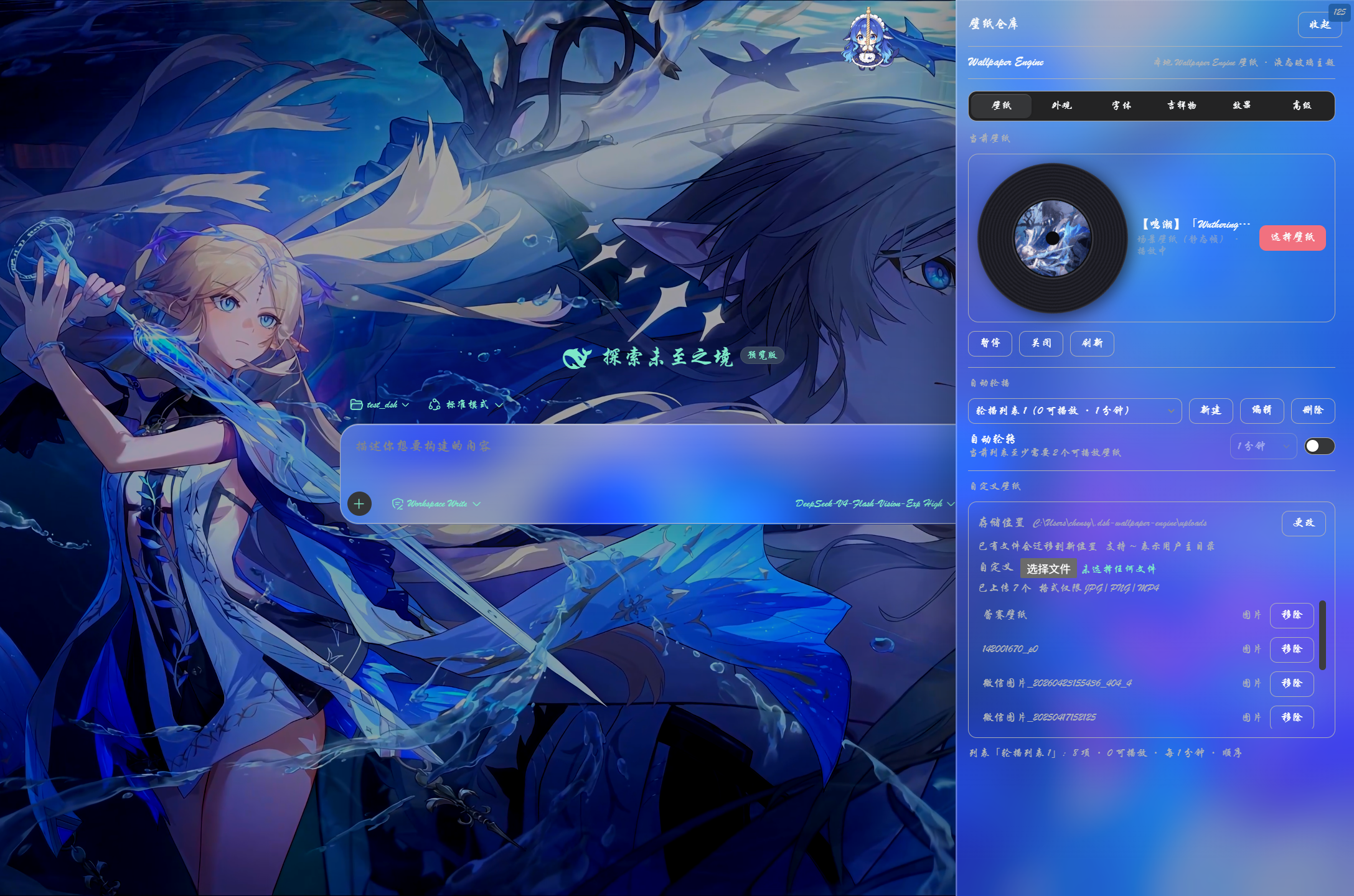
点击顶部拉绳吉祥物即可拉出「壁纸仓库」抽屉:六页签快捷调节,当前壁纸黑胶、轮播与自定义壁纸管理随手可及。
字体自定义
「字体」页签提供独立的字体自定义分区。总开关默认关闭——此时整个界面维持 dsh 原生字体外观,不注入任何样式;开启后才应用下方三项,各项改动即时生效并持久保存(调节面板自身的标签文字始终保持主题墨色、不跟随「字体颜色」染色,保证可读性):
| 控件 | 作用 | 范围 / 选项 | 默认 |
|---|---|---|---|
| 字体自定义 | 总开关:关闭 = 完全恢复 dsh 原生字体(一键还原) | 开 / 关 | 关 |
| 字体颜色 | 全局文本染色 | 自定义取色 | #000000 |
| 字重 | 全局字体粗细 | 100–900(步进 50) | 400 |
| 字体 | 字体族切换 | 默认 · 雅黑 · 楷体 · 宋体 · 黑体 · 行楷 · 等宽 | 默认 |
每个字体选项按钮都以它自己的字体渲染(所见即所得);行楷使用华文行楷
STXingkai(未安装时自动回退楷体,macOS 走 Xingkai SC)。报错 / 危险 / 警告语义元素强制保留系统红字,不会被全局染色盖住。
输入光标颜色
输入框的光标颜色由 dsh 主题决定,壁纸透过液态玻璃输入框直接衬在光标后面——两者颜色相近时光标就「隐形」了(#83)。「字体」页签的 输入光标 分区给光标一个独立的颜色项:
| 选项 | 作用 |
|---|---|
| 自动 | 不注入任何样式,跟随 dsh 原生光标表现(默认) |
| 6 种预设色 | 白 / 黑 / 经典蓝 / 冰青 / 玫瑰粉 / 珊瑚红——黑白两色在深浅壁纸上对比最强 |
| 自定义取色 | 任意颜色 |
选定后经 caret-color 作用于所有文本输入位(输入框、文本域、可编辑区域),即时生效、持久保存;与 字体自定义 开关互不依赖——只想让光标可见时,不必打开全局字体染色。
八个滑动条
「效果」页签(壁纸激活后)提供八个滑动条,微调壁纸与界面的融合效果:
| 滑动条 | 作用 | 范围 | 默认 |
|---|---|---|---|
| 壁纸模糊 | 模糊壁纸本身 | 0–60 px | 0 |
| 亮度 | 壁纸画面亮度(媒体滤镜) | 40–160 % | 100 % |
| 对比度 | 壁纸画面对比度(媒体滤镜) | 40–200 % | 100 % |
| 饱和度 | 壁纸画面饱和度(媒体滤镜) | 0–200 % | 100 % |
| 壁纸透明度 | 壁纸整层的透明度(越大越透):淡出后壁纸融向页面底色,即 IDEA 背景图式的「看得见但不喧宾夺主」。与暗化互补——一个减淡壁纸本身、一个压暗整体画面;想要融底色效果,建议「透明度调高 + 暗化调低」组合使用 | 0–90 % | 0 % |
| 暗化 | 加深壁纸与文字之间的遮罩 | 0–90 % | 25 % |
| 边框 | 提高边框 / 分割线的对比度 | 0–90 % | 35 % |
| 玻璃 | 玻璃面板(输入栏、气泡)的模糊半径 | 0–60 px | 16 |
浅色 / 深色模式的适配提醒 — 每张壁纸的色系和明暗差异很大,没有哪一种模式能适配所有壁纸。请在 DSH 的「浅色 / 深色」主题之间来回切换,找到适合当前壁纸的那一种。如果在偏亮或花纹复杂的壁纸上 文字或分割线看不清,就把 暗化、边框 两个滑动条调高,或用 亮度 压低过亮的壁纸(必要时再稍微加一点 壁纸模糊),直到看着舒服为止;嫌壁纸太抢眼则相反——调高 壁纸透明度 让它退到底色里。八个滑动条都是即时生效的,无需刷新页面。
配置
本插件不会向模型暴露任何工具或提示文本,对 agent 零 token 开销。选择、隐藏、轮播列表等状态都保存在浏览器 localStorage,不写入任何持久化 DSH 设置。唯一的本地落盘数据是自定义壁纸文件(存于你设置的上传目录)与记录该目录位置的 ~/.dsh-wallpaper-engine/config.json(约百字节)。
环境变量:
| 变量 | 作用 |
|---|---|
DSH_WE_FFMPEG |
指定 ffmpeg 可执行文件(解析链最高优先) |
DSH_WE_FFMPEG_URL |
替换自动下载源(自建镜像 / 代理加速) |
DSH_WE_CACHE_DIR |
覆盖缓存根目录(抽帧转码缓存 / 场景静态帧缓存) |
DSH_WE_STEAM_ROOT |
显式指定 Steam 根目录(逗号/分号分隔,Windows 或 /mnt 路径;注册表/自动探测失效时的兜底) |
与 dsh-better-sidebar 的兼容适配
本插件的液态玻璃效果对 dsh-better-sidebar 的侧边栏面板做了专门适配(毛玻璃、高光与层级统一),让侧边栏与对话区共享同一套「壁纸 + 遮罩」背景,三列视觉一致、不再割裂。
「外观」页签还提供一组独立于会话玻璃和当前壁纸的侧栏玻璃细粒度控制:即使没有启用 Wallpaper Engine 壁纸,也可以在普通 DSH 背景或其他背景来源上调整侧栏。它只作用于 dsh-better-sidebar 的侧边栏子树;不支持 backdrop-filter 的浏览器会自动回退到高不透明实色。
| 控件 | 作用 | 范围 | 默认 |
|---|---|---|---|
| 侧栏液态玻璃 | 总开关:把侧边栏面板换成液态毛玻璃 | 开 / 关 | 开 |
| 侧栏模糊 | 侧边栏毛玻璃的模糊半径 | 0–200 px | 16 |
| 侧栏透明度 | 侧边栏玻璃的浓淡(越大越透:0 最实 / 200 最透) | 0–200 % | 120 % |
| 侧栏玻璃颜色 | 侧边栏玻璃的底色色调 | 6 预设 + 自定义取色 | #ffffff 白 |
侧栏玻璃与设置窗口玻璃是两套独立参数:会话玻璃的「玻璃」滑杆只管输入栏/气泡,侧栏玻璃滑杆管侧边栏。关闭「侧栏液态玻璃」会连同编辑器/终端内容面一起恢复原生样式。侧边栏默认较透(与背景观感一致、避免面板发白);编辑器/终端等内容面另有独立的近不透明底色 + 透明度控制,保证窄面板里文字可读。
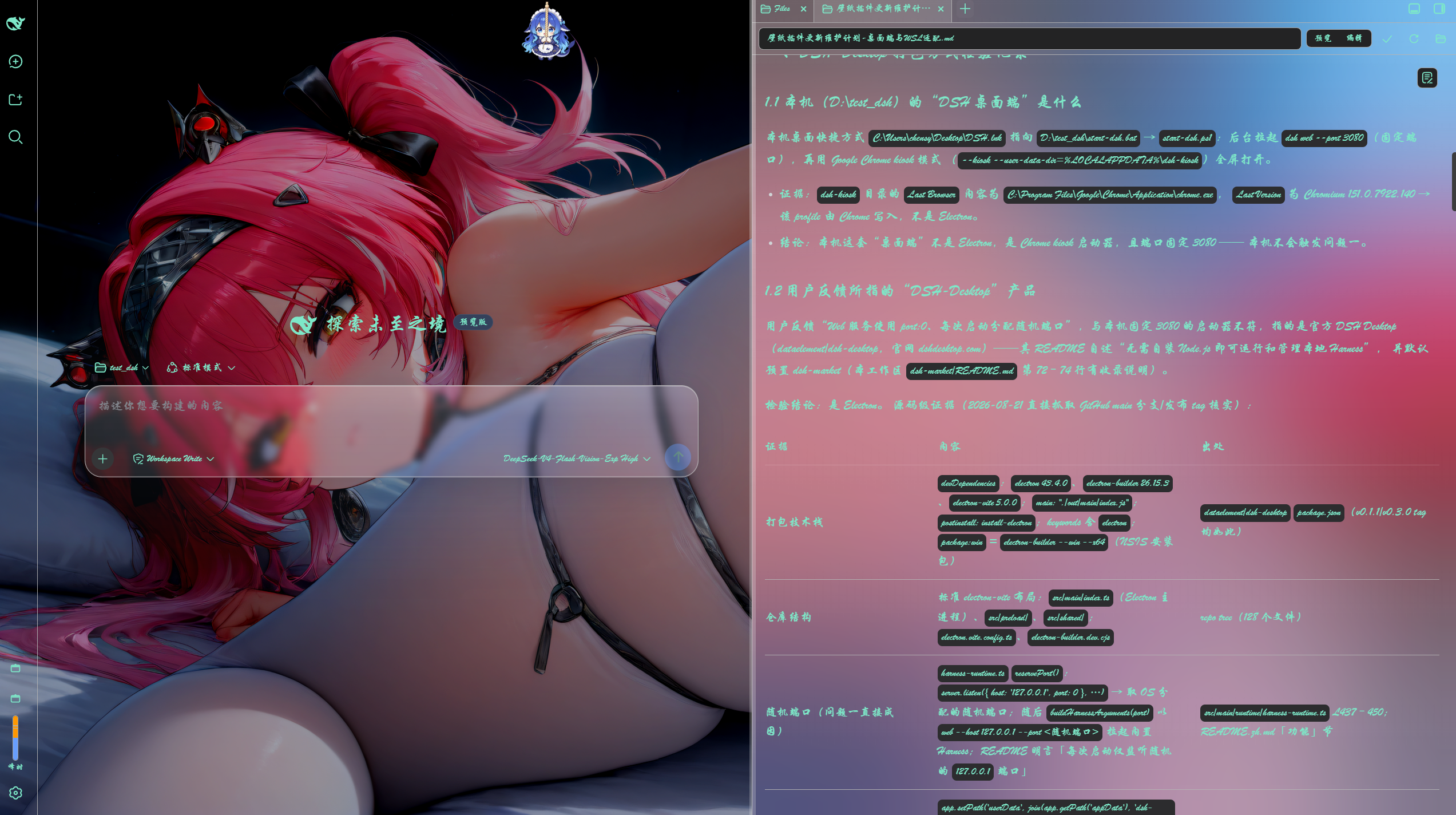
侧边栏液态玻璃适配与「字体」页签自定义(行楷)同时生效的实际观感。
已知限制
- Scene(原生 3D)和 Application 壁纸无法内嵌,不会显示在缩略图选择器和轮播候选中;它们的动态渲染仍是 Wallpaper Engine 在桌面上的工作。
- 浏览器需能自动播放静音
<video>(DSH 跑在 loopback,现代浏览器允许静音自动播放)。 - 媒体从你本机的 Wallpaper Engine 安装路径提供;host 只提供它已枚举过的文件,不会暴露任意文件系统。自定义上传的文件同样只存在于本机,不上传任何服务器。
- 抽帧转码依赖 ffmpeg 与 NVIDIA NVENC(
av1_nvenc→h264_nvenc回退):无 ffmpeg(含自动下载不可用,如 musl/Alpine 等未覆盖平台)或无 NVIDIA 显卡时,帧率上限功能自动关闭,壁纸保持原片播放,不影响其它任何功能。 - 遮挡暂停仅对视频壁纸生效:网页(iframe)壁纸无法从外部暂停,只能随页面隐藏被浏览器节流。
- 选择器文案为中英混合(本 bundle 尚未接入 DSH 的 locale 命名空间)。
开发 / 重建
准备提交代码前,请先阅读 贡献指南。Windows、WSL 与跨平台公共功能提交到 main;macOS、WaifuX 与松散媒体相关改动提交到 dsh-wallpaper-engine-mac,由 Jerry(@ruijiaang-lab)维护。
host 端(lib/index.js)是纯 ESM,无需构建。client 端(lib/client.js)是编译产物,由规范源文件 src/client.js 经 scripts/build-client.mjs 生成,输出 DSH 模块加载器要求的 window.__ModuleLoader__.load({ id, factory }) 外壳(与盒内 client 包 tsdown 产出的形态一致)。
npm run build                  # 从 src/client.js 重新生成 lib/client.js
npm run verify                 # 物化生成的 bundle 并断言其导出
node scripts/verify-scene.mjs  # 场景静态帧提取 / scene-frame 路由自检(含合成 fixture)
编辑 src/client.js 后运行 npm run build,不要手改 lib/client.js。npm install/pnpm install 会自动触发 prepare → build,因此全新 checkout 总是带最新的 lib/client.js。
host↔browser 的契约是同源 HTTP,两端可独立开发:改 host 后重启 dsh web 生效,改 client 则先 npm run build 再重启 dsh web。
No comments yet. Be the first to write one.