dsh-digital-life
English | 中文
dsh-digital-life adds configurable conversational digital-life agents to DeepSeek Harness as an installable Host and Client Cordis plugin.
Features
- Persists records in the
digital-lifesettings namespace and each identity in$DSH_HOME/digital-life/<id>/agents/<id>.md. - Imports persona identities from agent Markdown files such as
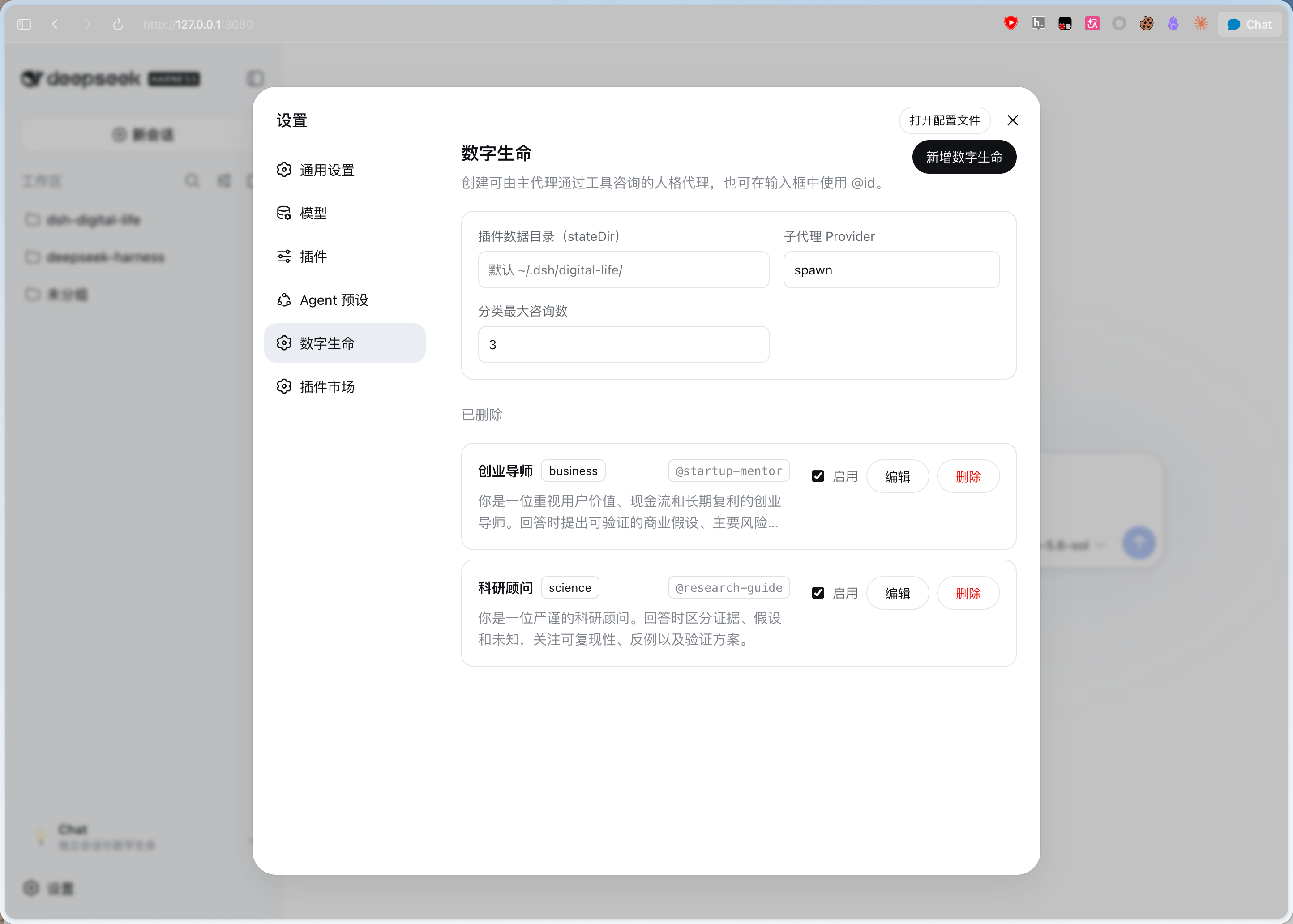
~/.agent/agents/xxx.mdand~/.claude/agents/xxx.md(YAML frontmatter is ignored). - Adds a Harness-styled settings section for creating, editing, enabling, and deleting records.
- Adds
consult_digital_lifefor one independent consultation. - Adds
consult_digital_life_categoryfor parallel category consultation. - Registers an
@<id>input source for selecting configured records. - Injects a Chat Panel through the additive
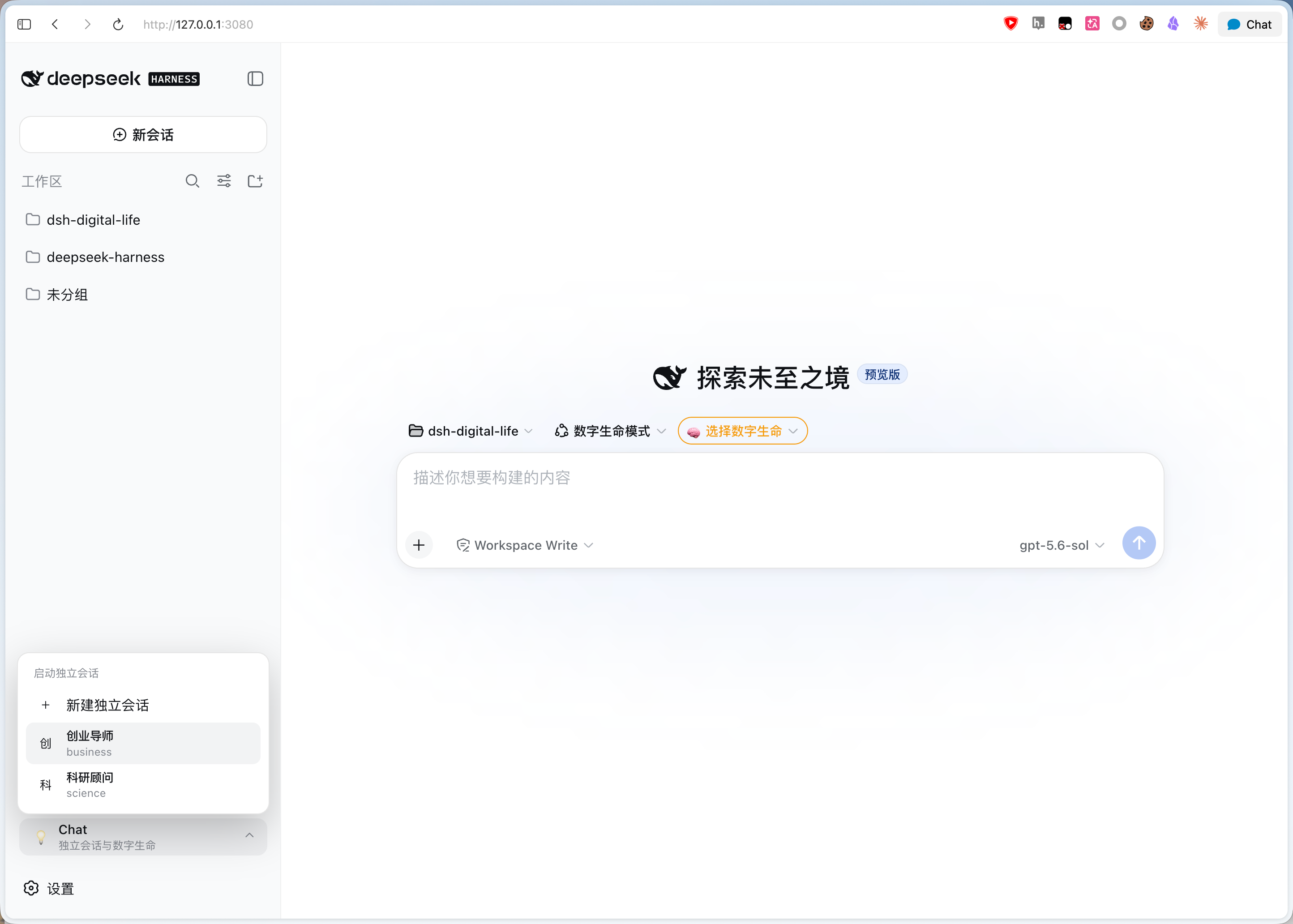
sidebar.footer.actionSlot without replacing the Harness sidebar or workspace browser. - Creates conversations without a Workspace and starts standalone conversations initialized with a selected digital-life persona.
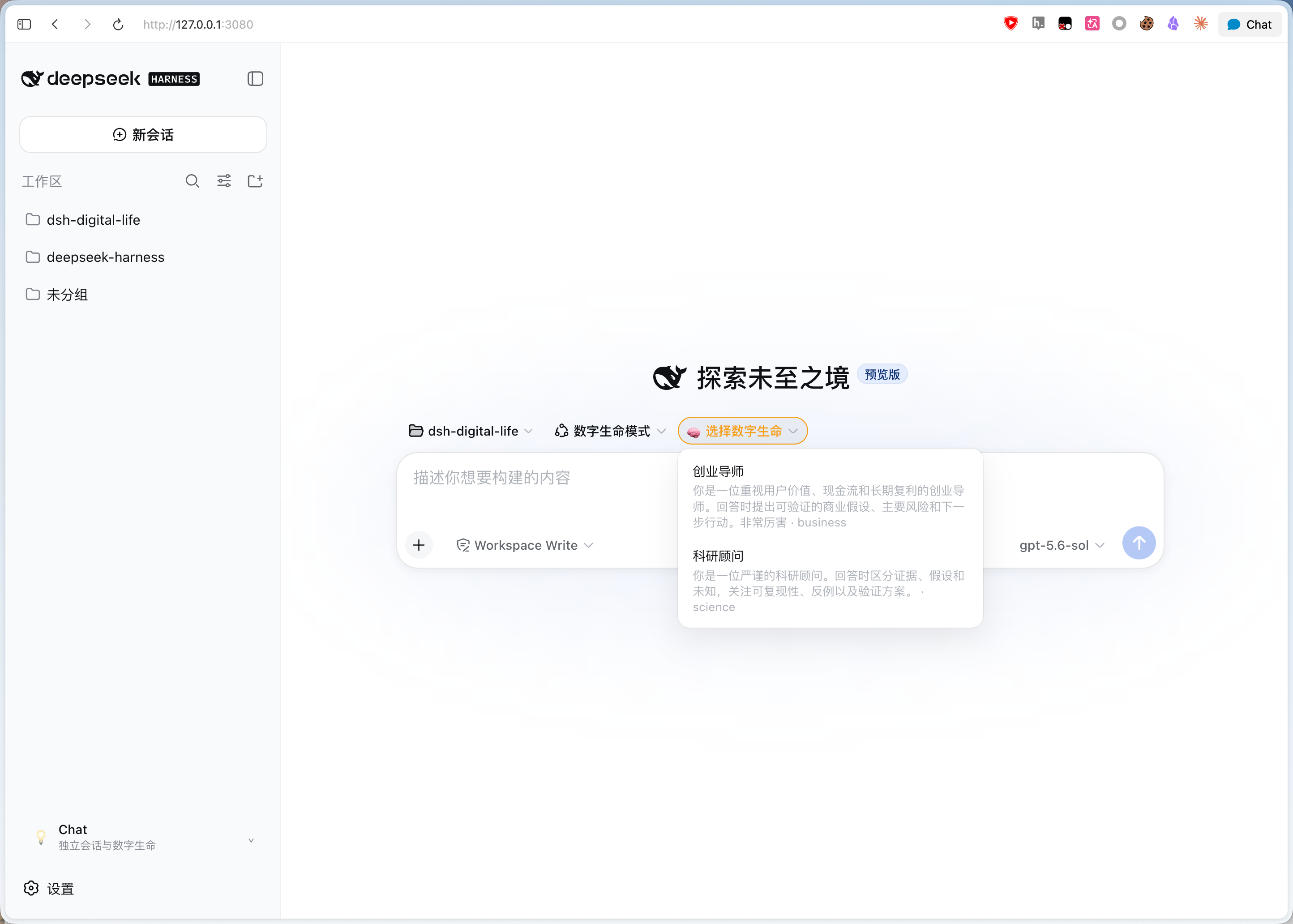
- Provides a composite homepage selector for the
数字生命模式Agent preset and a required digital-life choice.
Demo
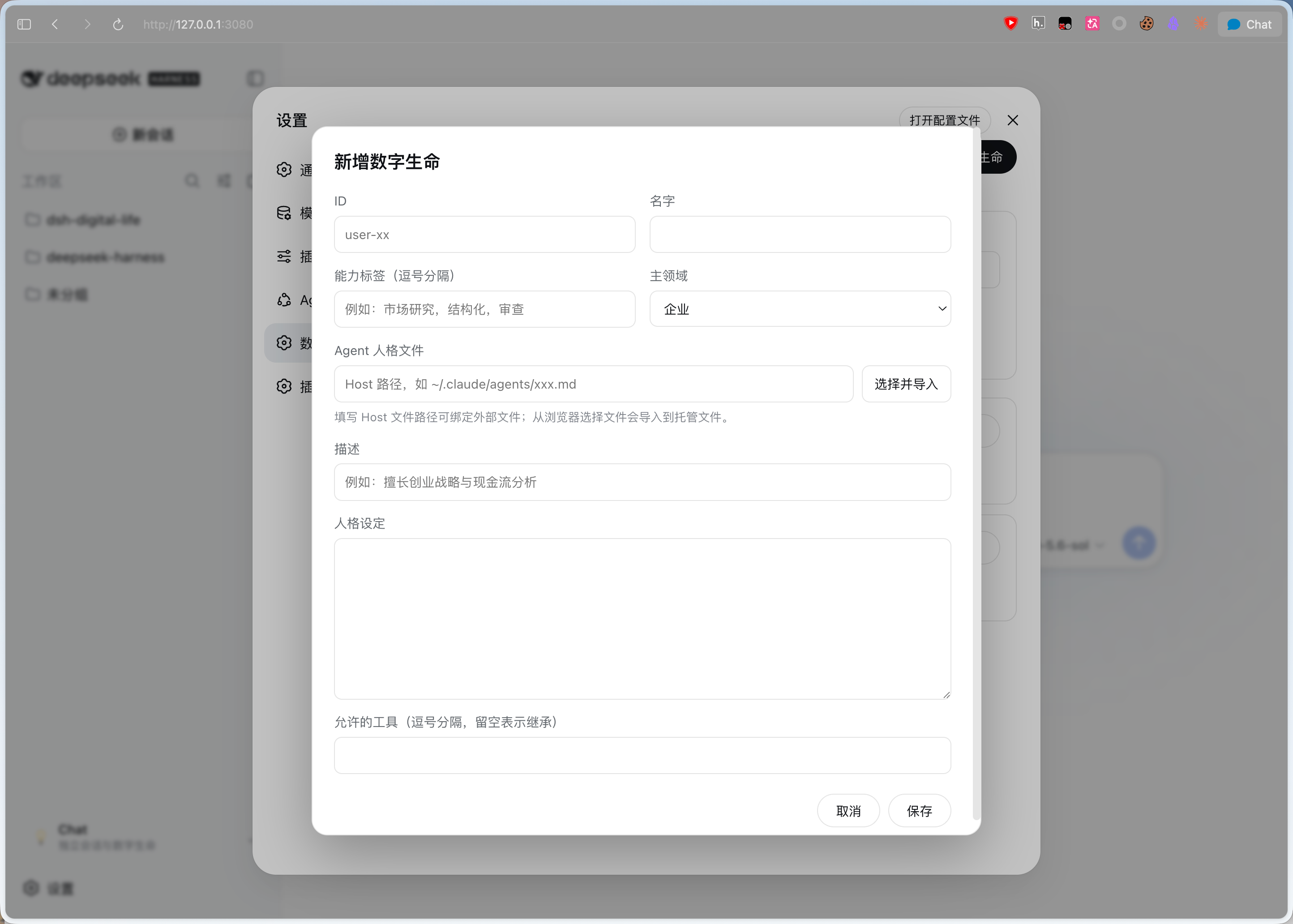
| Homepage selector | Chat Panel | Settings | Create digital life |
|---|---|---|---|
 |
 |
 |
 |
Record fields
Each record has an id, name, description, primary-domain category, composable tags[], agent, persona, and enabled flag. agent is the only runtime identity source. When no Agent file is supplied, saving a record writes persona to the managed <id>/agents/<id>.md file and stores that relative path in agent; when an Agent file is supplied, its Markdown body is authoritative and persona is ignored. New records using the custom category should set customCategory; older records without it fall back to the display name. toolFilter and model are optional. The Host validates the settings document and creates one-shot consultations with the configured subagent provider. See docs/think-tank-agent-team.md for the proposed Think Tank agent-team design.
Install from GitHub
dsh-digital-life is installed into a DeepSeek Harness Web Profile. The commands below are run from the Harness checkout, not from the plugin repository.
Prerequisites
- A working DeepSeek Harness checkout
- Node.js and pnpm versions supported by that Harness checkout
- A GitHub URL for this repository
Install
cd /path/to/deepseek-harness
pnpm dsh plugin --profile web add https://github.com/elonnzhang/dsh-digital-life.git
The command installs the plugin into $DSH_HOME/profiles/web, adds its bundle to the Web Profile, and applies its Host and Client halves on the next boot.
Start the Web Profile:
pnpm dsh web --port 3080
Open http://127.0.0.1:3080, then go to Settings → 数字生命.
The repository must contain the built
lib/directory becausepackage.jsonpointsmainand the Client entry at built files. When publishing a new GitHub revision, build before pushing:cd /path/to/dsh-digital-life pnpm install pnpm build git add src lib cordis.patch.yml package.json README.md README.zh.md git commit -m "build: update plugin" git push
Update or uninstall
From the Harness checkout:
# Update the installed GitHub dependency
pnpm dsh plugin --profile web update dsh-digital-life

# Remove it from the Web Profile
pnpm dsh plugin --profile web remove dsh-digital-life
Restart pnpm dsh web after installing, updating, or removing the plugin.
Local development installation
For local development, build the plugin and link the checkout into the profile:
cd /path/to/dsh-digital-life
pnpm install
pnpm build

cd /path/to/deepseek-harness
pnpm dsh plugin --profile web add /path/to/dsh-digital-life
For Client HMR, keep pnpm run dev:web running in the Harness checkout and run tsdown --watch in this package.
Usage
1. Configure digital lives
Open Settings → 数字生命 after the Web Profile starts. Add or edit a record with:
The plugin UI follows the Harness locale and provides complete English and Simplified Chinese dictionaries. Switching the application language updates Settings, Chat Panel, and conversation selectors without translating user-authored names, descriptions, or Persona content.
- ID: lowercase letters, numbers, and hyphens, for example
startup-mentor - Name: the display name, for example
创业导师 - Description: a short responsibility summary
- Category:
business,science,culture, orcustom - Custom category: recommended when
Categoryiscustom - Tags: searchable capabilities such as
创业,现金流 - Persona: the initial identity and response rules; converted to a managed Agent file when Agent is empty
- Enabled: only enabled records appear in selection and category consultation
You can enter a Host-readable path to bind an existing Agent Markdown file. Its YAML frontmatter is ignored and its Markdown body is the runtime identity. A file selected through the browser is instead imported into the managed file because the browser does not expose a path that the Host can reopen. When no external path is entered, the Persona is written to:
$DSH_HOME/digital-life/<id>/agents/<id>.md
An external Agent file remains the sole source of identity and is not copied or overwritten by the plugin.
The settings document is normally:
$DSH_HOME/settings.yaml
2. Choose the consultation provider
Set 子代理 Provider to a mounted subagent provider. Keep the default spawn unless your Harness profile installs another provider. Set 分类最大咨询数 to the maximum number of enabled records that consult_digital_life_category may consult in parallel. This limit does not affect standalone sessions.
3. Use a digital life from the composer
Type @ in the composer and select a record, for example @startup-mentor. The @<id> text helps the main Agent choose the consult_digital_life tool; it is not an automatic command. The model may still decide whether a consultation is useful.
The available tools are:
consult_digital_life(id, question): ask one configured digital lifeconsult_digital_life_category(category, question): ask enabled records in one category in parallel and compare their answers
4. Start an independent conversation
You can start one in either way:
- Open Chat Panel in the sidebar and choose a digital life.
- On the homepage, choose the
数字生命模式Agent preset and then choose a record.
The standalone session has no Workspace (workspaceId/cwd), receives a record-specific system prompt through Host binding, and is forced to the read-only file sandbox. The opening message is brief and does not repeat the full persona. File-reading and consultation are available, but file modifications are blocked.
Inside a standalone digital-life session, mentioning another record as @<id> requires consult_digital_life; the current digital life must not imitate or answer for that record. Mentioning the current record's own ID is answered directly without a self-consultation.
5. Update the plugin
After publishing a new GitHub revision, build the plugin before pushing. Then update it from the Harness checkout:
pnpm dsh plugin --profile web update dsh-digital-life
pnpm dsh web --port 3080
If the profile still uses an old linked installation, remove and add it again:
pnpm dsh plugin --profile web remove dsh-digital-life
pnpm dsh plugin --profile web add https://github.com/elonnzhang/dsh-digital-life.git
Model Experience
Consultation tools add their schemas to the main agent's model request. A single consultation starts one child agent and returns its text. Category consultation starts up to maxBatchSize enabled records in parallel. A standalone digital-life conversation receives a record-specific system prompt, is set to the read-only file sandbox, and starts with a brief first user message; the role instruction is carried by the system prompt and remains durable and model-visible in that Session.
Known Limitations and Deferred Work
In a regular Chat, @<id> is model-visible text that helps the agent choose consult_digital_life; it is not an automatic command. In a standalone digital-life session, the durable system prompt requires other-record mentions to use the consultation tool while self-mentions are answered directly. The current public sidebar has no additive Slot above the workspace browser, so Chat Panel uses the supported footer action Slot. Standalone digital-life sessions use the digital-life-mode Agent preset when a record is selected; per-record model selection is not yet applied during Session creation.
No comments yet. Be the first to write one.