ProviderEnhance



English | Chinese
One third-party provider, many named configurations. DeepSeek Harness (DSH) binds one credential per provider route; ProviderEnhance turns a provider profile into a container of equally editable configurations — each with its own name, API key, endpoint, wire protocol and model list. Chat's model picker groups models by those configuration names.
Built and tested against DSH Desktop 0.2.1-rc.3 on Windows. The adapter half is a patched build of the bundled
@deepseek-ai/dsh-llm-pi-ai; read Compatibility and risks before upgrading DSH.
Maintained by Youpeng (@elliotmasheal).
Screenshots
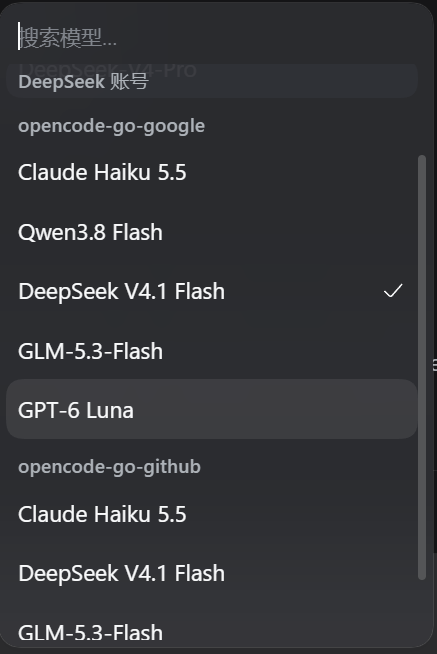
The Models page: one provider card holding several peer configurations, each with its own key, endpoint, protocol and model list.
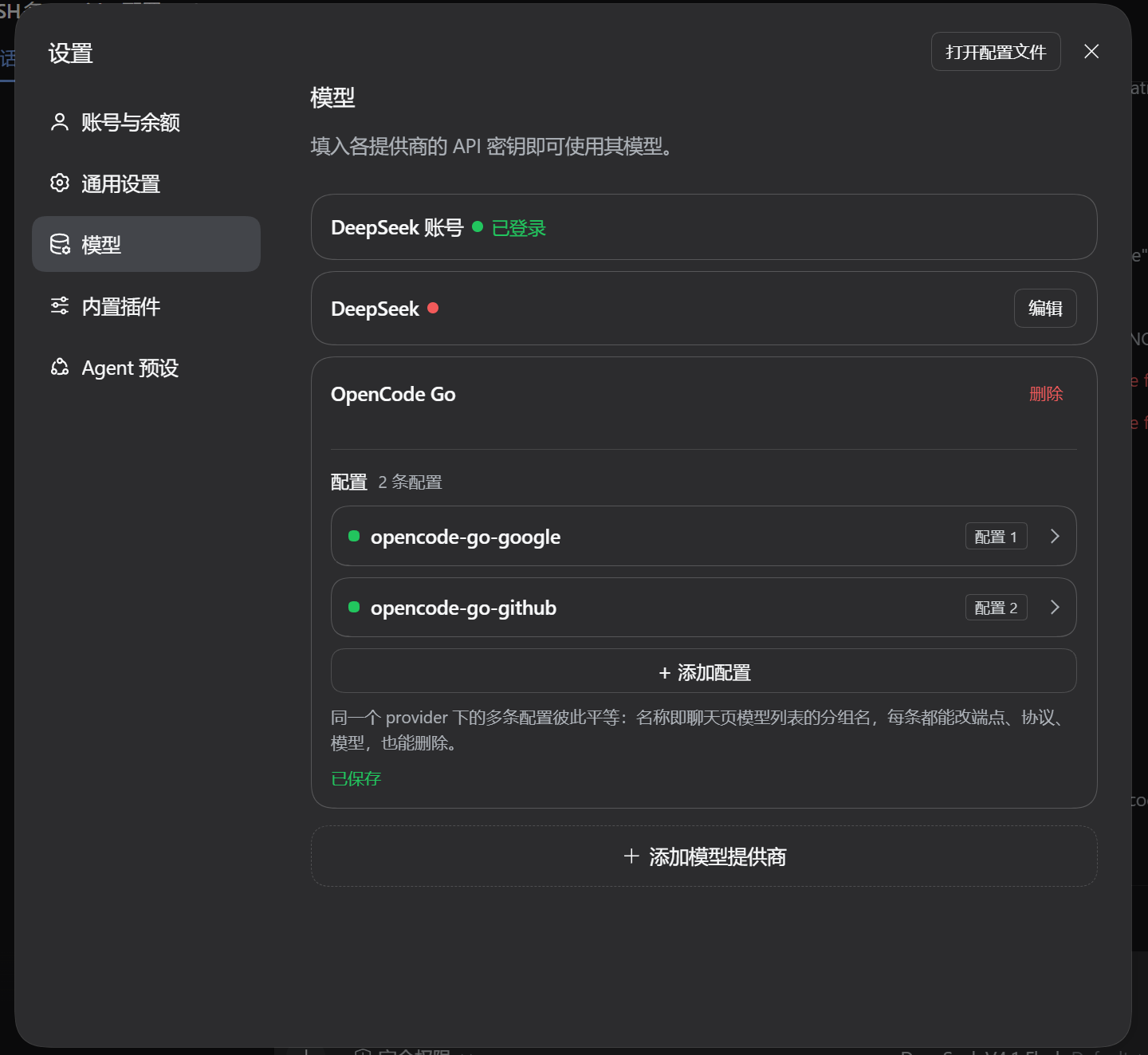
The chat model picker: models are grouped under configuration names
(opencode-go-google, opencode-go-github, …).
Why
A model route in DSH is one provider id with one display name, one credential
reference and one model list; registering the same route twice fails with
DUPLICATE_ADAPTER. That makes "two subscriptions of the same provider"
impossible with the stock UI. ProviderEnhance keeps one provider id in
configuration and expands its accounts into internal routes at load time, so
each configuration gets its own credential and its own chat group while the
Models page still shows a single provider row.
Install
Requirements: DSH Desktop 0.2.x with the desktop profile, and the Node/pnpm that DSH ships (the script finds them). Node 22+ is only needed when you run the script with your own Node.
git clone https://github.com/elliotmasheal/dsh-provider-enhance.git
cd dsh-provider-enhance
node scripts/install.mjs --profile desktop
The installer:
- links
packages/adapteras@deepseek-ai/dsh-llm-pi-aiin the profile, so the loader resolves the patched adapter for the existingllm-pi-airow; - links
packages/uiand appends it todsh.profile.bundles; - runs the profile's own
pnpm install(backups ofpackage.json/pnpm-lock.yamlare written first).
Restart DSH Desktop afterwards. The profile links to this clone, so keep the directory where it is (re-run the installer if you move it).
Options:
--dry-runprints the manifest changes without writing them.--no-installskips pnpm; runpnpm installin the profile yourself.--home <DSH_HOME>for a non-default harness home.--profile <name>for a profile other thandesktop.
The installer edits the profile manifest, so review it with --dry-run first if
you keep the profile under version control.
The UI bundle is also published on npm as
dsh-provider-enhance.
It is only the Web half: the stock adapter rejects accounts, so installing the
npm package alone shows the configuration editor but breaks provider loading.
The installer above adds both halves; if you install from npm, link
packages/adapter into the profile as well.
Use
- Settings → Models → Add model provider, pick a third-party provider
(for example
opencode-go) and paste the first subscription's API key. - Open that provider's card. Its configurations are listed collapsed; use + Add configuration to add the next subscription.
- Click a configuration row to expand it:
- name — the chat group name (unique within the provider);
- key — stored write-only in DSH's credential store;
- Customized settings — endpoint, wire protocol, model list with
Fetch models (catalog lookup for catalog providers,
GET {baseURL}/modelsfor custom endpoints); - Save, Delete — configurations are peers; deleting the first one promotes the next without touching the provider's name.
- Chat: the model picker shows one group per configuration name. The provider's own product name is only used as the Models-page row title.
Configuration model
providers:
  opencode-go:                 # the only route id in configuration
    models: [...]              # provider defaults, inherited by configurations
    accounts:                  # configuration 1 … N, in order
      - name: opencode-go-google
        apiKeyEnv: OPENCODE_GO_API_KEY
      - name: opencode-go-github
        apiKeyEnv: OPENCODE_GO_2_API_KEY
      - name: opencode-go-work
        apiKeyEnv: OPENCODE_GO_3_API_KEY
        baseURL: https://opencode.ai/zen/go
        api: openai-completions
accounts[0]is served on the base route id (opencode-go), soagent-default-modeland existing session logs keep working; entries 2…N expand to internal routesopencode-go#2,#3that inherit the profile and catalog.- Every configuration of an installed catalog provider — including the base one
— resolves through that catalog. The catalog supplies each known model's
default protocol, endpoint, compatibility and metadata; an account's
api/baseURLwin over those defaults when set, andmodelsreplaces the served list. Configurations therefore behave identically instead of configuration 1 forcing its own protocol. - An account's
models/compat/headers/retryPolicyoverride the profile defaults; blank values inherit.headersmerge field by field with the provider's headers. - Configuration names must be unique per provider (client and adapter enforce it). Deleting the last configuration removes the provider entry.
- Configuration 1's display name is stored as
configName, so the provider's product name never doubles as a chat group name.
Request headers
Every provider request carries the harness identity, the configuration's headers, and the protocol headers pi-ai adds:
user-agentis alwaysdeepseek-harness/<version> (+url). A configured value is dropped so attribution cannot be suppressed.- Configuration headers merge with the provider's, so one header added on a configuration does not remove the provider-level ones.
- On OpenCode catalog routes (
opencode-go,opencode) pi-ai sendsx-opencode-sessionwith the current DSH session id. That name is reserved: a configured value is dropped, so every conversation keeps its own id. The id is stable for the life of a session (including resume, compaction and the session-title request) and differs for a new session or a subagent. - Models on the Responses protocol also get
x-client-request-idwith the same session id from pi-ai. - A hand-declared provider keeps its own
headersuntouched, including a custom session header, because no OpenCode provider wrapper is involved.
Compatibility and risks
- Pinned to DSH 0.2.1-rc.3.
packages/adapter/lib/index.jsis a built artifact extracted from that build and patched. After a DSH upgrade, re-run the upstream extraction and re-apply the patches in docs/upgrading.md; otherwise the plugin fails to load or loses the accounts feature. - The adapter overrides the bundled package by name, which is the only way a plugin can replace it; this also means the override must be re-linked after a DSH upgrade. The override affects the whole profile, not only providers that use configurations.
- The Models page's per-provider Edit button is hidden for providers with
more than one configuration by a DOM lookup (
*_rowActions). If a future build renames that class, the button reappears; nothing else depends on it. - The stock Add model provider dropdown only lists unconfigured providers.
Adding another configuration of an existing provider happens inside its card
(
+ Add configuration); this is a page-internal filter that slots cannot extend. - Provider profiles created by an older single-provider setup are not migrated automatically: add a configuration and paste the existing key once.
- Platform support: tested on Windows only. The scripts use portable Node APIs but macOS and Linux are unverified.
- Security: the plugin runs in-process with the user's permissions and writes to the DSH profile. See SECURITY.md.
This project is not affiliated with, endorsed by, or sponsored by DeepSeek.
Troubleshooting
Run the diagnostic first:
node scripts/doctor.mjs --profile desktop
It checks the profile manifest, the linked adapter and UI bundle, the adapter
patch markers, the accounts blocks, and the installed DSH version.
Common issues:
| Symptom | Likely cause |
|---|---|
| The Models page shows no configuration UI | The UI bundle is not in dsh.profile.bundles; re-run the installer and restart. |
Startup fails with "unexpected field accounts" |
The patched adapter is no longer linked (for example after a DSH upgrade); re-run the installer. |
| DSH does not start after uninstalling | accounts blocks remain in the profile's cordis.patch.yml; run node scripts/uninstall.mjs again or remove them by hand. |
| Two configurations share a name | Names must be unique per provider; rename one. |
Fetch models returns nothing |
The endpoint answered no models; check the base URL and key, or add models manually. |
Uninstall
node scripts/uninstall.mjs --profile desktop
The script removes the adapter and UI dependencies, deselects the bundle, and —
because the stock adapter rejects unknown fields — removes the accounts:
blocks from the profile's cordis.patch.yml after writing a backup. Pass
--keep-accounts to leave them in place. Restart DSH afterwards.
Repository layout
| Path | What |
|---|---|
packages/adapter |
Patched @deepseek-ai/dsh-llm-pi-ai (drop-in override; not published) |
packages/ui |
dsh-provider-enhance Web client bundle and locale dictionaries |
patches/0001-accounts-and-headers.patch |
the adapter diff against the published upstream release |
scripts/install.mjs, scripts/uninstall.mjs, scripts/doctor.mjs |
profile installer, remover and diagnostics |
scripts/sync-adapter.mjs |
rebuilds packages/adapter/lib/index.js from npm + patches |
scripts/check.mjs |
offline syntax/manifest/hygiene checks (also runs in CI) |
tests/headers.test.mjs |
fake-fetch regression tests for the header contract |
docs/upgrading.md |
how to re-patch the adapter after a DSH update |
docs/architecture.md |
how the loader override, slots and route expansion fit together |
Development
node scripts/check.mjs
npm test                       # header tests; need a DSH install (or peers below)
node scripts/install-test-peers.mjs   # fetch the published DSH peer packages
DSH_APP_NODE_MODULES=.test-dsh/node_modules npm test
node scripts/sync-adapter.mjs --check # adapter == npm upstream + patches
node scripts/pack-check.mjs           # published tarball contents
check.mjs verifies JavaScript syntax, manifests, patch markers and scans the
tree for personal absolute paths or secret-like strings. CI runs the same
checks on Linux and Windows, and runs the header tests against the published
DSH 0.2.1-rc.3 packages.
Contributions are welcome; see CONTRIBUTING.md. Please report security issues privately as described in SECURITY.md.
License
MIT. packages/adapter/lib/index.js is a modified copy of
@deepseek-ai/dsh-llm-pi-ai (MIT, Copyright (c) 2026 DeepSeek). See
LICENSE and NOTICE.md.
No comments yet. Be the first to write one.