dsh-auto-archive
A DSH plugin that automatically archives idle conversations and clears the expired projection cache of archived sessions — without deleting transcripts, attachments, workspace files or anything a conversation produced.
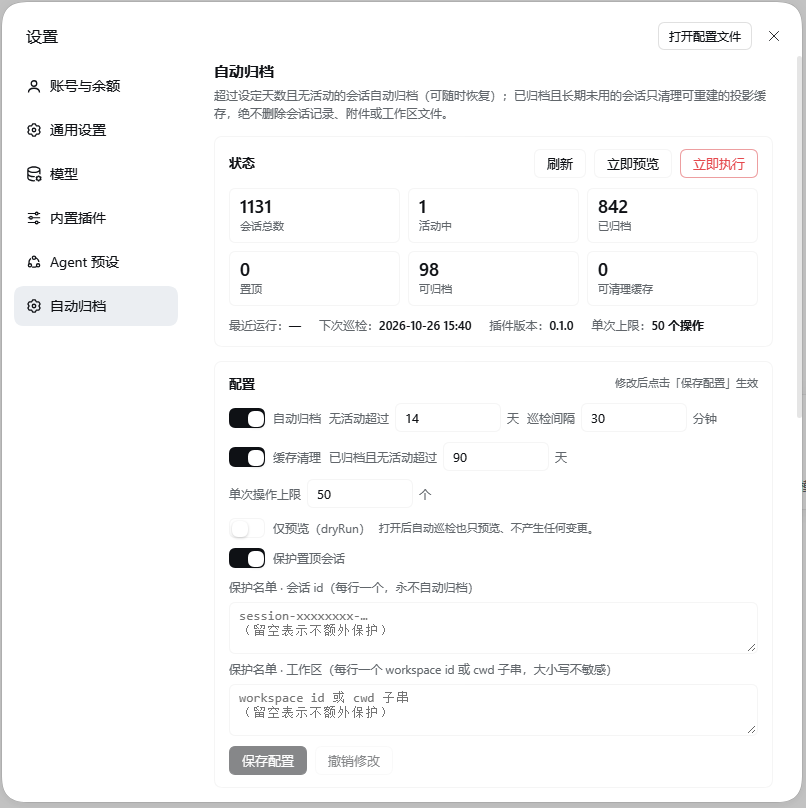
给 DeepSeek Harness(桌面版 / Web)用的本地插件:闲置会话按天自动归档,已归档会话的超期「对话缓存」自动清理,不删除会话记录、附件或任何对话产出。
What it does / 它做什么
| Capability | Default | Behaviour |
|---|---|---|
| Auto-archive / 自动归档 | idle 14 days | Calls DSH's official workspaceRegistry.archiveSession(); archived sessions stay restorable from the archived list. |
| Cache cleanup / 缓存清理 | archived and idle 90 days (~3 months) | Deletes only DSH's derived projection cache (~/.dsh/storages/session_projcache/sessions/<id>.json, rebuilt on demand). |
| Scheduled check / 巡检 | every 30 minutes | Silent background check; the settings panel can preview or run immediately. |
| Protection / 保护 | pinned sessions | Optional extra allow-list by session id, workspace id or cwd fragment. |
| Audit / 审计 | last 30 runs | Per-run archive/cleanup details; restoring an archived session is one click. |
Safety boundary / 安全边界
The plugin never deletes:
- session transcripts (
session.v4.jsonl.zstd/ session directories); - attachments (
~/.dsh/attachments), spill files, workspace or project files; - results produced by a conversation — archiving only adds/removes ids in DSH's archived set, and the content stays untouched.
Its only two writes are:
- Archive state — adding/removing session ids in DSH's
archivedSessionIdsthrough the official registry API (reversible). - Projection cache — deleting
~/.dsh/storages/session_projcache/sessions/<id>.json, a cache DSH rebuilds on demand.
Active sessions are always skipped (the plugin never passes stopActivity), so a running turn, job or subagent is never interrupted.
Install / 安装
Install into a DSH profile (the desktop profile is managed by the Electron app, so use the CLI):
dsh plugin --profile desktop add github:elk-9527/dsh-auto-archive
Or from a local checkout:
dsh plugin --profile desktop add "file:D:/path/to/dsh-auto-archive"
Then fully quit and reopen DSH (host plugins load at startup). Open the panel via bottom-left avatar → Settings → 自动归档; it appears next to General / Built-in plugins.
Uninstall:
dsh plugin --profile desktop remove dsh-auto-archive
Configuration / 配置
Stored at ~/.dsh/auto-archive/config.json (created automatically; editable from the panel):
{
  "version": 1,
  "autoArchive": { "enabled": true, "idleDays": 14, "checkIntervalMinutes": 30 },
  "cacheCleanup": { "enabled": true, "unusedDays": 90 },
  "protect": { "pinnedSessions": true, "sessionIds": [], "workspaces": [] },
  "limits": { "maxOperationsPerRun": 50 },
  "dryRun": false
}
idleDays— a session whose last activity is older than this is archived. Last activity = max(transcript mtime,createdAt).unusedDays— an archived session idle longer than this has its projection cache removed.protect.workspaces— workspace id or a case-insensitive cwd fragment; matching workspaces are never archived.dryRun: true— every automatic run becomes a preview.limits.maxOperationsPerRun— caps one run, so a first launch cannot sweep the whole history at once.- Run state lives in
~/.dsh/auto-archive/state.json(atomic writes, last 30 runs).
HTTP API / 本机回环 API
Prefix /dsh-auto-archive (loopback Host only; anything else gets 403):
| Method | Path | Purpose |
|---|---|---|
| GET | /dsh-auto-archive/api/state |
Config, last/next run, counts |
| GET | /dsh-auto-archive/api/sessions?limit=200 |
Session inventory with idle days and eligibility |
| GET | /dsh-auto-archive/api/history |
Last 30 runs |
| POST | /dsh-auto-archive/api/config |
Deep-merge and save config |
| POST | /dsh-auto-archive/api/run |
{"dryRun":true} preview / {"dryRun":false} execute |
| POST | /dsh-auto-archive/api/restore |
{"sessionIds":["..."]} unarchive |
Development / 开发
npm test              # node --test "test/*.test.mjs" "test-client/*.test.mjs"
npm run test:e2e      # fake-host end-to-end suite (temp DSH_HOME, real node:http)
The host half interacts with DSH only through ctx services (webServer, sessionPersistence, sessions, workspaceRegistry, sessionProjectionCache); the client half is a hand-written window.__ModuleLoader__.load({...}) bundle with no build step. No third-party dependencies. Node ≥22.
index.js            # host entry
lib/config.js       # config schema / load / atomic write
lib/state.js        # run state and history
lib/sessions.js     # inventory, last-activity, classification
lib/run.js          # archive + cache cleanup (dry-run has no side effects)
lib/api.js          # HTTP API + loopback guard
lib/scheduler.js    # periodic checks, single-flight
client.js           # settings panel (ModuleLoader bundle, no build)
cordis.patch.yml    # profile patch layer
test/ test-client/  # node --test suites
e2e/                # fake-host integration suite
docs/kernel-api.md  # verified DSH kernel API reference
Known limits / 已知限制
- Cache cleanup targets archived sessions only, so the active list is never touched.
- "Conversation cache" means DSH's projection cache; transcripts and attachments are never deleted by design, so they keep their disk usage.
- Archiving obeys DSH's own activity check; a session another plugin considers active is skipped, never force-stopped.
- The host half loads at startup: restart DSH after changing code.
Verified scope / 已验证范围
- Settings panel — opened in a real Edge (headless CDP) session at
bottom-left avatar → Settings → 自动归档; panel renders status cards, config form, inventory and history with no console errors (see screenshot above). - Host API — exercised on a scratch profile against real data: state/session inventory, dry-run (98 candidates → capped at 50), live archive of one session (
archivedSessionIds+1), restore, cache-cleanup candidate counting. - Safety — only registry archive/unarchive happened against real data; the archive set was restored to its pre-test baseline, and no transcript, attachment or workspace file was removed.
- Tests — 148 unit/client tests plus the fake-host e2e suite pass.
No comments yet. Be the first to write one.