Connectome



A living map of your workspace for the DeepSeek Harness Web UI — every file is a
neuron, every import is a synapse. Connectome scans the current workspace, draws the
file/dependency graph on a single <canvas> with d3-force physics, lets you trace
any relationship, and turns a click on a neuron into the file's code in the
harness' own right-sidebar preview.
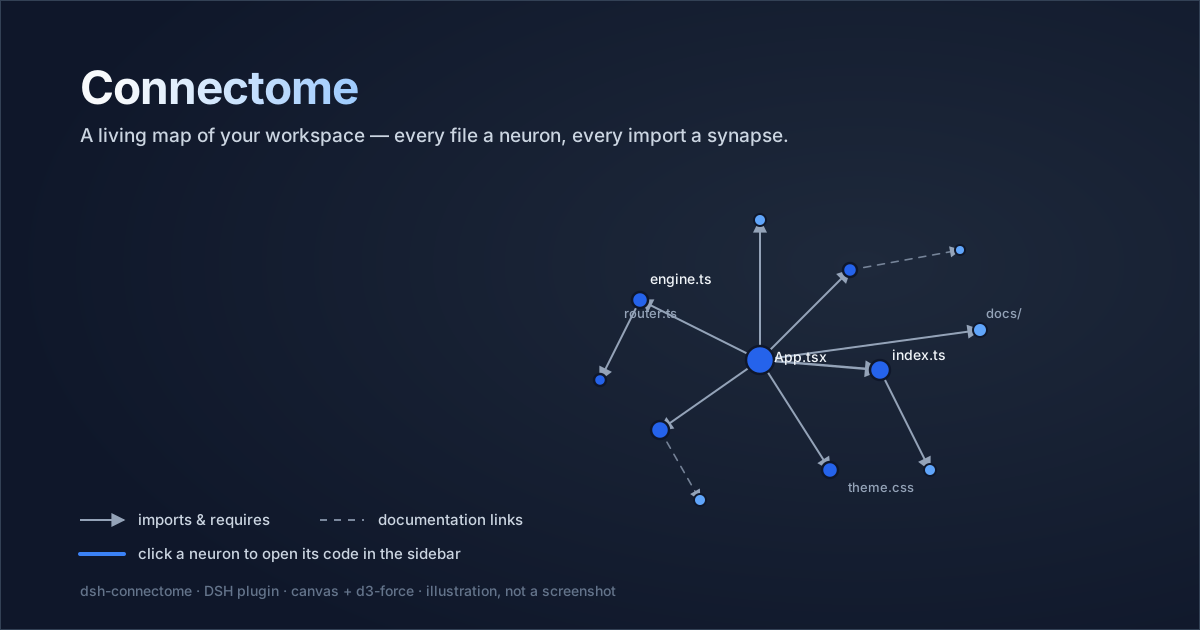
The banner is an illustration of the canvas graph, not a screenshot.
Features
- One canvas, hundreds of nodes, 60 fps. Nodes and links are painted into a single
<canvas>; there is no DOM node per file.d3-forceruns the layout, the plugin's ownrequestAnimationFrameloop ticks it, and the simulation stops when idle. - Relationships you can read. Dependency edges carry an arrowhead at the imported
file: solid for
import/export … from/ dynamicimport()/require/ CSS@import, dashed for HTML and Markdown references. Hover a link to see both endpoints and the relation kind. - Neighbourhood inspection. Hovering a node highlights its neighbourhood and lists
its direct ties (
→imports,←imported by), each clickable, with a+Nsummary for the rest. Great for seeing how two modules — or two "engine" files — meet. - Click to read code. Clicking a neuron opens that file in the harness'
right-Sidebar document preview (
ctx.sidebarRight.openResourcewith adsh-resource://file/session/…address): line numbers, language label, copy, and automatic reload, all inside DSH. A missing preview or selected session is explained in the footer. - Theme-aware. The canvas reads its colors from the live
--dsw-alias-*theme tokens at runtime, so light/dark switches recolor the graph. - Workspace switcher, rescan, fit, zoom, pan, node drag,
Escto close. - Local by design. No telemetry, no network calls, no workspace data leaves your machine.
Install
Connectome is a DSH bundle plugin: installing it adds a Host row (workspace scanner
- HTTP route) and a lazy browser module (the canvas UI).
Requirements
- DeepSeek Harness 0.2.1-rc.2 or newer (Desktop or a
dsh webdeployment with the standard Web bundle). - Node.js 18+ only if you build from source; the release ships
client.jsprebuilt.
From the Web UI (recommended)
Open the sidebar's Plugins page, choose Install, and enter one of:
dsh-connectome                                   # npm (recommended)
github:elalamiimed/dsh-connectome                # straight from GitHub
The npm package is live at npmjs.com/package/dsh-connectome; the plugin manager enables the bundle after a successful install. Open the sidebar panel list's More menu and pick 🧠 Connectome.
From a terminal
The DSH CLI forwards package operations to the profile; then enable the bundle in Plugins (or keep using the Web UI above, which does both steps):
dsh plugin --profile desktop add dsh-connectome
# or straight from GitHub:
dsh plugin --profile desktop add github:elalamiimed/dsh-connectome
Mirror tip: if
npm config get registrypoints at a mirror that has not synced this release yet (for exampleregistry.npmmirror.comright after a publish), the install can resolve an older or placeholder version. Point npm athttps://registry.npmjs.orgfor that install, or wait for the mirror to sync.
Manual / development install
git clone https://github.com/elalamiimed/dsh-connectome.git
cd dsh-connectome
# then install the folder as a bundle in the running profile, e.g. with
# plugin_manager install_bundle <absolute-path>, or `dsh plugin add link:<absolute-path>`
Note: the npm name
dsh-project-brainbelongs to an unrelated DSH plugin. This project is published asdsh-connectome; the GitHub repository still uses the "project brain" working title in its history only.
Usage
- Open the sidebar panel list's More menu → 🧠 Connectome.
- The dialog scans the current workspace and fits the graph to view.
- Use the header to switch workspace (when several are registered), rescan, fit or zoom; drag the background to pan; scroll to zoom around the pointer; drag a node to pull it.
- Hover a node or a link for the relationship tooltip. Click a neuron to open the file
in the right sidebar.
Esc/ the ✕ button closes the dialog.
Supported dependency syntax
The Host extracts links with small, dependency-free regexes (bare package names are
deliberately not expanded into node_modules):
| Files | Relationships |
|---|---|
| JS / TS / JSX / TSX / Vue / Svelte | import … from, export … from, dynamic import(), require() |
| CSS / SCSS / Sass / Less / Stylus | @import, @use, @forward |
| HTML | <script src>, <link href> |
| Markdown | relative links and images |
| Python | import x, from . import y |
Only relative, root-relative and @/ / ~/ specifiers resolve to workspace files.
node_modules, .git, build outputs, caches and dot-directories are skipped.
How it works
Host half (index.js)
POST /connectome/api/graph— same-origin route fenced throughctx.connection.requestRejection(req); optional JSON body{ "root": "<workspace>" }.- Resolves the workspace root from the registered workspaces (or the current working directory) and scans it under hard caps: 2,000 file nodes, 12,000 directory entries, 1,500 parsed files, 512 KiB read per file, an 8 s soft time budget.
- Returns the graph:
{
  "ok": true,
  "root": "C:\\path\\workspace",
  "roots": [{ "path": "C:\\path\\workspace", "title": "my-project" }],
  "nodes": [{ "id": "src/index.js", "label": "index.js", "ext": ".js", "size": 1234, "dir": "src" }],
  "links": [{ "source": "src/index.js", "target": "src/util.js", "kind": "import" }],
  "stats": { "files": 2, "scanned": 2, "links": 1, "truncated": false, "durationMs": 4 }
}
Client half (client.source.js → client.js)
- Registers
sidebar.panellist.actions(the menu row) andshell.overlay(the dialog), both throughctx.slots.inject/ctx.slots.register. - Builds the d3 simulation once per loaded graph with
simulation.stop(), then ticks it from the plugin'srequestAnimationFrameloop; hover changes update React state, but pointer moves only mutate transforms, and frames are requested only while needed. - Batches all solid edges into one stroke, all documentation edges into a dashed stroke, all arrowheads into one fill, and all nodes into one fill per color group. Link hit-testing is a screen-space segment-distance pass — no DOM.
- Layout seeds d3's phyllotaxis spiral and uses weak
forceX/forceYcentering, so disconnected files stay in one cloud and fit-to-view never zooms to sub-pixel dots. ResizeObserverkeeps the backing store matched to CSS size (DPR clamped to 2);MutationObserverre-reads theme tokens when the app theme changes.d3-force(plus its UMD dependencies) is inlined intoclient.jsbybuild.mjs: the browser module table has no runtime npm resolution, so the bundle is self-contained.vendor/pins the exact ISC-licensed distributions.- Clicking a node builds the harness' own file address
(
dsh-resource://file/session/<session>/<path>) and callsctx.get('sidebarRight').openResource(...); the on-screen session comes fromsidebarRight.mounted, with the UI Session adapter as fallback.
Privacy
Connectome reads the workspace through the Host process, exactly like the rest of DSH. It sends nothing to the network: no analytics, no remote API calls, no file contents uploaded. The graph response stays between the Host and your local page; open files are displayed by DSH's built-in preview, and Connectome itself never keeps or transmits file contents.
Performance
- Canvas painting, one path per color group; only the hovered neighbourhood gets labels.
- The simulation stops at
alphaMin; an interaction kicks it again. - Measured layout cost on a development machine: ~1.1 ms/tick at 300 nodes, ~8 ms/tick at 2,000 nodes; a 2,000-node / ~3,300-link scan runs in about half a second warm.
- Large workspaces are capped and report
stats.truncated; the dialog shows a "partial scan" marker.
Development
No dev dependencies are needed — vendor/ is committed and the tests use Node builtins.
node build.mjs      # regenerate client.js from client.source.js + vendor/
npm test           # scanner + artifact + package/release contract tests
npm run check      # node --check on index.js and the generated client
npm pack --dry-run # inspect exactly what npm would publish
npm install is only needed to rebuild client.js from a different d3-force copy:
node build.mjs --modules <node_modules dir> looks there after vendor/.
See CONTRIBUTING.md for the project layout and review rules, and
PUBLISHING.md for the maintainer release flow.
Styling note
The project-wide design-token rule asks frontend artifacts to use the --ds-* scale.
This plugin is a Harness UI surface, so it deliberately splits the two systems:
- Colors come only from the host's live
--dsw-alias-*theme tokens (this is what keeps the graph legible in both light and dark mode). - Spacing / radii / shadows / font sizes use a locally declared
--ds-*token layer (4px rhythm, 4/8/12/16/20/24 px spacing, 4/8/12/16 px radii, the shadow scale and the caption/body-sm/body/h3 type scale) — no off-scale numeric styling.
Limitations
- Regex-based parsing: aliases beyond
@//~/,tsconfigpath maps and bundler resolution rules are not modeled; bare package names do not become nodes. - Files are only previewed as code when the harness' right-Sidebar document preview is available; unsupported extensions fall back to plain text, and binary files are not indexed at all.
- Very large repositories hit the scanner caps (see above) and show a partial graph.
- The graph is a viewer, not an editor: there is no refactoring, search or saved layout.
License
MIT © 2026 elalamiimed.
Bundled d3 distributions (vendor/) are ISC licensed, Copyright 2010–2021 Mike
Bostock; see vendor/LICENSE-d3.txt. DeepSeek Harness and its
packages are separate projects with their own licenses.
No comments yet. Be the first to write one.