dsh-custom-brand · 大肥鱼品牌图标





把 DeepSeek Harness 侧边栏左上角的品牌位(默认是鲸鱼图标 + deepseek HARNESS)换成你自己的图标和文字,改一个 JSON 文件、刷新页面即可生效。
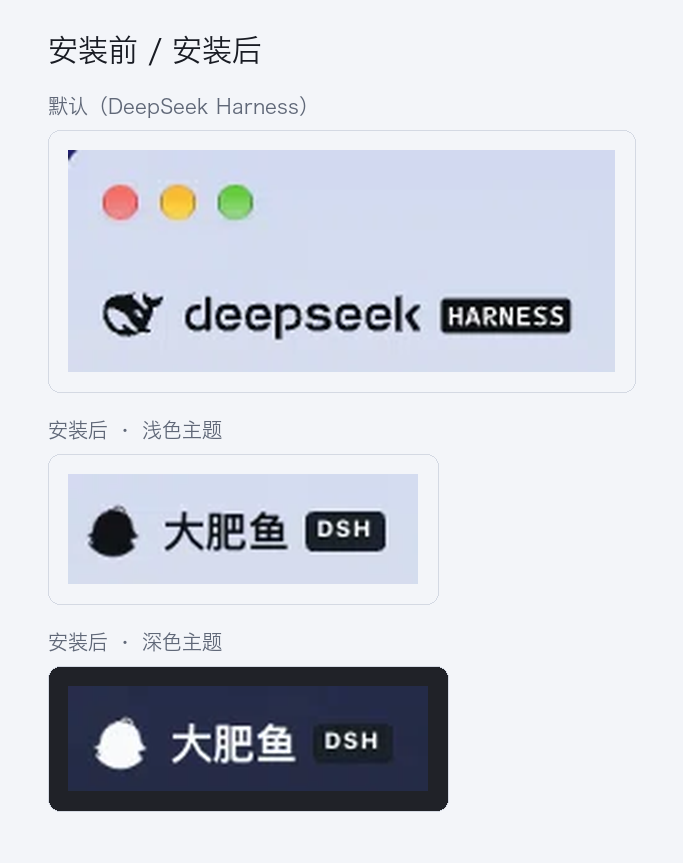
社区插件,与 DeepSeek 官方无关。分类:UI & Experience。
特性
- 两个位置都覆盖:
sidebar.brand.mark和sidebar.brand.name,折叠成 56px 窄栏时同一个图标位继续生效 - 不用停用官方包:以更低
priority影子覆盖 single slot,卸载即恢复原样 - 两种图标模式
glyph:只取图片形状当剪影,用currentColor上色 —— 浅色主题近黑、深色主题自动转浅,背景透明(和原版鲸鱼一致)image:保留图片本身配色,适合直接放一张头像
- 可配置:图标、尺寸、圆角、文字、徽标、字号、徽标配色
- 改完即生效:配置读的是 JSON 文件,图标按 mtime 自动换版本号,刷新页面即可;不需要重新打包
安装
从 npm 安装到你的 profile(Web 版通常是 web,桌面版是 desktop):
dsh plugin --profile web add dsh-custom-brand
或者从 GitHub 源码安装:
dsh plugin --profile web add github:dyguests/dsh-custom-brand
安装后在「插件」页确认 大肥鱼品牌图标 是打开状态,刷新页面即可看到效果。
配置
两个来源,后者覆盖前者:
- 插件行的
config:(在 profile 的cordis.patch.yml里) $DSH_HOME/dsh-custom-brand.json—— 首次运行自动生成,日常改这个
| 字段 | 默认 | 说明 |
|---|---|---|
mark |
"" |
图标。绝对路径、~/x.png、相对 $DSH_HOME 的路径、http(s)://、data: 都可以;留空用包内自带的图 |
markMode |
"glyph" |
glyph = 剪影 + markColor;image = 保留原图配色 |
markColor |
"currentColor" |
glyph 模式下的颜色,默认跟随主题文字色 |
markSize |
24 |
图标边长(px),12–48 |
markRadius |
"50%" |
圆角(仅 image 模式),50% 为圆形 |
name |
"大肥鱼" |
主文字,留空则只显示图标 |
badge |
"DSH" |
小标签,留空则不显示 |
showName |
true |
是否显示文字 |
nameSize |
"17px" |
主文字字号 |
badgeBg |
"#1b1f27" |
标签底色 |
badgeFg |
"#ffffff" |
标签文字色 |
示例 ~/.dsh/dsh-custom-brand.json:
{
  "mark": "",
  "markMode": "glyph",
  "markColor": "currentColor",
  "markSize": 24,
  "markRadius": "50%",
  "name": "大肥鱼",
  "badge": "DSH",
  "showName": true,
  "nameSize": "17px",
  "badgeBg": "#1b1f27",
  "badgeFg": "#ffffff"
}
也可以直接用接口读写:
curl -s http://127.0.0.1:<port>/api/dsh-custom-brand/config
curl -s -X PUT -H 'content-type: application/json' \
  -d '{"name":"我的品牌","badge":"BETA","markMode":"image","mark":"~/Pictures/avatar.png"}' \
  http://127.0.0.1:<port>/api/dsh-custom-brand/config
启用 / 停用 / 卸载
- 停用:「插件」页关掉
大肥鱼品牌图标的开关,官方品牌立刻回来 - 卸载:
dsh plugin --profile web remove dsh-custom-brand - 换素材:把
mark指向你的图片即可;assets/里还放了几版备选剪影(head-oval.png默认、head-eyes.png、head-silhouette.png、head-bust.png、fat-fish-glyph.png)
兼容性
- DSH
>= 0.2.0,Web 与桌面(Electron)客户端 - 只依赖客户端插槽
sidebar.brand.mark/sidebar.brand.name,不改核心文件、不碰app.asar - 从旧版
dsh-brand-slot升级:旧的~/.dsh/dsh-brand-slot.json会被自动读取,接口同时保留旧路由别名
权限与隐私
- 图标文件由本机 Harness 读取并通过本地 HTTP 路由提供,不上传到任何服务器
- 插件只注册 UI 插槽与三个本地路由,不发起外部请求、不读取会话内容
素材与许可
- 代码:MIT © 2026 dyguests
assets/head-*.png里的大肥鱼剪影取自社区同人立绘(dsh-pet-dafeiyu / codex-deepseek-pet 系列),仅作示例;二次分发或商用请自行确认原作者授权并署名- 角色“大肥鱼”是 DeepSeek 鲸鱼娘形象的社区二创,与 DeepSeek 官方无关
English
dsh-custom-brand replaces the Harness sidebar brand mark and wordmark with your own, configured from one JSON file — no rebuild, refresh to apply.
dsh plugin --profile web add dsh-custom-brand
Config lives at $DSH_HOME/dsh-custom-brand.json (mark, markMode = glyph | image, markSize, name, badge, …). glyph mode paints the image as a currentColor mask with a transparent background; image mode keeps the artwork's colors.
MIT licensed. Character artwork belongs to its original community authors; replace assets/* before redistributing.
No comments yet. Be the first to write one.