dsh-model-advanced
Per-model default reasoning level and image handoff for text-only models — added to the existing Settings → Models page.
Model adapters describe a model once, provider-wide and statically. Two things an agent actually needs cannot be expressed that way:
- The level a conversation should start at, per model. A fast model and a reasoning model on the same provider usually want different defaults, but an adapter exposes a single provider-wide effort.
- What happens when a text-only model is handed an image. Today the image is dropped or the turn fails. It should be read by a model that can see, and the reading should stay in the conversation.
This plugin adds a card at the bottom of the Models page that configures both, and implements the runtime behaviour behind them.
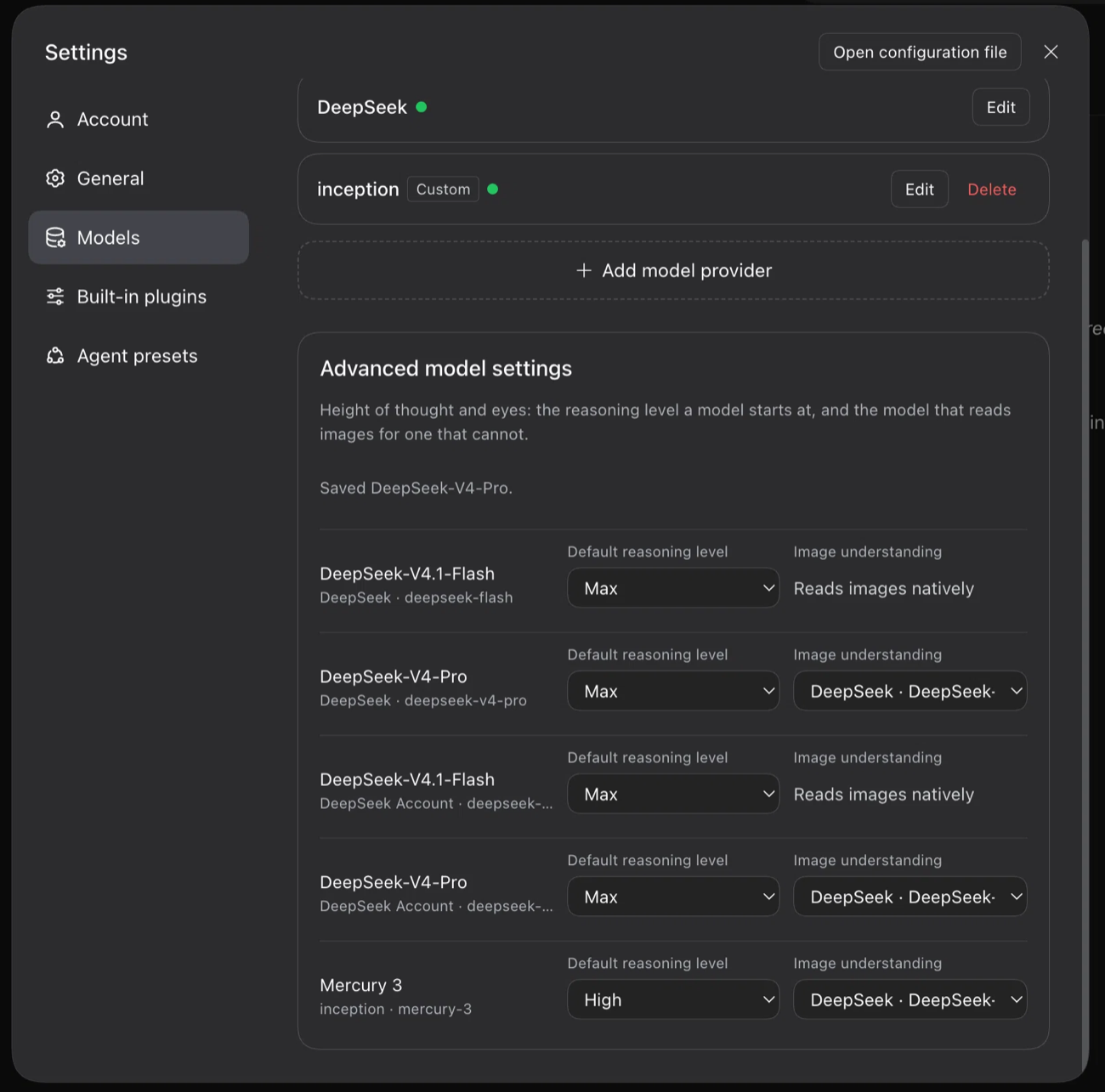
The card this plugin adds, at the bottom of Settings → Models: a starting reasoning level for each model, and — for a model that cannot see — the model that reads images on its behalf.
Install
Requires a DeepSeek Harness install with the plugin manager.
dsh plugin --profile desktop add github:drm-nz/dsh-model-advanced
Then restart the app. This plugin has a host half (lib/index.js) and a browser
half (lib/client.js); the host half loads at boot, and the browser half is served
from the installed package, so neither picks up without a restart.
From a local checkout
dsh plugin --profile desktop add link:/absolute/path/to/dsh-model-advanced
or add the link: dependency to the profile's package.json, run pnpm install there,
and restart. A linked package resolves its dependencies and peers from its own
directory, so they must be installed there too.
The shipped cordis.patch.yml names its entry bare (dsh-model-advanced), not
relatively. A link: install's real directory sits outside node_modules, and this
plugin imports Harness packages, so a bare name resolves through the profile's
dependency mapping — a relative name would bypass it and the import would fail.
To remove it:
dsh plugin --profile desktop remove dsh-model-advanced
Requires the Harness packages it builds on (@deepseek-ai/dsh-llm,
@deepseek-ai/dsh-tools, @deepseek-ai/schemastery) to resolve from the profile, and
they should match the running Harness version — the plugin decorates runtime
prototypes, so it is version-coupled by nature. See Compatibility below.
The card
One row per configured model, under the model list:
| Column | What it sets |
|---|---|
| Model | The model's name, provider, and id |
| Default reasoning level | The level a conversation starts at when it has not picked one. Empty option = no override |
| Image understanding | For a model that cannot read images: the configured model that reads them on its behalf |
Both choices are stored in this plugin's own settings namespace (model-advanced),
keyed provider/model — not in the adapters'. That is what keeps two models on one
provider independent, and what lets a model the adapters cannot describe still get a
default.
How the default reasoning level is applied
Four seams, because a level can be chosen — or never chosen — in several places:
resolveModelInfois decorated so the model catalogue states the configured level, and so the composer's Effort menu opens on it.resolveCallConfigis decorated so selecting a model without naming a level saves the configured level instead of the adapter's own default.- An
agent/requestwaterfall covers entry points that never pick a level at all. - A startup reconciliation (once, after the composition transaction settles) aligns the global default selection with the configured level.
Both prototype decorations are restored on dispose.
How image handoff works
Configure a delegate for a model that does not read images. Then, when a turn carries an image:
- The delegate is called once, with a layout-preserving transcription instruction: a one-line summary, reading order, every text region with its approximate bounding box on a 0–1000 scale, tables as GFM, and notes for diagrams and UI state.
- The result is appended to the step as an image transcript note naming the image id.
- That note carries a
[dsh-image-handoff:<id>]marker which is read back from session history, so retries and later turns never re-bill the delegate. - The image itself stays in the conversation; the wire to the text-only model still carries a placeholder, never the image. The transcript is what the model reads.
For follow-up questions the model calls:
inspect_image(image_id, question)
which hands the same image to the delegate again with the question. This exists so a text-only model is not stuck with a single fixed reading of an image forever.
A delegate failure does not end the turn — it becomes a note in the transcript saying what could not be read.
Discovering which models read images
Capability is resolved in this order, cheapest first:
- The provider's own configuration — the model's declared input modalities in its settings namespace.
discoverModels, asked only for models the configuration does not describe, so an ordinary page load stays offline.- Inference from the same model id served by another configured route.
- A checkbox — "This model reads images" — when all of the above are unknown, which pins the answer for that model.
Configure by hand
The card writes this namespace; it can also be edited directly.
- id: model-advanced
  config:
    modelDefaults:
      "deepseek/deepseek-chat": high
    imageDelegates:
      "deepseek/deepseek-chat": { provider: openai, model: gpt-5-mini }
    imageCapable:
      "openai/o4-mini": true
| Key | Shape | Meaning |
|---|---|---|
modelDefaults |
provider/model → effort id |
Starting reasoning level for that model |
imageDelegates |
provider/model → { provider, model } |
The model that reads images on this one's behalf |
imageCapable |
provider/model → true |
Pins image capability when it cannot be discovered |
Effort ids must match the adapter's own level ids; the card lists them, so pick from there rather than guessing.
Startup self-check
Every boot, after the composition settles, the plugin appends one line to
~/.dsh/health.log — the one place a silent degradation becomes visible:
2026-11-01T02:00:42Z dsh-model-advanced ok   patch=live tool=live defaults=2/2
2026-11-01T02:00:42Z dsh-model-advanced warn patch=live tool=live defaults=1/2 stale=deepseek/old-model
patch— the two prototype decorations are still the functions this plugin installed.deadmeans a Harness internal moved and the defaults stop applying.tool—inspect_imageregistered.defaults— how many configured defaults were read back fromresolveModelInfoand found to name a level their model still offers.stale=names the ones that do not, which is what a renamed effort id looks like.
Read it with:
tail -n 2 ~/.dsh/health.log        # both plugins, when both are installed
grep -v ' ok ' ~/.dsh/health.log   # only problems
Set DSH_HEALTH_LOG to write somewhere else. A diagnostics failure never stops the
plugin from loading.
Verified on a real boot of DeepSeek Harness 0.2.1-rc.5 (macOS desktop profile) on 2026-11-01, with five configured model defaults:
2026-11-01T02:03:32Z dsh-model-advanced ok patch=live tool=live defaults=5/5
That line is the compatibility datapoint worth checking after you upgrade: it names the Harness version this plugin was last confirmed against.
Compatibility
This plugin reaches into Harness internals rather than wrapping a public extension point, which is a deliberate trade: there is no public seam for "change this model's default effort" or "read this image for a model that cannot".
What that means in practice:
- It fails soft, and silently. Every decoration and hook is wrapped so that a
failure leaves the turn exactly as it would have been. If a future Harness release
renames
resolveModelInfoorresolveCallConfig, the card still renders and saves settings, but the defaults stop being applied — with no error in the UI. The startup self-check is the detector: look forpatch=deadin~/.dsh/health.logfirst. - It is version-coupled. Tested against the Harness build it was developed on.
- No automated tests. The behaviour depends on a live composition (LLM runtime, settings documents, agent sessions) that is not practical to fake convincingly; the seams above are the thing to verify by hand after an upgrade.
Known limits
- DeepSeek's adapters register no model discovery, so their models report image capability only through provider configuration (API-key routes) or the adapter's own catalogue (account route, when the app has it). For a model whose capability is genuinely unknown, use the pin checkbox.
- The composer's Effort menu lists the adapter's level names. The card uses the same names deliberately, so the two never disagree.
- Defaults changed while the app runs align the global default selection at the next start (or after re-picking the model).
- Multi-model routes take reasoning-level names from each model, but the stored default is always per model.
- A delegate call is a real model call — it costs tokens. It is made once per
image per session, plus once per
inspect_imagecall.
Layout
| Path | Purpose |
|---|---|
lib/index.js |
Host half: config schema, prototype decorations, handoff, inspect_image |
lib/client.js |
Browser half: the card in the Models page footer slot |
cordis.patch.yml |
Bundle patch that inserts the plugin row |
docs/advanced-model-settings.png |
Screenshot of the card, shown at the top |
License
MIT.
No comments yet. Be the first to write one.