Weekly log (dsh-weekly-log)
Export any ISO week as a weekly report in one click — 1 panel, 2 agent tools, 0 API keys.
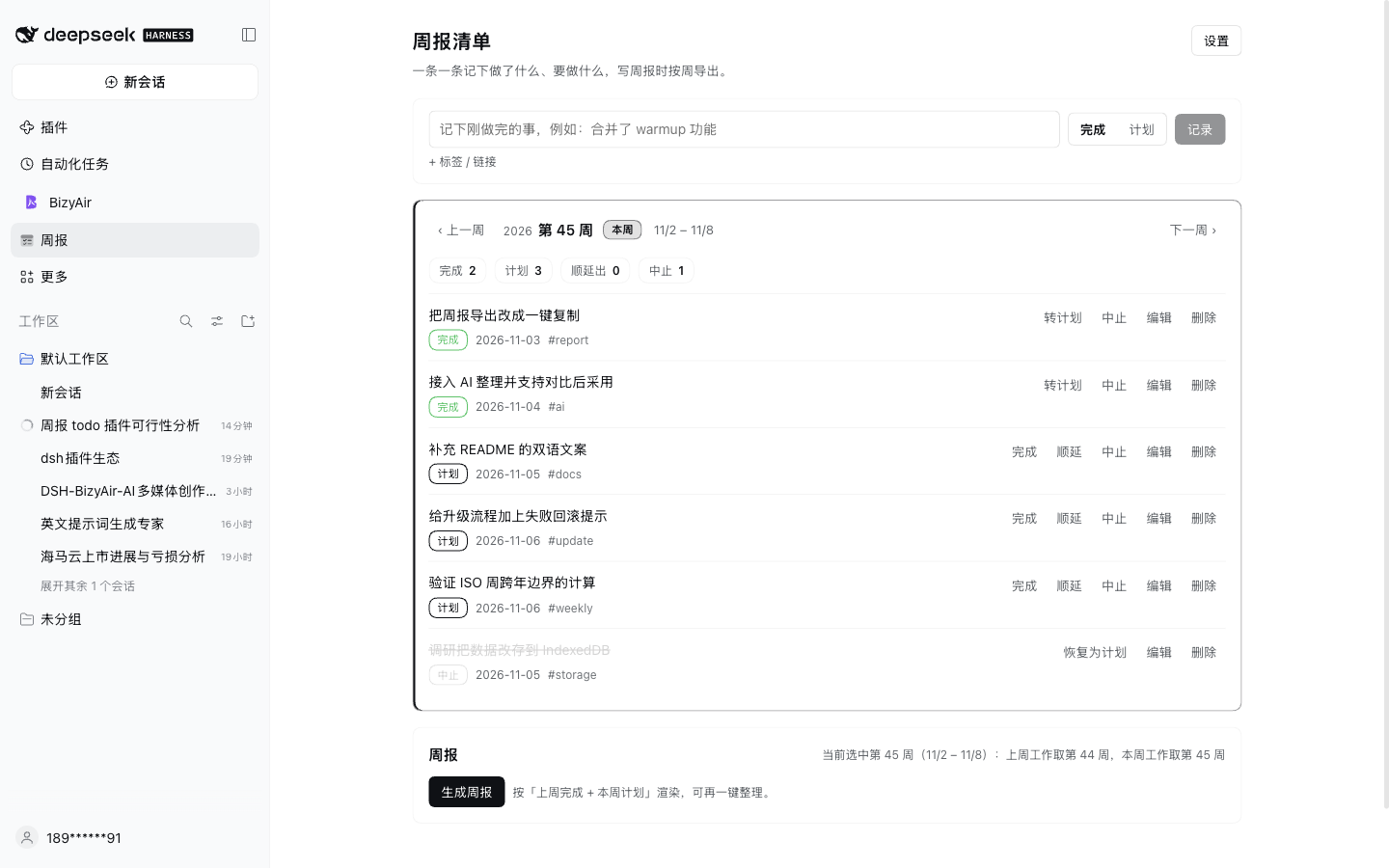
Keep a running list of work items in a panel, copy any ISO week out as a weekly report, and let the configured model tidy the wording — 2 agent tools, no API key.
Install (one command):
plugin_manager install_bundle target=dsh-weekly-log
Cost / prerequisites: no API key needed. "AI polish" calls the model already configured in Harness and is billed through that model. Entries live in ~/.dsh/weekly-report/data.json; exported reports are plain Markdown.
What it does
Log a line while you work, then stop trying to remember what you did when the report is due.
- Panel: sidebar entry, one line per item, browse any week, mark a plan as done / carried / aborted.
- Carry-forward: carrying keeps causal history — last week still shows "carried to week 46", and this week's plan holds the same item.
- Export:
last week's done+this week's planrendered into a weekly report you can edit, copy, or save as Markdown. - AI polish: one click with the configured model fixes wording, length and typos; the result is shown next to your draft, so you adopt it or drop it.
- In chat:
weekly_logandweekly_reporttools, so "log this", "what did I log this week" and "build the report" work from the conversation.
Usage
- Log: type a line, pick 完成 (done, default) or 计划 (plan), press Enter. Plans can be filed into a future week by browsing there first.
- Review: the week bar moves through weeks; the current week is marked, and "back to current week" jumps home.
- Handle plans: 完成 / 顺延 / 中止. Carry changes the item's week and leaves a trace instead of copying it; aborted items stay visible but never enter a report.
- Produce: "generate report", then "AI polish", then copy or save.
Entry model
| Field | Meaning |
|---|---|
text |
one line, e.g. "merged the warmup feature" |
state |
plan / done / aborted |
week |
owning ISO week, e.g. 2026-W45 |
day |
date of the last state change |
tag |
optional label, e.g. warmup (never used for report grouping) |
link |
optional link, appended to the line in exports |
history |
created / done / aborted / carried / moved traces |
Export rules
- Last week's work = items
donein that week. - This week's work = items currently
planfor that week, including carried-in ones. - Template:
Name:,Last week:,This week:, one-line per item. - The selected week is "this week"; its predecessor is "last week". The panel states the mapping next to the button.
Data and files
- Entries:
$DSH_HOME/weekly-report/data.json(default~/.dsh/weekly-report/data.json) — profile-level, shared across workspaces, survives restarts. The panel shows the exact path. - Exports: directory from settings, default
reports/under the current workspace, fileweekly-<ISO week>.md. - The store is a plugin-owned JSON file rather than the framework KV domain: a profile-installed plugin cannot resolve
@deepseek-ai/dsh-storage-domain, so it persists the same data as a file.
Upgrade
Settings shows the running version and a "check for updates" action. Installed from npm, a new release appears as a banner and can be upgraded in place through pluginManager.updateBundle (uninstall + install, automatic rollback on failure). Local link: installs cannot self-upgrade — the panel says so instead of failing silently.
Publishing, market index and upgrade caveats: docs/PUBLISHING.md.
Repository layout
index.js           Loader entry: cache-busted import of lib/impl.js
lib/impl.js        Host: store, ISO week math, item operations, 2 tools, POST /weekly/api
client.js          Panel: sidebar.panellist icon + main panel (key = weekly-report)
cordis.patch.yml   inserts the weekly-report row
locale/            meta title and description (en / zh)
assets/            store icon and screenshots
screenshots.json   store screenshot list
docs/PUBLISHING.md publishing, upgrade and market index
CHANGELOG.md       release notes
Development
npm run check       # node --check index.js client.js lib/impl.js
npm pack --dry-run  # inspect the published file set
The panel calls the same-origin POST /weekly/api with actions state / week / add / update / setState / carry / delete / report / write / polish / settings / checkUpdate / upgrade; the panel and the agent tools share one implementation.
Known limitations
- The panel UI is Chinese only; locale files carry both languages for the store.
- AI polish needs a configured default model; without one the panel says so and manual editing still works.
- Data does not follow workspaces and is not in git; point the export directory at a repository path if you want reports versioned.
No comments yet. Be the first to write one.