dsh-living-plan
English · 中文
A DeepSeek Harness (DSH) plugin with a host half and a web client half. Not an agent skill.
Gives every DSH session a living plan: one Markdown file that the model writes before it starts and keeps up to date while it works. Every save becomes a new version, and the current version is re-read and injected into the system prompt at every step, so the plan survives compaction, restarts and interruptions.
It fills the gap between the built-in /plan (a one-off review) and goal (a one-line target): where a long task stands now and what comes next.
- Version: 0.2.1 (CHANGELOG)
- Verified on DSH 0.2.1-rc.5 and 0.2.2-rc.1 (desktop app,
dsh web, PTC mode) - License: MIT
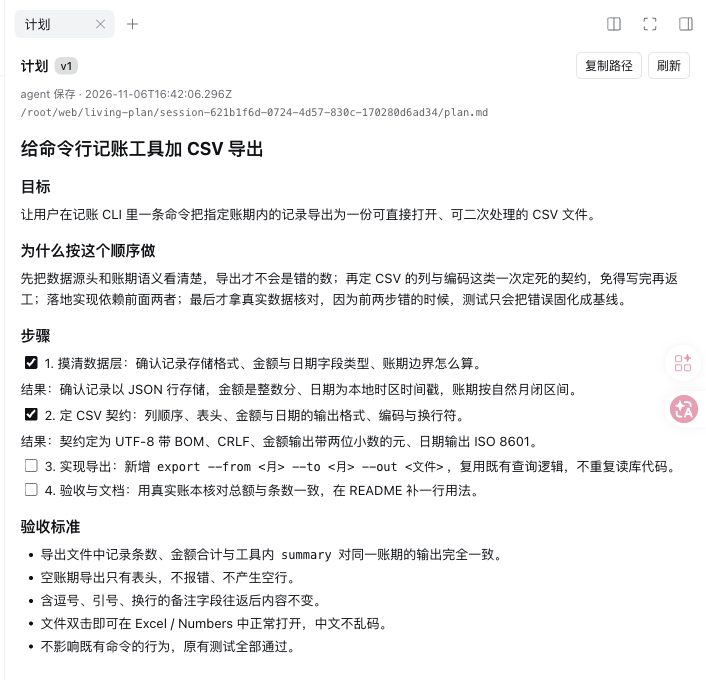
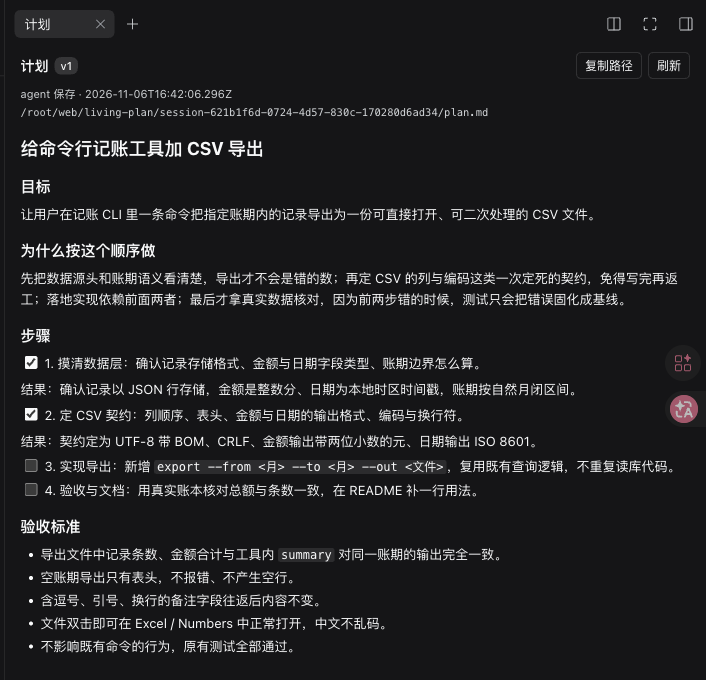
The 「计划」 (Plan) panel in the right sidebar: current version, who changed it, the file path, the rendered plan, and older versions below. Follows the app's light and dark themes. (The UI and the prompt text are in Chinese.)
Why
The built-in /plan is a review gate: once approved, the plan lives only in a tool call, has no versions, and is not re-injected into later requests. goal keeps a single sentence, not "what is done, what is next, what has been decided". After a compaction or a hand-over, the model has to guess from a summary.
dsh-living-plan keeps the plan in a fixed per-session file:
- the model sees it at every step;
- every change is a version, and old versions stay readable;
- you can edit the file yourself, and the next request picks up your edit;
- a read-only panel in the web UI shows it without hunting for the path.
What it does
- Fixed location:
$DSH_HOME/living-plan/<session-id>/plan.md, one per session, outside your workspace repository. - Injected at every step: a system prompt section reads the file fresh for each model step.
- Versions: each
plan_writeor edit by you bumps the version; old ones go tohistory/vNNNN.md. - You can edit it: editing
plan.mddirectly is a supported path; the next request treats it as a new version. - Write guard:
plan_writeis accepted only if the model has seen the current version. If the file changed in between (for example you edited it), the write is refused withPLAN_STALEand the model mustplan_readfirst, so it never overwrites your edit with a stale copy. - Subagents keep no plan by default (
includeSubagents: false).
The prompt tells the model to write a plan unprompted for anything bigger than a quick question or a small fix, to update it when the work moves, to keep results rather than a log, and not to write one for trivial turns. This is a soft contract, not a hard gate.
Install
Requirements: DSH 0.2.1-rc.5 or 0.2.2-rc.1 (others untested); quit the desktop app before installing.
dsh plugin --profile <profile> add github:doctorllll/dsh-living-plan#v0.2.1
The desktop app's desktop profile only accepts the CLI bundled with the app (a dsh on your PATH refuses with managed exclusively by the Electron application). On macOS:
"/Applications/DeepSeek Harness.app/Contents/Resources/runtime/cli/bin/dsh" \
  plugin --profile desktop add github:doctorllll/dsh-living-plan#v0.2.1
Reopen the app afterwards. The plugin applies to new sessions in that profile.
Only some profiles. The plugin is host-level: once installed in a profile, every session there gets the plan section, including sessions of custom presets. If a profile should not have it (say, a chat bot whose sessions have no plan_* tools), disable it in that profile's or home's cordis.patch.yml:
- id: living-plan
  disabled: true
Upgrade: re-run plugin add with the new tag and reopen the app. Uninstall: dsh plugin --profile <profile> remove dsh-living-plan; plan files under $DSH_HOME/living-plan/ are kept.
Configuration
Override by id in the profile's cordis.patch.yml:
- id: living-plan
  config:
    includeSubagents: false   # true = subagent sessions keep their own plans
    maxPlanBytes: 24576       # plan size limit; plan_write over it returns PLAN_LIMIT
    historyLimit: 50          # how many old versions to keep; 0 = none
    sectionOrder: 950         # where the section sits in the prompt; changing it changes the cache prefix
    home: null                # defaults to $DSH_HOME, then ~/.dsh
Tools
plan_read— returnsmarkdown,version,bytes,path,exists,truncated, and marks this version as seen.plan_write({ markdown, note? })— replaces the whole plan and creates the next version. Fails withPLAN_STALE(changed since the model saw it; read first) orPLAN_LIMIT(too large).
In PTC mode the model can only call run_code directly, so it calls them from code: await tools.plan_write({ markdown: "# Plan\n\n- [ ] first step" }). Sessions created before installing may cache the old tool declarations; open a new session.
Storage
$DSH_HOME/living-plan/<session-id>/
├── plan.md          current text
├── meta.json        version / hash / bytes / updatedAt / updatedBy
└── history/
    ├── v0001.md
    └── index.jsonl  only when plan_write passed a note
Directories are 0700 and files 0600; writes go through a temp file and rename. The session id is sanitised before it becomes a path.
Panel
The 「计划」 card in the right sidebar shows the current version, update time, whether the agent or you changed it, and the path; renders headings, task checkboxes, code, quotes and tables; refreshes every 5 seconds; lets you open any older version read-only; and has copy-path and refresh buttons. It reads the local route GET /api/living-plan?sessionId=…[&version=N], never marks a version as seen for the model, and only serves live sessions.
Sessions, forks, subagents
| Case | Plan injected | Plan file | plan_write |
|---|---|---|---|
| New session | yes | empty, created on demand | yes |
| Same session resumed | yes | continues | yes |
| Fork / branch | yes | starts empty (not inherited) | yes |
| Subagent (default) | no | none | no |
/plan still works as the official review gate; after approval, have the model save the same plan with plan_write.
Troubleshooting
| Symptom | Cause / fix |
|---|---|
profile "desktop" is managed exclusively by the Electron application |
You used the dsh on your PATH; use the app's bundled CLI |
| No 「计划」 in the right sidebar | Restart the app and open a new session |
Model says it has no plan_write |
In PTC call tools.plan_write from run_code; open a new session |
PLAN_STALE |
The file changed after the model saw it; plan_read, then write |
PLAN_LIMIT |
The plan exceeds maxPlanBytes; trim it to what a successor needs |
Panel shows session-not-live |
The session is not running; the panel only serves live sessions |
Development
npm test            # 11 unit tests on the store (no DSH needed)
node --check lib/index.js lib/client.js
| File | Content |
|---|---|
lib/core.js |
storage, versions, hashes, external-edit detection (no DSH dependency) |
lib/index.js |
host plugin: prompt section, plan_read / plan_write, HTTP route |
lib/client.js |
web client: the panel, a hand-written module-loader bundle using react / react/jsx-runtime only, no build step |
cordis.patch.yml |
bundle mount row and defaults |
Known limits
- The panel is read-only (no inline edit or diff); change the plan with
plan_writeor by editing the file. - Whole-file replacement only, within a 24 KB default limit.
- Forks start empty: DSH's fork seed does not expose the parent session id.
- Not per preset: the section goes into every session of the profile; disable the plugin where it is not wanted.
- Depends on DSH host APIs (
agent/created,agent.ctx.systemPrompt.section,ctx.tools.register,webServer.register); re-test after DSH upgrades. - Soft contract: whether the model writes a plan unprompted is its own judgement.
Feedback
Please open an issue.
License
MIT, see LICENSE.
No comments yet. Be the first to write one.