READMESource: main@1c599052
dsh-ssh
DeepSeek Harness (DSH) 插件:SSH 主机管理 + 远程 Bash 执行。
提供三种形态:
| 形态 | 位置 | 适用 |
|---|---|---|
Host 插件(dsh plugin 安装,推荐) |
index.mjs / client.js |
全局挂载,所有 session 的 agent 直接获得工具;web profile 附带 GUI 设置页面 |
| Agent 预设 | preset/ |
每个使用该预设的新 session 自动获得全部 SSH 工具与服务,重启持久 |
| 动态 Cordis 插件(会话临时) | plugin/ |
在任意会话中通过 cordis_define 粘贴加载,进程内有效 |
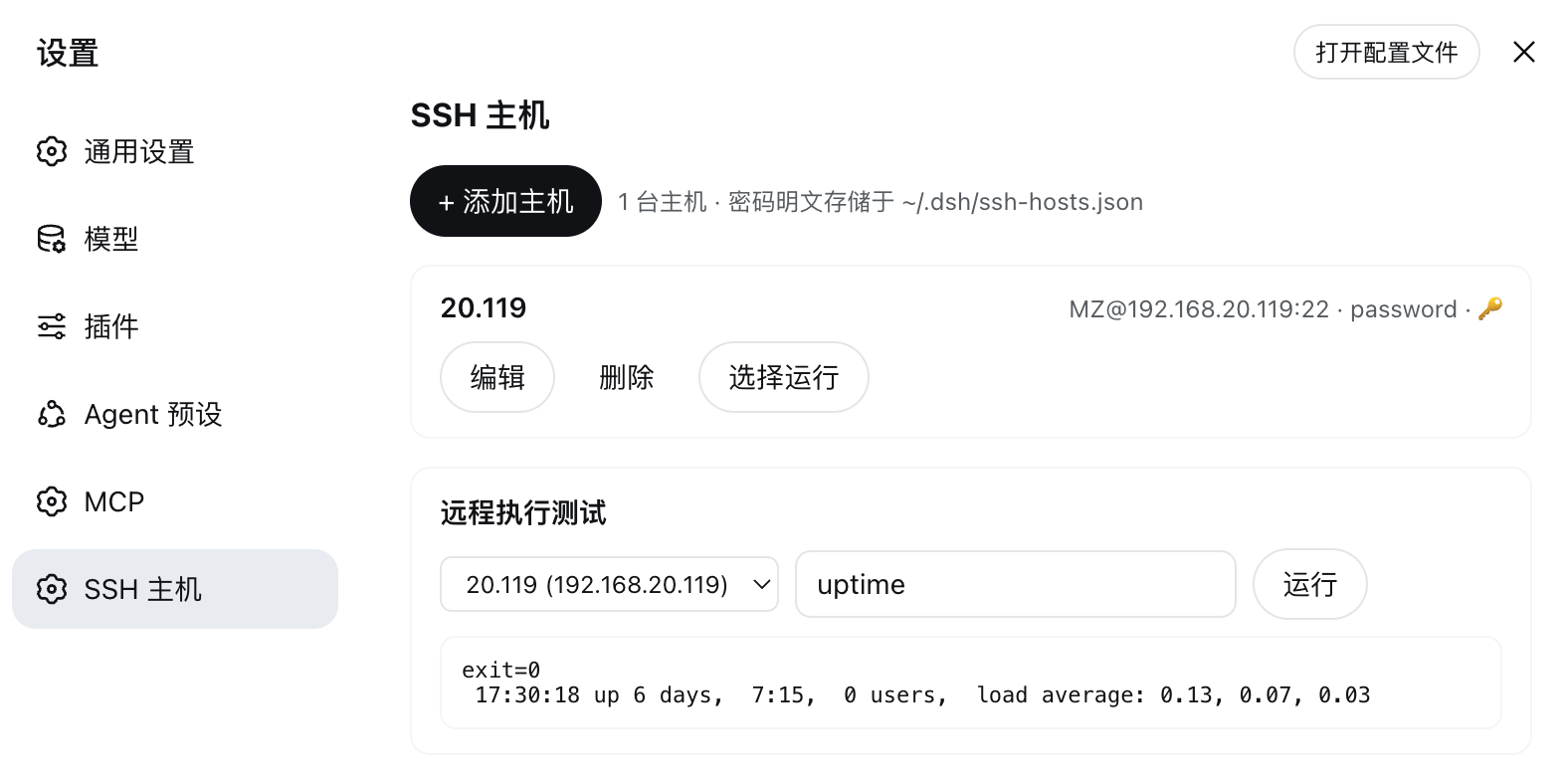
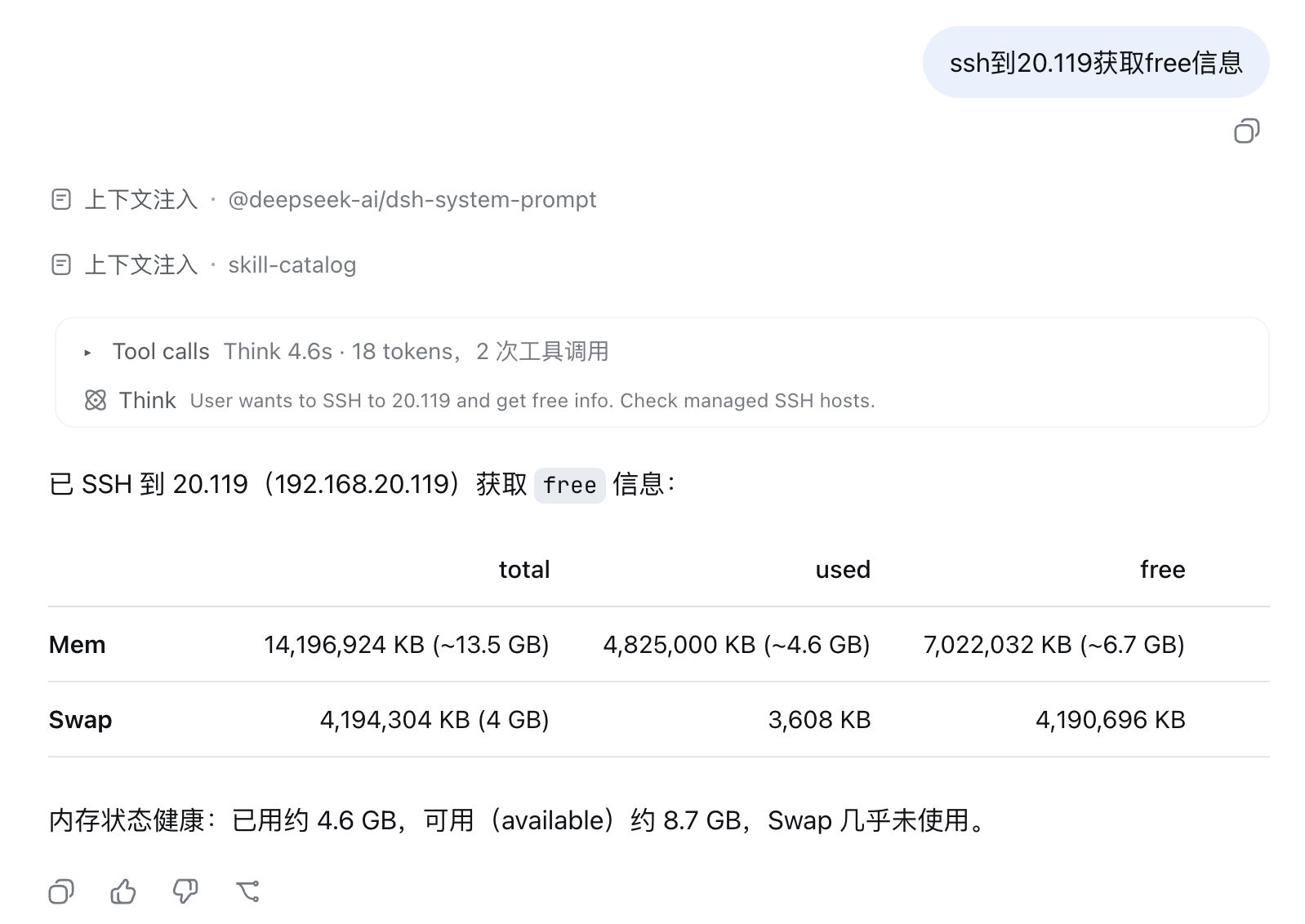
截图
Web GUI 设置页面
Agent 使用 ssh_bash
功能
- 📋 主机管理(增删改查) — 持久化到
~/.dsh/ssh-hosts.json - 🔧 模型工具:
ssh_host_list/ssh_host_add/ssh_host_update/ssh_host_remove/ssh_host_copy/ssh_bash/ssh_upload/ssh_download - 🔌 Cordis 服务
ssh.hosts(预设形态下隔离 realm,每挂载一份),其他插件可ctx.get('ssh.hosts')调用 - 🔑 三种认证:
agent(BatchMode 免交互)/key(私钥)/password(SSH_ASKPASS机制,无需 sshpass、不申请 pty,可在受限沙箱内运行) - 📦 文件传输:
ssh_upload/ssh_download(≤128MB,base64 over ssh,无需 scp,BusyBox 设备可用;父目录自动创建) - 🐚 自适应远端 Shell:默认优先
bash、无则回落sh/ash(BusyBox/嵌入式设备),可按主机或按次调用强制指定
正式安装(dsh plugin,推荐)
# 一键安装到 web profile:
dsh plugin --profile web add https://github.com/dmz2922990/dsh-ssh.git

# 重启 dsh web,所有 session(任意 preset)的 agent 直接拥有 ssh_bash 等工具,
# 设置中出现「SSH 主机」管理页面(/dsh-ssh/api 后端由同一插件提供)
插件在 package.json 中声明了 dsh.bundle,dsh plugin add 会自动将其挂载为 profile 的 bundle 层——无需手动编辑 cordis.patch.yml。
正式安装(Agent 预设)
git clone https://github.com/dmz2922990/dsh-ssh.git ~/.dsh/.agent-presets/ssh
若目录已存在,先删除旧的:
rm -rf ~/.dsh/.agent-presets/ssh
然后**新建 session 时选择 preset「SSH Agent」**即可 —— agent 直接拥有上表全部工具,主机配置自动从 ~/.dsh/ssh-hosts.json 读取(agent 无需、也不会直接读该文件)。
预设结构:
ssh/                          # ~/.dsh/.agent-presets/ssh/
├── preset.yml                # 显示名与描述
├── agent.cordis.yml          # 完整组合(standard 副本 + ssh 组行)
└── plugins/
    └── ssh.mjs               # 静态 Cordis 插件(服务 + 工具,无外部依赖)
组合中的关键行(发布 ssh.hosts 服务,须置于 isolate realm):
- id: ssh
  name: cordis:group
  group: true
  isolate:
    ssh.hosts: true
  config:
    - id: ssh-plugin
      name: ./plugins/ssh.mjs
临时安装(动态插件,单会话)
在 DSH 会话中调用 cordis_define:plugin: {"kind":"new","idPrefix":"ssh"},
code.host 粘贴 plugin/host.js、code.client 粘贴
plugin/client.js(额外附带 GUI 设置页面),再 cordis_run 激活。
远程执行原理
ssh -o StrictHostKeyChecking=accept-new -o ConnectTimeout=15 [-i key] [-p port] user@host -- bash -s
脚本经 stdin 传给远端 bash -s;密码认证走 SSH_ASKPASS + SSH_ASKPASS_REQUIRE=force
(辅助脚本 ~/.dsh/.ssh-askpass.sh,权限 700,仅回显环境变量中的密码)。
ssh.hosts 服务 API
const ssh = ctx.get('ssh.hosts')
await ssh.list()                        // 所有主机(不含密码明文)
await ssh.get(ref)                      // ref: id | name | user@host | host
await ssh.add({ id, host, port, user, name, note, auth: { type, keyPath, password }, tags })
await ssh.update(id, patch)             // 部分字段更新;auth 留空字段保持原值
await ssh.remove(id)
await ssh.bash(ref, command, timeoutMs) // { ok, exitCode, stdout, stderr, timedOut, ... }
await ssh.upload(ref, localPath, remotePath)    // { ok, bytes, ... } ≤128MB
await ssh.download(ref, remotePath, localPath)  // { ok, bytes, ... } ≤128MB
await ssh.copy(ref, { id, host, name })         // 克隆主机配置(含认证)
安全提示
- 密码以明文存储于
~/.dsh/ssh-hosts.json,建议优先使用密钥认证 ssh_host_list等返回值不含密码,只有hasPassword布尔值
No comments yet. Be the first to write one.