dsh-client-ui-obsidian-memory
🧠 Obsidian Memory for DeepSeek Harness — persistent memory via local Markdown vault
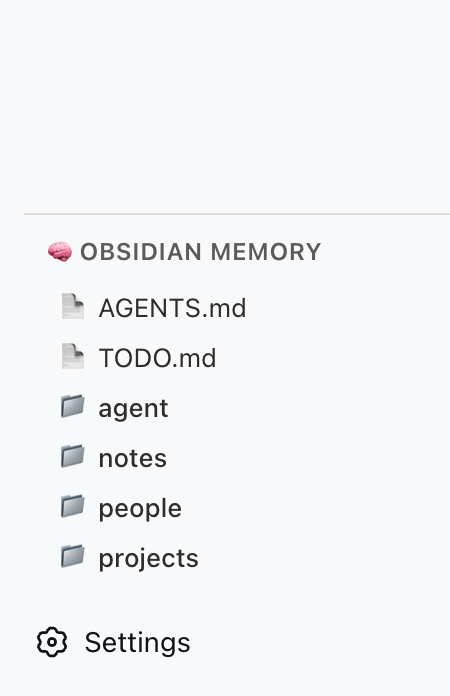
A DSH plugin that gives your AI agent persistent memory backed by a local Obsidian (or plain Markdown) vault. It registers 5 file-system tools (obsidian_memory_*) and renders a sidebar panel showing vault status and tool reference.
Inspired by @Saccc_c's Codex memory techniques.
What it does
- 5 memory tools — AI can read, list, search, write, and append to your local vault
- Sidebar panel — renders inside the
sidebar.obsidian-memoryslot in DSH's left column - No external server — talks directly to the file system via DSH's host runtime
- Codex-compatible — works with the
Codex/directory structure recommended by the community
Available Tools
| Tool | Action |
|---|---|
obsidian_memory_read |
Read a Markdown or text file |
obsidian_memory_list |
List files and directories |
obsidian_memory_search |
Full-text search across .md and .txt files |
obsidian_memory_write |
Write or overwrite a file |
obsidian_memory_append |
Append content to the end of a file |
Quick Start
1. Prepare your vault
Create a Codex/ folder anywhere on your machine (e.g. inside an Obsidian vault):
~/Documents/Obsidian Vault/
└── Codex/
    ├── AGENTS.md      ← AI operating instructions
    ├── TODO.md        ← pending tasks / open loops
    ├── people/
    ├── projects/
    ├── notes/
    └── daily/
2. Install the plugin
cd ~/.dsh/profiles/web        # or your DSH profile directory
npm install dsh-client-ui-obsidian-memory
If you installed DSH from source and don't use profiles, install into the DSH workspace root instead.
3. Add to cordis.patch.yml
Edit your profile's cordis.patch.yml (or cordis.yml):
- insert:
    - id: ui-obsidian-memory
      name: dsh-client-ui-obsidian-memory
      config:
        vaultPath: /Users/YOURNAME/Documents/Obsidian Vault/Codex
Replace vaultPath with the absolute path to your Codex/ folder.
Note:
insert(not justid+config) is required so DSH loads the host-side tool plugin. If you only addid: ui-obsidian-memorywithconfig, the sidebar UI may load but the tools will not be registered.
4. Restart DSH
dsh web # or however you launch DSH
After restart:
- The sidebar panel appears in the left column (🧠 Obsidian Memory)
- The 5 tools are available to the AI when
vaultPathis configured
Configuration
| Option | Type | Default | Description |
|---|---|---|---|
vaultPath |
string |
— | Absolute path to your Codex/ vault directory |
Environment variable fallback (optional):
export OBSIDIAN_VAULT_PATH=/Users/YOURNAME/Documents/Obsidian Vault/Codex
If neither vaultPath in config nor the env var is set, the plugin logs a warning and skips tool registration.
Architecture
┌─────────────────────────────────────────┐
│ DSH Web (browser)                       │
│  ┌─────────────────────────────────┐    │
│  │ sidebar.obsidian-memory          │    │
│  │  ┌─────────────────────────┐    │    │
│  │  │ 🧠 Obsidian Memory      │    │    │
│  │  │  — tool reference       │    │    │
│  │  │  — vault structure      │    │    │
│  │  └─────────────────────────┘    │    │
│  └─────────────────────────────────┘    │
└─────────────────────────────────────────┘
                    │
┌───────────────────▼─────────────────────┐
│ DSH Host (Node.js)                      │
│  • reads / writes local files           │
│  • registers 5 obsidian_memory_* tools  │
└─────────────────────────────────────────┘
                    │
┌───────────────────▼─────────────────────┐
│ Local File System                       │
│  ~/Documents/Obsidian Vault/Codex/      │
└─────────────────────────────────────────┘
| Component | Role |
|---|---|
Host (lib/index.js) |
Node side: registers tools, reads/writes vault files |
Client (lib/client.js) |
Browser side: sidebar panel with static tool reference |
| Vault | Data source: local Markdown files |
Troubleshooting
| Symptom | Cause | Fix |
|---|---|---|
| Plugin not in Settings → Plugins | insert missing in cordis.patch.yml |
Add the insert block (see Quick Start step 3) |
| Tools not available to AI | vaultPath not configured |
Set vaultPath in cordis.patch.yml or env var |
| Sidebar panel not visible | DSH version lacks sidebar.obsidian-memory slot |
Upgrade DSH to ≥ 0.1.0-rc.5 |
| "Path traversal detected" error | AI tried to access files outside vault | All paths are sandboxed to vaultPath |
Development
git clone https://github.com/detongz/dsh-client-ui-obsidian-memory.git
cd dsh-client-ui-obsidian-memory/plugin
npm install
npm run build        # outputs lib/index.js + lib/client.js
npm run watch        # dev mode with auto-rebuild
Build artifacts:
lib/index.js— host entry (tool registration + file I/O)lib/client.js— browser bundle (DSH closure-factory format, CSS inlined)
License
MIT
No comments yet. Be the first to write one.