dsh-workspace
Unofficial — an independent community project, not affiliated with or endorsed by DeepSeek.



English · 中文
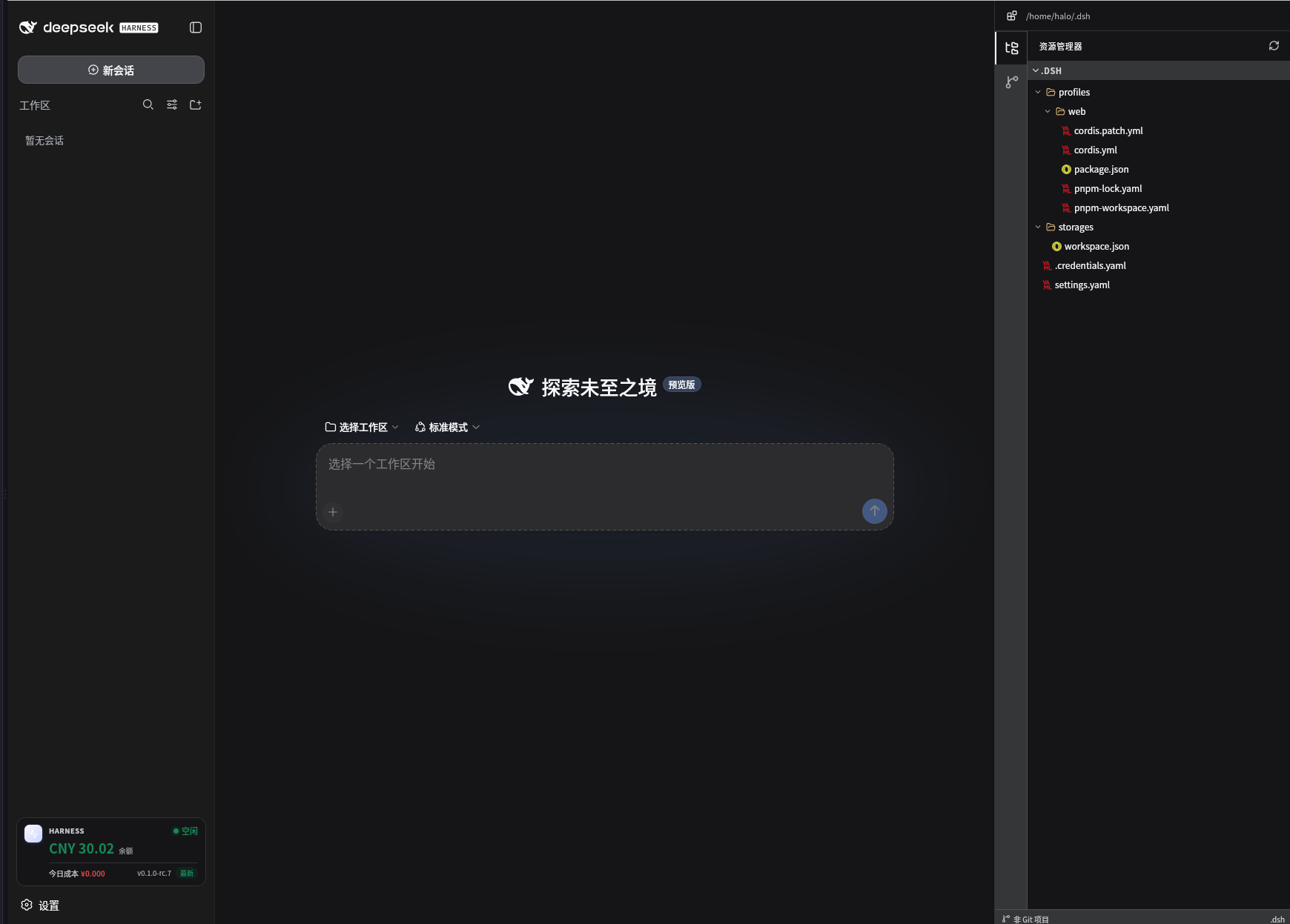
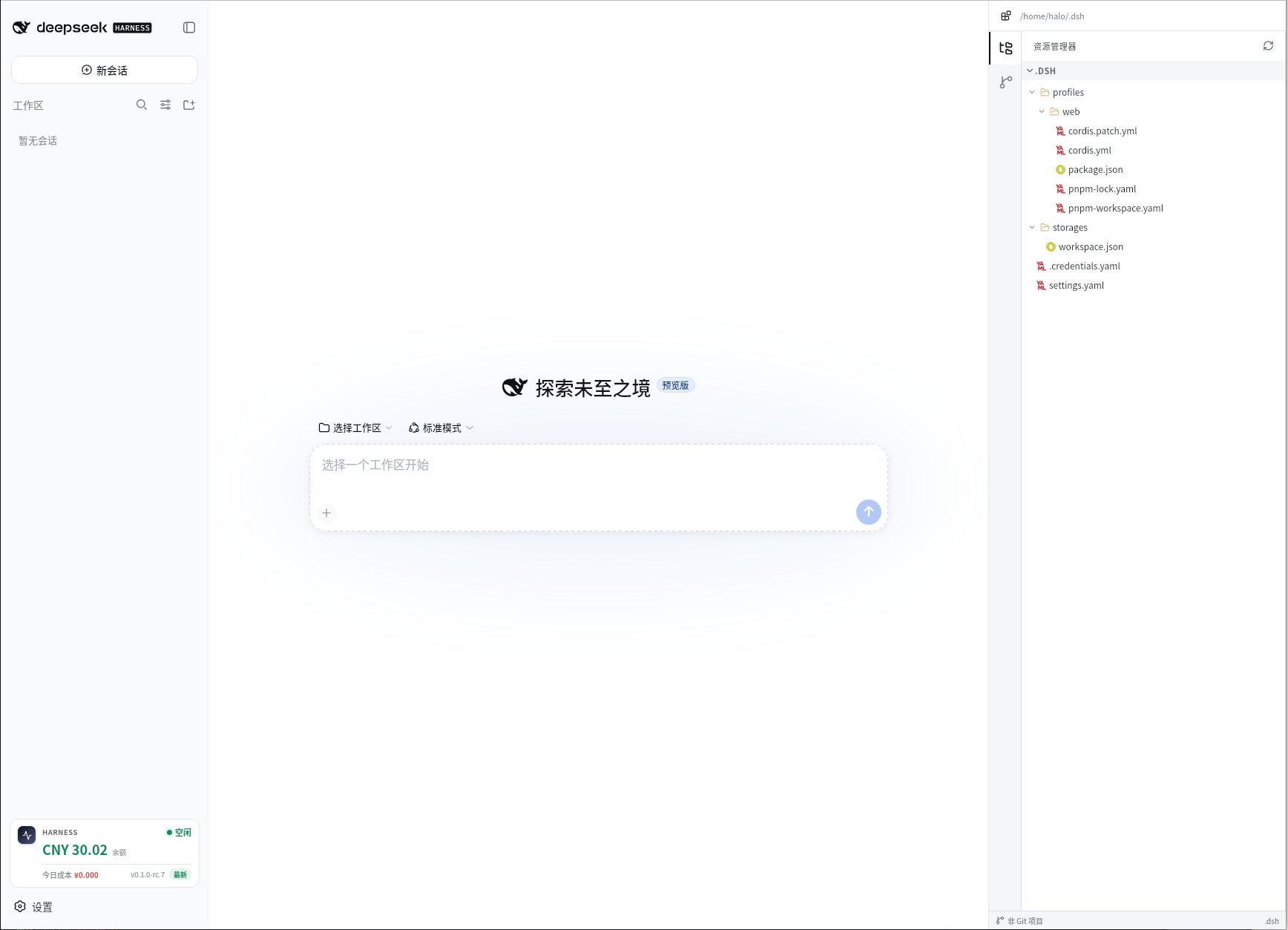
A drop-in UI enhancement for DeepSeek Harness (DSH): keep an eye on your balance and today's cost, browse and edit-worthy project files, review Git changes & history, open a terminal, and update Harness in one click — all from the sidebar, no extra config.
Features · Screenshots · Install · Configuration · FAQ · Known limitations · License
Screenshots
Features
Usage at a glance
- Live balance, today's cost, and idle/peak status in the bottom-left of Harness
- Balance is green normally and turns red at 10 CNY or below; idle shows green, peak shows red
- Auto-refreshes every 30s and re-fetches the moment you switch back to the tab
- Today's cost uses the official DeepSeek bill first, falling back to a local token estimate when the platform API is unavailable
Harness updates, one click away
- Shows the installed Harness version, and turns red with a prominent "new version" notice when an upgrade is available
- Hit Update to install the latest version; Harness restarts automatically with a breathing-logo transition screen and the page recovers on its own — no white screen, no manual steps
Project workspace panel
- A right-side panel previews the current session's project: file tree with type-aware icons, Git working-tree changes, per-file diff, and commit history
- Read-only and strictly confined to
projectRoot; path traversal and out-of-root symlinks are rejected - Skips
.git,node_modules,dist,lib,coverage,.next,.cache - Built-in terminal for quick command execution in the project
Privacy by default
- All endpoints are loopback-only unless you opt in with
allowRemote: true - API keys are resolved through Harness
ctx.credentialsand never exposed to the browser
Install
Requirements
- DeepSeek Harness installed and
dsh webrunning - Node.js >= 22 when installing from the repository
One-line install
dsh plugin --profile web add "github:deepseek-dsh/dsh-workspace#dev"
Restart dsh web after installation.
Verify & remove
dsh web --dump-config | grep dsh-workspace    # confirm the plugin layer is mounted
dsh plugin --profile web remove dsh-workspace # remove, then restart dsh web
Configuration
The plugin works with zero configuration. The following options can be set in the profile's config file when needed:
| Option | Default | Description |
|---|---|---|
baseUrl |
https://api.deepseek.com |
DeepSeek API base URL |
apiKeyEnv |
DEEPSEEK_API_KEY |
Env name of the API key resolved via ctx.credentials |
projectRoot |
— | Absolute project root to preview; defaults to the session working directory |
peakWindows |
[[540, 720], [840, 1080]] |
Peak billing windows in minutes (Beijing time) |
allowRemote |
false |
Allow non-loopback access to the plugin endpoints |
Troubleshooting
| Symptom | Cause | Fix |
|---|---|---|
| No sidebar entry after install | Bundle plugins need a process restart | Restart dsh web, then check dsh web --dump-config | grep dsh-workspace |
[WARN] Issues with peer dependencies found |
Peer deps (@deepseek-ai/*, react) are provided by the profile |
Harmless warning, ignore |
ERR_PNPM_IGNORED_BUILDS |
pnpm rejects the node-pty native build script |
Add node-pty to allowBuilds in the profile pnpm-workspace.yaml and reinstall |
Cannot find package '...' |
Dependencies not hoisted under a strict pnpm layout | Set nodeLinker: hoisted in the profile pnpm-workspace.yaml and reinstall |
| Today's cost always shows the estimate | Authentication failed on platform.deepseek.com | Make sure the key behind apiKeyEnv is valid there; the plugin falls back to the estimate automatically |
FAQ
Installed and restarted, but there is still no sidebar entry?
A: Make sure it is installed into the web profile (command uses --profile web) and confirm the plugin layer is mounted with dsh web --dump-config | grep dsh-workspace. Refreshing the page is not enough; restart the dsh web process.
Today's cost does not match the official bill?
A: The cost is taken from the official platform bill first, so it shows real spending; when the platform API fails authentication it falls back to a local token estimate, which is approximate and not a bill. The source is labeled next to the amount.
Why is the balance red?
A: The balance turns red when it drops to 10 (CNY) or below as a low-balance reminder; it is display only and does not affect API calls.
Does "Update" really upgrade Harness?
A: Yes. It installs the latest published Harness version via npm, then restarts the process automatically; the page recovers itself. A full update takes about a minute.
Can I access it from my phone or another device?
A: Project data is loopback-only by default; other browsers get a 403. If you really need it, set allowRemote: true and make sure the access is secured.
Does the idle/peak label affect billing?
A: The label mirrors DeepSeek's actual peak/off-peak tariff (peak 9:00–12:00 and 14:00–18:00 Beijing time, off-peak at half price). The local estimate prices tokens at the current period, so it already accounts for peak vs off-peak. The official bill always takes precedence.
Known limitations
- Today's cost prefers the official bill and falls back to a local estimate; the estimate is not an account bill
- The project API is read-only and loopback-only by default; no write operations
- The idle/peak label mirrors DeepSeek's peak/off-peak billing windows (peak 9:00–12:00, 14:00–18:00 Beijing time); the local estimate prices at the current period
- Depends on the
node-ptynative module; see Troubleshooting if platform builds fail
License
MIT
No comments yet. Be the first to write one.