Ditto
Review a few. Ditto the rest.
A review-first batch automation plugin for DeepSeek Harness (DSH).



AI is great at doing one file. Ditto is for doing the same thing to 30 files without babysitting all 30.
You describe the batch job the way you always would. Ditto picks a few representative samples, lets you review and edit them until they look right, then applies the same standard to everything else — after showing you the full preview and asking for approval. Nothing is written until you say so.
Code → Spec: discover → review 3 samples → approve → preview everything → apply
Files:       preview every proposed copy and deliverable → revise → approve → apply
Installation
Ditto is a native DSH plugin. One command installs it into a DSH profile:
dsh plugin --profile web add dsh-ditto
dsh plugin forwards to pnpm inside the profile directory, so pnpm must be on your PATH. Use --profile headless, --profile acp, or any custom profile name instead of web as needed.
| Update | dsh plugin --profile web update dsh-ditto |
| Remove | dsh plugin --profile web remove dsh-ditto |
| Verify | dsh plugin --profile web exec dsh-ditto doctor |
The doctor prints plain-language checks:
✓ Ditto 0.3.0
✓ Node.js 22.23.1
✓ dsh 0.1.5-rc.1 detected
✓ pnpm 11.22.0 detected (used by "dsh plugin")
✓ dsh-ditto is installed in profile "web" and listed in its bundles
✓ 17 of 17 tools registered
✓ skill "ditto" registered
✓ stateRoot /your/project/.dsh-ditto is writable
✓ allowedSourceRoots /your/project
✓ allowedDestinationRoots /your/project
✓ approvalUnavailable deny
Requirements: Node.js 22 or later, DSH 0.1.5-rc.1 or later (see Compatibility). If the host packages are not resolvable yet, boot the profile once (dsh web) so DSH links them, then run the doctor again.
Quick start
Start DSH from the repository you want to work on and ask for batch work in plain language:
Write a consistent Markdown spec for every module in
src/. Show me three samples first.
You do not have to say "Ditto" or learn any tool names. When a request covers a whole folder, many similar modules, a repeated transformation, or a batch write that deserves a review, the DSH agent routes it through the ditto skill. Single-file edits and ordinary questions never trigger it.
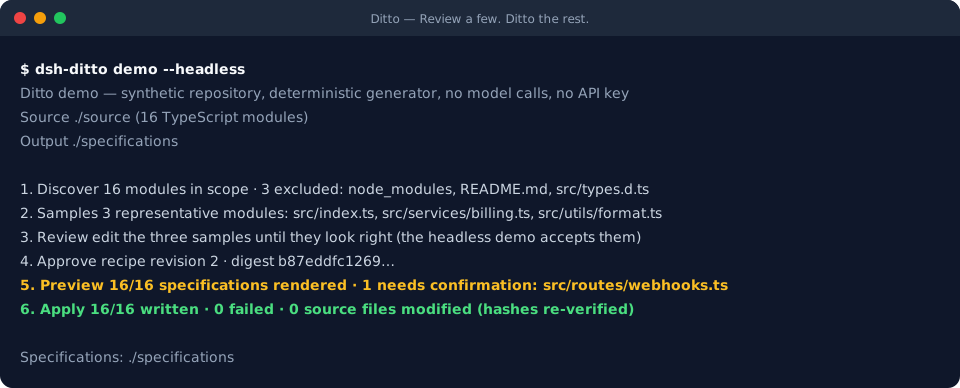
Want to see the workflow before installing anything? The demo needs no model and no API key:
npx dsh-ditto demo --headless   # terminal transcript, 16 synthetic modules
npx dsh-ditto demo              # the same batch in a local browser review page
Example: Code → Spec
Ditto's first use case is turning a TypeScript/JavaScript or Java codebase into consistent, evidence-backed Markdown specifications.
- Discover. Ditto scans the folder (skipping
node_modules, build output, tests, declaration files) and reports exactly what is in scope and what was excluded, and why. - Review three samples. It picks three structurally different modules — the richest exporter, the module with the most imports, the smallest — and the agent drafts a spec for each from real, line-numbered source evidence. You edit the Markdown until it reads the way you want.
- Approve. Your approved samples become the standard for the rest of the batch.
- Preview everything. Every remaining module gets a spec in the same style. Every factual line cites the source lines it came from; anything the source cannot support is collected under Needs confirmation instead of being stated as fact.
- Apply. After you approve the full preview, Ditto writes the Markdown files into a separate output folder — never into your source tree, never over an existing file.
A written spec looks like this:
# src/routes/webhooks.ts [ev_670d8499c08cf407cc283778]

- Source: `src/routes/webhooks.ts`

## Purpose
- Provides `registerWebhookRoutes`. [ev_670d8499c08cf407cc283778]

## Public API
- **function registerWebhookRoutes**(router, handlers): … [ev_670d8499c08cf407cc283778]

## Needs confirmation
- Needs confirmation: Which event names does the webhook dispatcher accept at runtime? …

## Evidence
- ev_670d8499c08cf407cc283778: `src/routes/webhooks.ts:1-13`
Example: File organisation and delivery
The file workflow previews every proposed copy and deliverable before it writes anything:
The PDFs in
C:\Users\me\Desktop\ftp-backupare namedCODE_description.pdf. Copy them toD:\shared\PRO\PRO_FILES\CODE\CODE.pdf, show every exception, and include a CSV mapping, SHA-256 list, SQL Server INSERT file, and ZIP.
A profile owner first authorises those external source and destination roots. Relative tool paths never use that authority: they remain anchored to workspaceRoot, and Code → Spec remains workspace-only.
Recipe v2 can match an anchored RE2 expression such as ^(?<code>[^_]+)_.*\.pdf$, substitute {match.code} into safe nested destinations, and keep non-matches, unsafe captures, invalid names, and collisions as visible per-item exceptions. ditto_revise_rule changes the rule once and regenerates the whole plan; ditto_revise remains for deliberate one-off corrections.
Before approval, ditto_manifest can export the complete mapping as CSV, JSON, or Markdown, and ditto_artifact_review exposes the exact reviewed bytes of each sidecar. Supported sidecars are manifests, checksums, and safe SQL INSERT ... VALUES text with validated identifiers and escaped literals. Ditto never connects to a database or executes SQL. An optional deterministic, streamed store-only ZIP is built only from the reviewed output allowlist, never by walking the destination folder. Classic-ZIP limits are enforced explicitly (at most 65,535 entries and less than 4 GiB); archive crash recovery adopts only the exact hash covered by a durable write intent.
Apply creates copies and reviewed deliverables in the new folder. Originals are never moved or modified; existing files are never overwritten; a saved declarative recipe can be reused on the next batch.
How it works
User
 ↓  "specs for every module, show me a few first"
DSH agent
 ↓  routes through the `ditto` skill
Ditto native tools (ditto_spec_create, …_module, …_submit, …_approve, …_apply, …)
 ↓  bounded evidence in, validated JSON drafts out
Deterministic core
 ↓  discovery · evidence ids · citation validation · rendering · hashes · digests
Preview → Human approval → Apply
- The agent does the thinking; Ditto does the bookkeeping. Ditto never calls a model itself and never stores model API keys. It hands the DSH agent bounded, line-numbered evidence and accepts only structured drafts whose every claim cites that evidence.
- The batch is durable. Every plan and batch is saved with a revision and a digest. Editing a sample, instructions, naming rule, sidecar, or archive changes the reviewed identity. An interrupted copy records durable intent and may adopt only the exact reviewed hash on resume; completed items are never redone or overwritten.
- The skill is the routing layer, not the product.
skills/ditto/SKILL.mdis a plain file you can read; the plugin registers exactly that file. The full tool reference is generated from the live schemas indocs/TOOLS.md.
Why Ditto
Prompt-only batch work tends to drift, miss files, format inconsistently, invent details, write too early, and lose its place when a session is interrupted. Ditto gives you:
- Representative samples to calibrate on, instead of re-explaining the format 30 times
- Human review of those samples, with your edits carried into the rest of the batch
- A full preview of every item before anything is written
- Source evidence on every claim, and exceptions collected in one place
- Explicit approval as a hard gate, not a suggestion
- Safe apply: copies and new files only, hashes re-checked, no overwrites
- Resume after interruption without duplicate work
Ditto does not make a model smarter and cannot guarantee that a spec is semantically correct. It makes the batch reviewable, consistent, and safe to apply.
Safety by design
Your source stays untouched. Nothing is batch-written before approval. Ditto does not execute your source code. Ditto does not store your model API keys.
Every guarantee below is enforced by code and covered by an automated test; the mapping is in docs/SAFETY.md.
- Preview performs zero writes to sources or outputs; only local review metadata is saved
- Source files are read as text and never executed, imported, modified, moved, or deleted
- Outputs go to a separate folder; an existing destination, sidecar, or archive is never overwritten
- Every apply re-checks source hashes and the exact plan revision/digest; a changed source or stale review is rejected
- Path traversal, symlink/junction escapes, duplicate, case-insensitive, ancestor/descendant, and artifact collisions are rejected
- File organisation can use external roots only when the profile owner authorises each source/destination role; Code → Spec and state stay inside
workspaceRoot - Sidecar SQL is deterministic text with validated identifiers and escaped literals; Ditto never connects to a database or executes it
- A completed item is never re-run or overwritten on resume; only a previously recorded intent may adopt an exact-hash crash remnant
- Claims the source cannot support become Needs confirmation questions, not facts
- With
approval: host, onlyallowed-onceproceeds. Rejection and cancellation always deny; a missing approval service/agent identity or hostunavailabledenies by default. Conversational fallback requires the profile owner to setapprovalUnavailable: agentand is not proof of human approval - No telemetry, no network access beyond DSH itself, no API key storage
Plugin architecture
Ditto is a DSH plugin, not a Markdown skill. The package contains:
| Layer | What it is |
|---|---|
| Cordis service | dsh-ditto/dsh — one service that registers the skill and the tools on the host's public skills and tools services; unloading the bundle removes everything |
| Skill | skills/ditto/SKILL.md — the routing layer the agent reads (model- and user-invocable) |
| Native tools | 17 typed tools: 9 for Code → Spec, 8 for file organisation (reference) |
| Deterministic core | discovery, RE2 matching, safe path rendering, evidence/citation validation, sidecar and ZIP rendering, hashing, revision/digest gates, durable state |
| Local review page | an optional loopback-only browser page used by the demo and dsh-ditto serve |
Ditto depends only on public DSH APIs (@deepseek-ai/cordis, @deepseek-ai/dsh-tools, @deepseek-ai/dsh-skill) and patches nothing in DSH. Recipe v2 uses re2-wasm for linear-time matching. Configuration (workspaceRoot, stateRoot, file-only external allowlists, approval policy, paging limits) is set from the profile's cordis.patch.yml; see docs/ARCHITECTURE.md.
Compatibility
| Ditto | DSH | Node.js | Status |
|---|---|---|---|
| 0.2.0 | 0.1.5-rc.1, 0.1.5-rc.2 | 22, 24 | release candidate — build, test, component, tarball, and real isolated-profile install/boot/doctor gates all pass |
| 0.2.0 | 0.1.6-alpha.1 | 22, 24 | canary — non-blocking CI |
| 0.1.0 | 0.1.5-rc.1, 0.1.5-rc.2 | 22, 24 | supported historical release |
DSH is moving fast; see docs/COMPATIBILITY.md for what exactly is tested and how to report a breaking change.
Development
git clone https://github.com/darrien1998/dsh-ditto.git
cd dsh-ditto
npm ci
npm run build
npm test                 # unit, core safety, UI, plugin contract, CLI
npm run smoke:dsh        # real Cordis + ToolRuntime + SkillRegistry component host
npm run smoke:tarball    # pack, clean-install, mount, run the installed CLI
npm run smoke:profile    # real `dsh plugin add` into an isolated DSH_HOME (needs dsh + pnpm)
More in docs/DEVELOPMENT.md.
Contributing
Issues and pull requests are welcome — see CONTRIBUTING.md. Good places to start: a language adapter for Python, C#, or Go (the seam is small and documented), custom spec templates, better sample selection, UI localisation, and documentation examples. Look for the good first issue and help wanted labels.
Roadmap
See docs/ROADMAP.md. In short: keep Ditto small, understandable, safe, DSH-native, and review-first. No background watchers, no scheduled runs, no unattended batch writes.
No comments yet. Be the first to write one.