Whale-chan · DeepSeek 娘 mascot for DeepSeek Harness 🐋


Provenance — this is not the original plugin. This repository is a standalone, heavily extended derivative of yefeng7531/dsh-whale-maid-mascot by yefeng7531 (MIT, with a contribution by Amakurai). It is not a GitHub "fork" of that repository, but it starts from its source and keeps its MIT copyright notice. See NOTICE for the full provenance and CHANGELOG.md for everything that changed. Upstream remains the original work: install that repository if you want the unmodified plugin.
An in-page companion for the DeepSeek Harness (DSH) web UI — not a separate desktop window. She lives in the bottom-right corner of the page: you can drag her around, pat her head, talk to her, and she reacts to what you build.
The upstream plugin provides the base in-page pet (dragging, tap zones, affection, speech bubbles, outfit switching). This repository rebuilds and extends it with AI chat, a workspace panel, mood poses, notifications and a much larger test suite. See provenance and credits.
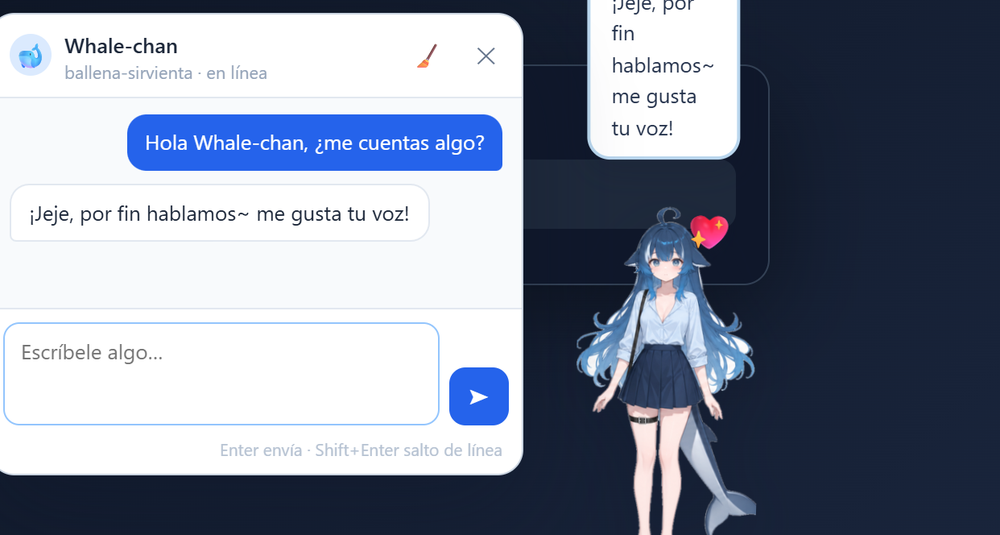
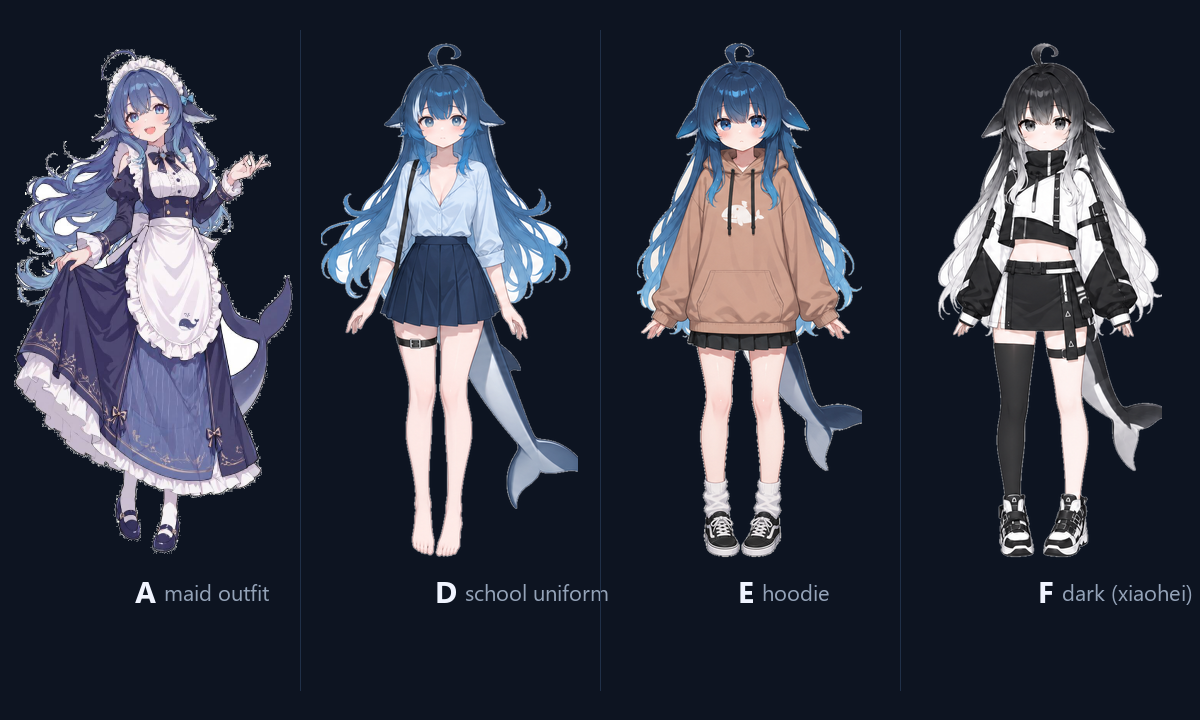
| Four outfits | Mood poses |
|---|---|
 |
Front / side / back poses swap automatically with her mood (see assets/poses/) |
Features
Companion
- Idle float animation, drag with tilt + inertia, and a landing bounce; position, outfit, visibility and affection are stored in
localStorage. - Collapse with ✕; restore with the small 🐋 button.
- Four non-chibi outfits cycle from the top-left button: A maid, D school uniform, E hoodie, F dark. Clicking her body no longer changes the outfit.
- Head pats, chest pokes, leg/skirt taps and 10 rapid clicks each trigger their own reactions (blush, 💢, anger, tsundere lines).
- Affection system: head +1, chest +3, legs +2, skirt +1, with levels at 0/10/30/60/100 and progressively warmer bubble lines.
💬 Chat with Whale-chan
- Open with the 💬 button (or right-click → Hablar con Whale-chan). The panel is draggable and remembers its position.
- She answers in 1–3 sentences with her sweet, slightly tsundere personality and remembers the last 10 turns; Enter sends, Shift+Enter adds a newline.
- Replies use your DSH model through the host's LLM service: the API key never reaches the browser. A stable routing session id is sent when the provider requires one.
- If the model is unavailable (no quota, offline, provider error) she falls back to built-in in-character lines — the chat never goes silent.
👀 Mis trabajos (workspace panel)
- Opens with 👀 (or right-click → Mis trabajos): the current session workspace is summarised as projects, recent files and deliverables (images, PDF, documents, slides, sheets, archives, audio, video) with size and age.
- Built-in preview: images, PDFs in an iframe, and text/code up to 200 KB; Office formats show metadata and point you to open them from the workspace.
- She comments on new or updated deliverables every ~20 s (at most once a minute) and gets a workspace summary when you chat with her.
- Privacy: the browser tells the host which folder to scan; only folders inside your home directory are accepted and paths containing
..are rejected with 403.
Right-click menu
- Archive the current chat (double confirmation), start a new session, and browse archived sessions.
- Explain a term: select page text → floating button → the answer opens in a separate side panel using a hidden session, so your current conversation is untouched. Deleting the current session deletes its explain sessions too; the 🗑 button clears them.
- Prompt presets, system notifications, random idle skits, and dragging a workspace session onto the pet to archive or delete it (both double-confirmed).
Install
Option A — npm package (recommended)
The plugin is published on npm: dsh-whale-maid-mascot.
In DSH's plugin installation dialog, enter:
dsh-whale-maid-mascot
To pin this release, use dsh-whale-maid-mascot@1.1.0. Wait for the install to finish, fully restart DSH (closing the window may not quit the app), and look at the bottom-right corner of the web UI. The menu name depends on your DSH version (usually Settings → Plugins).
Option B — directly from GitHub
In DSH's plugin installation dialog, enter this spec and confirm:
github:dariodemh/dsh-whale-maid-mascot#v1.1.0
Option C — local clone (development / manual install)
This is the path tested on Windows with DSH Desktop 0.2.1-rc.5. Your DSH profile lives in %USERPROFILE%\.dsh (or $DSH_HOME); this example uses the default profile name desktop.
Clone or copy the repository somewhere without spaces in the path (the old
dsh plugin addparser breaks on spaces):git clone https://github.com/dariodemh/dsh-whale-maid-mascot.git C:\dsh-whale-maid-mascotCopy it into your DSH plugins folder, without dev-only folders:
robocopy C:\dsh-whale-maid-mascot "$env:USERPROFILE\.dsh\plugins\dsh-whale-maid-mascot" /E /XD shots test .git /NFL /NDL /NJH /NJSBack up and edit
%USERPROFILE%\.dsh\profiles\desktop\package.jsonto add the dependency and the bundle entry:{ "dependencies": { "dsh-whale-maid-mascot": "file:../../plugins/dsh-whale-maid-mascot" }, "dsh": { "profile": { "bundles": ["dsh-whale-maid-mascot"] } } }(Keep your existing dependencies and bundles; this snippet only shows the two additions.)
Link it with DSH's bundled pnpm, then restart DSH:
$dsh = Join-Path $env:USERPROFILE '.dsh'
& "$dsh\dsh-runtimes\dsh-primary-runtime\dependencies\node\bin\node.exe" `
  "$dsh\dsh-runtimes\dsh-primary-runtime\dependencies\pnpm\bin\pnpm.mjs" `
  install --dir "$dsh\profiles\desktop" --no-frozen-lockfile
On macOS/Linux the runtime layout is the same (
~/.dsh/dsh-runtimes/dsh-primary-runtime/dependencies/{node,pnpm}); use your profile'spnpm install --no-frozen-lockfileif you already have pnpm.
Uninstall
Remove dsh-whale-maid-mascot from the profile's dependencies and dsh.profile.bundles, run pnpm install again, and restart DSH — or uninstall it from the plugin manager.
Requirements and compatibility
- DSH Desktop 0.2.x with the web UI; developed and tested against
0.2.1-rc.5on Windows 11 (Chromium/Edge). - Node.js 20+ only for development and tests; the plugin itself has no build step and no runtime dependencies.
- The client half is a hand-written bundle for DSH's client module loader (
window.__ModuleLoader__) and uses DSH client services (uiWorkspace/workspaces/sessions). DSH is evolving quickly: a DSH upgrade can break these internal APIs. Pin a working DSH version if that happens, and open an issue. - The plugin is an unofficial fan project and is not affiliated with, endorsed by or supported by DeepSeek.
AI provider configuration
Chat and ambient lines call the model through DSH's own llm service, using the provider/model configured for DSH. Two environment variables override the defaults:
| Variable | Default | Meaning |
|---|---|---|
WHM_PROVIDER |
opencode-go |
DSH provider id used for mascot requests |
WHM_MODEL |
deepseek-v4.1-flash |
Model id used for mascot requests |
The variables must be visible to the DSH process (restart the app after changing them). On Windows:
setx WHM_PROVIDER "your-provider"
setx WHM_MODEL "your-model"
If the configured provider/model does not exist in your DSH installation, the AI features degrade gracefully to the built-in fixed lines and the plugin keeps working. No API keys are read, stored or forwarded by the plugin.
Privacy
- The plugin makes no network requests of its own. The only outbound calls come from DSH's LLM service when you chat with her (message text, the last 10 chat turns, and a compact workspace summary).
- The workspace scan is read-only and limited to a folder the browser explicitly sends; the host rejects anything outside your home directory and any path escaping the requested root.
- Previews are capped: text/code 200 KB, images 8 MB, PDF 25 MB; scans stop at 4,000 files / depth 3 and skip
node_modules,.git,dist,.dsh,tmpand similar folders. - No telemetry, no analytics, no extra listening port. All routes are served by DSH's own web server under
/whale-maid-mascot/*. - Preferences (position, outfit, affection, chat history, prompt presets) stay in your browser's
localStorageunder thedsh-whale-maid-mascot:prefix.
Host routes
| Route | Purpose |
|---|---|
GET /whale-maid-mascot/{a,b,c}.png |
Base portraits |
GET /whale-maid-mascot/poses.json |
{ moods, poses } manifest of available mood/outfit sprites |
GET /whale-maid-mascot/poses/<outfit>_<view>.png |
Outfit pose (school / hoodie / xiaohei × front / side / back) |
POST /whale-maid-mascot/line |
One short ambient line for an event or tap zone → { line, mood } |
POST /whale-maid-mascot/chat |
Chat reply → { line, mood } (body: message, history[], love, style, sessionId, context) |
GET /whale-maid-mascot/workspace?root=<session cwd> |
Workspace summary: projects, recent files, deliverables |
GET /whale-maid-mascot/workspace/file?root=<cwd>&path=<rel> |
Safe preview: image, PDF or text (200 KB max), metadata otherwise |
Project layout
dsh/index.js          host plugin: static sprites, pose manifest, workspace routes, AI routes
dsh/client.js         browser plugin: pet rendering, interactions, chat panel, works panel
assets/               mascot_*.png + poses/*.png (CC BY-NC-SA 4.0, see ASSETS-LICENSE.md)
assets/SOURCE.md      detailed source attribution for every image
test/                 local QA page + host route unit tests + Playwright specs
cordis.patch.yml      DSH bundle layer that mounts the host plugin
There is no compile step: DSH loads dsh/index.js as the host plugin and injects dsh/client.js into the web page.
Development and tests
Node.js 20+ and npm/pnpm:
npm install                 # or pnpm install
npx playwright install chromium   # or set WHM_BROWSER_CHANNEL=msedge to reuse an installed browser
npm test                    # 19 browser tests: chat, panels, works, explain cleanup
node test/host-routes.test.mjs    # 14 host route unit tests (mock LLM + workspace fixture)
The browser tests start a local QA server, load the real client in Chromium and mock the AI, workspace and session endpoints — they do not need a running DSH and never touch your real sessions or model account.
CI runs the host route tests on every push and pull request (.github/workflows/ci.yml).
To compare with the original project, add it as a second remote:
git remote add upstream https://github.com/yefeng7531/dsh-whale-maid-mascot.git
git fetch upstream
Customisation
- Bubble lines / size / position: edit the
LINESarrays at the top ofdsh/client.jsand the.wm-root/.wm-imgCSS. - New mood poses: drop
happy.png,shy.png, … intoassets/poses/(transparent PNG or WebP, roughly 520 px tall). The host publishes them automatically at/whale-maid-mascot/poses/<mood>.pngand in the manifest; no code change needed. - Personality / prompt: the persona and rules live in
dsh/index.js(PERSONA,CHAT_RULES,EVENT_PROMPTS).
Provenance, attribution and credits
- Original plugin (base of this repository): yefeng7531/dsh-whale-maid-mascot by yefeng7531 — MIT, with a contribution by Amakurai. This repository starts from that source (upstream
master/ v1.0.0) and is not the original project; full details in NOTICE. - What changed here: AI chat and ambient lines, workspace panel with safe previews, mood poses (school / hoodie / xiaohei), four-outfit cycle, explain panel, prompt presets, notifications, tests and bilingual documentation — full list in CHANGELOG.md.
- Want the original? Install or clone
yefeng7531/dsh-whale-maid-mascot; upstream issues and pull requests belong there. - Character artwork: 鲸鱼娘 / Whale-chan by 上善无形 (Bilibili) — CC BY-NC-SA 4.0, non-commercial use only. Sources and modifications: assets/SOURCE.md and ASSETS-LICENSE.md.
- DeepSeek Harness: DeepSeek. This is a personal fan project, not an official DeepSeek product.
License
- Code: MIT — see LICENSE. It preserves the upstream copyright notice and adds the changes made in this repository.
- Artwork: CC BY-NC-SA 4.0, not MIT and not for commercial use — see ASSETS-LICENSE.md.
Español
Procedencia: este no es el plugin original. Este repositorio es un derivado independiente y ampliado de yefeng7531/dsh-whale-maid-mascot de yefeng7531 (MIT, con una contribución de Amakurai). No es un "fork" de GitHub, pero parte de su código y conserva su aviso de copyright MIT. Procedencia completa en NOTICE y cambios en CHANGELOG.md. Si quieres el plugin original sin modificar, instala el repositorio upstream.
Un complemento de página para la interfaz web de DeepSeek Harness (DSH) — no es una ventana de escritorio aparte. Whale-chan vive en la esquina inferior derecha: se puede arrastrar, acariciar y con la que puedes hablar, y reacciona a lo que vas creando.
Proyecto fan no oficial y derivado del plugin original de yefeng7531 (MIT). Todo el texto de la interfaz está en español.
Funciones
- Cuatro estilos: A sirvienta, D uniforme, E sudadera y F oscura (se cambian con el botón de la esquina superior izquierda y se recuerdan).
- Poses por emoción: delante / lateral / espalda según su estado de ánimo (archivos en
assets/poses/). - Reacciones por zona: cabeza, pecho, piernas, falda y 10 clics rápidos (enfado). Sistema de cariño con niveles 0/10/30/60/100 guardado en
localStorage. - 💬 Chat: panel arrastrable, responde en 1–3 frases con su personalidad, recuerda los últimos 10 mensajes y usa tu proveedor configurado en DSH (la clave nunca llega al navegador). Si la IA falla, contesta con frases de relleno: nunca se queda muda.
- 👀 Mis trabajos: resume el workspace de la sesión (proyectos, archivos recientes y entregables) y permite previsualizar imágenes, PDF y texto. Solo puede leer la carpeta que le indica el navegador y siempre dentro de tu carpeta de usuario.
- Menú contextual: archivar la conversación actual, nueva sesión, sesiones archivadas, explicar un término seleccionado en un panel aparte, prompts frecuentes, notificaciones del sistema, pequeñas escenas aleatorias y arrastrar sesiones sobre la mascota para archivarlas o borrarlas (con doble confirmación).
Instalación
Opción A (recomendada) — instálalo desde el gestor de complementos de DSH con el paquete de npm dsh-whale-maid-mascot (o fija dsh-whale-maid-mascot@1.1.0). También puedes pegar el spec de GitHub:
github:dariodemh/dsh-whale-maid-mascot#v1.1.0
Reinicia DSH por completo (cerrar la ventana puede no ser suficiente) y mira la esquina inferior derecha.
Opción B (manual) — clona el repo en una ruta sin espacios, copia la carpeta en %USERPROFILE%\.dsh\plugins\dsh-whale-maid-mascot (sin shots/, test/ ni .git/), añade "dsh-whale-maid-mascot": "file:../../plugins/dsh-whale-maid-mascot" a las dependencias del package.json de tu perfil y el id a dsh.profile.bundles, ejecuta el pnpm install del runtime de DSH y reinicia. Los pasos detallados están en la sección inglesa Install → Option C.
Para desinstalar: quita la dependencia y la entrada de bundles del perfil, vuelve a ejecutar pnpm install y reinicia DSH.
Configuración de la IA
| Variable | Valor por defecto | Significado |
|---|---|---|
WHM_PROVIDER |
opencode-go |
id del proveedor de DSH para la mascota |
WHM_MODEL |
deepseek-v4.1-flash |
id del modelo |
Deben estar definidas en el proceso de DSH (reinicia la app después de cambiarlas). Si el proveedor o el modelo no existen en tu instalación, las funciones de IA caen en las frases fijas y el resto del plugin sigue funcionando.
Requisitos
DSH Desktop 0.2.x (probado con 0.2.1-rc.5 en Windows 11) y Node.js 20+ solo para desarrollo. El cliente usa APIs internas del cliente de DSH (window.__ModuleLoader__, servicios uiWorkspace / workspaces / sessions), así que una actualización de DSH puede romperlo; en ese caso fija una versión de DSH o abre un issue.
Privacidad
Sin telemetría ni peticiones de red propias: lo único que sale del equipo son las llamadas al servicio LLM de DSH cuando hablas con ella (mensaje, últimos 10 turnos y un resumen compacto del workspace). Las preferencias se guardan en localStorage con el prefijo dsh-whale-maid-mascot:.
Agradecimientos y licencia
- Plugin original (base de este repositorio): yefeng7531/dsh-whale-maid-mascot de yefeng7531 (MIT), con una contribución de Amakurai. Procedencia completa en NOTICE; cambios en CHANGELOG.md. Si quieres el plugin original sin modificar, instala el repositorio upstream.
- Personaje: 鲸鱼娘 / Whale-chan de 上善无形 (Bilibili) — CC BY-NC-SA 4.0, solo uso no comercial. Fuentes y cambios en assets/SOURCE.md y ASSETS-LICENSE.md.
- Código: MIT (LICENSE). Arte: CC BY-NC-SA 4.0, no MIT y no comercial.
- Proyecto fan no oficial; DeepSeek Harness es de DeepSeek.
No comments yet. Be the first to write one.