DSH Token Insight
把每一颗 token,都看得清清楚楚。
DeepSeek Harness(DSH)的本地使用统计插件:累计/峰值 Token、连续天数、52 周热力图、 每日趋势、模型用量、会话 Top 5、成本与导出。





它是什么
DSH Token Insight 是一个装在 DSH host 上的本地插件。安装后,DSH 的
设置 → 使用统计 会出现一个完整的使用面板:
- 数据只来自本机
~/.dsh,不联网、不上传、不需要账号或 API key - 直接解析当前版本的
session.v4.jsonl.zstd,不是估算 - 增量扫描 + SQLite 缓存,第二次打开很快
- 明确标注数据覆盖范围,缺档时不会把“没记录”误看成“没使用”
给 AI / For AI agents: 先读 docs/INSTALL_FOR_AGENTS.md,里面有逐步命令、验收检查和排错。 手机 App 是另一个项目,见 手机 App。
界面截图
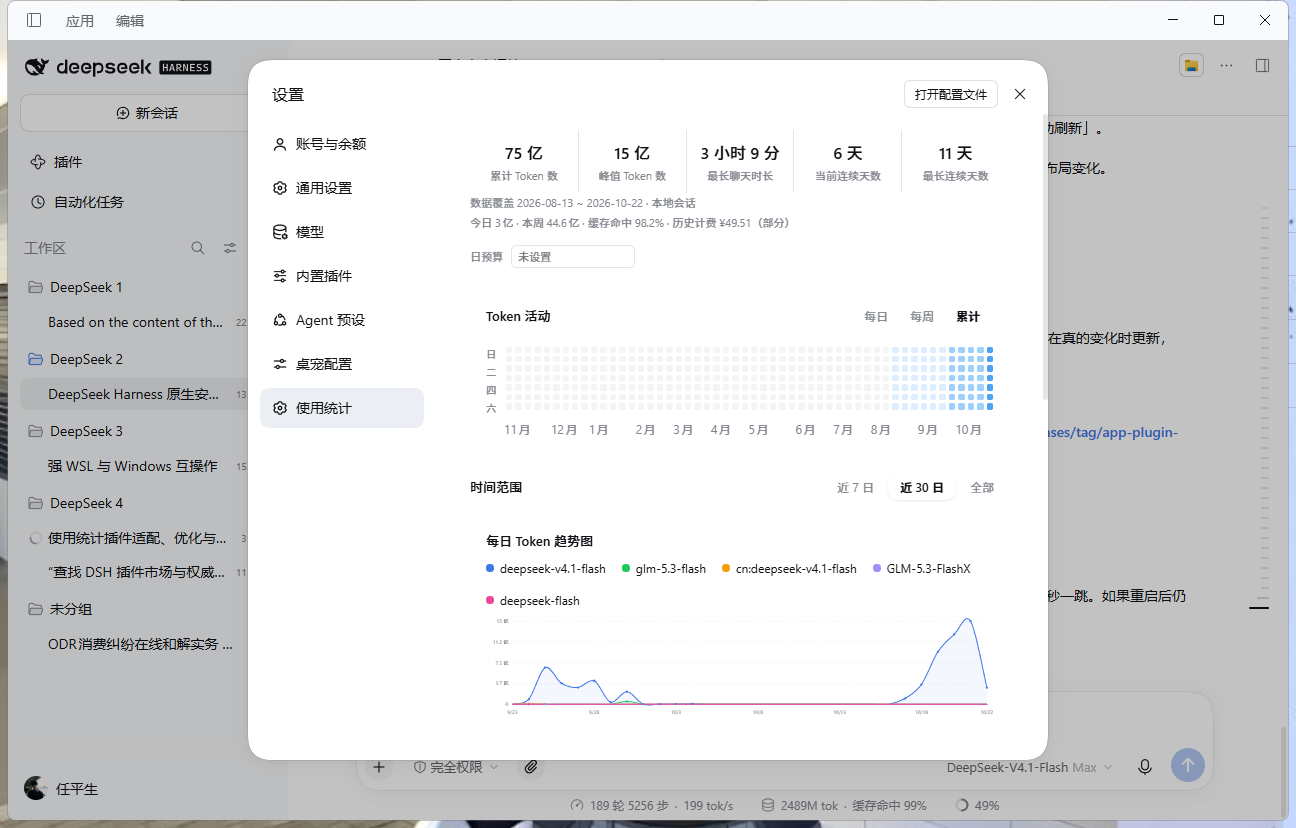
桌面端截图;手机端 52 周热力图比屏幕宽,可左右滑动,并会自动定位到最近几周。
功能一览
| 模块 | 能力 |
|---|---|
| 5 个总览指标 | 累计 Token、峰值 Token、最长聊天时长、当前连续天数、最长连续天数 |
| 52 周热力图 | 每日 / 每周 / 累计三种模式;悬停显示日期、token、轮消息 |
| 每日趋势 | 近 7 日 / 近 30 日 / 全部;平滑曲线、面积渐变、hover 十字线 |
| 模型用量 | 环形图 + 明细列表;图例点击隐藏模型,环形图点击筛选 |
| 数据覆盖 | 实际起止日期;今日、本周、缓存命中率 |
| 会话 Top 5 | 会话标题、Token、时长;快速看出谁最“费 token” |
| 导出 | CSV / JSON / PNG,方便存档或发群 |
| 日预算 | 本机 localStorage;超预算提示,不影响统计 |
| 历史计费 | 从旧 web-billing / cost-meter 补出部分费用,并标注“部分” |
| 主题适配 | 跟随 DSH 深色/浅色主题;手机端横向滚动、骨架屏 |
快速开始
一键安装(推荐)
git clone https://github.com/daniei-chen/dsh-token-insight.git
cd dsh-token-insight
node scripts/install.mjs --profile desktop
# 完整重启 DSH(关闭应用再打开)
脚本会:
- 把
dsh-token-insight写入~/.dsh/profiles/desktop/package.json - 加入
dsh.profile.bundles - 在 profile 的
node_modules下建立指向本仓库的 junction / symlink
安装完成后,打开 设置 → 使用统计。
GitHub Release 下载:
在 DSH 插件管理器里选择这个 tgz,或解压到
~/.dsh/profiles/desktop/node_modules/dsh-token-insight。
手动改 profile:
{
  "dependencies": {
    "dsh-token-insight": "file:/absolute/path/to/dsh-token-insight"
  },
  "dsh": {
    "profile": {
      "bundles": ["...", "dsh-token-insight"]
    }
  }
}
# Windows
New-Item -ItemType Junction `
  -Path "$HOME/.dsh/profiles/desktop/node_modules/dsh-token-insight" `
  -Target "<absolute-path-to-dsh-token-insight>"
# macOS / Linux
ln -s "<absolute-path-to-dsh-token-insight>" \
  "$HOME/.dsh/profiles/desktop/node_modules/dsh-token-insight"
安装流程
flowchart LR
  A[git clone] --> B[node scripts/install.mjs]
  B --> C[profile package.json]
  B --> D[node_modules junction]
  C --> E[完整重启 DSH]
  D --> E
  E --> F[设置 → 使用统计]
环境要求
| 项目 | 要求 |
|---|---|
| DSH | 0.2.1-rc.2 或更新 |
| Profile | desktop(默认) |
| DSH runtime Node | Node 24(插件使用内置 node:sqlite) |
| 手机 App | 可选,见 手机 App |
DSH_HOME 默认是 ~/.dsh;如果自定义了,安装脚本和插件都会读取它。
界面导览
对应上面的截图,从上到下:
- 总览卡:累计 / 峰值 / 最长聊天 / 当前连续 / 最长连续,全部时间口径
- 数据覆盖:
2026-08-13 ~ 2026-10-22 · 本地会话 - 今日 / 本周 / 缓存命中 / 历史计费:一行看清近期状态
- 日预算:输入数字后,显示今日已用百分比
- Token 活动:52 周热力图,可切换每日 / 每周 / 累计
- 时间范围:近 7 日 / 近 30 日 / 全部
- 每日 Token 趋势图:按模型分色,图例可点击隐藏
- 模型用量:环形图 + 明细列表
- 会话用量 Top 5:按会话看 Token 和时长
- 导出 / 刷新:CSV、JSON、PNG
数据流
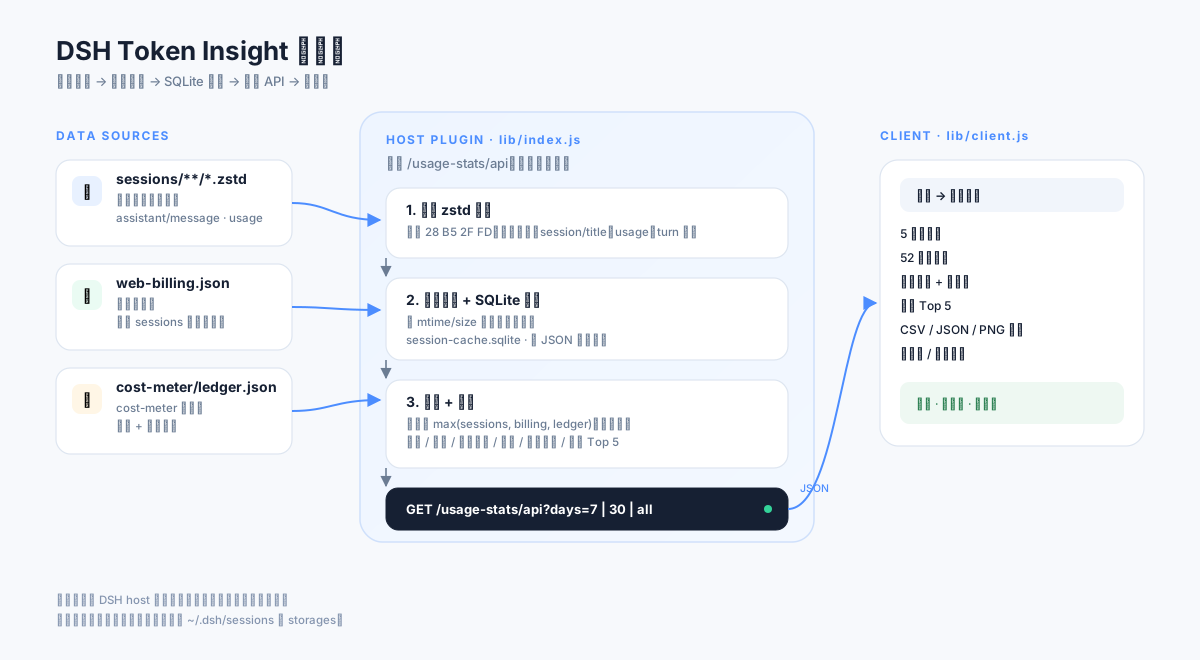
一句话:host 侧只读解析,client 侧只消费统计结果。
- 当前会话:
~/.dsh/sessions/**/session.v4.jsonl.zstd - 旧版日汇总:
~/.dsh/storages/web-billing.json - cost-meter 日汇总:
~/.dsh/storages/cost-meter/ledger.json - 增量缓存:
~/.dsh/dsh-usage-stats/session-cache.sqlite
同一自然日如果 sessions 与旧 billing/ledger 都有记录,按 max() 合并,避免重复累加。
插件不写 sessions、不写 storages,只读这些文件。
数据来源与隐私
| 文件 | 用途 | 插件行为 |
|---|---|---|
~/.dsh/sessions/**/*.zstd |
当前版本会话记录、usage、turn 时长 | 只读 |
~/.dsh/storages/web-billing.json |
旧版本日汇总 | 只读,按天补全 |
~/.dsh/storages/cost-meter/ledger.json |
cost-meter 日汇总 / 历史计费 | 只读,按天补全 |
~/.dsh/dsh-usage-stats/session-cache.sqlite |
增量缓存 | 读写 |
- 不发起网络请求
- 不上传会话内容
- 不需要账号、API key 或云端服务
- 统计结果只在本机 DSH 页面内渲染
数据口径
| 指标 | 计算方式 |
|---|---|
| 累计 Token | usage.totalTokens;旧消息缺失时用 input + cacheRead + output + reasoning + cacheCreation 补算 |
| 峰值 Token | 单日最大 Token 消耗 |
| 最长聊天时长 | 单个 turn(turn/start → turn/end)的最大跨度 |
| 当前/最长连续 | 有 Token 消耗的自然日连续段 |
| 缓存命中率 | cacheRead / (input + cacheRead) |
| 热力图 | 最近 52 周,周日起始;每日 / 每周 / 累计 |
| 历史计费 | 旧 billing 的 totals.cost 或 ledger 的日 cost 之和,标注“部分” |
手机 App
手机端是独立项目:DeepSeek-Harness-APP。
| 组件 | 装在哪 | 作用 |
|---|---|---|
dsh-token-insight(本仓库) |
运行 DSH 的电脑 | 提供 设置 → 使用统计 |
| DeepSeek-Harness-APP | 手机 + DSH host | Android WebView 壳、连接、通知、文件、Relay |
插件不需要装到手机上。 手机 App 只是显示 DSH Web UI;插件装在 host 后,手机打开
设置 → 使用统计 即可看到同一份数据。
App 的完整安装步骤见 app 仓库的 docs/INSTALL_FOR_AGENTS.md。
验证安装
# 1. 模块能解析
cd "$HOME/.dsh/profiles/desktop"
node -e "console.log(require.resolve('dsh-token-insight/client'))"

# 2. API 正常(端口换成 DSH Web GUI 端口)
curl "http://127.0.0.1:<port>/usage-stats/api?days=30"

# 3. 全部范围(0.5.1 新 host)
curl "http://127.0.0.1:<port>/usage-stats/api?days=all"
期望:"ok": true,并包含 totalTokens、peakTokens、longestChat、models、
cacheHitRate、todayTokens、weekTokens、sessionsTop、coverage。
API
GET /usage-stats/api?days=7|30|all
| 字段 | 说明 |
|---|---|
version |
host 版本 |
days |
7 / 30 / 0(全部) |
coverage |
firstDay、lastDay、sources |
totalTokens / peakTokens |
累计 / 单日峰值 |
longestChat |
最长聊天时长(本地化字符串) |
currentStreak / longestStreak |
当前 / 最长连续天数 |
cacheHitRate |
缓存命中率(0–100) |
todayTokens / weekTokens |
今日 / 近 7 日 |
cost |
{ amount, currency, partial, source } 或 null |
dayList |
[{ date, tokens }] |
dayModels |
{ date: { model: tokens } } |
models |
[{ name, tokens, pct }] |
sessionsTop |
[{ id, title, tokens, duration }] |
heatList |
[{ date, tokens, calls }] |
常见问题
| 现象 | 处理 |
|---|---|
| 设置里同时出现「DSH 使用统计」和「使用统计」 | 旧包 @dsh-external/dsh-usage-stats 还在运行中的进程里;确认 profile 只剩 dsh-token-insight,完整重启 DSH |
| 插件列表还有旧「DSH 使用统计」 | 同上;删除旧 node_modules/@dsh-external/dsh-usage-stats 后重启 |
热力图显示 0 轮消息 |
host 还是旧版;完整重启 DSH |
| 手机端热力图看起来是空的 | 数据在 52 周网格右侧;0.5.1 会自动滚到最近几周,也可以左右滑动 |
/usage-stats/api 404 |
插件没加载、profile 不对,或端口不是 DSH Web GUI 端口 |
Cannot find module 'node:sqlite' |
DSH runtime Node 低于 22.5;升级到 Node 24 的 DSH |
| 没有数据 | 确认 ~/.dsh/sessions 有 .zstd;先在 DSH 里跑几个任务 |
全部 比 近 30 日 少 |
旧 host 把 days=all 当成 7 天;完整重启 DSH |
更新
cd dsh-token-insight
git pull
node scripts/install.mjs --profile desktop
# 完整重启 DSH
卸载
- 从
~/.dsh/profiles/desktop/package.json删除dsh-token-insight(dependencies 和dsh.profile.bundles都要删) - 删除
~/.dsh/profiles/desktop/node_modules/dsh-token-insight - 重启 DSH
- 可选:删除缓存
~/.dsh/dsh-usage-stats/session-cache.sqlite和旧的~/.dsh/dsh-usage-stats/session-cache.json
删除插件不会删除 ~/.dsh/sessions 或 ~/.dsh/storages。
开发与测试
node scripts/install.mjs --profile desktop   # 安装/更新到 profile
node sync.mjs                                  # 同步到已安装副本
npm run verify                                 # 语法检查 + host 单测
npm pack                                       # 重新打包
- host:
lib/index.js - client:
lib/client.js - 测试:
test/host.test.mjs - 安装器:
scripts/install.mjs
修改 host 后需要完整重启 DSH;只刷新页面不够。
项目结构
dsh-token-insight/
├─ lib/
│  ├─ index.js            # host:解析、缓存、聚合、API
│  └─ client.js           # client:设置页 UI
├─ locale/
│  ├─ zh.json
│  └─ en.json
├─ scripts/
│  └─ install.mjs         # profile 安装器
├─ test/
│  └─ host.test.mjs       # 多帧 zstd / 统计口径测试
├─ docs/
│  ├─ INSTALL_FOR_AGENTS.md
│  ├─ CI.md
│  ├─ PUBLISH.md
│  ├─ banner.svg
│  ├─ architecture.svg
│  └─ screenshot.png
├─ cordis.patch.yml
├─ package.json
└─ README.md
Roadmap
- 0.5.0:全部范围、数据覆盖、缓存命中、会话 Top 5、导出、预算、SQLite 缓存
- 0.5.1:tooltip 挂 body,兼容 Catppuccin glass 等会 transform 弹窗的主题
- 0.6:真实成本账本(按模型单价、缓存节省)
- 0.6:会话下钻(点击 Top 5 / 峰值日期看明细)
- 0.6:今日常驻小部件(侧边栏 / 桌宠气泡)
- 0.7:7 日/30 日环比、周报长图
- 0.7:多设备 / 多 profile 汇总
- 0.8:TypeScript + 构建、worker 扫描、E2E 测试
相关文档
License
MIT
No comments yet. Be the first to write one.