dsh-plugin-rea

English · 简体中文
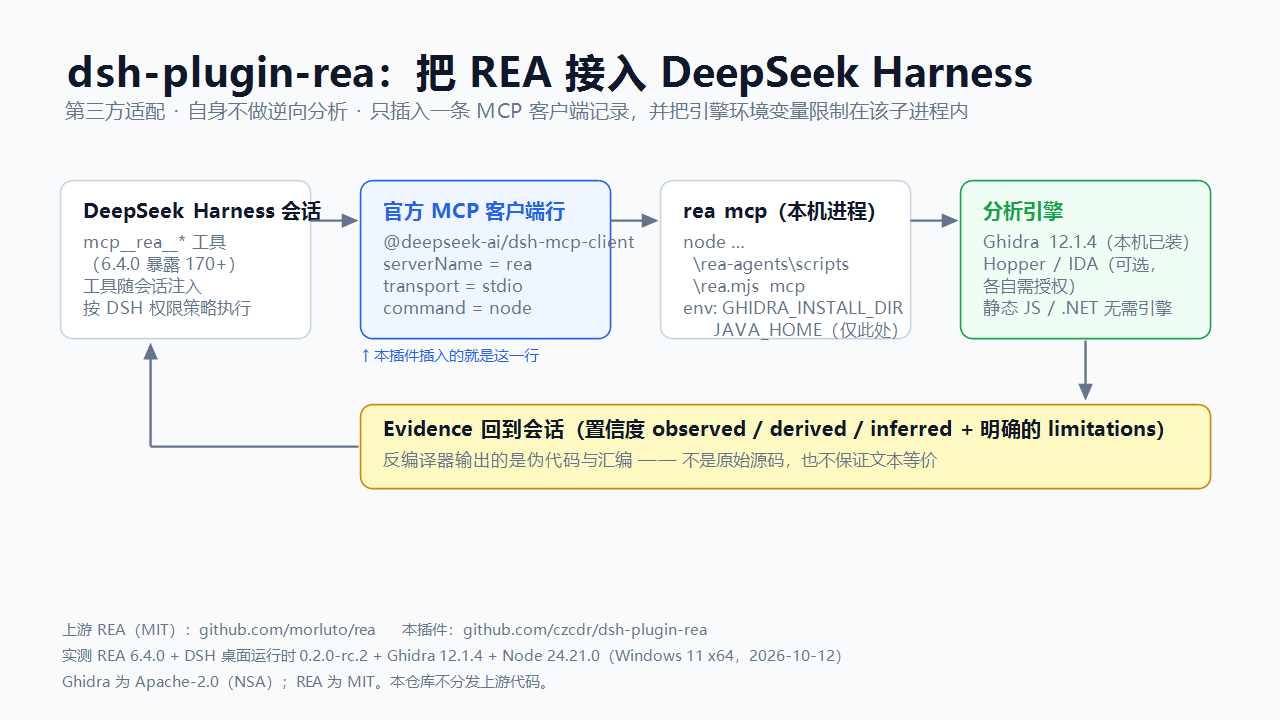
Brings the upstream REA — Reverse Engineer Anything MCP server into
DeepSeek Harness (dsh), so its tools show up in a session as mcp__rea__*.
What this is
A configuration-only Cordis bundle. package.json declares dsh.bundle.patch, and that patch inserts
one row of the official MCP client plugin (@deepseek-ai/dsh-mcp-client) pointing at the rea mcp stdio
server already installed on your machine. There is no analysis code here.
Third-party adapter. This repository is not part of REA, ships none of REA's code, and is not maintained by REA's authors. It composes one configuration row. Upstream: github.com/morluto/rea (MIT) · docs · 中文文档 · rea.tools · npm package
rea-agents. REA's own problems go to its tracker; this plugin's problems go to this repository's issues.
It adds exactly two things: the tool registration under the mcp__rea__* names, and a way to scope the
engine environment (GHIDRA_INSTALL_DIR, …) to that MCP child process instead of the whole harness.
What it can and cannot do
The analysis is upstream's; this section only restates upstream's own contract so expectations are right.
- It cannot recover complete source code. For native binaries upstream returns pseudocode and assembly, for Android APKs decompiled methods, for JEB units pseudocode, and for JavaScript/Electron modules and their relations. Upstream's tool contract states the pseudocode "is decompiler output, not original source and not text-equivalent" to another provider's output.
- Not recoverable in practice: original identifier names, types, comments, macros and template expansion, build scripts and assets. Optimisation (inlining, reordering), symbol stripping, obfuscation, packing and VM protection only make the output worse.
- Every result carries confidence and limitations (
observed/derived/inferred, plus an explicit limitations list). Read them as evidence, never as recovered source. - Good for: understanding behaviour, locating an implementation, interoperability and compatible re-implementation, security review, migration reference. To obtain actual source code, use the legitimate route — the upstream repository, vendor authorisation, or the vendor's own SDK.
Verified against
Author's machine, 2026-10-12/13:
| Component | Version |
|---|---|
REA (rea-agents) |
6.4.0 |
| DeepSeek Harness | desktop runtime 0.2.0-rc.2, with its bundled dsh CLI 0.1.7-rc.2 |
@deepseek-ai/dsh-mcp-client (row provider) |
bundled by the harness; npm latest 0.0.1-rc.1 |
| Ghidra | 12.1.4 (REA currently accepts 12.1.x) |
| Node.js | 24.21.0 (REA engines: ^22.19.0 || ^24.11.0 || >=26.0.0) |
| Host | Windows 11 x64 |
The shipped row was exercised live: list_documents answered through the cmd.exe form, and open_binary
completed with the ghidra provider while the engine directory came only from a profile-level override.
Install
Prerequisites
- Node.js on a version REA accepts (
^22.19.0 || ^24.11.0 || >=26.0.0). - The REA CLI installed globally:
npm i -g rea-agents. - For native analysis, Ghidra 12.1.x (Hopper / IDA are alternatives under their own licences). Static JavaScript/Electron and .NET analysis need no engine at all.
The plugin
dsh plugin --profile <profile> add github:czcdr/dsh-plugin-rea
# or, from npm:
dsh plugin --profile <profile> add dsh-plugin-rea
A prebuilt tarball is attached to Releases (version-free asset name, so the link keeps resolving).
Configure — usually nothing
The shipped row carries no machine-specific path:
- Windows:
command: cmd.exe,args: ['/c', 'rea', 'mcp']— the npm shim is a.cmd, so a shell is required. - macOS/Linux:
command: rea,args: ['mcp']— seeexamples/cordis.patch.posix.yml.
The only optional piece is the analysis engine. REA reads GHIDRA_INSTALL_DIR from its environment, so
either:
- set it as an OS-level environment variable and (re)start the harness, or
- pin it for the MCP child only — see
examples/cordis.patch.with-env.yml.
Either way no literal path is needed: the client hands the parent environment to the child (minus names
that look like secrets), and the patch dialect evaluates !!js expressions, so
GHIDRA_INSTALL_DIR: !!js process.env.GHIDRA_INSTALL_DIR also works.
Keep machine-specific values out of the plugin. Override the row from your own profile's
cordis.patch.yml (id-targeted config override). That file is machine-local and never published:
- id: mcp-rea
  config:
    env:
      GHIDRA_INSTALL_DIR: '<your Ghidra 12.1.x directory>'
Only one row may use serverName: rea in a profile.
Verify
Ask for a mcp__rea__* call — binary_session reports the engine checks
(configuration / installation / headless / native_decompiler / java), all of which should be
ok: true. Then open_binary a PE, binary_overview, and procedure_pseudo_code.
Scope and caveats
REA exposes 170+ tools at 6.4.0, so every session's tool list grows; the row sets
failOnStartupError: false so a missing REA never blocks harness startup. Some REA tools launch processes,
write files and access the network — DSH's permission policy applies. Analyse only artifacts you are
authorized to inspect.
Updating — two independent things, both manual
- This plugin never updates itself. Installed from a plugin market? Update it in that market.
Installed from a local
file:checkout? Overwrite the directory and install it again. Updating REA below does not update this plugin, and updating this plugin does not touch REA. - Upstream REA:
npm i -g rea-agents@latest. Itsbinentry (scripts/rea.mjs) is stable across releases, so this needs no change here. - Ghidra is version-gated by REA (12.1.x today): update REA first, then check that it accepts a newer Ghidra.
- DeepSeek Harness: a harness upgrade may change the MCP client's config schema — inspect the row with
Config.listConfigs name=@deepseek-ai/dsh-mcp-clientand adjust the field names.
check-updates.ps1 (Windows PowerShell) reports the state of all four at once, and
.github/workflows/validate.yml enforces the bundle's shape — including "the shipped patch must not
contain a machine-specific path" — in CI.
License
MIT (this adapter). REA is MIT and owned by its authors; Ghidra is Apache-2.0 and owned by the NSA. No upstream code is redistributed here.
No comments yet. Be the first to write one.