dsh-plugin-local-infer
For those who want more performance out of their specific hardware than what Unsloth gives out of the box.



A DeepSeek Harness plugin that manages local inference engines:
- llama.cpp
- NInfer
- Hyper-Qwen (vLLM)
- Strata
- ...with more coming soon.
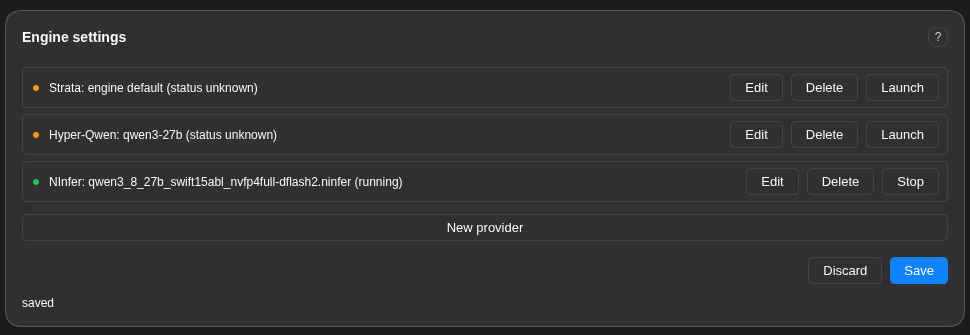
Pick a model and an engine, tune the parameters, watch a live VRAM Est. meter, see hardware warnings the moment a value (or a parameter itself) is unsafe for the detected hardware, then the plugin manages build, deploy, and health-check for each engine and automatically register it as a DSH model once it is confirmed working. No hand-editing of finicky yaml or launchers.
Install
Command line:
dsh plugin --profile web add https://github.com/cybtachyon/dsh-plugin-local-infer
Web UI: click Plugins → Add Plugin → paste https://github.com/cybtachyon/dsh-plugin-local-infer.
Using the plugin
The Engine settings card mounts on the Plugins page (older hosts: the Settings page).
- Pick an engine and model, then tune the parameters. Each field renders by its type: checkboxes, dropdowns, sliders, text, directory pickers, and a chat-template combo (known templates plus free text).
- Watch the VRAM Est. meter. It prices weights, KV cache, overhead, and workspace against your card as you adjust values, and shows the verdict (
fits/tight/over) and the largest context that fits. - Read the warnings. Red banners and inline field warnings fire when a parameter value, or the presence of a parameter, is unsafe for your detected hardware.
- Satisfy the system dependencies. The panel lists each missing host dependency (docker, CUDA toolkit, ffmpeg, hf CLI, ...) with its purpose, a copy/paste install string for your OS, and an optional one-click Run (sudo). The Get button stays disabled until every dependency reports satisfied.
- Launch / Stop.
Launchclones or pulls the engine, downloads the model, starts it, and polls its health endpoint.Stopshuts it down. - Register / Remove.
Registerpublishes the confirmed-working engine to DSH as a model (optionally as the agent default model) through the settings service, so the change is revision-tracked and undoable.Removepulls the entry back.
All values persist to ~/.dsh/local-infer/config.json; the browser never sees a value it did not store.
Supported Platforms
Operating systems
| OS | State | Notes |
|---|---|---|
Linux (Debian/Ubuntu, apt) |
Supported | Install blocks mirror the working NInfer launcher: the CUDA keyring sequence plus the compile toolchain. |
Linux (Arch, pacman) |
Supported | pacman blocks plus the /opt/cuda export lines. |
Linux (Fedora, dnf) |
Untested | Command set present, flagged untested on a live host. |
macOS (brew) |
Partial | CPU/docker path (llama.cpp). No NVIDIA Container Toolkit on macOS, so the CUDA engines' docker path is unavailable. |
| Windows (WSL2) | Untested | WSL2 is detected and the dflash2 pin-memory rule fires; the command set is flagged untested. |
| Windows | Partial | Code paths are only partially written; further development needed. |
Engines
| Engine | Docker | Local build | State |
|---|---|---|---|
| NInfer | Yes | Yes (cmake + CUDA) | The reference engine. Measured VRAM models for the Qwen 27B/35B artifacts. |
| Hyper-Qwen (vLLM) | Yes (compose) | No | .env-driven docker-compose profiles. |
| vLLM | No | No | Work-in-progress. |
| llama.cpp | Yes | Yes | Specified, not verified until the binary is available. |
| Strata | Yes | No | Placeholder engine; its parameter surface is empty until the flag set lands. |
Runtime requirements: Node ^22.19.0 || >=24.0.0, pnpm 12.11.2 (pinned by mise.toml), and the @deepseek-ai/cordis >= 4.0.1 peer dependency.
Hardware guide
What each common machine gets you in practice. Capability impressions are sourced from r/LocalLLaMA user threads. "Shared" means unified memory (the model and the OS share the pool).
| Hardware | Memory | What you get |
|---|---|---|
| NVIDIA RTX 5090 | 32 GB VRAM | Reliably fits model weights up to 23 GB with 240k+ context and vision. Handles complex coding and vision tasks, but needs special tooling for very long or complex tasks. |
| NVIDIA RTX 4090 | 24 GB VRAM | The community workhorse. 30B-class models fit at Q4 and drive coding agents; 70B needs slow CPU offload. Best speed-per-dollar single card. |
| NVIDIA RTX 3090 | 24 GB VRAM | The used-card value king. Same 24 GB as a 4090 but an older generation: 32B at Q4 with modest context, no FP8. A single card is limiting; the common advice is to pair two. |
| NVIDIA RTX PRO 6000 | 96 GB VRAM | Near-frontier dense models (70B–80B) fit fully in memory with long context, and 32B models can even be fine-tuned (LoRA, full FT). The prosumer ceiling. |
| NVIDIA RTX PRO 5500 | 84 GB VRAM | The rack-oriented 84 GB tier: 70B-class models with headroom, close to the PRO 6000 at a lower price point. |
| NVIDIA Tesla V100 | 32 GB VRAM | Cheap used HBM2 server card. 30B-class at Q4/Q8 at respectable speed (bandwidth is what matters for inference); no FP8, power-hungry. A budget homelab pick. |
| NVIDIA Tesla V100 | 16 GB VRAM | The budget entry. 13B–14B at Q8, or 30B with offload. NVLink pairs double the capacity. Slow by modern standards, surprisingly solid for inference. |
| NVIDIA RTX 5090 Laptop | 24 GB VRAM | The mobile 4090. 32B at Q4 just fits; realistically ~17B at Q4 once you subtract context. |
| NVIDIA RTX 4090 Laptop | 16 GB VRAM | The GPU is overkill for LLMs and the VRAM is underkill: 8B–14B at Q4/Q5 with small context. |
| NVIDIA GB10 (DGX Spark) | 128 GB shared | The desktop AI dev box. A 35B MoE runs at ~100 tok/s; 120B+ MoE fits but is slow. Capacity over speed. |
| NVIDIA GB10 (DGX Spark) | 64 GB shared | Half the pool: 32B–35B MoE with context; 70B is tight. |
| NVIDIA RTX N1X | 128 GB shared | The next-generation GB10-class laptop: DGX Spark-class capacity in a laptop. Very new, little real-world data. |
| NVIDIA RTX N1X | 64 GB shared | The 64 GB tier: 32B-class with context. |
| Apple M4 Ultra | 256 GB shared | The capacity king. 200B+ MoE and 70B at 128K context fit; expect ~5 tok/s on 70B. Slow per token, unmatched capacity. |
| Apple M4 Ultra | 128 GB shared | 70B–120B-class fits with room; ~5 tok/s. Great for capacity, slow for speed. |
| AMD Radeon AI PRO R9700 | 32 GB VRAM | AMD's 32 GB Vulkan card. 32B at Q8 around $1,300, good value; the radv driver is not a conformant Vulkan implementation. |
| AMD Ryzen AI Max+ PRO 495 | 160 GB shared | The UMA monster. 120B+ MoE fits and coding agents run well (Qwen3-Coder-class models are tuned for UMA); $7k+ systems, slower than a discrete GPU. |
| 2x NVIDIA RTX 3090 | 48 GB VRAM | The community's "minimum for a usable local LLM": 70B at Q4/Q5. |
| 2x NVIDIA RTX 4090 | 48 GB VRAM | 70B at Q4 with context; exllama2 quantizations run fast. |
| 2x NVIDIA RTX 5090 | 64 GB VRAM | 120B MoE (GPT-OSS-120B) with 128k context at ~10 tok/s with offload. |
| 2x NVIDIA Tesla V100 (NVLink) | 64 GB VRAM | The budget 64 GB: 70B at lower quant with NVLink bandwidth; older arch, no FP8. |
No comments yet. Be the first to write one.