dsh-fast-term


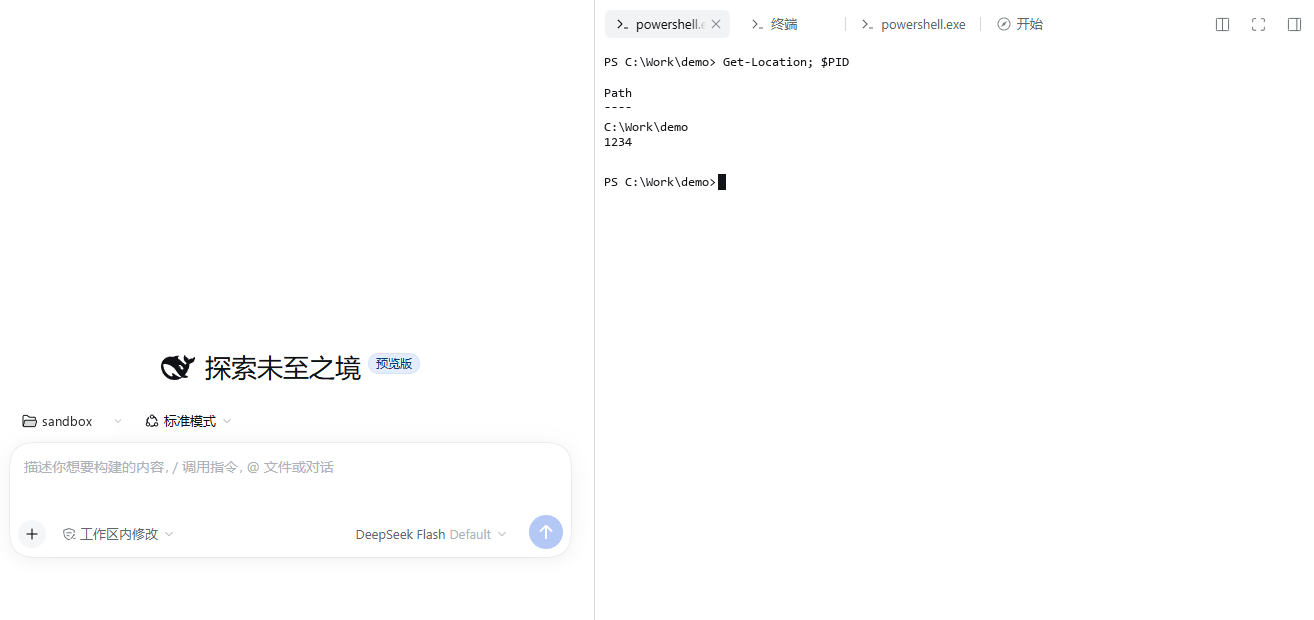
DSH(DeepSeek Harness)右侧边栏的终端插件。PTY 输出走专用 WebSocket,不经过共享网关与帧确认,可作为自带终端的替代品。

特性
- 专用 PTY WebSocket,按键回显不排队、不等帧确认
- 右侧栏标签,与自带终端同一槽位;
Ctrl + `新建 - 会话保持:切换标签、刷新页面后自动重连并回放,PTY 不退出
- 每个标签独立 PTY;shell 可选并记忆
- 配色、字体、字号跟随 DSH 主题;中英双语
- 复制粘贴、右键菜单、原生粘贴回退
- 桌面版快捷键让行:终端聚焦时单
Ctrl组合优先发给终端 - 输入权限:默认只读,可解锁外部输入并配置命令白名单
- 脚本与 Agent 接口:只读 HTTP API 和
dsh_fast_term_read工具 - 可选补丁:隐藏自带终端 UI,完全替代
性能
Windows、隔离 profile 实测:
| 场景 | 自带终端 | dsh-fast-term |
|---|---|---|
| 冷启动到提示符(复用已存在 PTY) | 3.1–3.2 s | ~0.12 s |
| 空闲按键回显 | 11.7–12.9 ms | 9.9–14.7 ms |
| 主线程 75% 合成负载下 | 43–46 ms | 4.8–35.7 ms |
| 2.99 MB 输出洪水 | 12.8 s | 2.9 s |
安装
要求 DSH 0.2.1-rc.2+(桌面版或 Web)。
dsh plugin --profile desktop add dsh-fast-term
也可以在「设置 → 插件市场」中搜索 dsh-fast-term。本地开发时安装目录:
dsh plugin --profile desktop add "file:<path>"
安装或更新后需要重启 DSH 宿主。file: 依赖是拷贝而非软链,修改 lib/ 后需重新执行 add,或手动覆盖 profile 下的 node_modules/dsh-fast-term/lib/。
使用
- 打开右侧边栏,点「新建终端」或按
Ctrl + ` - 点标题旁的箭头选择 shell;双击标签名可重命名
- 关闭标签会结束对应 PTY
- 点右上角的「只读」胶囊切换输入权限
- 选中文本后复制;右键打开操作菜单
新终端会从注册表重读系统 Path,安装新的命令行工具后无需重启 DSH。
快捷键
| 操作 | 快捷键 |
|---|---|
| 新建终端 | Ctrl + ` |
| 复制选中 | Ctrl+C / Ctrl+Shift+C |
| 粘贴 | Ctrl+V |
| 原生粘贴 | Ctrl+Shift+V |
| 发送 SIGINT | Ctrl+C(无选中时) |
| 复制 / 粘贴 / 全选 | 右键菜单 |
桌面版 Windows/macOS:终端获得焦点时,单 Ctrl 组合键(如 tmux 的 Ctrl+B)会直接发送给终端;点击页面其它区域后恢复 DSH 快捷键。
替代自带终端
在 profile 的补丁层(如 ~/.dsh/profiles/desktop/cordis.patch.yml)关闭自带终端 UI:
- id: ui-sidebar-terminal
  name: "@deepseek-ai/dsh-client-ui-sidebar-terminal"
  disabled: true
重启后「新建终端」入口与终端 UI 由本插件接管。终端服务本身仍在,其它插件的终端不受影响;删除该条目即可恢复并存。
配置
Shell
默认使用 PowerShell(pwsh → Windows PowerShell → ComSpec 依次回退),可在新建时通过下拉菜单选择其它 shell,或用环境变量 DSH_FAST_TERM_SHELL 覆盖。
输入权限
默认只读:只有终端界面自身可以输入。点击「只读」胶囊解锁后,其它 WebSocket 客户端(含 Agent)才能写入;配置命令白名单后,按整行前缀匹配(大小写不敏感),白名单之外的行会被丢弃。
配置保存在 ~/.dsh/fast-term.json,也可通过下方接口读写。
只读接口
宿主提供以下接口,仅接受回环地址并校验 Origin:
| 接口 | 说明 |
|---|---|
GET /api/dsh-fast-term/list |
终端列表:id / title / shell / pid / exited |
GET /api/dsh-fast-term/buffer?id=<id>&tail=8000&plain=1 |
输出缓冲尾部;plain=0 返回带 ANSI 转义的原始流 |
GET /api/dsh-fast-term/screen?id=<id>&cols=120&rows=40 |
重放一帧可见画面,返回按行文本,适合全屏 TUI |
GET /api/dsh-fast-term/config |
读取输入权限配置 |
POST /api/dsh-fast-term/config |
修改输入权限配置 |
curl "http://127.0.0.1:PORT/api/dsh-fast-term/list"
curl "http://127.0.0.1:PORT/api/dsh-fast-term/screen?id=<id>&cols=120&rows=40"
buffer 不做光标重绘还原,逐键重绘的程序可能留下重复片段;需要查看全屏 TUI 时用 screen。缓冲超过 4 MiB 后最旧输出会被丢弃,响应中的 truncated 会标记。
Agent 工具
宿主注册 dsh_fast_term_read,Agent 在任意沙箱权限档下都可以读取边栏终端:
| 参数 | 说明 |
|---|---|
list |
只列出终端 |
id |
终端 id,省略时取最近打开的一个 |
tail |
返回末尾字符数,默认 8000(200–200000) |
screen |
按 120×40 屏幕行渲染 |
工具只读,不会写入 PTY。需要 Agent 输入时,先在界面中解锁「可输入」。
安全
- 仅接受回环地址(
127.0.0.1/::1/::ffff:127.0.0.1),并校验 Origin - 桌面版从
__DSH_TRANSPORT__.streamBaseUrl解析宿主地址,只连接回环 - PTY 以当前用户身份运行,无额外沙箱,与系统终端一致;不要在不可信页面同源环境中暴露端口
兼容性
- 在 DSH 0.2.1-rc.2 上验证,依赖
sidebarRightTabs与右侧栏标签槽位 - Windows 优先支持;POSIX 使用
$SHELL -l - 重连快照上限 4 MiB
- 标签重命名保存在宿主内存,重启 DSH 后恢复为 shell 名
- 剪贴板权限受限时复制会提示失败;粘贴可用
Ctrl+Shift+V - 快捷键让行仅桌面版 Windows/macOS,且仅限单
Ctrl组合 - 替代自带终端依赖
ui-sidebar-terminalbundle id,DSH 升级改名后补丁会失效
开发
npm install
node build.mjs
node --check lib/index.js
dsh plugin --profile web add "file:<path>"
发布由 GitHub Actions 在 GitHub Release 发布时通过 OIDC trusted publishing 完成。
English
dsh-fast-term is a terminal plugin for DSH's right sidebar. It streams a real PTY over a dedicated WebSocket instead of the shared gateway multiplexer, and can replace the built-in terminal.
It supports persistent sessions, per-tab PTYs with a shell picker, theme and zh/en localization, copy/paste with a context menu, and focus-based shortcut passthrough on Desktop (plain Ctrl combos reach the terminal while it is focused). Read-only HTTP endpoints and the dsh_fast_term_read agent tool expose terminal state to scripts and agents.
dsh plugin --profile desktop add dsh-fast-term
反馈
- 问题与建议:GitHub Issues
- 更新记录:GitHub Releases
License
MIT
No comments yet. Be the first to write one.