dsh-sidebar-overflow
把左侧边栏里不常用的入口收进「更多」,哪些留在外面由你决定。 点一下收起、点一下放回,改完立刻生效,DSH 重启后依然记得。




中文 | English
DSH 的左侧边栏装得下十几个入口之后就开始拥挤:插件、插件市场、自动化任务、灵枢、上下文洞察、WSL…… 常用的其实没几个。
这个插件不新增按钮、也不改官方侧边栏的行为。它往官方的 sidebar.panellist.actions 槽位注册一条,官方那条「更多」就会出现在主导航列表末尾;点开是一张清单,列出当前所有入口,每个都能单独决定留在侧边栏还是收进「更多」。
收进去的没有消失 —— 点「更多」照样能打开,点「显示到侧边栏」就回来。
效果
| 收起之后 | 菜单里可以逐个切换 |
|---|---|
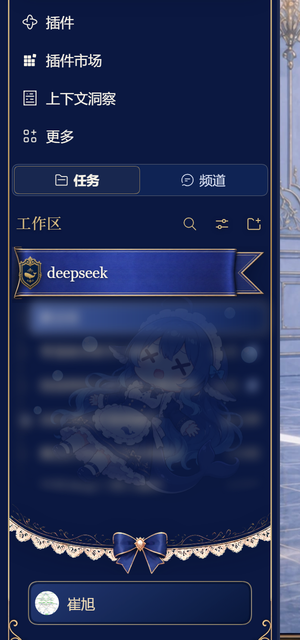 |
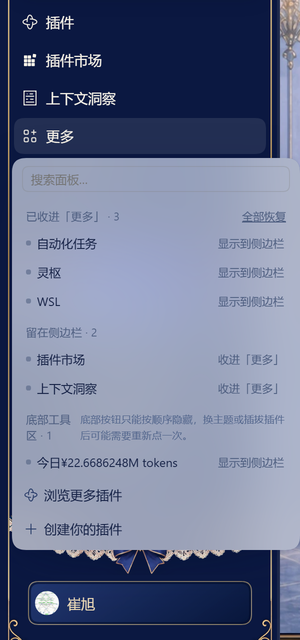 |
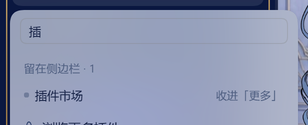
菜单顶部的搜索框,入口多了以后按名字筛:
功能
| 逐个选择 | 菜单里列出全部入口,一行一个,右边一个按钮切换「收进『更多』/ 显示到侧边栏」 |
| 搜索过滤 | 菜单顶部有搜索框,输两个字就筛出来;无匹配时给明确空态,不会误显示成「还没收起任何按钮」 |
| 一键还原 | 「全部恢复」把 panel: 与 footer: 两类键一次清空,全部放回 |
| 失效条目清理 | 插件卸载后配置里会残留 panel:<已删除的id>,菜单会提示「另有 N 个条目已失效」,点「全部恢复」即可清掉 |
| 底部工具区 | 侧边栏底部那排小按钮(用量、余额之类)也能隐藏 |
| 即时生效 | 点完就变,不用刷新、不用重启 |
| 重启保留 | 选择写进 profile 的 cordis.patch.yml,DSH 重启后自动回放 |
| 中英双语 | 跟随 DSH 语言设置 |
安装
桌面版不要用 dsh plugin --profile desktop ... 改 profile —— 该 profile 由应用内的插件管理器独占,命令行会直接拒绝(profile "desktop" is managed exclusively by the Electron application)。
三种装法,任选其一:
1. 从本地目录(开发/自用最常见)
设置 → 插件 → 添加插件 → 从本地目录,选中本仓库根目录。
2. 从 GitHub 仓库
在同一个安装框里粘贴:
https://github.com/cxv117793-blip/dsh-sidebar-overflow
3. 从 Release 的 .tgz
三个地址,按需选:
| 用途 | 地址 |
|---|---|
| 永远指向最新版(文件名固定) | https://github.com/cxv117793-blip/dsh-sidebar-overflow/releases/latest/download/dsh-sidebar-overflow.tgz |
| 锁定 v0.1.0 | https://github.com/cxv117793-blip/dsh-sidebar-overflow/releases/download/v0.1.0/dsh-sidebar-overflow-0.1.0.tgz |
也可以先下载再装:
curl -L -o dsh-sidebar-overflow.tgz \
  https://github.com/cxv117793-blip/dsh-sidebar-overflow/releases/latest/download/dsh-sidebar-overflow.tgz
非 desktop 的 profile 才可以用命令行:
dsh plugin --profile <你的profile> add file:<本仓库绝对路径>
装完之后
完全退出应用(文件 → 退出,或托盘右键退出)再启动。
刷新页面不够 —— 客户端模块只在应用启动时装配一次。这一步没做,界面不会出现「更多」。装好后主导航列表末尾会多出一行「更多」(宽侧边栏时带文字,窄侧边栏时只有一个图标)。
使用
点侧边栏里的「更多」:
- 已收进「更多」 分组:点右边「显示到侧边栏」把它放回;
- 留在侧边栏 分组:点右边「收进『更多』」把它挪走;
- 底部工具区 分组:底部那排按钮,同样两个方向的切换;
- 分组标题右侧有「全部恢复」。
「插件」这个入口是故意锁死的 —— 它是插件管理器的入口,收起来就没地方装插件了。点它会提示「该面板不能收起」。
「更多」按钮是常驻的:插件一装上,它就在主导航列表末尾,不管你有没有收过东西(因为插件往 sidebar.panellist.actions 槽位注册了一条,官方 shell 只要看到该槽位非空就渲染这个按钮)。全部恢复后按钮不会消失,但菜单会显示「还没有收起来的按钮」,侧边栏看起来和没装插件时一样。
配置
选择存在 profile 的 cordis.patch.yml 里,由插件自己的 Config 声明:
- id: dsh-sidebar-overflow
  name: dsh-sidebar-overflow
  config:
    hidden:
      - panel:dsh-wsl
      - panel:dsh-market
      - footer:0
键名规则:
| 前缀 | 含义 | 例子 |
|---|---|---|
panel: |
主导航面板,后接 sidebar.panellist 里的面板 id |
panel:dsh-wsl |
footer: |
底部工具区第 N 个按钮(按渲染顺序,从 0 数) | footer:0 |
footer: 记的是位置而不是 id —— 那些按钮渲染进 DOM 时既不带 id 也没有 data 标记,只能数位置。这是本插件最主要的粗糙之处,见下面的「已知限制」。
手工改法:改完完全退出再启动。想重置就删掉 hidden 整段(等价于空数组)。
工作原理
全部走官方扩展点,不劫持 DOM 结构、不打补丁、不替换组件:
让「更多」按钮出现 官方 sidebar shell 里
hasEntryActions直接来自ctx.slots.entriesOfSlot("sidebar.panellist.actions").length > 0。本插件注册一条进该槽位,官方按钮就渲染出来,菜单内容由我们提供。控制主列表显示谁 官方 shell 用
panels.filter(({ id }) => id === "plugins" || !unpinned.includes(id))决定主列表,unpinned来自createPanelPins()的内存 store。它的写入口setPinned(id, pinned)由 sidebar 插件通过injectProps()下发;本插件在apply()里从ctx.slots.entriesOfSlot("sidebar")[0].inject()取到同一份闭包,所以启动时不用打开菜单就能恢复收纳状态。setPinned是幂等的(状态已一致就直接 return),所以重复调用不会引发重渲染循环。持久化 官方 pin store 是纯内存态(刷新即还原)。落盘由本插件 Host 半边的
Config(hidden: string[])承担,走configForms实时读写 —— 点一下立刻写进cordis.patch.yml。字段全部标了
.volatile():它的语义是「值变化不触发插件重载」,不是「不落盘」。配置照常写入磁盘。底部工具区
sidebar.footer.action没有对应的官方 pin 机制,只能按 DOM 兄弟节点顺序做 best-effort 隐藏;匹配不到就静默跳过,不影响主功能。
Host 半边(lib/index.js)只有 43 行,只声明设置项,apply() 是故意空的。
已知限制
| 限制 | 原因 |
|---|---|
| 底部工具区按顺序而不是按 id 记忆 | 那些按钮渲染进 DOM 时既不带 id 也没有 data 标记,只能数位置。加减插件后序号会变,表现为「隐藏错了一个」 |
| 换主题后底部隐藏可能失效 | 同上,主题可能改变节点层级 |
| 「插件」入口不能收 | 锁死的,见上 |
| 没有拖拽排序 | 这一版只做「收起 / 显示」,不做重排 |
| 菜单不记忆滚动位置 | 每次打开都从顶部开始 |
如果底部那条「失效条目」的提示一直在,点「全部恢复」就能清干净。
常见问题
装完看不到「更多」按钮?
按钮是常驻的,正常情况下装完并完全退出重启后就会出现。看不到的话,首先确认确实完全退出应用了 —— 客户端模块只在启动时装配,刷新页面不算。再确认插件在 设置 → 插件 里是启用状态。
刷新页面后收纳状态没了?
说明配置没写进磁盘。检查 设置 → 插件 → dsh-sidebar-overflow 是否有设置项,以及 profile 的 cordis.patch.yml 里有没有 config.hidden。本插件启动时的恢复依赖这份配置。
底部那个按钮隐藏错了位置? 这就是「按顺序记忆」的代价:装/卸插件后序号整体平移。打开菜单,把当前错位的那两项重新点一遍即可。
会不会把侧边栏搞坏?
不会。插件停用/卸载时会把官方 pin store 还原成全可见、并用 data-dso-hid 标记还原被藏起来的底部按钮,不需要刷新自救。所有 DOM 操作都包在 try/catch 里,取不到元素就静默跳过。
支持哪些 DSH 版本?
开发与实测环境是 DSH 0.2.1-rc.3(CLI 0.2.0-rc.2)。插件只依赖 slots、locale、configForms 三个长期稳定的服务面,没有声明 engines.dsh 硬约束 —— 但它确实没有在更老的版本上验证过。
安全边界
- 不写会话数据、不联网、不上报,不读对话内容。
- 只写一个配置字段:profile 的
cordis.patch.yml里dsh-sidebar-overflow的config.hidden。 - 客户端半边崩溃只会影响侧边栏,不会白屏。
- 卸载后
hidden配置会残留,但不影响任何东西;想干净就删掉那几行。
开发
没有构建步骤 —— 源码直接就是产物。
git clone https://github.com/cxv117793-blip/dsh-sidebar-overflow.git
cd dsh-sidebar-overflow

node --check lib/client.js
node --check lib/index.js
装到本地 profile 调试(desktop 用应用内「从本地目录」安装):
dsh plugin --profile <profile> add file:<本仓库绝对路径>
改完客户端代码后完全退出应用再启动;只刷新页面不会重新加载模块。
结构:
lib/index.js      宿主半边:只声明 Config,43 行
lib/client.js     浏览器半边:菜单 UI + 收纳逻辑,816 行
locale/{zh,en}.json
cordis.patch.yml  loader 补丁,告诉 DSH 有这么一个插件
icon.svg
docs/             README 用的截图(不打进 npm 包)
English
dsh-sidebar-overflow adds a More entry to the end of the DeepSeek Harness left sidebar's panel list, so you can choose — entry by entry — which icons stay visible and which collapse into that menu.
DSH's left rail gets crowded fast once a handful of plugins are installed. The plugin lists every entry in one menu and lets you toggle each of them between in the sidebar and collected into More. Collected entries are not gone — one click on More and they are back.
Highlights:
- Per-entry control. Every row has a button that flips it between visible and collected.
- Search. A filter box at the top of the menu; a distinct empty state when nothing matches.
- Restore all. One button clears both
panel:andfooter:keys and puts everything back. - Stale-key cleanup. Uninstalled plugins leave
panel:<id>entries behind; the menu reports them and Restore all removes them. - Footer actions. The small buttons at the bottom of the rail (usage, balance, …) can be hidden too.
- Instant, and it survives restarts. Selections are written to the profile's
cordis.patch.ymland replayed on the next launch. - Bilingual — follows the DSH language setting.
Install
Desktop profiles are owned by the in-app plugin manager; dsh plugin --profile desktop ...
is refused on purpose. Use Settings → Plugins → Add plugin and pick either the cloned
directory, the GitHub URL, or a .tgz from
Releases.
Then fully quit the app — reloading the page does not load the client module.
Non-desktop profiles can use the CLI:
dsh plugin --profile <profile> add file:<absolute-path-to-this-repo>
How it works
Everything goes through official extension points — no DOM hijacking, no monkey-patching, no component replacement:
- The More button is what the stock sidebar renders when
sidebar.panellist.actionsis non-empty (entriesOfSlot(...).length > 0). We register one entry there and supply the menu body. - Visibility is driven by the stock
setPinned()closure, obtained fromctx.slots.entriesOfSlot("sidebar")[0].inject()— the same closure the shell itself uses, so state is restored at startup without opening the menu. - Persistence is the plugin's own Host
Config(hidden: string[]), written live throughconfigFormsinto the profile'scordis.patch.yml. Fields are marked.volatile(), which means "do not reload the plugin on change" — not "do not persist". - Footer actions have no official pin mechanism, so they are hidden best-effort by DOM sibling order.
Known limitation
Footer actions are remembered by position, not by id, because those buttons render without any identifier. After installing or removing plugins the indices shift; toggle them again if a hide lands on the wrong button.
Compatibility
Developed and tested against DSH 0.2.1-rc.3. The plugin declares no engines.dsh
constraint; it only relies on the slots, locale and configForms service faces, but has
not been verified on older releases.
Requires Node ^22.19.0 || >=24.0.0.
No comments yet. Be the first to write one.