Session title (session-title-pattern)
English | 中文
One small tool for the dsh sidebar: titles you can read at a glance — which day, what kind of work, what it was about.
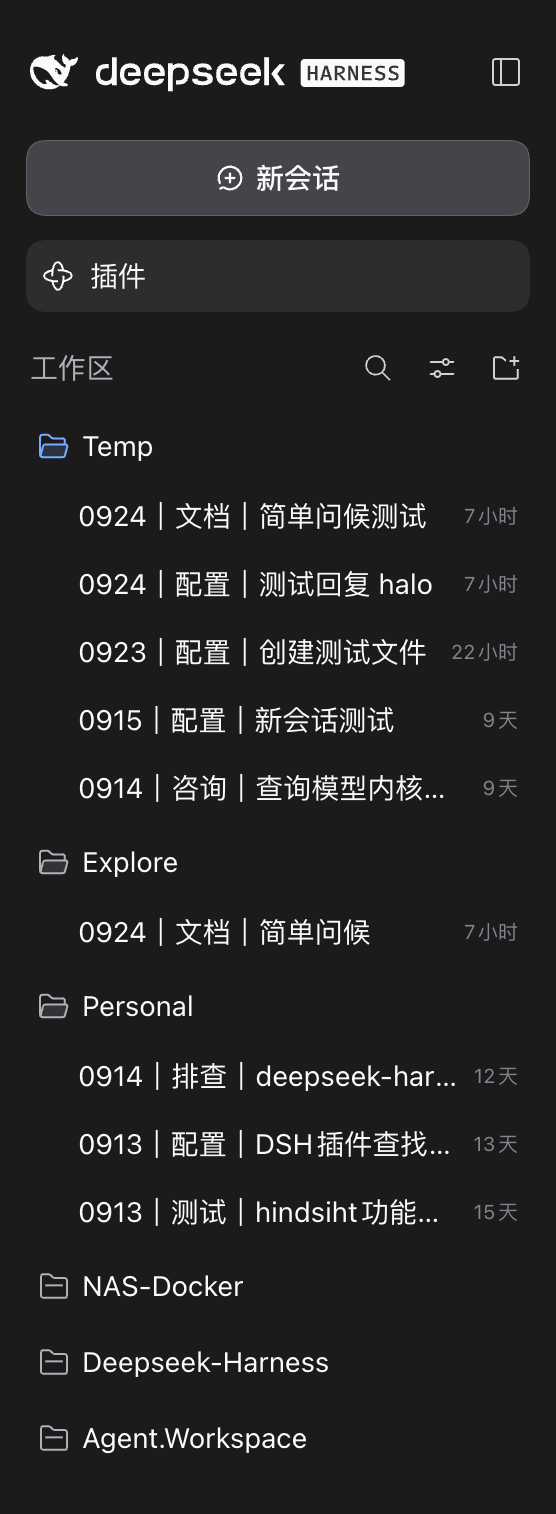
- Automatic titles — every title becomes
0913|排查|登录失败: which day, what kind of work, and what it was about, summarized from the whole conversation by a model (two Chinese characters for Chinese, one word for English)
Install
dsh plugin --profile web add dsh-session-title-pattern
Every stable release is published to npm, so it works right after installing — no extra configuration and no local build.
Automatic titles
What a title looks like
By default dsh uses a sentence the model happened to produce (for example 「确认当前模型身份及工具查询」); with a dozen sessions on screen you cannot tell which day a session belongs to or what kind of work it was. This plugin turns the title into three parts:
MMDD | type | topic
0913 | 排查 | DeepSeek-Harness login failure
- Date — the day the session was created, four digits
MMDD(your machine's local time zone, so no off-by-one day around midnight). It does not drift when the title is recomputed: keep chatting past midnight, or run/retitlelater, and the prefix still shows the day this conversation started - Type — what the session is about, following the interface language: a Chinese UI gets two Chinese characters (排查 / 生成 / 配置…), an English UI gets a single word (Debug / Config / Docs) — an English conversation under a Chinese UI still gets a Chinese type
- Topic — a summary of the whole conversation, not the first few characters of the first message
The format is yours to change; the default template is {MMDD}|{type}|{topic}:
| Placeholder | Meaning |
|---|---|
{YYYY} {MM} {DD} {HH} {mm} {ss} |
Date/time parts, local time zone, all taken from the session creation moment; freely combinable ({YYYYMMDD}, {HHmmss}) |
{type} |
Type. Omit it and there is no type; when it renders empty the whole segment disappears and the neighbouring separator goes with it |
{topic} |
Topic. Omit it and there is no topic; it disappears the same way when empty |
Change the template directly, e.g. {topic}|{MMDD} (topic first) or {YYYYMMDD} {topic} (with the year).
When it updates
- On the first message — dsh schedules this itself and produces a first title
- Every 10 messages afterwards (configurable) — this plugin triggers one recompute; the other turns never call the model
- Only top-level sessions are handled; forked child sessions are not auto-named
Each recompute sends only "first message + last main line + last summary + the new turns" — a few hundred tokens in total, no matter how long the conversation has been going (earlier text is only ever compressed forward, never re-sent).
The model follows the session's current main model by default; you can also pick one in the settings.
Failures behave differently depending on what already exists:
- A title already exists: timeouts, errors, and a missing route all keep the previous title — a good title is never wiped out
- No title yet (the very first attempt failed): instead of waiting for the model, the plugin builds a fallback title locally — the date as usual, no type, and the topic taken from the leading words of the first message (the same rule dsh uses for its own first-prompt naming: the first 8 whitespace-separated words, then a byte cap; Chinese has no spaces, so for Chinese this is effectively the whole message cut by bytes), e.g.
0915|login failure reason. The next recompute replaces it as soon as the model works
The type uses the same language as the interface copy — both follow dsh's interface language (Settings → General → Language). The topic follows the conversation's language. So an English conversation with a Chinese UI reads exactly 0915|排查|Login 401.
Manual recompute and rename
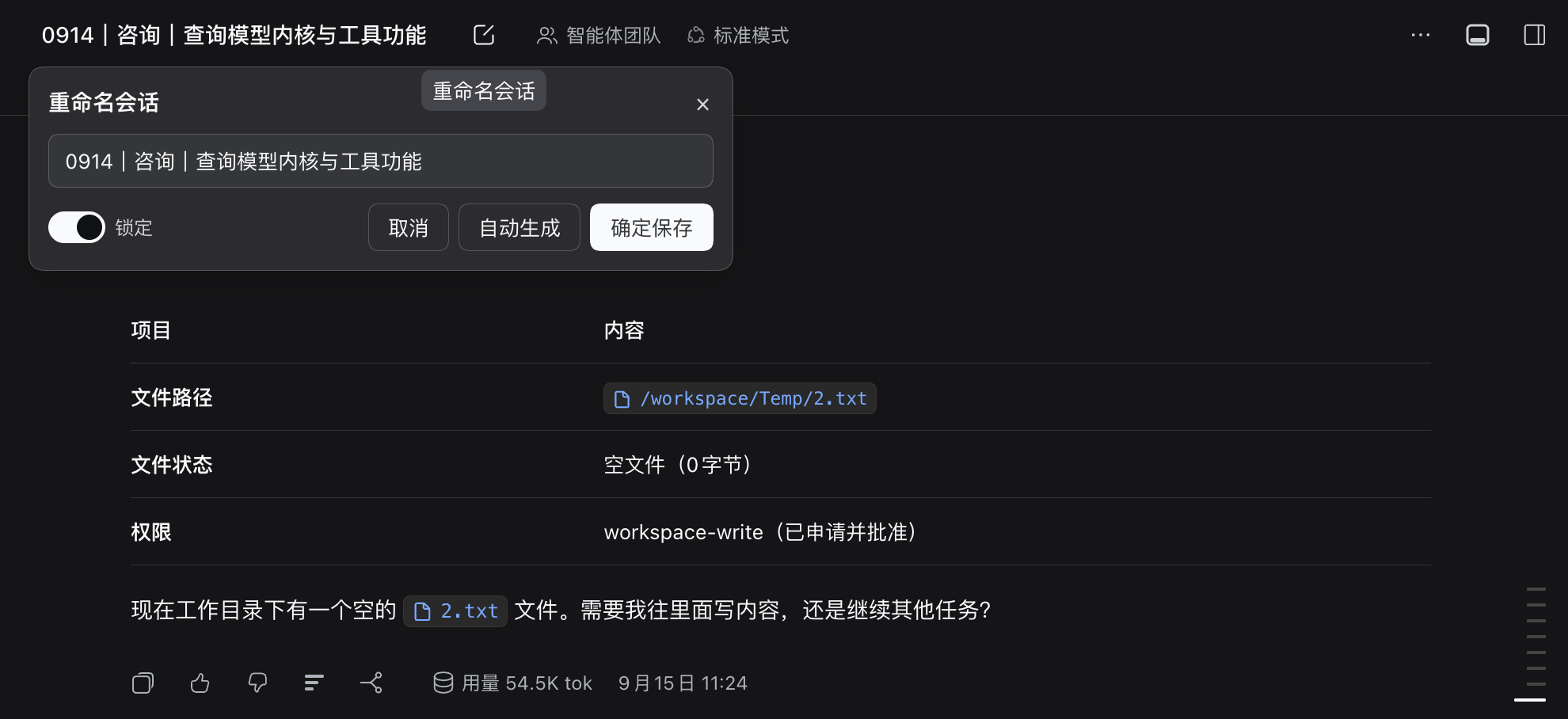
Click the header button: the first item to the right of the title is a pencil icon; it opens a "Rename session" card — the input is prefilled with the current title and can be edited by hand; "Generate" really computes a title and only fills the input; "Save" writes it and locks it (no further automatic updates), and the lock switch in the bottom-left corner releases it at any time.
Type a command: enter /retitle in the input box.
Automatic naming only fires for "a top-level session, the first human message, and no title yet", so later renames can only use the two entry points above. The three-dot menu on each session row (rename / fork / archive) is a closed platform component with no extension slot, so a third-party plugin cannot add menu items to it.
Title display width
dsh renders the title as the last breadcrumb segment, and the upstream stylesheet hard-codes max-width:220px for it — after padding and the MMDD|type prefix, only seven or eight Chinese characters are left for the topic. When the client activates, this plugin injects an override rule (no configuration needed):
[class*="_crumbCurrent"]{max-width:min(640px, 60vw) !important;}
Only the current session's title is widened; ancestor sessions and subagent breadcrumbs keep the original width. If upstream renames the class, the rule fails silently (no error — the title just gets short again): select the title element in DevTools and check whether class still contains _crumbCurrent.
Configuration
Settings UI (recommended)
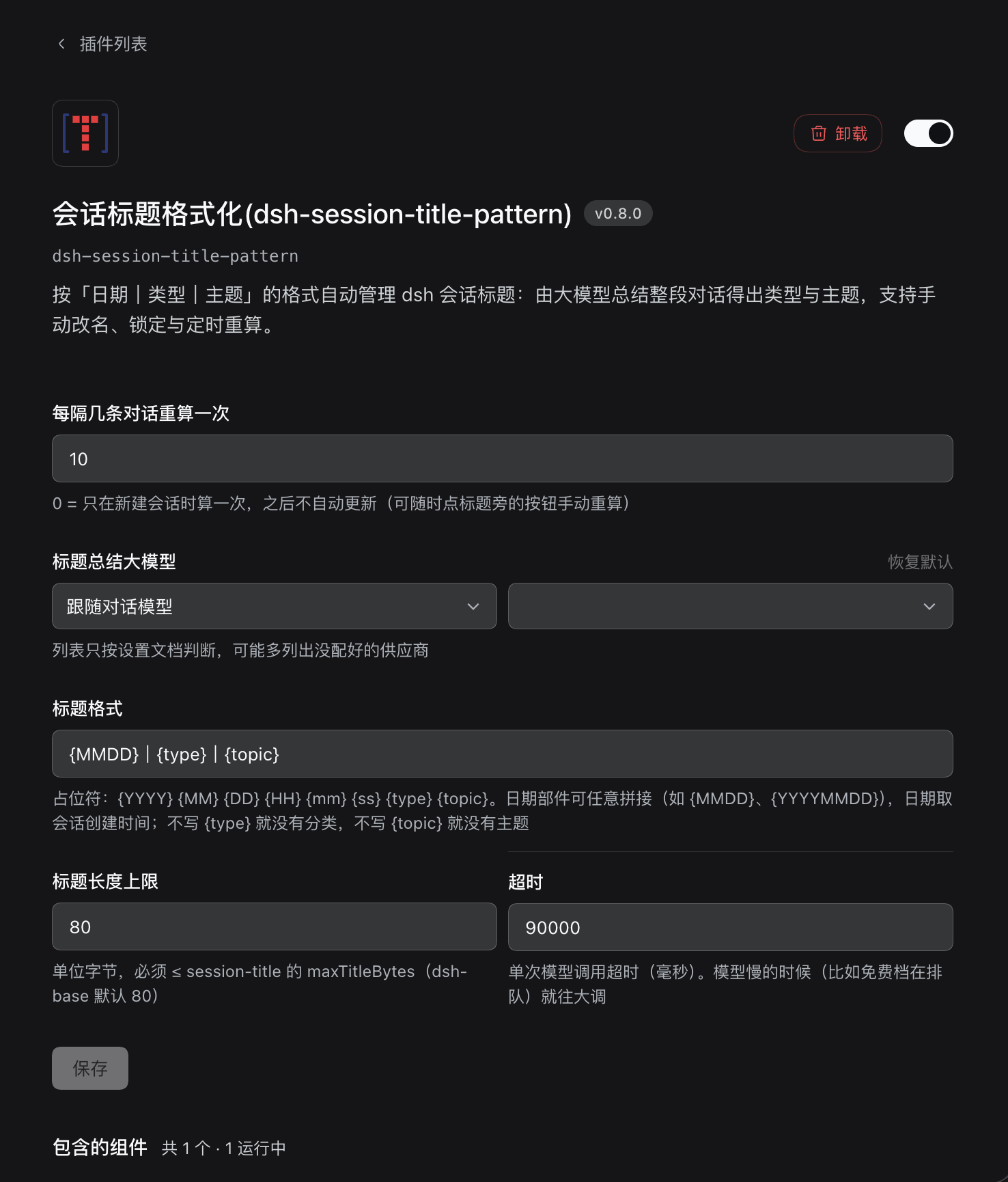
Since dsh 0.1.7 the settings live on the plugin's own page: open the Plugins view in the sidebar, find this plugin under Installed, and open its detail page — the configuration form sits between the description and the entry rows.
| Item | Meaning |
|---|---|
| Recompute every N messages | Default 10. 0 = compute once when the session is created |
| Model for title summaries (provider / model) | Two dropdowns on one row: pick a provider on the left (first item "follow the chat model" = empty follows the session's main model), then a model on the right — selecting a provider auto-picks its first model. Options come from providers you have configured; falls back to two text fields when the directory is unavailable |
| Timeout | Raise it when the model is slow (e.g. a free tier queueing) |
| Title format / Title length limit | What the three parts look like, and how long the title may get |
Edits are staged and written only when you press "Save"; each field marks whether it was customized and can be reset on its own; leaving the form discards unsaved edits.
The UI copy is bilingual and follows dsh's interface language (Settings → General → Language).
cordis.patch.yml in the profile
For scripted or bulk deployments:
- id: session-title-pattern
  config:
    retitleEvery: 10
    template: '{MMDD}|{type}|{topic}'
    maxBytes: 80
| Key | Type | Default | Meaning |
|---|---|---|---|
retitleEvery |
number | 10 |
How many human messages between title recomputes; minimum 0; 0 = compute once when the session is created |
provider |
string | empty | Model provider; must be paired with model; empty follows the session's main model |
model |
string | empty | Model id; must be paired with provider |
timeoutMs |
number | 90000 |
Timeout for one model call (ms) |
maxOutputTokens |
number | 2048 |
Output token fuse; reasoning counts against it too. Not shown in the UI; reach for it here when needed |
maxInputBytes |
number | 4096 |
Input byte cap for one call |
template |
string | {MMDD}|{type}|{topic} |
Title format template |
maxBytes |
number | 80 |
Total title length cap (UTF-8 bytes), minimum 20 |
The
|in the default template is a full-width vertical bar (U+FF5C). A placeholder the plugin does not recognize stays in the title verbatim (e.g.{date}), so a typo in the template is obvious at a glance.⚠️
maxBytesmust be ≤maxTitleBytesof thesession-titlerow (dsh-baseuses 80 by default); anything beyond is silently truncated.Precedence is
schema default → composition layer (this section) → user layer (settings UI): for a field you changed in the UI, editingcordis.patch.ymlhas no effect until you "Reset" it in the UI first.
When something goes wrong
dsh fails to start: this plugin ships browser-side code, so a very old dsh may not be compatible. In the profile's cordis.patch.yml, disable only this plugin and dsh recovers; upgrade dsh and install again afterwards:
- id: session-title-pattern
  disabled: true
Development
npm install
npm run build        # builds host first, then client
npm run typecheck
lib/is a build artefact committed to git — dsh loadsmainfrompackage.json(lib/index.mjs) and never compiles TypeScript at runtime. After changingsrc/you must runnpm run buildagain and commitlib/with it, or the change will not take effect.
Implementation details (the cost model, how v0.8.1 wires the configuration form into dsh 0.1.7's plugin-page slot, and lessons from past iterations) were carried in the now-retired root DEVELOPMENT.md (removed during the doc-system upgrade — its content is preserved in git history). Its version / task history now lives in docs/PROGRESS-HISTORY.md (closed releases) and docs/progress.json (in-progress), maintained via the koc-code-doc-progress skill; design / architecture details are pending extraction to docs/design/.
This README has two languages: this file and README.zh.md. Changing one means changing the other — the copy readers actually see is the one that counts.
License
MIT
No comments yet. Be the first to write one.