dsh-task-board
A cross-project task board for DeepSeek Harness — every DSH session becomes a task card, grouped into three columns: 待处理 / 处理中 / 待审阅 (To do / In progress / Needs review).
English | 中文
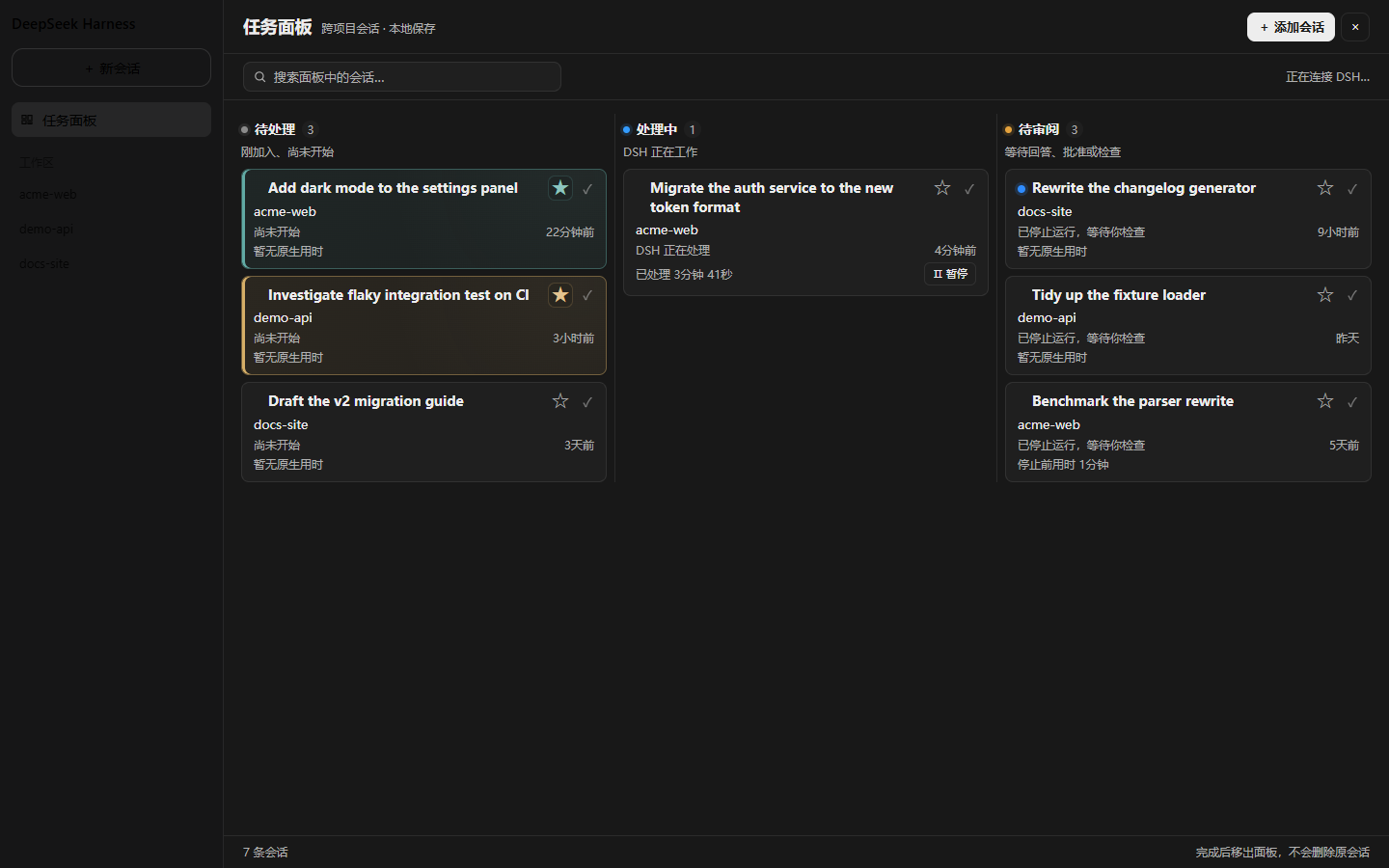
The screenshot above is rendered from the real bundle against fictional demo data (
npm run preview). Nothing in this repo contains a maintainer's workspace names, paths or session titles.
What it does
The board is a first-class DSH destination, not an overlay: it registers into the shell's own global-panel seats (sidebar.panellist + main), the same mechanism DSH's built-in Schedules page uses. Selecting it swaps the centre column; returning to the Conversation does not change the current session.
- Three columns derived from live host facts —
running,completed(finished but not yet opened), and unanswered interactions. - Priority stars with a 16-colour palette. A colour is assigned once and remembered, so it survives filtering, sorting, unstarring, and even removing the card.
- Stable "In progress" ordering — progress, timestamps, titles and stars never reorder the column; new arrivals append at the end.
- One-page adaptive layout — busy columns gain horizontal lanes instead of shrinking text. Font size is never reduced and no card detail is ever hidden.
- Native turn duration folded from the session's own
turn/start→turn/endevents. - Add-session picker, panel search, pause/resume, complete-with-undo.
- Light and dark, following the shell's resolved colour scheme.
Install
Install straight from GitHub — this is the supported path, and the only one that works today (the package is not on npm yet):
dsh plugin --profile <your-profile> add git+https://github.com/cpsGGG/dsh-task-board.git
Then restart DSH and open 任务面板 at the bottom of the sidebar.
Other ways to installFrom a local clone (best if you want to edit the source):
git clone https://github.com/cpsGGG/dsh-task-board.git
dsh plugin --profile <your-profile> add ./dsh-task-board
Pinned to a tag or commit — recommended once versions are tagged, so an upstream change cannot surprise you:
dsh plugin --profile <your-profile> add git+https://github.com/cpsGGG/dsh-task-board.git#v1.0.0
lib/client.js is committed, so no build step and no install scripts run —
the package deliberately ships no prepare script, which is what would
otherwise trip pnpm's allowBuilds prompt on a git install. If you change
src/, run npm run build and re-install.
Windows note: pnpm installs
file:dependencies as a copy, not a symlink. When developing against a local checkout, point the profile'snode_modules/dsh-task-boardat your working tree with a directory junction instead, or re-run the install after every build.
Requirements
| DSH | 0.2.0-rc.2 (developed and verified against it) |
| Profile | any web-platform profile |
| Node | ≥ 20 (build and tests only — the shipped bundle needs none) |
DSH is in developer preview and its internal slot surface can change between releases. The plugin reads useSessions from the global standard props and registers into sidebar.panellist + main; if a future release renames either, the board fails loudly with a visible stack rather than silently disappearing.
How it works
DSH has no DOM to patch — it has slots. So this is a native plugin rather than an injection:
| Concern | Approach |
|---|---|
| Sidebar entry | sidebar.panellist list slot (id: task-board) |
| Panel body | main keyed slot, dispatched by that same id |
| Navigation | ctx.layout.selectPanel(id) / selectPanel(null) |
| Session data | the useSessions global standard prop |
| Turn duration | ctx.sessions.binding(id).eventSource folded over turn/start / turn/end |
| Pause / resume | ISession.cancel() / ISession.prompt() |
| Persistence | localStorage, key dsh-task-board:session-state:v3 |
src/core.mjs is deliberately framework-free — no DOM, no React, no Cordis — so every rule (status precedence, ordering, layout arithmetic, colour balancing) is unit-testable in plain Node.
Layout of the repo
| Path | |
|---|---|
src/core.mjs |
Pure logic: palette, status, ordering, adaptive layout, store normalisation |
src/client.mjs |
Panel UI + slot registration |
src/panel.css |
Stylesheet |
lib/client.js |
Built bundle (committed) |
tests/core.test.mjs |
34 logic tests |
tests/panel.test.mjs |
16 render tests that execute the real built bundle |
tools/build.mjs |
Build |
tools/make-preview.mjs |
Generates preview/board.html from demo data |
tools/*asar*.mjs, tools/*slots*.mjs |
Introspection helpers for a DSH app.asar |
Development
npm run build     # src/*.mjs + panel.css -> lib/client.js
npm test          # 50 tests
npm run preview   # regenerate preview/board.html
The client half is not an ES module. DSH's client module system loads a classic script that calls window.__ModuleLoader__.load({ id, factory }) and resolves externals through an injected require. tools/build.mjs inlines the two local modules, rewrites the react import into that require, and wraps the result — no bundler, because the graph is two files.
The render tests are worth knowing about: they load lib/client.js, drive the same apply() the shell drives, and expand the returned element tree with a stub React. That catches the class of failure a live check hides behind DSH's slot error boundary, which renders an opaque empty div.
Why the preview exists
A screenshot of a real board leaks whatever the maintainer had open. tools/make-preview.mjs renders the same component against a fixed cast of fictional sessions, so the artifact is reproducible and safe to publish.
Behaviour notes
Two behaviours are worth knowing about, because DSH's session model constrains them:
"Resume" sends a real message. DSH offers no "continue without a message" verb:
promptrejects content with no non-whitespace text (the gateway'shasPromptContentguard), and there is no session-level resume. So resuming a paused card sends a minimal real instruction (继续). The card leaves the paused state and starts running; the message is visible in the transcript.Blank sessions stay off the board. DSH reuses one empty "New session" draft per workspace, so it is a scratch slot rather than a task, and the board excludes it.
Contributing
Issues and PRs welcome. Please run npm test before opening a PR; if you touch the panel UI, also run npm run preview and check both themes.
License
MIT.
This project is not affiliated with DeepSeek AI.
中文说明
一个 跨项目任务面板:把每条 DSH 会话变成一张任务卡片,按 待处理 / 处理中 / 待审阅 三栏集中查看与打开。
面板是 DSH 的原生目的地,不是浮层——它注册进外壳自己的全局面板槽位(sidebar.panellist + main),和 DSH 内置的「自动化任务」页用的是同一套机制。点它切换中央面板,返回会话不改变当前会话。
功能
- 三栏由宿主真实状态推导:运行中、已完成但未打开、等待回答。
- 优先级星标:16 色色板,颜色只分配一次并记住——筛选、排序、取消星标、甚至移出面板后重新加入,都恢复原色。
- 「处理中」顺序稳定:进度、时间、标题、星标都不触发重排,新进入的追加到末尾。
- 单页自适应:繁忙的列增加横向分栏,而不是缩小文字;字号永不压缩,卡片信息永不隐藏。
- 原生用时:从会话自身的
turn/start→turn/end事件折算。 - 添加会话弹窗、面板搜索、暂停/启动、完成并撤销。
- 浅色 / 深色跟随外壳解析出的配色。
安装
从 GitHub 直接安装(当前唯一可用方式,包尚未发布到 npm):
dsh plugin --profile <你的 profile> add git+https://github.com/cpsGGG/dsh-task-board.git
然后重启 DSH,点侧边栏底部的 任务面板。
也可以先 git clone 再 add ./dsh-task-board,或锁定到某个 tag/commit:
add git+https://github.com/cpsGGG/dsh-task-board.git#v1.0.0。
lib/client.js 已随仓库提交,无需构建、也不会执行任何安装脚本——本包刻意不提供 prepare,否则 git 安装会触发 pnpm 的 allowBuilds 提示。改动 src/ 后运行 npm run build 并重新安装。
Windows 提示:pnpm 对
file:依赖是复制而非软链。若你在本地 checkout 上开发,建议把 profile 的node_modules/dsh-task-board用目录联接指向工作目录,否则每次构建后都要重装。
行为说明
有两处行为值得了解,都是 DSH 会话模型决定的:
「启动」发送真实消息。DSH 没有"不追加消息地继续"这个动词:
prompt拒绝没有非空白文本的内容,也没有会话级 resume。因此启动暂停的卡片会发送一条最小真实指令(继续)——卡片离开暂停态并开始运行,该消息在对话记录里可见。空会话不入面板。DSH 每个工作区复用一个空的「新会话」草稿,它是草稿位而非任务,故面板排除。
开发
npm run build     # src/*.mjs + panel.css -> lib/client.js
npm test          # 50 个测试
npm run preview   # 重新生成 preview/board.html
客户端半边不是 ES module:DSH 的客户端模块系统加载的是调用 window.__ModuleLoader__.load({ id, factory }) 的经典脚本,外部依赖通过注入的 require 解析。tools/build.mjs 内联两个本地模块、把 react 改写成该 require,再包上外壳——没有引入打包器,因为依赖图只有两个文件。
渲染测试值得一提:它加载 lib/client.js,走与外壳相同的 apply(),用桩 React 展开元素树。这能抓住一类被 DSH 槽位错误边界(只渲染一个空的 data-slot-error)掩盖的崩溃。
许可
MIT。本项目与 DeepSeek AI 无隶属关系。
No comments yet. Be the first to write one.