@copylee/dsh-proxy
English | 中文
A network proxy plugin for DeepSeek Harness (dsh):
- Global proxy: enter
http://127.0.0.1:7890under Settings → Network proxy, and model requests, web search, web fetch, HTTP MCP, and commands the agent runs all go through it. - Per-provider proxy: give one model provider its own proxy or force it direct. For example, Anthropic through
http://127.0.0.1:7890and DeepSeek direct. - Applies on save: no dsh restart needed.
Precedence: provider setting > global proxy > HTTP(S)_PROXY from launch.
Install
dsh plugin --profile web add @copylee/dsh-proxy
Restart dsh web, and a Network proxy page appears in Settings.
Keep the
@copylee/scope. The unscopeddsh-proxyanddsh-network-proxypackages on npm belong to other people and are unrelated.
You can also install straight from GitHub. Built output is committed, so no build script or allowBuilds entry is needed:
dsh plugin --profile web add github:copylee711/dsh-proxy
Use
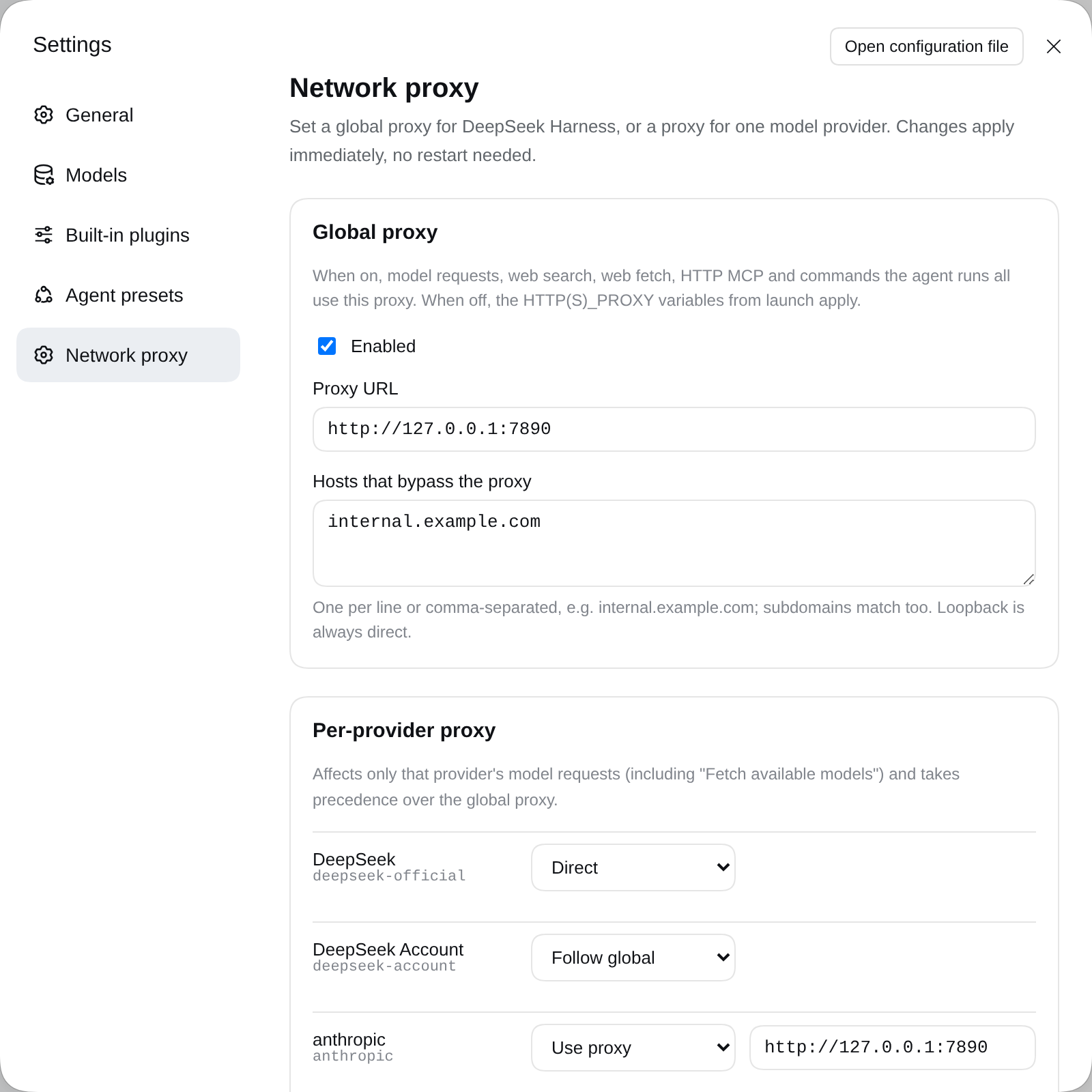
Open Settings → Network proxy:
| Area | What it does |
|---|---|
| Global proxy | Tick Enabled and enter the proxy URL. Hosts that bypass the proxy takes one host per line and matches subdomains too. localhost / 127.0.0.1 are always direct. |
| Per-provider proxy | Lists configured model providers. Each can be Follow global, Use proxy, or Direct. Add a provider not in the list by typing its id below it (e.g. deepseek-official, anthropic, openai, or a custom Provider ID from the Models page). |
Save applies to the next request, including Fetch available models on the Models page.
Configuration file
The same settings live in $DSH_HOME/profiles/<profile>/cordis.patch.yml (the Web UI profile is web):
- id: dsh-proxy
  config:
    global:
      enabled: true
      url: http://127.0.0.1:7890
      noProxy: [internal.example.com]
    providers:
      anthropic:
        mode: proxy
        url: http://127.0.0.1:7890
      deepseek-official:
        mode: direct
| Field | Meaning |
|---|---|
global.enabled |
Turn the global proxy on. Default false, which keeps the launch environment's proxy. |
global.url |
Global proxy URL. |
global.noProxy |
Hosts reached directly while the global proxy is on. |
providers.<id>.enabled |
Use this provider's own setting. Default true; false follows the global route. |
providers.<id>.mode |
proxy (use url) or direct (bypass every proxy, the global one included). |
providers.<id>.url |
This provider's proxy URL. |
Proxy URLs may be http:// or https://. A bare 127.0.0.1:7890 becomes http://127.0.0.1:7890. Credentials go in the URL: http://user:password@host:port.
How it works
- Global proxy installs through dsh's own
@deepseek-ai/dsh-http-proxy, the package the launcher uses forHTTP(S)_PROXY. Loopback bypass,NO_PROXYmatching,web_fetchrouting, and the proxy environment of spawned tools therefore behave exactly as upstream. Turning it off restores the launch policy. - Per-provider proxy hooks the
llm/streammiddleware. A provider's model call runs in one async context. The plugin puts that provider's undiciProxyAgent(or a directAgent) in an AsyncLocalStorage, andfetchuses it inside that context. Other requests are untouched, and concurrent calls to different providers don't interfere. - Both sections are Cordis volatile fields. Saving in Settings fires
loader/volatile-update, and the plugin switches routes in place without reloading.
Limits
- HTTP(S) proxies only; SOCKS5 is not supported. The "mixed port" of Clash, v2rayN, and similar apps (e.g. 7890) also speaks HTTP, so use that port.
- Per-provider routes cover that provider's model requests only (including model discovery). Web search, web fetch, and other traffic use the global route.
- Credentials are stored in plain text. A username and password in the URL are saved in the profile's
cordis.patch.yml. The global proxy URL also reaches commands the agent runs through their environment. - Telemetry stays direct. It uses Node's
httpmodule, as it does in upstream dsh.
Develop
npm install
npm run typecheck
npm test        # global / per-provider / direct routing against local fake proxies
npm run build   # regenerates lib/ and client/ (commit them)
Try it in a local dsh: dsh plugin --profile web add /path/to/dsh-proxy.
Publish to npm (maintainers)
npm login                 # sign in as copylee; check with npm whoami
npm ci && npm test        # tests pass; lib/ and client/ are already built
npm pack --dry-run        # should list only lib/ client/ cordis.patch.yml README LICENSE package.json
npm publish               # publishConfig is public; with 2FA on, npm asks for an OTP
For later releases, push a version tag and the publish workflow publishes it through npm Trusted Publishing (no token needed):
npm version patch         # or minor / major: bumps the version, commits and tags vX.Y.Z
npm run build             # rebuild; commit lib/ and client/ if they changed
git push --follow-tags    # the vX.Y.Z tag triggers the publish workflow
The workflow checks that the tag matches package.json, runs typecheck, tests and the build check, then publishes. Prerelease versions (1.2.0-rc.1) go to the next dist-tag. It can also be run by hand from the Actions tab; a version already on npm is skipped.
License
MIT
No comments yet. Be the first to write one.