Translation Assistant
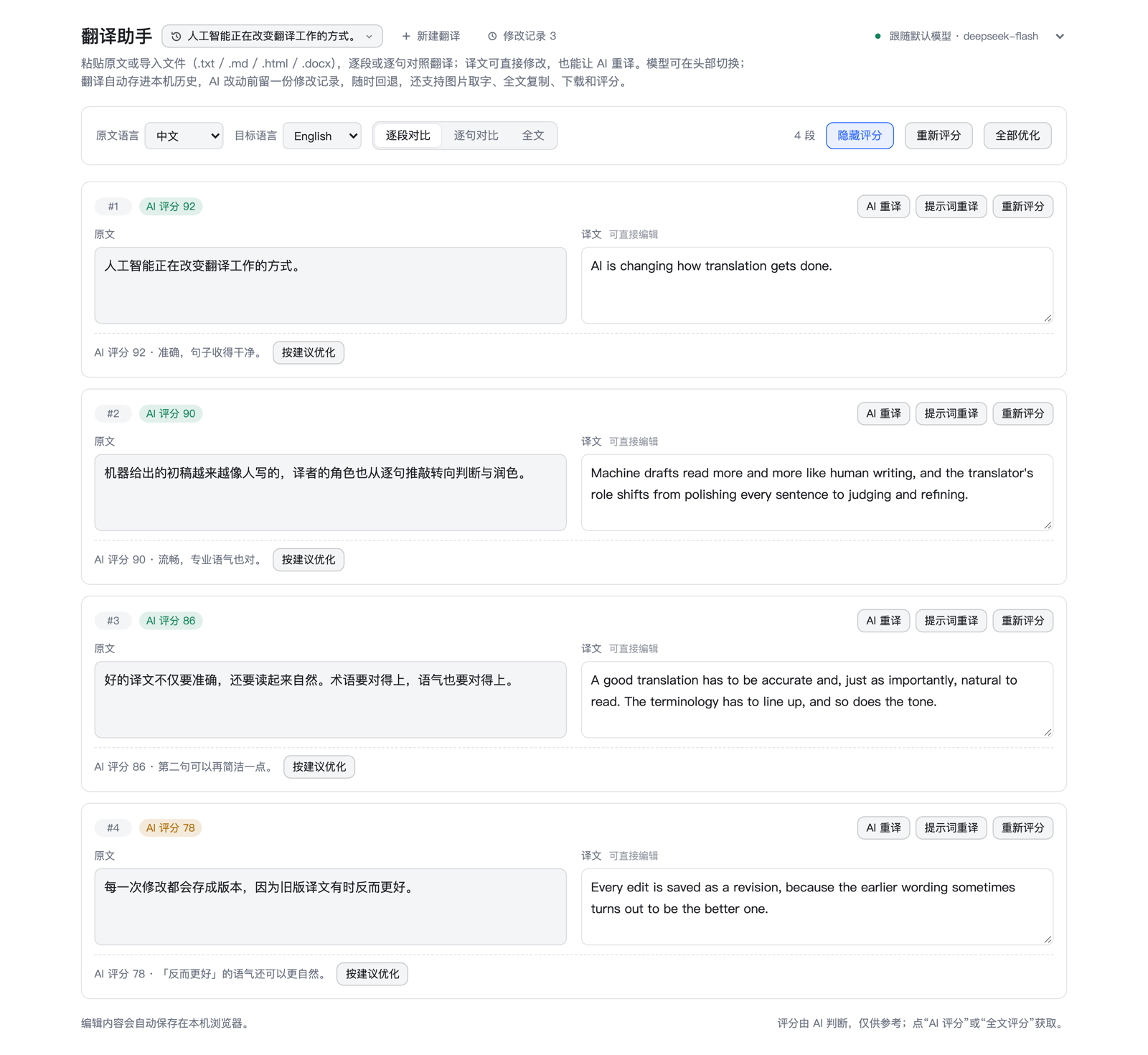
A DeepSeek Harness plugin that turns the Web GUI into a translation workspace: paste text, drop a file, or paste a screenshot, read the source and the translation side by side, edit the output, and let a second model review what a first one drafted. Everything stays on this device, and the model can be switched per request.
Install
It targets DeepSeek Harness 0.2.x (the desktop app or dsh web, verified on 0.2.1). The plugin is published to npm as dsh-translation-assistant; pick whichever of the four fits. It ships no model of its own, so select a default model under Settings → Models before you start.
Method 1: from npm (recommended)
- Open Harness, pick Plugins in the sidebar, and press Add plugin.
- Enter
dsh-translation-assistantin Package name or address, press Install, then Enable now. - A Translation Assistant entry appears in the sidebar.
Method 2: a local directory (for hacking on it)
Best if you intend to keep working on the code: edits to client.js are swapped into the open page by the artifact watcher, and Host changes apply after a restart.
Put the checkout somewhere you will not move it:
git clone https://github.com/coldgust/dsh-translation-assistant.git ~/code/dsh-translationOpen Harness and pick Plugins in the sidebar.
Press Add plugin and enter the absolute path of the repository root in Package name or address — the directory that holds
package.json, for example/Users/you/code/dsh-translation.Press Install, wait for pnpm to finish, then press Enable now.
A Translation Assistant entry appears in the sidebar.
This records a link: dependency: the profile points at that directory instead of copying it. Do not move or rename the directory afterwards — the plugin will fail to load and has to be installed again.
Method 3: a Git address
For when you do not want a local copy. Enter https://github.com/coldgust/dsh-translation-assistant.git where method 2 asks for the path and keep the rest. The code lands in the profile's node_modules, so edits never reach your repository and upgrading means uninstalling and reinstalling.
Registering it by hand
If you prefer files or want to script the setup, edit the profile's package.json (~/.dsh/profiles/desktop/package.json on the desktop app). Only the two places below concern this plugin; keep the profile's existing bundles and dependencies. Using the published package:
{
  "dsh": {
    "profile": {
      "bundles": ["dsh-translation-assistant"]
    }
  },
  "dependencies": {
    "dsh-translation-assistant": "^1.11.1"
  }
}
Use "link:/Users/you/code/dsh-translation" instead to point at a local checkout.
Then run pnpm install in that directory and restart Harness. Keep the profile's existing entries in the bundles array and append this one at the end. The profile's cordis.patch.yml stays untouched: the plugin row comes from the patch this package ships (dsh.bundle.patch in package.json → cordis.patch.yml).
After installing
- Plugins → Installed plugins lists Translation Assistant, switched on, and its detail page shows the single
translation-assistantrow it contributes. - If the header says "Translation service not ready", pick a default model under Settings → Models and reload the page.
- To use an outside model — Bilibili's Index-Translate in the appendix below, for instance — register the route first; the header picker then offers it.
Upgrading and uninstalling
| Installed as | Upgrade | Uninstall |
|---|---|---|
| npm package | Uninstall it first, then install again with method 1 | Uninstall on the bundle's page |
| Local directory | git pull, then reload; Host changes need a restart |
Same as above |
| Git address | Uninstall, then install again with method 3 | Same as above |
| By hand | Change the version and pnpm install; for a link, git pull and restart |
Delete the bundles entry and the dependency, then pnpm install |
What you get
Translate
- Two views from one request —
By paragraphis the default;By sentenceswitches granularity. A single request returns both, so switching costs nothing. - Files — drop or pick
.txt,.md,.log,.html,.htm, or.docx. Word files are unpacked in the browser (no library, and the original never leaves the machine); HTML loses scripts, styles, and the head first, so only visible prose reaches the model. - Images — paste a screenshot or pick one; it is downscaled to a 2048 px long edge, sent as JPEG, transcribed, and translated.
Review and refine
- Every segment is editable — source and translation sit side by side and stay in step across all three views: editing a sentence re-joins its paragraph, editing a paragraph splits back over its sentences, and text is never cut mid-sentence.
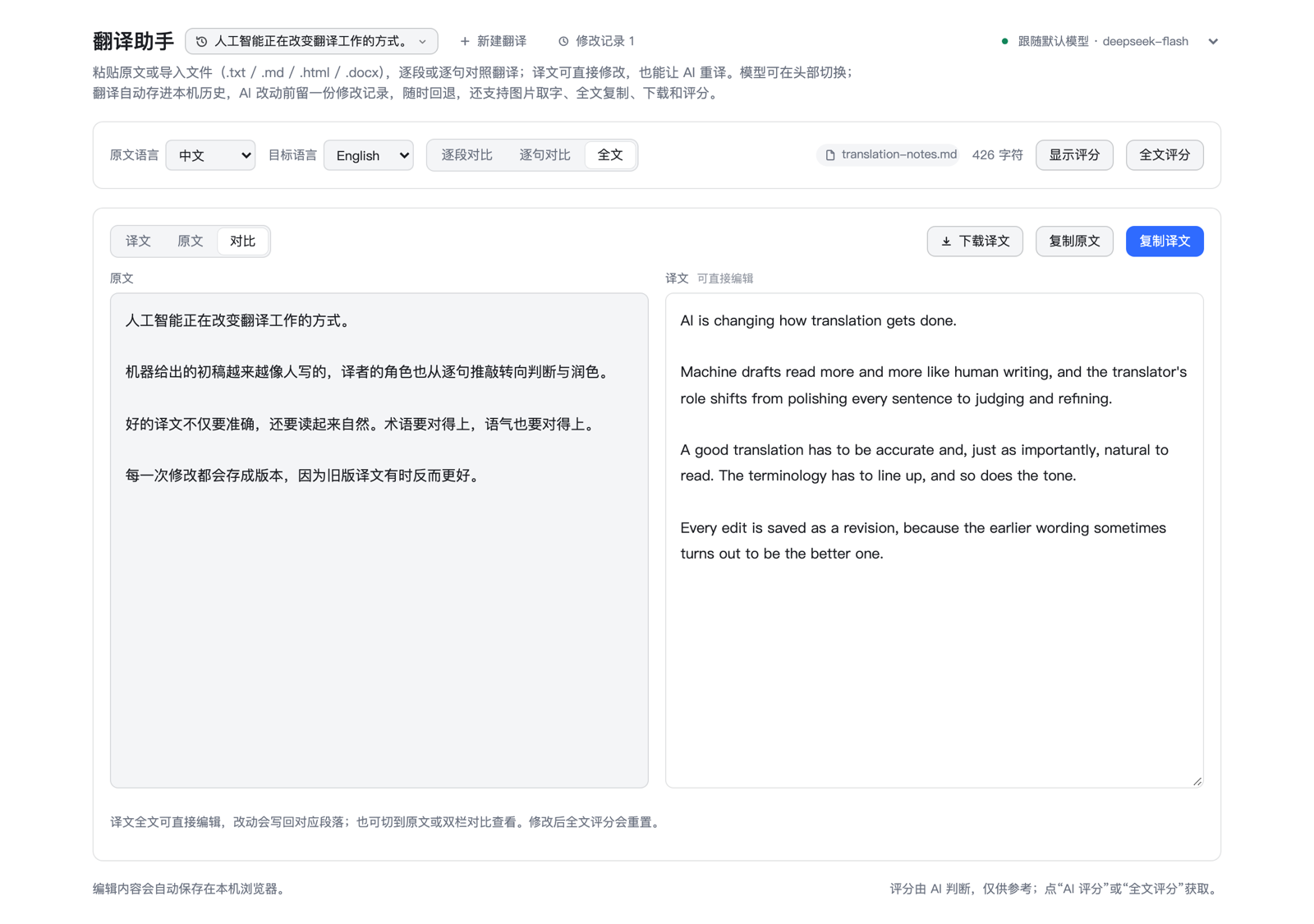
- Full text —
Translation(editable),Source, orCompare(side by side, stacked on narrow screens). Edits are split on blank lines and written back onto the matching segments; copying and document-level scoring live here. - Retranslate —
AI retranslateredoes one segment;Retranslate with promptadds an instruction such as "more colloquial" or "keep the legal terms". - Score on demand — scores stay hidden on every load. Score one segment, the current view, or the whole document, then reveal them from the toolbar. Editing a translation clears the score it invalidated.
- Turn feedback into a rewrite —
Apply suggestionunder a score sends that score and its comment back as the instruction for a fresh pass;Apply alldoes the same for every scored segment in the view, three at a time. While scores are hidden, no suggestion button is shown.
Keep track
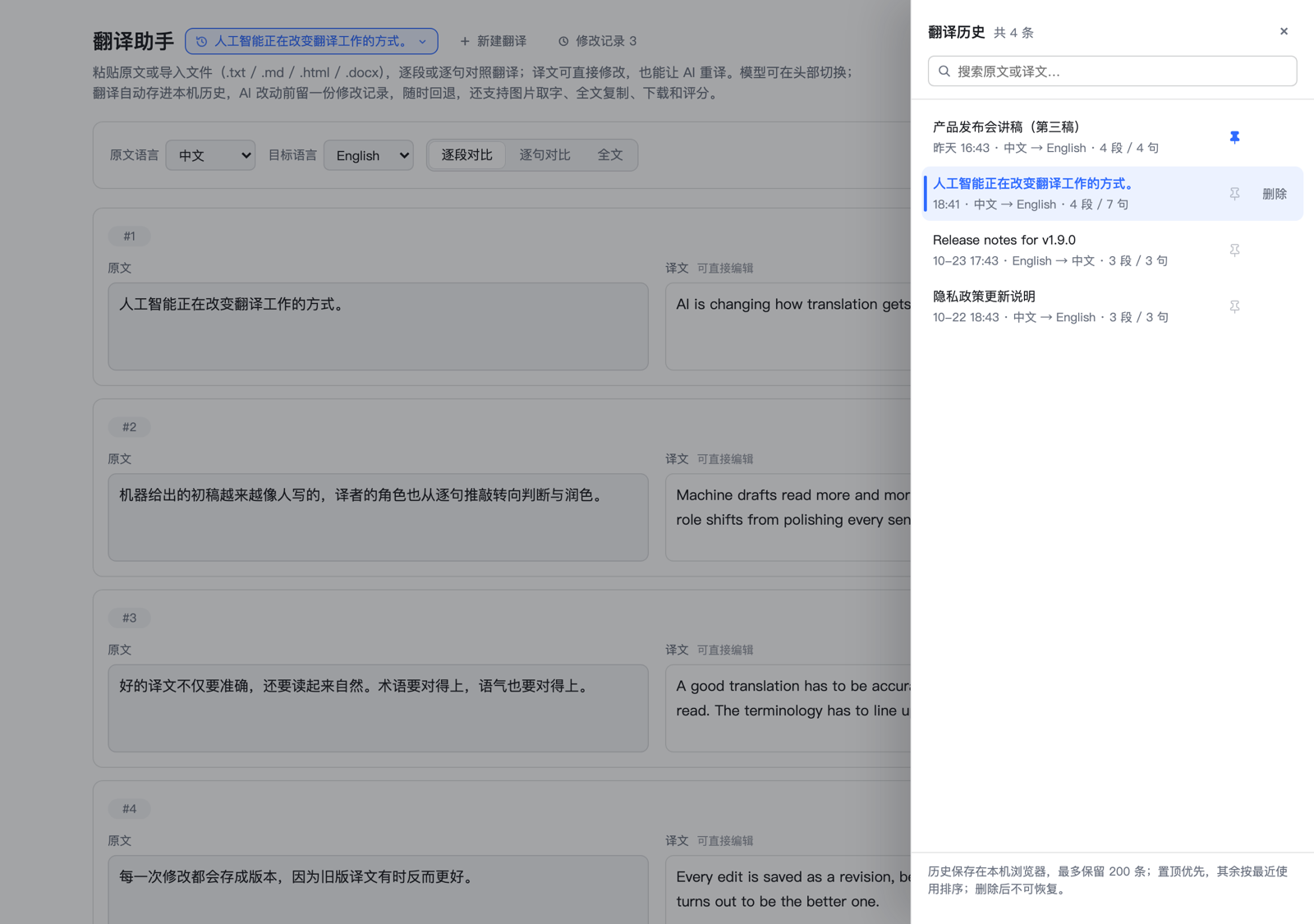
- On-device history — up to 200 documents with title, time, language pair, and segment counts. Search matches source or translation and quotes the hit in context; pin an entry to keep it on top, delete in two clicks.
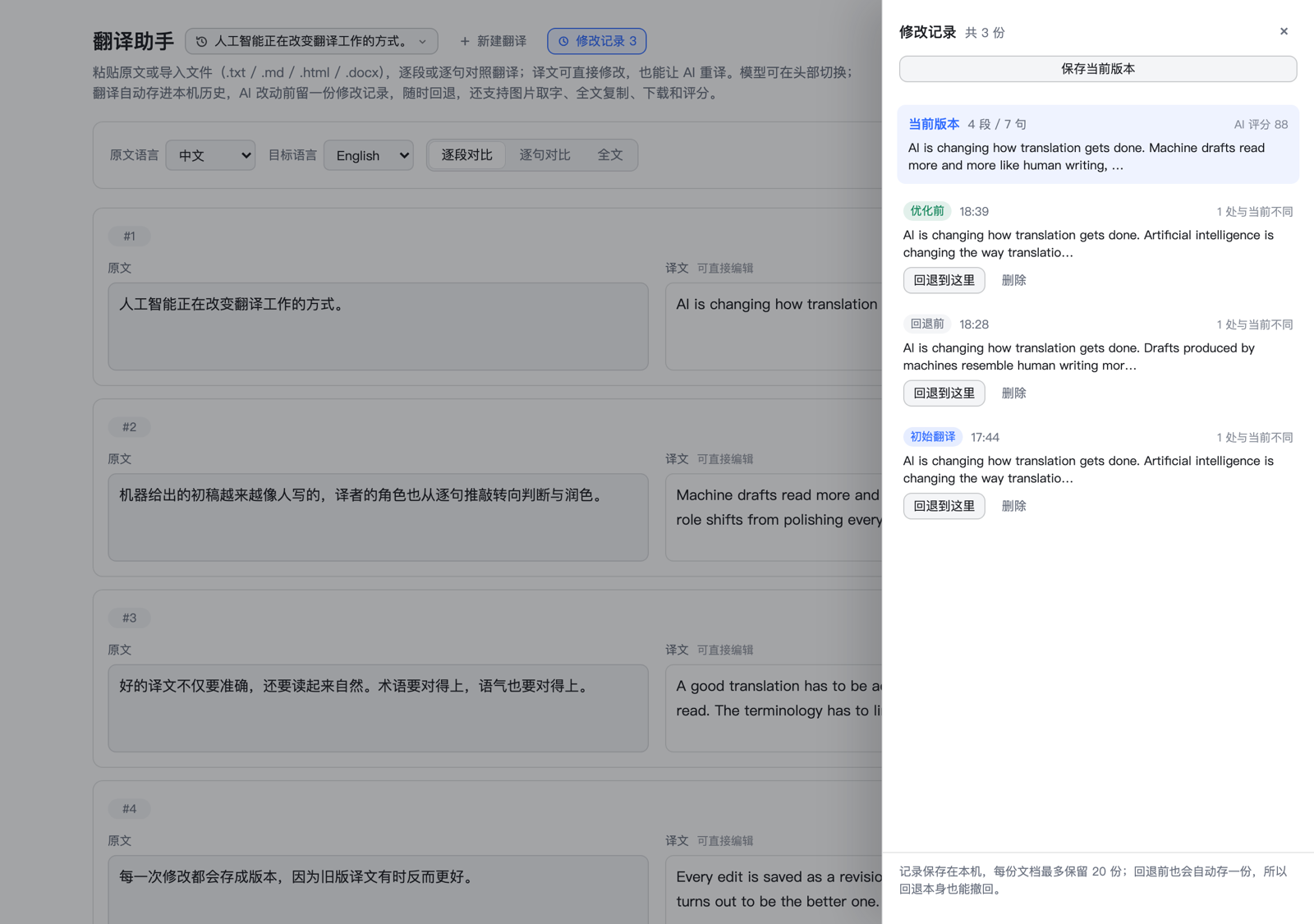
- Revisions — up to 20 labelled snapshots per document: the machine baseline, one before every AI pass, one before each rollback. The drawer says how many segments differ from the current text, and
Restoreputs one back — the text it replaces is snapshotted too, so a rollback can itself be undone.
Integrate
- Model switching — the header chip becomes a provider-grouped picker as soon as the Host advertises more than one model.
Follow defaultkeeps tracking the profile; any other entry pins that route for translation, retranslation, scoring, and OCR, and the choice is remembered on this device. A model that has since disappeared falls back to the default with a notice instead of failing every request. The appendix shows how to register an outside endpoint. - Agent tool — the same engine is exposed as
translation_assistant(action: translate | retranslate | score | score_document), so the assistant can translate or review text in chat.
Use cases
One model drafts, another one reviews
Quality comes from separating the two jobs: draft cheap and fast, then judge and rewrite with the strongest model you can reach. The pick applies to translation, retranslation, scoring, and OCR, so the two halves of the job can even come from different providers.
- Switch the header to a fast translation model —
Index-Translate-9B, orIndex-Translate-2Bwhen there is a lot of text — and pressTranslate, or drop the file in. - Switch to the strongest model you have:
deepseek-reasoner,GPT-5, orIndex-Translate-35B-A3B. - Press
Show scores, thenScore all. Each segment comes back with a 0–100 score and one sentence of feedback. - Press
Apply all, orApply suggestionon a single segment. The rewrite is sent together with the score and its comment as the instruction, so the strong model fixes exactly what it criticised. - Open
Revisionsto compare the passes. Every AI rewrite left a snapshot, and restoring one is undoable in turn.
Scores are cached with the text: a rewrite drops the stale score, and editing a translation clears the score it invalidated, so step 3 only has to be repeated when the text actually changed.
A whole document, end to end
Drop a .docx, .md, or .html file and it is translated in one request. The file name stays on the document, and Download translation writes the result back in the same shape: .md for Markdown, an HTML document for HTML, .txt for everything else. Blank-line structure survives, so the output opens the way the input did.
How it works
| File | Role |
|---|---|
host/index.js |
Host half: registers the /dsh-translation/api JSON route and the translation_assistant Agent tool, validates requests, resolves the model route. |
host/engine.js |
Prompt construction, streaming completion wrapper, retries, batched translation with per-segment fallback, retranslation, segment/document scoring, image OCR. No Harness imports, so it is unit-testable with a fake LLM stream. |
client.js |
Browser half: the main page, the sidebar panel icon, all interaction state and rendering. |
package.json |
Bundle declaration: dsh.bundle.patch points at the shipped cordis.patch.yml, dsh.client names the browser entry and the sidebar package it injects into. |
cordis.patch.yml |
Inserts the Host plugin row. |
locale/en.json, locale/zh.json |
Plugin Manager title and description, in English and Chinese. |
The page talks to the Host through same-origin calls:
| Endpoint | Purpose |
|---|---|
GET /dsh-translation/api/health |
Service state, the resolved model label, the profile default, the switchable model list (grouped by provider), and per-provider listing failures. |
POST …/translate |
Translate a sentences / paragraphs array in one request. |
POST …/retranslate |
Redo one segment, optionally with extraPrompt. |
POST …/score |
Score one segment (0–100 plus a one-sentence comment). |
POST …/score-document |
Score a whole source/translation pair. |
POST …/ocr |
Transcribe an image (image as base64 + media type). |
POSTs are rejected when the Origin header names a different origin, and the request body is capped at 24 MiB. Every POST accepts an optional route: { provider, model }; omitting it follows the configured or profile-default route. A route that is not in the advertised catalog is rejected with HTTP 400 before any model call, unless the catalog itself is empty (discovery failed), in which case the model service has the final say.
Configuration
All fields are optional and live in the plugin row (cordis.patch.yml or Plugin Manager):
| Field | Default | Meaning |
|---|---|---|
provider, model |
current default selection | Exact model route for all calls. |
reasoningEffort |
unset | Optional reasoning effort passed to the route. |
models |
unset (discovery) | Extra routes for the header picker, for example [{ provider: deepseek-account, model: deepseek-pro, label: Pro }]. Merged with what the Host's LLM registry advertises; the routes in use are always listed. |
targetLanguage |
Chinese | Default target language. |
sourceLanguage |
unset (auto-detect) | Default source language; the page can override it. |
maxTokens |
8192 |
Output limit for translation calls. |
retranslateMaxTokens |
4096 |
Output limit for retranslation. |
scoreMaxTokens |
4096 |
Output limit for scoring. |
ocrMaxTokens |
4096 |
Output limit for image transcription. |
maxRetries |
1 |
Retries for transient provider failures. |
scoreRetries |
1 |
Retries when a scoring reply cannot be parsed. |
sentenceChunk, paragraphChunk |
16, 6 |
Segments per translation batch. |
concurrency |
3 |
Batches in flight at once. |
tool |
true |
Set false to hide the Agent tool. |
Data kept on this device
| Key | Content |
|---|---|
dsh-translation-assistant:history:v1 |
Up to 200 entries (~2 M characters), pinned first and then most recently used. Each entry carries its own revision snapshots (up to 20, 200,000 characters per document). |
dsh-translation-assistant:session:v1 |
The id of the document that was open last. |
dsh-translation-assistant:prefs:v2 |
Source/target language, comparison view, full-text display mode, and the picked model route (or null to follow the default). |
dsh-translation-assistant:document:v1 |
Legacy single-document key from 1.1.x: adopted into history on first boot, then cleared. |
History, edits, and preferences never leave the browser; only the text being translated, retranslated, scored, or read from an image is sent to the model route. Clearing site data for the Harness origin erases the history — there is no server-side copy.
Limits
- A translation request accepts up to 400 segments, 20,000 characters per segment, and 120,000 characters in total.
- Revisions keep the latest 20 snapshots per document within 200,000 characters; older snapshots are dropped first. They count against the history budget, so a heavily iterated document may evict older documents.
- Document scoring accepts up to 60,000 characters on each side (120,000 combined).
- Images: PNG, JPEG, WebP, or GIF, up to 12 MiB each and 24 MiB per request.
- Imported files: up to 8 MiB each, and the extracted text still has to fit the 120,000-character translation budget.
.docxunpacking needs the browser'sDecompressionStream(Chrome 80+, Firefox 113+, Safari 16.4+); elsewhere the page asks for.txt,.md, or.htmlinstead. - HTML import translates visible text only: scripts, styles, the head, and attributes are dropped. The downloaded HTML keeps one
<p>per translated paragraph and does not restore inline markup such as links or emphasis. - Scoring asks for the stable
SCORE:/COMMENT:pair, falls back to JSON, and retries once when the model breaks that shape. A score is a model judgement, not a certified metric.
Development and verification
This directory is the installed bundle (the profile links it), so client.js is picked up by the artifact watcher and swapped into the open page; Host changes (host/index.js, host/engine.js) apply after the next Harness restart.
# 86 unit/integration tests: engine (translation/retranslation/scoring/OCR),
# the HTTP handler, model-catalog discovery and route overrides, and the page
# rendered through a minimal React harness (no browser needed).
node --test 'test/*.test.mjs'
Notes for maintainers:
- The page pre-checks the Host limits (400 segments / about 120,000 characters) and explains an oversized document before a request is sent.
- Model discovery uses the documented
@deepseek-ai/dsh-llmregistry:listProviders()names the registered routes, thenlistModels(providerId)asks each adapter what it serves.listModelstakes a provider id — calling it with no argument throwsNO_ADAPTER, which is why a generic "call every list-like method" probe finds nothing on a current Host. One provider whose listing fails is reported inmodelFailuresand does not hide the others. The result is cached for 60 seconds and dropped onllm/adapters-updated, so adding a provider in Settings → Models shows up without a restart. Requests only pay for discovery when they carry aroute. - The picker groups candidates by provider (
optgroup) once more than one provider is visible, and thedefaultentry is labelled from the profile selection rather than from the route in use, so it keeps naming the real default after a switch. .docxreading is a small ZIP walker (central directory → local header →DecompressionStream('deflate-raw')) plus a tag stripper forword/document.xml; it deliberately ignores headers, footers, and comments. HTML reading is regex-based so it also runs in the Node test harness, where no DOM exists.- Scores are hidden on every mount by design; only an explicit score request reveals them, and the toggle hides them again.
- A fresh boot opens the most recently used document, not the first pinned one. Loading an entry never bumps its timestamp; editing does.
- History pruning drops the oldest unpinned entries first, so pinned documents survive the count and character budgets.
- Revision snapshots record the document as it stood before a rewrite and are taken only when that text differs from the newest snapshot, so a batch pass adds one row rather than one per segment. Rollback snapshots the outgoing text first, which is what makes a rollback reversible.
- The screenshots in
docs/screenshots/are the real page rendered against mocked Host data at 1280 px CSS width (2x, downscaled to 1600 px). Retake them the same way when a layout change makes them lie. - When changing the page's CSS, remember it lives inside a template string: a backtick inside a CSS comment truncates the literal. Counting backticks (expected: 0) and comparing
{/}totals catches it.
Troubleshooting
| Symptom | Cause and fix |
|---|---|
| Installation says the package is not a bundle | The path points at a subdirectory. Enter the repository root — the directory with package.json and its dsh.bundle.patch. |
| The bundle reports an error after the folder moved | A local install is a link: dependency, so moving or renaming the directory breaks it. Put it back, or uninstall and install again from the new path. |
| No sidebar entry after installing | Restart Harness on the desktop app, or reload the page under dsh web. If it is still missing, check that the bundle is switched on in Plugins. |
| Header shows “Translation service not ready” | No default model is selected in Settings, or the provider is unreachable. Pick a default model and reload. |
| The header shows no model picker | Only one route was discovered, so there is nothing to switch to. The notice above the editor names the provider whose listing failed; a models list in the plugin config is the manual fallback. |
| “The selected model cannot read images” (HTTP 422) | The routed model cannot read images. Choose a vision-capable model. |
Importing a .docx says the browser cannot unpack it |
DecompressionStream is unavailable in that browser. Save the file as .txt, .md, or .html and import that. |
| The downloaded HTML has no styling or links | Expected: the page translates text, so the export keeps paragraphs only. Keep the original file if you need the markup. |
New translation seems to have deleted the document |
It does not: the document stays in history and the page opens a blank form. Open the header chip to switch back. |
| A rollback lost the newer wording | It does not: the text you left is stored as a Before rollback revision. Open Revisions again and restore it. |
| Edits disappeared after clearing browser data | History and edits live in localStorage only; there is no cloud copy. |
Appendix: adding Bilibili's Index-Translate models as a route
The model
Index-Translate is Bilibili's open machine-translation model family, and that page is its online demo. It runs on vLLM and speaks standard OpenAI Chat Completions, so it can be registered as an ordinary custom provider; once it is, this plugin's header picker can select it directly.
Index-Translate-35B-A3B— the flagship: a mixture-of-experts model (35B total parameters, 3B active) that translates between many languages and can also read text straight out of an image, which in this plugin means translation, retranslation, scoring, and OCR all work.Index-Translate-9B/Index-Translate-2B— smaller, faster text-only models for high volume.
The demo needs no API key and comes with no SLA, so treat it as a playground route.
Method 1: the Web UI (recommended)
The most direct way, and what most users want.
Start the DeepSeek Harness Web UI: run
dsh weband open the interface.Open the model settings: click Settings in the sidebar, then Models.
Add a custom provider: click Add a custom provider.
Fill in the form:
- Provider ID:
bilibili-translate— a lowercase identifier you choose, used internally to recognise the provider - Base URL:
https://index-translate.bilibili.com/v1 - Protocol:
OpenAI Completions(openai-completions) - API Key: any placeholder, for example
index - Models: click Fetch available models; it should discover
Index-Translate-35B-A3B. If that fails, add the model id by hand.
- Provider ID:
Save, then pick the Bilibili model from the model dropdown.
Method 2: edit the settings file directly
For people who prefer files or want to script the setup. Edit $DSH_HOME/settings.yaml (usually ~/.dsh/settings.yaml; on the desktop app the live file is ~/.dsh/profiles/desktop/cordis.patch.yml) and add an entry under providers inside the llm-pi-ai section:
llm-pi-ai:
  providers:
    bilibili-translate:                      # Provider ID
      apiKeyEnv: BILIBILI_TRANSLATE_API_KEY  # names an environment variable
      api: openai-completions
      baseURL: https://index-translate.bilibili.com/v1
      models:
        - id: Index-Translate-35B-A3B
Note that apiKeyEnv is a reference, not a value: the Harness process has to be able to read that variable. The endpoint ignores the key, so any non-empty value works. A Harness launched from Finder or the Dock does not inherit your shell environment, so if the variable cannot resolve, send the placeholder as a header instead:
      headers:
        Authorization: Bearer index
Verify
Restart Harness — providers are registered at boot. This plugin's header picker then gains a bilibili-translate group, and picking Index-Translate-35B-A3B pins it for translation, retranslation, scoring, and OCR. You can also check the endpoint directly:
curl http://127.0.0.1:<port>/dsh-translation/api/health
Entries under models with provider: bilibili-translate mean the route is live.
Caveats
- A public demo deployment: no SLA, no published rate limit, and it may change or disappear. A playground route, not production capacity.
- Context is 24,576 tokens on the 35B, while this plugin accepts documents up to 120,000 characters. Batches are 6 paragraphs or 16 sentences, so normal documents fit; a single paragraph of tens of thousands of characters does not. Drop
concurrencyto2for the demo endpoint. - Do not paste a real key. The endpoint ignores it, and whatever you type is stored in your local credential store.
No comments yet. Be the first to write one.