English | 中文
dsh-proxy-manager
Set, inspect and clear the proxy configuration of the developer tools on this machine from one page in Settings → Proxy: 13 tools are built in, your own can be added, and one click enables or clears the proxy for all of them.
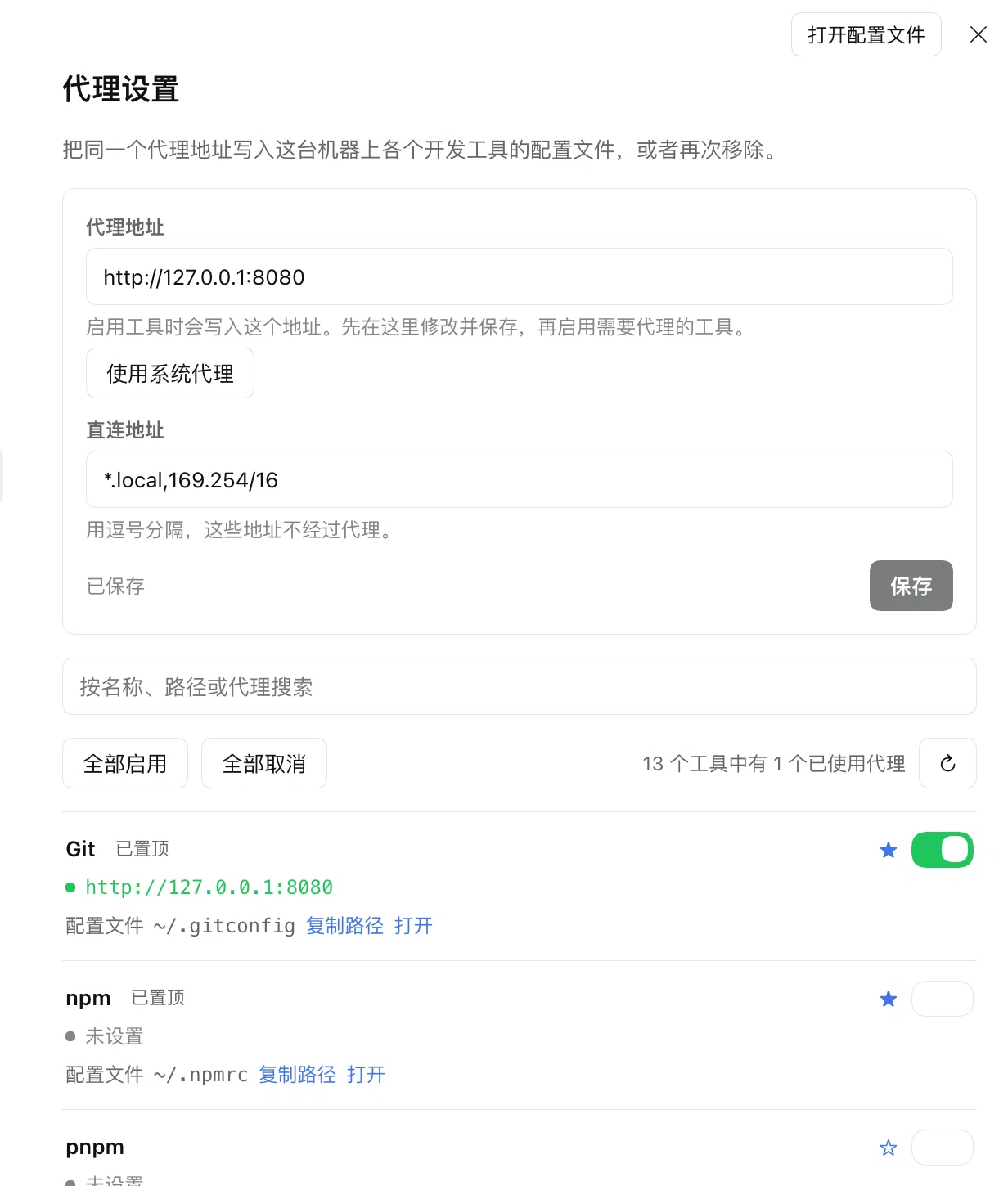
What it does
- One list, every tool. Each row shows whether the proxy is on, the address it uses, and the exact configuration file that holds it.
- One click to enable or clear.
Enable for all/Clear for all, or the switch on a single row. Files are edited in place: comments, ordering and unrelated keys survive. - Use the system proxy. Reads the proxy the operating system itself is set to and fills it in, including the bypass list.
- Open the configuration file. Opens it in the default text editor; rows whose file does not exist yet are marked and cannot be opened.
- Pin, search, page. Pinned tools stay on top, configured tools sort above unconfigured ones, missing files go last; search filters by name, id, path, category or address; 10 rows per page.
- Extensible three ways. Add software from the page, add a built-in adapter in code, or register one from another plugin at runtime.
- Available to the agent too. The
proxy_managertool reads the same state and performs the same actions as the page.
Install
- In Plugins, choose Add plugin, enter
dsh-proxy-manager, and press Install — or rundsh plugin --profile <profile> add dsh-proxy-manager, where<profile>is the one you boot (for exampleweb). - Choose Enable now, or switch on the
Proxy managerrow. - Restart DeepSeek Harness once — the Host module and the browser bundle are loaded with a new process. After that, toggling the row is enough to reload the plugin.
- Open Settings → Proxy.
To upgrade, reinstall: uninstall the row and add dsh-proxy-manager again (dsh plugin --profile <profile> add dsh-proxy-manager@latest).
Supported tools
| Tool | Configuration file | Written keys |
|---|---|---|
| Git | ~/.gitconfig |
[http] proxy, [https] proxy |
| npm | ~/.npmrc |
proxy, https-proxy |
| pnpm | ~/.npmrc (shared with npm) |
proxy, https-proxy |
| Yarn | ~/.yarnrc.yml |
httpProxy, httpsProxy |
| Cargo | ~/.cargo/config.toml |
[http] proxy |
| pip | ~/Library/Application Support/pip/pip.conf (macOS), ~/.config/pip/pip.conf (Linux), %APPDATA%\pip\pip.ini (Windows) |
[global] proxy |
| Maven | ~/.m2/settings.xml |
one <proxy> element (dsh-proxy-manager) |
| Gradle | ~/.gradle/gradle.properties |
systemProp.http(s).proxyHost/proxyPort/nonProxyHosts |
| DeepSeek Harness | $DSH_HOME/.env |
HTTP_PROXY, HTTPS_PROXY, NO_PROXY |
| Docker | ~/.docker/config.json |
proxies.default.httpProxy/httpsProxy/noProxy |
| Shell environment | ~/.zshrc / ~/.bashrc (Windows: PowerShell profile) |
HTTP_PROXY, HTTPS_PROXY, NO_PROXY |
| curl | ~/.curlrc |
proxy, noproxy |
| wget | ~/.wgetrc |
http_proxy, https_proxy, no_proxy |
The shell entry covers every tool that only reads environment variables — Go, kubectl, Helm, Terraform, aws, uv, Poetry, Bundler, Homebrew.
Use it
- Open Settings → Proxy.
- Enter the proxy address (for example
http://127.0.0.1:7890), or press Use system proxy to take the system value, and the bypass hosts. - Press Save, then Enable for all — or flip the switch on the tools you want.
- Use Clear for all, or a single switch, to remove the proxy again.
Programs that are already running keep the proxy they read at start-up: restart the tool, or open a new terminal. DeepSeek Harness itself applies the change on its next start.
Add software
From the page. Open Add software at the bottom of the list and describe the tool: display name, file format, configuration file, section, key, and what that key holds (the whole URL, host, port or bypass list). The adapter is stored in this plugin's own state file.
In code. Add src/host/adapters/<tool>.ts:
import type { ToolSpec } from '../core/types.ts'

export const bun: ToolSpec = {
  id: 'bun',
  name: 'Bun',
  category: 'javascript',
  kind: 'toml',
  path: '~/.bunfig.toml',
  section: 'install',
  fields: [{ key: 'proxy', part: 'url' }],
}
then list it in builtinAdapters in src/host/adapters/index.ts. The page, the HTTP endpoint and the agent tool all read that one table.
From another plugin:
const dispose = ctx.proxyManager.registerTool({ id: 'my-tool', name: 'My tool', kind: 'json', path: '~/.my-tool/config.json', fields: [{ key: 'proxy.url', part: 'url' }] })
Adapter fields
| Field | Meaning |
|---|---|
kind |
File dialect: ini ([section] + key = value), props (key=value), yaml (top-level key: value), toml ([table] + key = "value"), json (dotted path), env (KEY=VALUE), shell (managed export block), xml (managed <proxy> element) |
path |
One path, a list of candidates (the first existing one wins), or a per-platform table; ~, $DSH_HOME and %APPDATA% expand |
section |
Section or table name for ini / toml; a field may override it |
fields[].key |
Key, dotted JSON path, or element name inside the managed block |
fields[].part |
url (whole address), scheme / host / port (stored separately), noProxy |
fields[].transform |
jvmNoProxy converts the bypass list to the JVM's ` |
binary |
Executable checked against PATH for the "not installed" hint |
Agent tool
proxy_manager with action:
status— every tool, its proxy and its configuration fileenable— write the proxy (toolslimits it to specific ids,proxyoverrides the saved address for the call)disable— remove it (optionally fortools)system— what the operating system proxy is
Notes
Use system proxyreads the manual proxy of the OS (macOSscutil --proxy, Windows Internet Settings, GNOMEgsettings). An automatic configuration script (PAC) or a TUN/VPN adapter exposes no fixed address, and the page says so instead of guessing.- pnpm and npm share
~/.npmrc, so enabling one shows both as enabled — that is the real state. - Windows and Linux paths, registry/GNOME detection and
explorer/xdg-openare implemented and unit-tested, but only macOS has been run end to end.
Development
pnpm 12 is pinned in package.json (packageManager); pnpm-workspace.yaml allows the one build script development needs (esbuild).
pnpm install
pnpm typecheck
pnpm build     # lib/loader.js, lib/host.js, lib/client.js
pnpm test
pnpm build writes the committed lib/ artifacts; reload the plugin row (or restart once after installing) to load them.
License
MIT — see LICENSE.
No comments yet. Be the first to write one.