READMESource: main@29cb9c0c
@code4lala/dsh-plugin-workspace-path


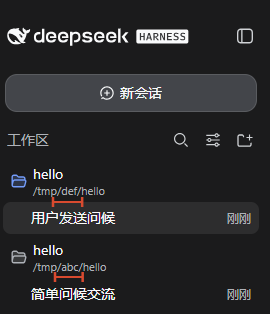
A DeepSeek Harness (dsh) client plugin that displays the full directory path below each workspace title in the web sidebar, with line wrapping.
侧边栏的每个工作区标题下方显示完整的目录路径,自动换行。
📦 npm 包主页 / npm package: https://www.npmjs.com/package/@code4lala/dsh-plugin-workspace-path
效果 / Screenshot
Install
Install into your web profile:
dsh plugin --profile web add @code4lala/dsh-plugin-workspace-path
The plugin declares a dsh.bundle patch that inserts itself into the web
plugin roster, so it activates on the next dsh web boot. To activate it in an
already-running server without restarting, append to
~/.dsh/profiles/web/cordis.patch.yml:
- insert:
    - id: workspace-path
      name: '@code4lala/dsh-plugin-workspace-path'
The running dsh web server watches this file and hot-loads the plugin.
How it works
- Host half (
lib/index.js): no behavior — everything happens in the browser. - Client half (
lib/client.js): reads the workspace list from theworkspacesclient service and injects awkpath-subtitleelement with each workspace's path below its sidebar title, kept in sync through aMutationObserverplus a subscription to the workspace list. Rows are matched to workspaces positionally (sidebar order equals the workspace list's stable order), so workspaces with identical titles each show their own path — never a collision.
Changelog
- 1.0.2 — Bundle
screenshot.pnginto the package and reference it via the unpkg CDN so the README renders with the screenshot on npmjs.com; add the npm package link and version badge. - 1.0.1 — Fix wrong paths when several workspaces share the same title (title-keyed lookup collided; now matched by position). Subtitles also live-update on reorder/rename instead of being written once.
- 1.0.0 — Initial release.
License
MIT © code4lala
No comments yet. Be the first to write one.