DSH Tauri Launcher


沿用 DeepSeek Harness「一切皆插件」的架构哲学,把桌面端启停、退出确认、桌面快捷方式联动 全部抽象为标准 Web 插件——用户在 设置 → 桌面启动 中即可一键唤起 Tauri 桌面应用,既 享受插件生态的深度集成,也保留原生桌面体验。本仓库同时附带 Tauri 桌面应用完整源码与 GitHub Release 自动构建流程。
平台支持
| 平台 | 状态 |
|---|---|
| Windows | ✅ 已支持(含桌面快捷方式 .lnk) |
| Linux | 🚧 规划中 |
| macOS | 🚧 规划中 |
Web 插件本体(host/client JS)跨平台;目前 Windows 专属的实现集中在桌面快捷方式创建与 回环进程控制上。Linux/macOS 适配已在路线图中,欢迎在 issue 里提出你的需求与场景。
功能
- 桌面端启动开关:一键启动/退出桌面应用(点击即反馈,秒级状态同步);
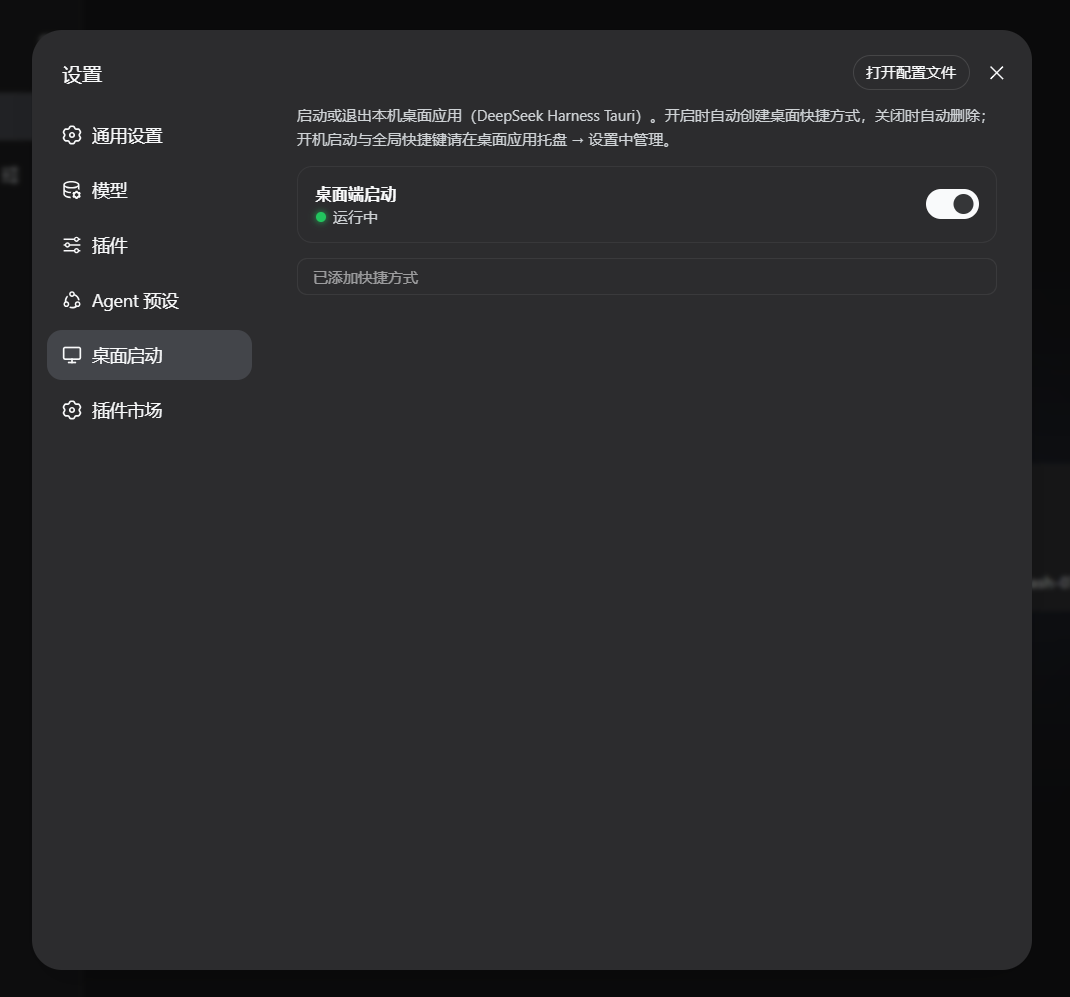
- 快捷方式联动:开启时自动创建桌面快捷方式、关闭时自动删除;运行中可手动补建;
- 关闭确认弹窗:关闭前弹窗确认(含快捷方式将被删除的提示);
- 状态可视:运行中 🟢 / 已停止 ⚪ / 状态未知 🟡 + 出错时显示诊断信息;
- 深色模式适配:全部颜色走 DSH 主题令牌,深浅色自动适配;
- 设置导航显示器图标:替换默认齿轮图标(矢量绘制,任意缩放锐利)。
界面截图
Web 设置面板(插件分区)
安装后,DSH 设置 → 桌面启动 即可看到启动开关、运行状态、快捷方式联动提示。 |
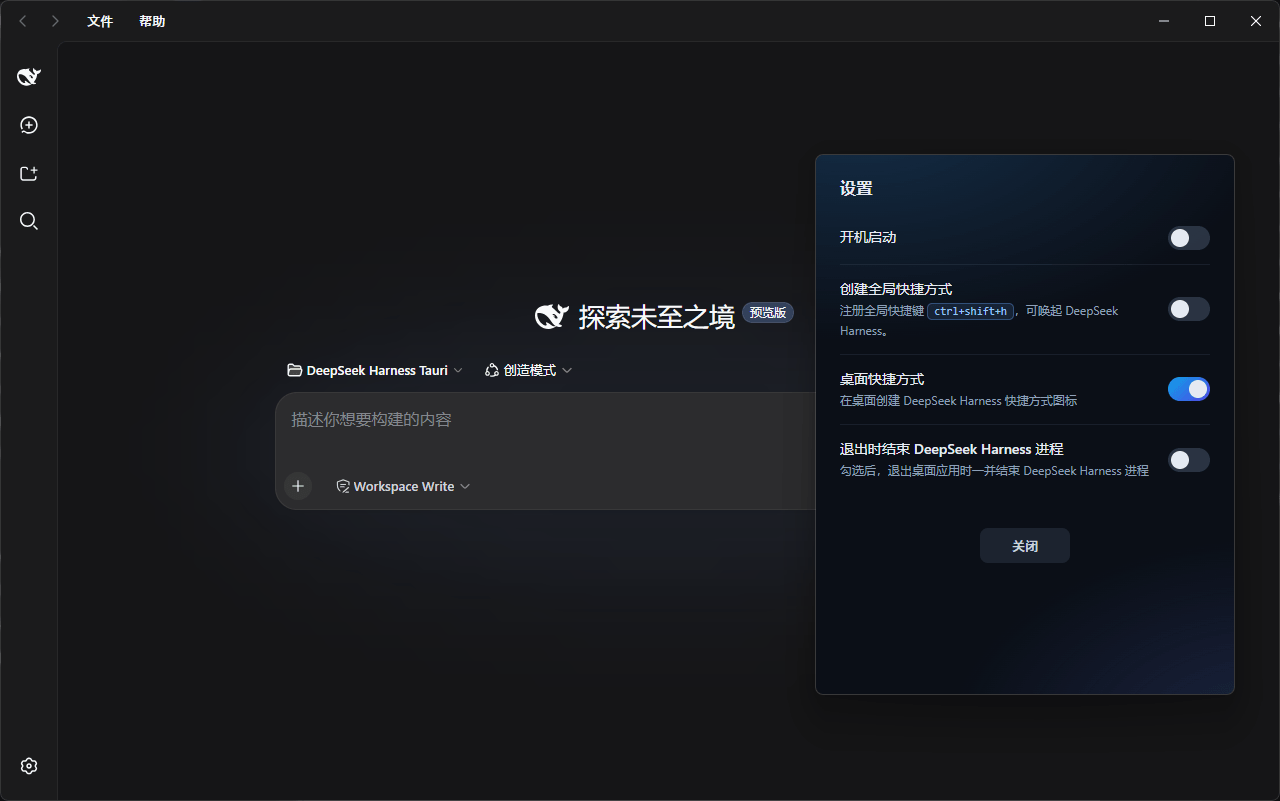
桌面应用设置面板
Tauri 桌面应用自身设置:开机启动、全局快捷键、桌面快捷方式、退出策略。 |
工作原理(摘要)
Web 插件(宿主半)通过 /api/dsh-tauri-launcher/* 回环路由与浏览器半通信,
并使用标记文件协议控制桌面应用(详见 docs/architecture.md):
.dsh-heartbeat:桌面应用每秒写入时间戳,插件以此探测运行状态;.dsh-quit:写入1后桌面应用仅退出自身(保留 Harness 进程),消费时自删。
目录结构
dsh-tauri-launcher/
├── README.md             # 中文 README
├── README.en.md          # 英文 README
├── package.json          # dsh.bundle + dsh.client 双 manifest
├── cordis.patch.yml      # 组合补丁(插入插件行)
├── lib/
│   ├── index.js          # 宿主半:回环路由 + 控制逻辑(可配置)
│   └── client.js         # 浏览器半:设置分区 UI
├── launcher/             # Tauri 桌面应用工程(源码 + 一键构建;当前仅 Windows)
├── .github/workflows/    # CI:打 tag 自动构建 Windows exe 并发布 Release
└── docs/                 # 架构与发布文档
    └── screenshots/      # README 引用的界面截图
安装(Web 插件)
关于
<profile>:它指 DSH 的配置档(profile)——一套可启动的插件组合, 位于$DSH_HOME/profiles/<名字>/。<profile>是占位符,需要替换成你实际 要装进的 profile 名。本机常见配置档名为web(启动 DSH Web GUI 的档); 查看已有档:dir %USERPROFILE%\.dsh\profiles(或ls ~/.dsh/profiles)。 下面的命令示例中,把<profile>换成web即可,例如dsh plugin --profile web add ...。
三种方式任选(任选其一):
# 1) npm(发布后)
dsh plugin --profile web add @lenorin/dsh-tauri-launcher

# 2) GitHub(git 安装;纯 JS 零构建,无需 allowBuilds 授权)
dsh plugin --profile web add github:cilis/dsh-tauri-launcher

# 3) 本地 checkout / tarball
dsh plugin --profile web add ./dsh-tauri-launcher
dsh plugin --profile web add ./dsh-tauri-launcher-1.0.3.tgz
如果你有多个 profile,把命令里的
web换成目标 profile 名即可。
验证层已生效(应能看到 dsh-tauri-launcher 层):
dsh --profile web --dump-config
重启 DSH Web 进程后,设置面板即出现「桌面启动」分区。卸载(web 换成你的 profile 名):
dsh plugin --profile web remove @lenorin/dsh-tauri-launcher
配置
插件行支持以下配置(无硬编码可调参数;默认值适配常见部署):
- id: desktop-launcher
  name: '@lenorin/dsh-tauri-launcher'
  config:
    launcherExe: ''            # 桌面应用 exe 绝对路径;空 = 自动探测
    launcherDirs: []           # 候选 exe 目录列表;空 = 内置默认候选
    freshSecs: 4               # 心跳“新鲜窗口”(秒),须大于心跳写入周期
    shortcutName: 'DeepSeek Harness.lnk'   # 桌面快捷方式文件名
桌面应用构建与发布
- npm 包自带预编译 exe(
launcher/bin/dsh-launcher.exe),插件安装后自动探测、装上即用; - 本地自行构建:
pwsh -File launcher/build.ps1(可选-Offline -CargoHome <dir>); - ⚠️ 维护纪律:修改
launcher/src-tauri下的 Rust 源码后,必须重新构建并同步launcher/bin/dsh-launcher.exe(发布流程见 docs/release.md), 否则 npm 包内 exe 与源码漂移;版本号需在package.json/Cargo.toml/tauri.conf.json三处同步。 - GitHub Release:推送
v*tag,CI 自动构建 Windows exe 并发布(Linux/macOS 构建 尚未启用,见 docs/release.md)。
文档
- docs/architecture.md — 架构与标记文件协议
- docs/release.md — 安装、构建、发布、卸载与配置参考
No comments yet. Be the first to write one.