dsh-power-monitor
Real-time power draw in your DeepSeek Harness sidebar — watts first, then CPU, memory, temperature and fan speed, right above your account row.
一个 DeepSeek Harness 社区插件:把你 Mac 的实时功耗放到侧栏底部(账号行上方),顺带显示 CPU、内存、温度与风扇转速。
Why power? Watts are the single number that tells you whether something is quietly burning your battery — a 0.2 W idle and a 22 W runaway look identical in every CPU-percentage widget.
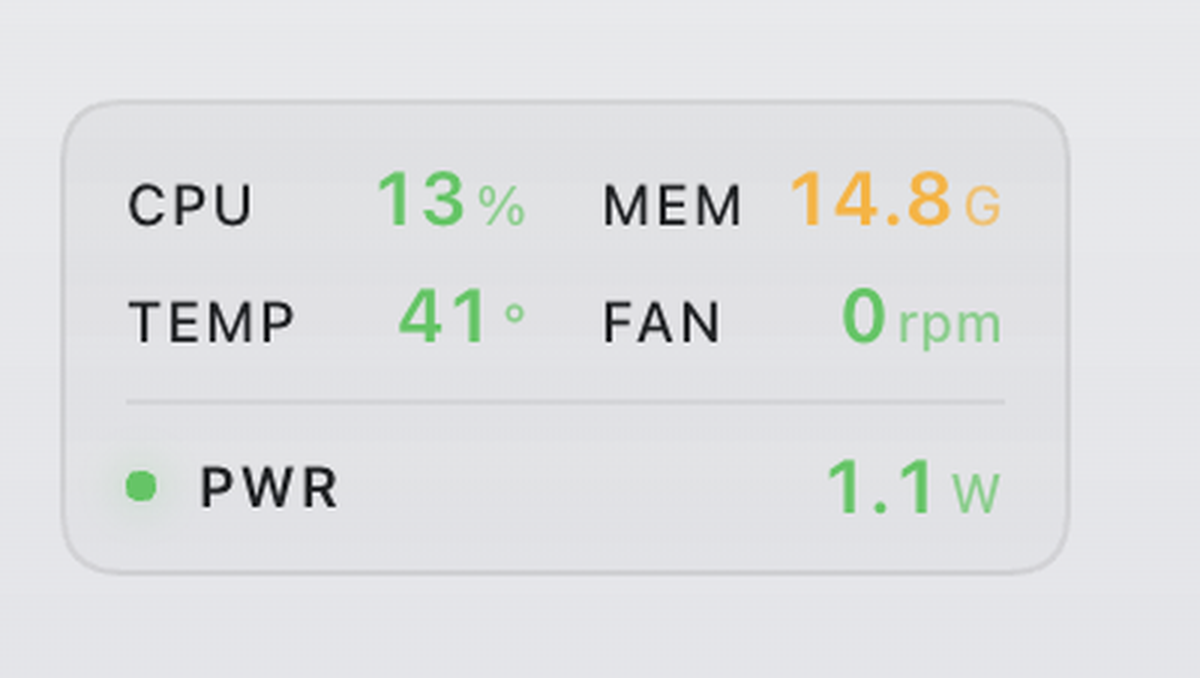
CPU 13%   MEM 14.8G
TEMP 41°  FAN 0 rpm
● PWR     1.1W
Columns are colour-coded by threshold — green → amber → orange → red — so a hot machine is obvious at a glance.
Requirements
| OS | macOS on Apple Silicon (arm64). Intel Macs are not supported by the bundled binary. |
| DSH | A Desktop build exposing the sidebar.footer.action slot |
| Admin | One administrator prompt, only if you want temperature / fan / power |
Without the privileged helper the widget still works, showing CPU and memory only.
Install
1. Plugin (no admin)
git clone https://github.com/chuanjunzhang/dsh-power-monitor.git
cd dsh-power-monitor
./install-plugin.sh
This links the package into ~/.dsh/profiles/desktop/node_modules/ and appends dsh-power-monitor to the profile's bundles list. Restart DeepSeek Harness afterwards.
2. Privileged helper (optional, enables TEMP / FAN / PWR)
./helper/install.sh
macOS will ask for your administrator password once. The script installs:
/usr/local/libexec/dsh-power-monitor-smc          SMC reader (arm64, reads fan + sensors)
/usr/local/libexec/dsh-power-monitor-helper.sh    sampler loop, writes a snapshot every ~2 s
/Library/LaunchDaemons/com.local.dsh-power-monitor.plist
Remove everything with:
./helper/uninstall.sh
How it works
LaunchDaemon (root)
  ├─ dsh-power-monitor-smc ──► SMC keys  ─┐
  └─ powermetrics    ──► watts    ─┴─► /tmp/dsh-power-monitor.json  (every ~2 s)
                                            │
DSH host plugin ── GET /power-monitor/metrics ─────┘
                                            │
DSH client plugin ── sidebar.footer.action ─┘  → renders the card
The client polls the host route every 2 seconds. Nothing is sent over the network.
Why a root daemon?
Reading SMC (fan RPM, die temperatures) and powermetrics (power draw) both require root on Apple Silicon. There is no userland API for them — every macOS monitor that shows these values either ships a privileged helper or asks for a password each time.
If you would rather not install a daemon, skip step 2: the widget falls back to CPU and memory, which need no privileges.
Metrics & thresholds
| Metric | Source | 🟢 | 🟡 | 🟠 | 🔴 |
|---|---|---|---|---|---|
| CPU | Mach host_statistics (400 ms delta) |
<30% | 30–60% | 60–85% | >85% |
| MEM | vm_stat (active + wired + compressed) |
<60% | 60–80% | 80–90% | >90% |
| TEMP | SMC Tp* sensors, max |
<55° | 55–70° | 70–82° | >82° |
| FAN | SMC F0Ac |
≤2600 | 2600–4200 | >4200 | — |
| PWR | powermetrics cpu+gpu+ane |
<4 W | 4–12 W | 12–25 W | >25 W |
The status dot takes the worst of CPU / TEMP / PWR.
FAN showing 0 rpm is normal: Apple silicon stops the fan below its start threshold (about 50–60 °C on this machine, minimum spin-up 2317 rpm).
Known limitations
- Fanless Macs (MacBook Air) have no
F0Ac; the FAN cell stays empty. - Temperature keys are probed from a list of known Apple silicon keys (
Tp00…Tp0g,Tg0*). Other SoCs may use different names and report nothing — the card degrades gracefully rather than showing wrong numbers. - Bundled binary is arm64 only. Building for Intel needs a universal build; see
helper/smc.swift. - Power is noisy. A 250 ms
powermetricswindow sampled every 2 s can differ from what another tool shows at the same instant. The client applies a 3-sample median for display only. - Relies on DSH's internal slot name
sidebar.footer.action; a DSH update may rename it.
Building the binary yourself
cd helper
swiftc -O smc.swift -o ../bin/dsh-power-monitor-smc
Source is ~150 lines of IOKit AppleSMC calls — read it before running it as root.
Privacy
- No network requests leave your machine.
- The daemon writes exactly one file:
/tmp/dsh-power-monitor.json, world-readable, overwritten every ~2 s. - Error output goes to
/var/log/dsh-power-monitor.err.log.
Uninstall
./helper/uninstall.sh                     # remove daemon (admin prompt)
rm ~/.dsh/profiles/desktop/node_modules/dsh-power-monitor
# then remove "dsh-power-monitor" from the bundles array in
# ~/.dsh/profiles/desktop/package.json
License
MIT
Repo metadata (for maintainers)
Suggested repository description:
Real-time power draw, temperature and fan speed in the DeepSeek Harness sidebar — Apple Silicon macOS.
Suggested GitHub topics:
deepseek-harness dsh-plugin deepseek cordis macos power-monitor wattage system-monitor smc apple-silicon
Search terms this README targets: DeepSeek Harness 插件, DSH plugin, macOS 温度监控, fan speed menu bar, Apple Silicon sensors.
No comments yet. Be the first to write one.