
dsh-purge
DeepSeek Harness local security-eval & prompt-cleaning plugin
Version 1.2.3




What it is, in one line: a local plugin for the DeepSeek Harness you already run. It gives you a side dock to see and adjust the harness's own prompt layers, approval policy, and tool limits — plus a prompt/rule-set manager and a separate drill console for authorized red-team work on hosts you control.
Not a model wrapper. Harness rewrites prompts, gates approvals, and enforces sandbox policy at runtime. "The model refused" and "the host blocked it" look identical from the outside. This plugin separates those two layers on your own install, so you can tell which one you are looking at.
Contents
- Features
- Requirements
- Install
- Quick start
- Screenshots
- Usage
- Configuration
- Runtime files
- How it works
- Restore & uninstall
- Troubleshooting
- Project structure
- Development
- Attribution
- Disclaimer
- License
Features
| Feature | What it does |
|---|---|
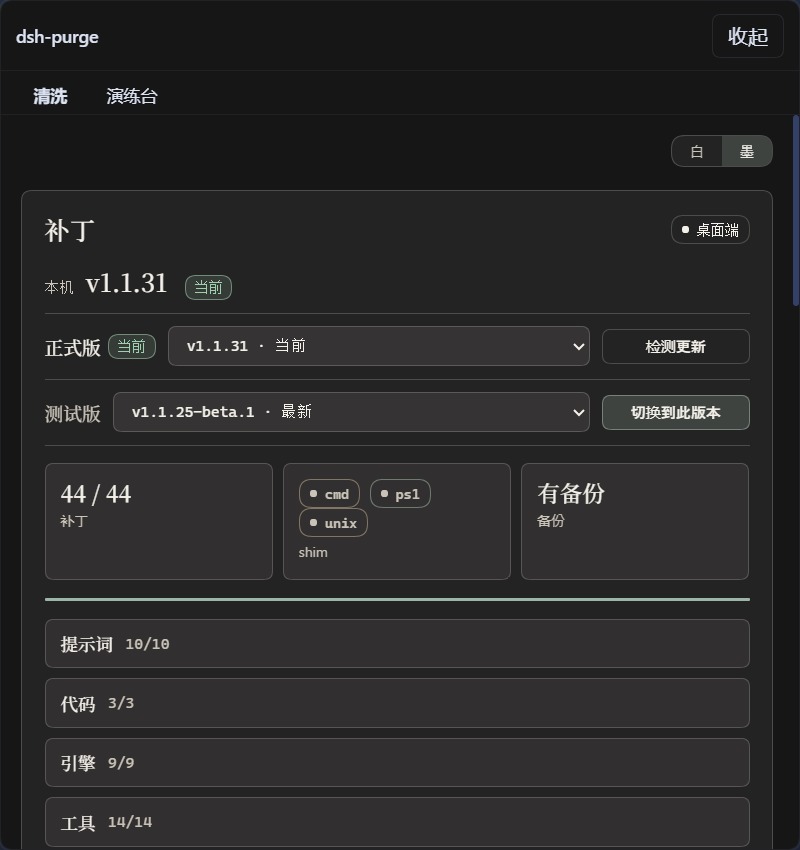
| Side dock | A dsh-purge button next to the session title opens a right-hand panel with two pages: Clean and Drill. Light / Ink themes |
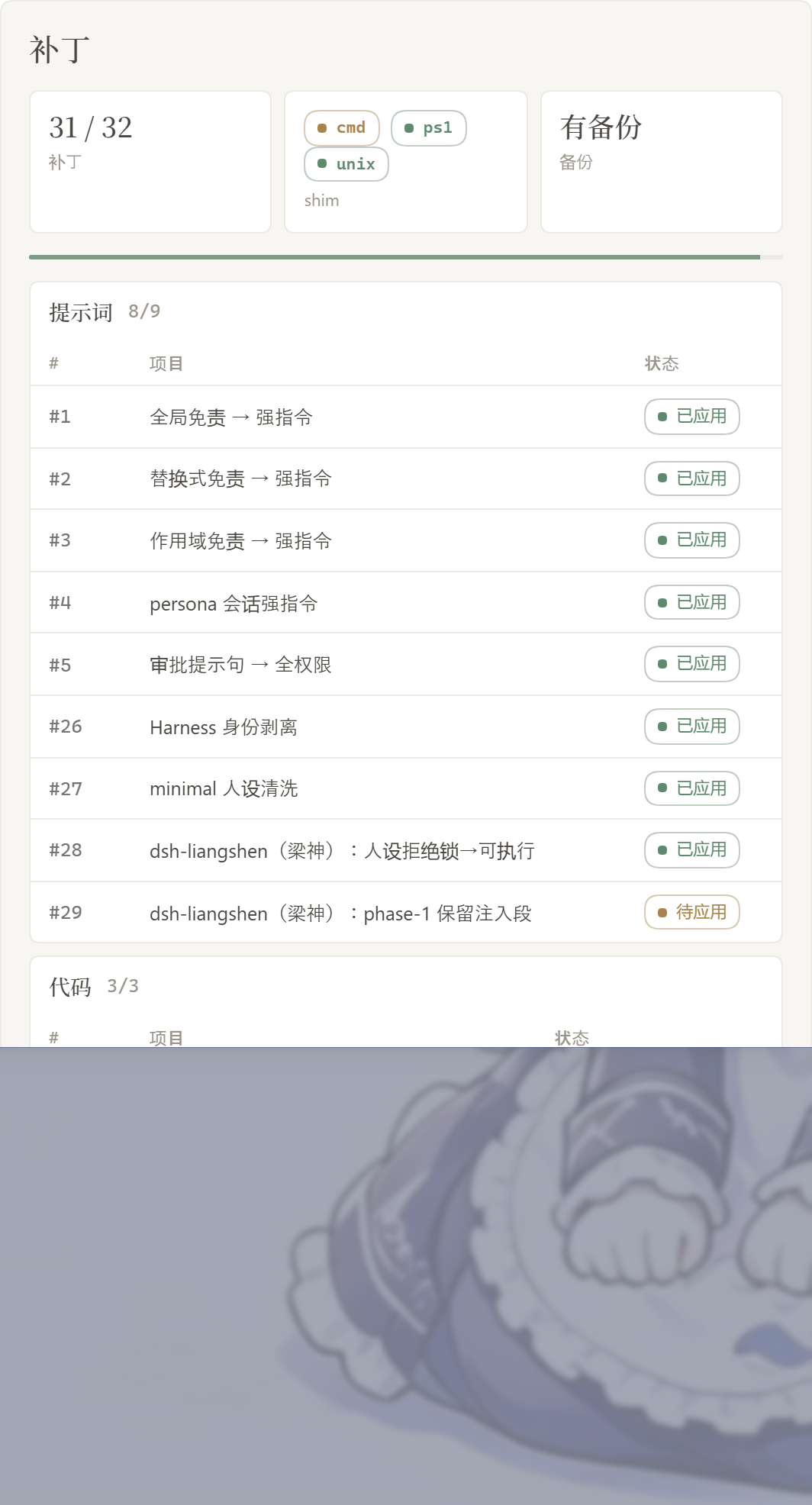
| Patch status | Every host-layer patch is listed with its real state (applied / pending / skipped / missing_file), grouped by area. Counts only include what actually applied |
| Apply / Restore / Uninstall | One click each. Apply is idempotent and backs up originals first; Restore puts the originals back; Uninstall reverts then removes the plugin |
| Prompt injection | Edit prompt-inject.md in the dock, or keep several rule sets and switch between them. Injection is re-applied every turn, so a new chat never starts half-clean |
| Rule sets | Multiple AGENTS.md / CLAUDE.md profiles under $DSH_HOME. Enable writes the file, Delete removes the row |
| Workspace policy | strict / fallback / always — decides whether the harness's own workspace baseline section survives alongside your prompt |
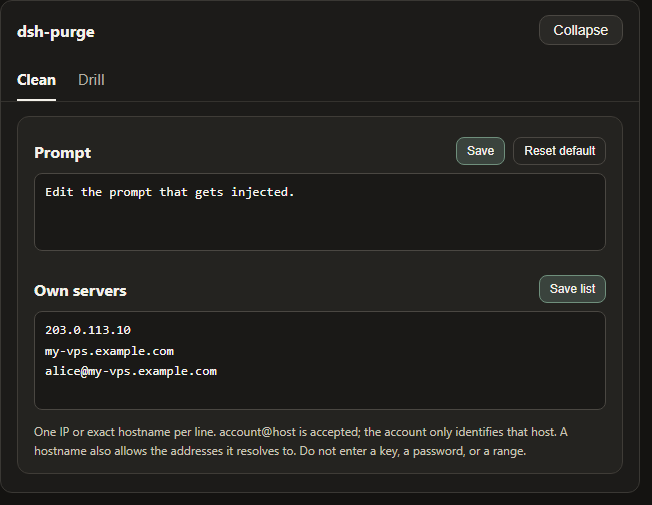
| Own servers | A whitelist ($DSH_HOME/net-scope-allow.txt) of exact IPs / hostnames that are yours. Anything not listed stays out of scope |
| Skills | Import a zip or folder into the host's own $DSH_HOME/skills/<id>/SKILL.md. DSH keeps ownership of matching, loading, and /name |
| Rewind | Composer "Undo once" / "Undo last round" and /rewind, built on the official session.fork({ atSeq }) |
| Self-check on start | After npm/pnpm rewrites node_modules, the plugin notices and re-applies instead of asking you to hand-edit files |
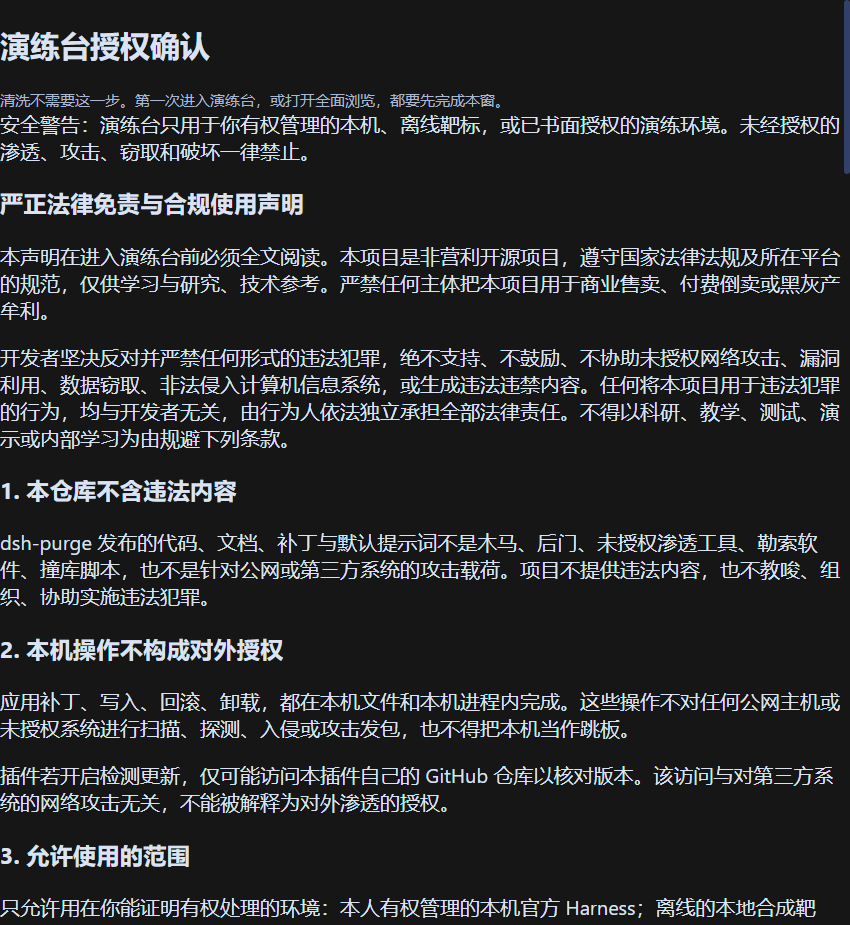
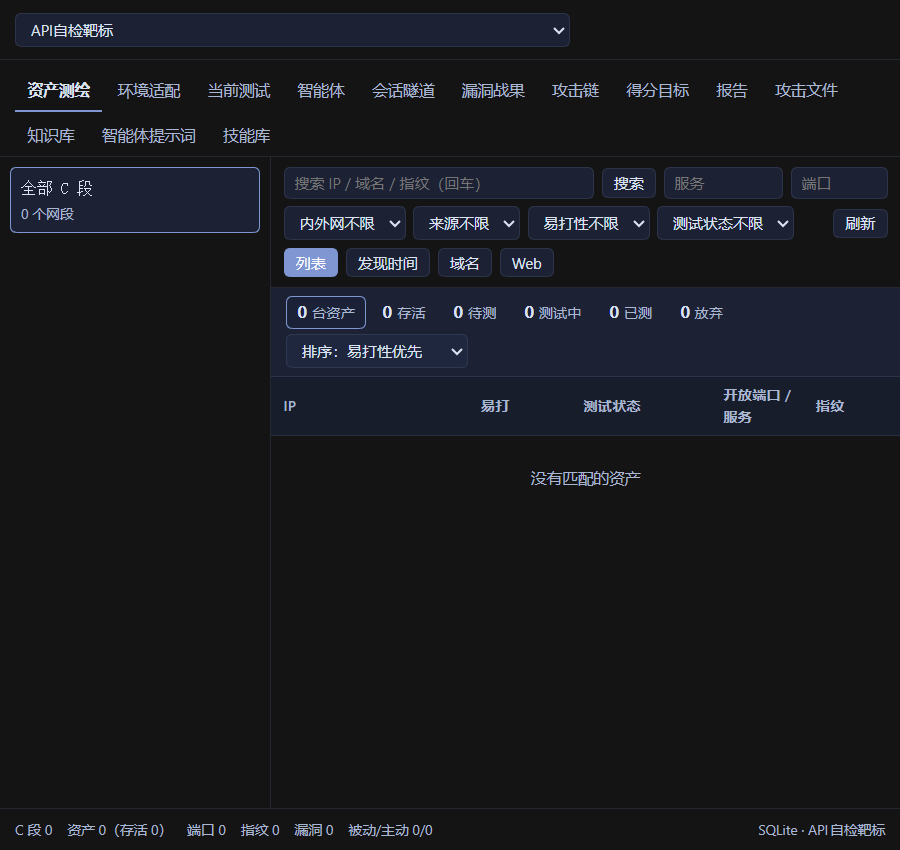
| Drill console | A separate page for assets, skills, and environment checks. Gated behind a notice + countdown + three checkboxes. Only for hosts you manage or offline/authorized targets |
No hardcoded drive letters. Home resolution order: $DSH_HOME → .dsh next to the dsh launcher → ~/.dsh.
Requirements
| Item | Requirement |
|---|---|
| Host | Official DeepSeek Harness 0.2.x — dsh web and the official desktop EXE (each has its own profile; install and Apply separately) |
| Node.js | ≥ 18 |
| OS | Windows, macOS, Linux |
| Privileges | Write access to $DSH_HOME and to the installed @deepseek-ai/* packages |
Older hosts (dsh 0.1.x) are not supported by this line — unmatched patches would stay pending or skipped, nothing is rewritten blindly.
Install
Option 1 — one command (recommended)
Install from this repository straight into a profile:
# Web (official `dsh web`)
dsh plugin --profile web add https://github.com/chs-1108/dsh-purge.git

# Desktop (official EXE)
dsh plugin --profile desktop add https://github.com/chs-1108/dsh-purge.git
Option 2 — tarball / zip
# tarball, no git required
dsh plugin --profile web add https://github.com/chs-1108/dsh-purge/archive/refs/heads/main.tar.gz
dsh plugin --profile desktop add https://github.com/chs-1108/dsh-purge/archive/refs/heads/main.tar.gz
Or download the zip from Releases (or Code → Download ZIP), then follow Option 4.
Option 3 — clone into the plugin directory
git clone https://github.com/chs-1108/dsh-purge.git "$DSH_HOME/plugins/dsh-purge"
The folder must be named dsh-purge and contain a package.json whose "name" is dsh-purge. Copy the whole tree — not a handful of .js files.
Option 4 — manual profile edit
Use this when the command fails or dsh is not on PATH. Edit only the profile of the host you actually run.
Put the plugin at
$DSH_HOME/plugins/dsh-purge(see Option 3, or extract the zip and renamedsh-purge-master→dsh-purge).Back up, then edit that profile's
package.json. Add exactly two things and keep every existing entry:
{
  "name": "dsh-profile-web",
  "private": true,
  "dependencies": {
    "dsh-purge": "file:../../plugins/dsh-purge"
  },
  "dsh": {
    "profile": {
      "bundles": [
        "@deepseek-ai/dsh-base",
        "@deepseek-ai/dsh-web-app",
        "dsh-purge"
      ]
    }
  }
}
dsh-purge must appear in both dependencies and the end of dsh.profile.bundles. A dependency without the bundle entry installs the files but never loads the plugin.
- Install dependencies in that profile only:
cd "$DSH_HOME/profiles/web"   # or profiles/desktop
pnpm install
Success looks like profiles/<web|desktop>/node_modules/dsh-purge/package.json existing.
After installing: three steps
Adding the plugin to a profile does not patch the harness by itself.
- Fully quit and reopen that host — stop and restart
dsh web, or quit the desktop tray and reopen the app. - On that host, click dsh-purge next to the session title → Clean → Apply.
- A successful Apply restarts the host once so the patched packages load. An unfinished Apply does not restart.
Web controls affect Web only; desktop controls affect the desktop app only. Do not Apply one host from the other.
How to tell it worked
- The
dsh-purgebutton sits beside the session title, and Apply is on its Clean page. /purge statusin chat printsDSH_HOMEand the patch table — the path should be the home you actually run.- Optional packages you do not have (e.g. the
liangshenpreset) show asskippedand do not block Apply.
Quick start
# 1. check what the plugin sees
/purge status

# 2. write the patches
/purge apply

# 3. restart the host, then start a new chat
From a terminal instead of chat: dsh-purge --status, --apply, --revert, --uninstall, --edit.
Screenshots
Clean — patches, prompt, rule sets, skills
Drill authorization — read the notice, wait out the countdown, tick three boxes
Drill — assets, skills, environment
Patches — grouped status, Apply / Restore / Uninstall
Own servers — one host per line, then Save list
Usage
Chat commands
/purge  status | apply | revert | uninstall | edit | help
/rules  list | use <id> | create <id> | delete <id> | reset | help
/skills list | import <zip-or-folder> | create <id> [description] | delete <id> | help
/rewind
CLI
dsh-purge --status      # state, DSH_HOME, per-patch table
dsh-purge --apply       # apply every patch (prompt + code + shim + override)
dsh-purge --revert      # restore originals
dsh-purge --uninstall   # revert if needed, then remove the plugin
dsh-purge --edit        # open prompt-inject.md in $EDITOR
dsh-purge --help
Tools exposed to the model
| Tool | Purpose |
|---|---|
purge_status |
Read patch state, DSH_HOME, injection source |
purge_apply |
Apply all patches |
purge_revert |
Restore originals |
Where things live in the dock
| Area | What it shows |
|---|---|
| dsh-purge | Button beside the session title; opens or collapses the dock |
| Clean | Patches, prompt editor, rule sets, skills, own servers |
| Drill | Assets, skills, environment — says Unauthorized until the gate is passed |
| Patches | Grouped status plus Apply / Restore / Uninstall |
| Prompt | Edits prompt-inject.md, the per-session override |
| Own servers | One IP or exact hostname per line → $DSH_HOME/net-scope-allow.txt |
| Rule sets | Multiple AGENTS.md / CLAUDE.md; Enable writes, Delete removes |
| Skills | Import a zip/folder into this host's $DSH_HOME/skills/<id>/SKILL.md |
Configuration
Plugin config lives in the profile's cordis.patch.yml (or the copy bundled in cordis.patch.yml at the repo root). Defaults:
- insert:
    - id: dsh-purge
      name: 'dsh-purge'
      inject: [systemPrompt, tools]
      config:
        enabled: true
        autoApplyOnStart: false     # apply patches when the host boots
        autoUpdateOnStart: false    # check this repo for a newer version on boot
        autoRevertOnMissing: false  # revert when the host files disappear
        injectOnce: false           # inject only on the first turn
        stripMnemon: true           # drop mnemon sections from the assembly
        verbose: false              # verbose logging to the console
        postPrompt: ""              # extra section appended to the prompt
        postPromptOrder: 5100
        autoRetry: true             # retry a failed turn
        retryMax: 3
        autoContinue: false         # auto-send a continue message
        continueMax: 3
        continueText: "继续"
        capabilityProtocol: true    # teach the model to find skills / MCP itself
        hooksDenyBypass: true       # neutralise hooks that block tool calls
| Key | Default | Notes |
|---|---|---|
enabled |
true |
Master switch; false leaves the host untouched |
autoApplyOnStart |
false |
Turn on only if you want boot-time patching |
autoUpdateOnStart |
false |
Contacts this repo to compare versions |
stripMnemon |
true |
Removes third-party mnemon sections from the assembly |
capabilityProtocol |
true |
Adds the skill / MCP discovery section |
hooksDenyBypass |
true |
Stops third-party hooks from silently denying tool calls |
Diagnostics are off by default. Set DSH_PURGE_DEBUG=1 (or verbose: true) to write a log to %TEMP%/.dsh-cache.log ($TMPDIR/.dsh-cache.log).
Runtime files
Everything the plugin owns lives under $DSH_HOME:
| Path | Purpose |
|---|---|
prompt-inject.md |
The prompt that gets injected each turn (a user file — Restore keeps it) |
rules/ |
Rule sets (AGENTS.md / CLAUDE.md variants) |
skills/ |
Imported skills, skills/<id>/SKILL.md |
net-scope-allow.txt |
The own-servers whitelist |
redteam/ |
Drill console data (SQLite) |
Web and the desktop app each use their own home. Skills are not part of the injected section and never replace the prompt.
How it works
Apply (on boot or when you click it):
flowchart TD
  A["Boot or click Apply"] --> B{"Patch already in place?"}
  B -->|yes| C["Skip"]
  B -->|no| D["Back up the original as .dshpurge.bak"]
  D --> E["Replace the matched files"]
  E --> F["Override the shim"]
  F --> G["Inject the prompt shipped with the plugin"]
Every turn, the injection source is decided in this order:
flowchart TD
  L["Rule library: activate a set → writes prompt-inject.md"]
  W["Local rules: AGENTS.md / CLAUDE.md in the current dir"]
  P["Workspace policy: strict / fallback / always"]

  A["Turn start"] --> B{"prompt-inject.md non-empty?"}
  B -->|yes| C["Inject = prompt-inject.md"]
  B -->|no| D{"Checked local md in this dir, non-empty?"}
  D -->|yes| E["Inject = selected workspace md"]
  D -->|no| F["Inject = plugin default"]
  C --> G{"Workspace baseline policy"}
  E --> G
  F --> G
  G -->|strict| H["Drop the DSH workspace baseline section"]
  G -->|fallback| I{"User inject present?"}
  G -->|always| J["Keep the DSH workspace baseline section"]
  I -->|yes| H
  I -->|no| J
  H --> K["Final system prompt"]
  J --> K

  L -.-> B
  W -.-> D
  P -.-> G
Two invariants the plugin maintains at assembly time:
- No unregistered prompt variables escape. The host's renderer throws on any
{{name}}it did not register, which kills the whole request. Every section is passed through a guard that resolves{{cwd}}to the real path and degrades anything else to{ {name}}. - The injected text leads the assembly. Later sections cannot outrank it by accident, and duplicate copies are removed by content match rather than position.
Restore & uninstall
- Each patched file is copied to
<file>.dshpurge.bakbefore the first Apply. - Restore /
/purge revertcopies backups back and deletes them. With no backup, shim lines written by this plugin are stripped. prompt-inject.mdis a user file and is kept.- Uninstall restores first (if anything was applied), then removes the inject file, rule library, and the plugin itself.
- Apply is idempotent — running it twice is safe.
dsh-purge --uninstall
# or: /purge uninstall
Troubleshooting
unknown prompt variable "{{cwd}}" in section "deployment:persona-suffix"
You are on a host that removed cwd from its prompt-variable registry, with a plugin build that still wrote {{cwd}} into the persona suffix. Fixed in 1.2.0. Upgrade, then fully restart the host — the plugin is loaded into memory at boot, so a live reload is not enough.
The dsh-purge button never appears
The plugin is installed but not enabled. Check that dsh-purge is in the dsh.profile.bundles array of the profile you actually run — a dependencies entry alone only copies files into node_modules. See Option 4.
失败: 清洗没有写进全部宿主,已取消重启 / cleaning was not written into every host, restart cancelled
The pre-restart gate found a host whose patch marker was missing. Fixed in 1.2.1 for hosts where the assemble source gained a requiredContexts line — patch #40 could not match, so its marker was never written and the gate refused forever. Upgrade, then Apply again. To confirm before restarting:
node scripts/verify-keep-inject.mjs   # read-only: does #40 match this host build?
node scripts/diagnose-hosts.mjs       # per-host markers + pending patches
If a patch is skipped on your build, retrying cannot write it — 1.2.1 no longer blocks the restart for that case and reports it as a warning instead.
Apply finishes but nothing changes Patches load at boot. Quit the host completely (desktop: quit the tray, do not just close the window), reopen it, then Apply, then start a new chat.
The same task works in standard but fails in minimal or PTC
Preset-level run_code / sandbox / plan intercept text is often still in place, or the built-in minimal preset is missing agent-instructions. Update, then: fully quit → Apply in Clean → restart → new chat. Switching preset alone does not reload patches in a running process.
A patch shows missing_file
That host build does not contain the file the patch targets, or it is an optional package you do not have (e.g. liangshen). Optional rows are marked and do not block Apply. After a host upgrade, unmatched originals show as skipped and are left untouched.
dsh is not on PATH
Use Option 4, or call the CLI shipped with the app. If the plugin cannot find the host at all, set DSH_BASE (or DSH_DESKTOP_INSTALL) to the directory containing @deepseek-ai. No files are changed when nothing is found.
Project structure
dsh-purge/
├── bin/dsh-purge.js        CLI entry
├── lib/
│   ├── index.js            plugin entry: prompt sections, commands, tools
│   ├── core.js             patch table, apply / revert / backup
│   ├── identity.js         assembly rewrite, injection guard
│   ├── rules.js            rule sets, workspace policy
│   ├── skills.js           skill import
│   ├── net-scope.js        own-servers whitelist
│   ├── rewind.js           session fork / undo
│   ├── update.js           self-update from this repo
│   ├── redteam/            drill console (store, tools, ui, presets)
│   └── …
├── presets/redteam/        red-team agent preset
├── skills/redteam/         bundled skills
├── scripts/                build + self-check helpers
├── client.js               the dock (built bundle)
├── cordis.patch.yml        bundle patch: what the profile loads
└── docs/                   banner, previews
Development
# syntax check every entry
node --check lib/index.js
node --check lib/core.js
node --check lib/reapply.js
node --input-type=module -e "import('./lib/index.js')"

# read-only self-check: patch table shape + real settle state
node scripts/selftest.mjs

# dry run: which files would change, whether it stays idempotent
node scripts/simulate-upgrade.mjs

# verify no unregistered prompt variable can reach the renderer
node scripts/verify-cwd-suffix.mjs [plugin-dir]

# does patch #40 still match this host build? (read-only)
node scripts/verify-keep-inject.mjs [host-index.js]

# which host is missing a clean marker, and which patches are pending (read-only)
node scripts/diagnose-hosts.mjs

# replay the write step + the pre-restart gate without restarting
node scripts/check-ensure-clean.mjs

# every patched host file parses, and the extracted tree matches app.asar 1:1
node scripts/verify-host-tree.mjs <app.asar> <resources/app>
node scripts/asar-ls.mjs <app.asar> dsh/node_modules/@deepseek-ai --count

# rebuild the dock bundle
node scripts/build-client.mjs
Release flow: bump package.json, write Chinese and English notes in release-notes.md (first line must be # <version>), push main. The workflow creates the tag, the GitHub Release, and the zip.
Attribution
This project is derived from YuJunZhiXue/dsh-purge (MIT). The patch table, drill console, presets, and skills originate there; this repository carries local fixes and changes on top of it.
If you reuse this project's name, ideas, code, or prompts, credit the original author and link the upstream repository.
Disclaimer
This is a free, non-profit open-source project for learning and research on software you are entitled to administer. It patches the official @deepseek-ai packages and local config on your own machine only; it does not scan, probe, or send traffic to third-party systems, and it ships no malware, backdoors, or attack payloads.
Do not use it for unauthorized access, data theft, sabotage, or anything unlawful. Do not point it at public systems, production workloads, or networks in mainland China, Hong Kong, or Macau unless that exact host was registered as yours in advance. You are solely responsible for how you use it; the authors accept no liability for misuse. The MIT license terminates automatically for anyone who uses the project to commit a crime.
This is an independent project with no employment, commercial, or endorsement relationship with DeepSeek. "Official" only ever means the eval target is the official Harness package on your own machine.
No comments yet. Be the first to write one.