dsh-archives
English | 中文
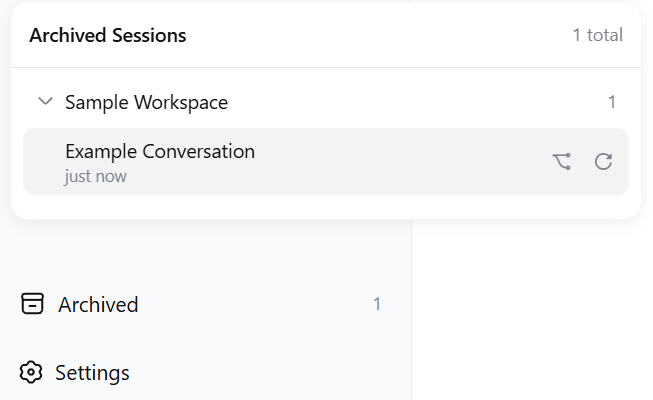
Archived-session drawer at the bottom of the DSH web sidebar — grouped by workspace, one-click restore & open, fork, or unarchive.
Repository mirrors
- GitHub: https://github.com/chou109/dsh-archives
- Gitee (mainland-China mirror — faster access there): https://gitee.com/chill109/dsh-archives
👤 If you are a human, read this
What this plugin does
dsh-archives is a plugin for the DeepSeek Harness (DSH) web app.
DSH has a frustrating design: once a session is archived, there is no way to view it or restore it — it simply disappears from the sidebar. The log and data are still on disk, but the UI leaves no trace. This plugin adds an "Archived (n)" button at the bottom of the sidebar that lists every hidden session, grouped by workspace, so you can restore anything with one click.
Screenshots
Features
- Persistent "Archived (n)" seat at the sidebar foot — auto-hides when nothing is archived
- Panel grouped by workspace, groups collapsed by default, expansion state remembered
- Click a session row → restore & open the original session (live, no restart)
- ⿻ button → fork a copy as a new session (the original stays archived)
- ↻ button → move back to the sidebar without opening
- Bilingual UI (zh/en), inline error messages, click-outside to close
Option 1: Deploy manually
Prerequisite: a machine with DSH installed and dsh web running.
- Get the plugin: clone or download this repo (Gitee mirror recommended in mainland China):
You get thegit clone https://gitee.com/chill109/dsh-archives.git # mainland China, faster git clone https://github.com/chou109/dsh-archives.git # international mirrordsh-archivesfolder - Copy it into DSH's plugin directory (note:
profiles/node_modules, not underprofiles/web; paths resolve via$DSH_HOME, default~/.dsh):- Windows (PowerShell):
$dsh = if ($env:DSH_HOME) { $env:DSH_HOME } else { "$env:USERPROFILE\.dsh" } Copy-Item -Recurse .\dsh-archives "$dsh\profiles\node_modules\" - macOS / Linux:
cp -r dsh-archives "${DSH_HOME:-$HOME/.dsh}/profiles/node_modules/"
- Windows (PowerShell):
- Enable it: edit
$DSH_HOME/profiles/web/cordis.patch.yml(default~/.dsh/profiles/web/cordis.patch.ymlwhen unset) and append:- insert: - id: archives name: 'dsh-archives' - Restart: stop the running
dsh web, rundsh webagain, openhttp://127.0.0.1:3080 - Confirm: the "Archived (n)" button appears at the sidebar foot. If you have never archived a session, the button stays hidden — that is normal; archive one session first to try it
Option 2: Let an AI deploy it for you
The "If you are an AI agent, read this" section below is an executable deployment manual written for AI (one-command deploy, verification checklist, troubleshooting). You don't have to type any commands — just copy this prompt to any AI assistant (DeepSeek / GPT / Claude …):
Please deploy the dsh-archives plugin to my DeepSeek Harness Web.
Repo location: https://gitee.com/chill109/dsh-archives.git (recommended in mainland China)
or https://github.com/chou109/dsh-archives.git
First read the README in the repo (especially the "If you are an AI agent" part),
then follow its one-command deploy steps, run the verification checklist,
and tell me the result. Locate the DSH home directory yourself ($DSH_HOME env var, default ~/.dsh).
The AI will do it all: locate the DSH directory → copy the plugin → write the config → restart → verify.
Everyday usage
- Click "Archived (n)" at the sidebar foot
- Expand the workspace group you want
- Pick an action: click a row = restore & open; ⿻ = fork; ↻ = unarchive only
License
MIT — see LICENSE.
🤖 If you are an AI agent, read this
This is an executable deployment and operations manual. Whenever you are asked to "deploy / install / use / debug dsh-archives", follow it as-is — paths and commands are exact, do not improvise.
0. What this is
A DSH dual-half client plugin — no build step, no third-party runtime dependencies.
| Path | Purpose |
|---|---|
package.json |
Package manifest; name must equal the client bundle id and the loader name |
lib/index.js |
Host half: POST /archives/unarchive endpoint |
lib/client.js |
Browser half: the sidebar UI (client bundle) |
tests/smoke-test.cjs |
Client smoke test (bundle load → apply registration → SSR render, 9 assertions) |
tests/host-test.mjs |
Host smoke test (route → unarchive → idempotence → validation, no external deps) |
docs/screenshot_*.png |
README screenshots |
1. Deploy
Get the repo (if not already local):
git clone https://gitee.com/chill109/dsh-archives.git(recommended in mainland China) orgit clone https://github.com/chou109/dsh-archives.git, thencd dsh-archivesbefore running the steps below.
TL;DR — one command (Linux / macOS bash):
DSH_HOME="${DSH_HOME:-$HOME/.dsh}"
cp -r ./dsh-archives "$DSH_HOME/profiles/node_modules/"
mkdir -p "$DSH_HOME/profiles/web"
cat >> "$DSH_HOME/profiles/web/cordis.patch.yml" <<'EOF'
# dsh-archives: archived sessions at the sidebar foot
- insert:
    - id: archives
      name: 'dsh-archives'
EOF
TL;DR — one command (Windows PowerShell):
$dsh = if ($env:DSH_HOME) { $env:DSH_HOME } else { "$env:USERPROFILE\.dsh" }
Copy-Item -Recurse .\dsh-archives "$dsh\profiles\node_modules\"
Add-Content "$dsh\profiles\web\cordis.patch.yml" @"

# dsh-archives: archived sessions at the sidebar foot
- insert:
    - id: archives
      name: 'dsh-archives'
"@
Full procedure (exact paths):
- Locate DSH home:
$DSH_HOME(default~/.dshwhen unset;%USERPROFILE%\.dshon Windows). - Copy the plugin into the dependency directory. Note the
webprofile's deps live one level above the profile dir ($DSH_HOME/profiles/node_modules/, flat hoisted layout), not insideprofiles/web/node_modules:cp -r dsh-archives "$DSH_HOME/profiles/node_modules/" - Enable the plugin: append to
$DSH_HOME/profiles/web/cordis.patch.yml(create the file with this content if it does not exist):# Your patch layer for this dsh profile. - insert: - id: archives name: 'dsh-archives'idis an arbitrary loader row name;namemust equal the package name (dsh-archives). - Restart: stop the running
dsh webprocess, rundsh webagain, openhttp://127.0.0.1:3080.
2. Verification checklist (all four must pass)
# Linux/macOS
curl -s -o /dev/null -w "bundle=%{http_code}\n" http://127.0.0.1:3080/plugins/dsh-archives/client.js  # expect bundle=200
curl -s -o /dev/null -w "route=%{http_code}\n"  http://127.0.0.1:3080/archives/unarchive             # expect route=405
# Windows PowerShell
(Invoke-WebRequest http://127.0.0.1:3080/plugins/dsh-archives/client.js -UseBasicParsing).StatusCode  # 200
(Invoke-WebRequest http://127.0.0.1:3080/archives/unarchive -UseBasicParsing).StatusCode              # 405
The other two: window.__DSH_BOOT__ in the served page source contains dsh-archives; the "Archived (n)" button appears at the sidebar foot (requires at least one archived session to be visible).
3. Debugging
| Symptom | Diagnosis |
|---|---|
| bundle 404 | Plugin not in $DSH_HOME/profiles/node_modules/, or name: in cordis.patch.yml mismatches the directory/package name → fix and restart |
| route 404/500 | Host half did not load → dsh --profile web --dump-config to confirm the archives row is composed |
| bundle 200 but no button | Open the browser console (F12): a component render crash is silently abdicated by the slot machinery, so the console error is the only clue; confirm the page is refreshed |
| API returns 500 | The host log prints [dsh-archives] unarchive failed: ... (server console) |
| Panel data wrong | Check global.archivedSessionIds in $DSH_HOME/storages/workspace.json |
| Code edits not taking effect | The client bundle is read per request: UI changes only need a page refresh; host changes (lib/index.js) need a restart |
Live frame check (verify the unarchive push path): connect to ws://127.0.0.1:3080/api/events.host; after one unarchive you should receive a host/archived-sessions-changed frame carrying the full updated archive set.
4. Operations (interface & behavior contract)
HTTP endpoint
| Item | Value |
|---|---|
| Path | POST /archives/unarchive |
| Body | {"sessionId": "session-..."} |
| Success | 200 {"ok":true,"changed":true} (removed); or {"ok":true,"changed":false} (was not archived — idempotent) |
| Bad request | 400 (body not JSON / invalid sessionId) |
| Method error | 405 (not POST) |
| Server error | 500 |
UI actions
| Action | Effect |
|---|---|
| Click session row | Restore & open: unarchive → subscribe to ctx.workspaces.list until the set syncs → sessions.open |
| ⿻ button | sessions.fork as a new session and open the child (the original stays archived) |
| ↻ button | Unarchive only, do not open |
| Click group header | Collapse/expand; state persisted to localStorage (key dsh.archived.panel.expanded.v1) |
| Click outside the panel | Close the panel |
Data contract
- The archive set persists at
global.archivedSessionIdsin$DSH_HOME/storages/workspace.json - Archived sessions stay in
session.list(only hidden from grouping views); log and accounting slot are untouched - Directly
open()ing a still-archived session is cleared immediately by the runtime (by design) — so "restore" must unarchive first, wait for the set to sync, then open
5. How unarchive works
POST /archives/unarchive {sessionId}
  └─ host: workspaceRegistry.enqueueOperation → requireState → setState
       └─ workspace.domain.global.set (disk + memory + domain/changed event)
            └─ api-proxy observes the event → pushes host/archived-sessions-changed
                 └─ client: installArchived → useWorkspaces updates → the panel drops the session
It uses the registry's own write path (serialized on its operation tail), exactly like built-in operations: live across tabs, survives restarts.
6. Modifying / extending (do & don't)
- ✅ The bundle id in
window.__ModuleLoader__.load({id, ...})must equalpackage.jsonname - ✅
useSessions/useWorkspacesrequire a selector — the engine'sbindSnapshotSelectordoes not default a missing one (crashes withw is not a function) - ✅
host/archived-sessions-changedis a framework constant — never rename it - ✅ The restore flow waits for the archive set to sync before
open(), so the projection sweep cannot clear the fresh selection - ❌ Do not
open()a still-archived session directly - UI changes need only a refresh; host changes need a restart; renaming the package requires updating the bundle id, the directory, and
cordis.patch.ymltogether
7. Testing
node tests/smoke-test.cjs   # client smoke test; react resolves via $DSH_HOME/profiles/node_modules by default, override with DSH_PROFILE_NODE_MODULES
node tests/host-test.mjs    # host smoke test; no external dependencies
8. Known limitations
- Directly
open()ing an archived session is cleared by the runtime (by design); use restore & open or fork - Archived sessions are excluded from sidebar content search (framework behavior)
- Rail (collapsed) sidebar shows the icon only
- The panel is a fixed-position overlay; it overlaps the Cordis plugin panel if both are open
- Built and verified against dsh 0.1.0-rc.6; adapt if slot/service names change after upgrading
License
MIT — see LICENSE.
No comments yet. Be the first to write one.