dsh-system-net
Make DeepSeek Harness follow your system network settings: route through the OS proxy and trust its certificate store.
Install it when your accelerator is on, your browser is fine, and DSH still cannot reach the network.
No environment variables · No exported certificates · No restart
中文 · Install · Requirements · Verify · Configuration




Install
This plugin is distributed through GitHub (not yet published to npm), which is why the command below carries the
github:prefix.
dsh plugin --profile web add github:chickmat/dsh-system-net
Without a global dsh command:
npx -y @deepseek-ai/dsh plugin --profile web add github:chickmat/dsh-system-net
Restart DSH once. The plugin applies at load time; every later launch re-detects and re-installs automatically, so there is no ongoing maintenance.
This plugin is plain JavaScript with zero build step, so the GitHub path works as-is — there is no prepare script to authorize (which would mean letting the package's code run on your machine).
Requirements
- DSH 0.2.0-rc.2+
- Node 22.19+ or 24.5+ (23.x is not supported: it has
getCACertificatesbut lacks thesetDefaultCACertificatesthis plugin needs)@deepseek-ai/cordis,@deepseek-ai/schemasteryand@deepseek-ai/dsh-http-proxyare supplied by your DSH runtime — you never install them yourselfOn an unsupported version the plugin does not crash — it records the exact reason in the status file and tells you which official remedy to use instead.
Uninstall
dsh plugin --profile web remove dsh-system-net
No residue. Every change lives in process memory only; a restart restores Node's defaults. To remove the status file too, delete $DSH_HOME/system-net-status.json.
Why the browser works and DSH does not
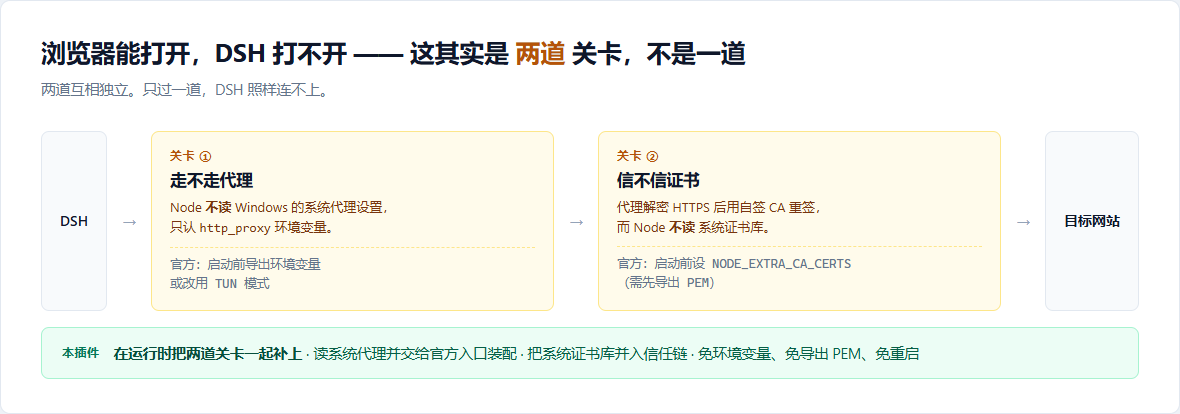
This is not a DSH bug — it is two Node defaults. They are independent barriers:
| Barrier | Cause | What the official docs require | What this plugin does |
|---|---|---|---|
| ① routing | Node does not read the Windows/macOS "system proxy"; it only honours http_proxy / https_proxy |
export environment variables before startup, or switch to TUN mode | reads the system proxy / probes local ports at runtime and installs via the official entry point |
| ② trust | the proxy decrypts HTTPS and re-signs with its own self-signed CA; Node does not read the OS certificate store | set NODE_EXTRA_CA_CERTS before startup (after exporting a PEM), or NODE_OPTIONS=--use-system-ca |
merges the OS store into the trust chain at runtime |
Failing either barrier breaks DSH. This plugin closes both, so there is nothing left to configure by hand.
Which barrier are you hitting?
| Error in DSH | Barrier |
|---|---|
timeout / ECONNREFUSED / ENOTFOUND / endless spinner |
① routing |
UNABLE_TO_VERIFY_LEAF_SIGNATUREunable to verify the first certificate |
② trust |
Both are solved by installing this plugin.
Verify it worked
The plugin writes $DSH_HOME/system-net-status.json (default ~/.dsh/system-net-status.json):
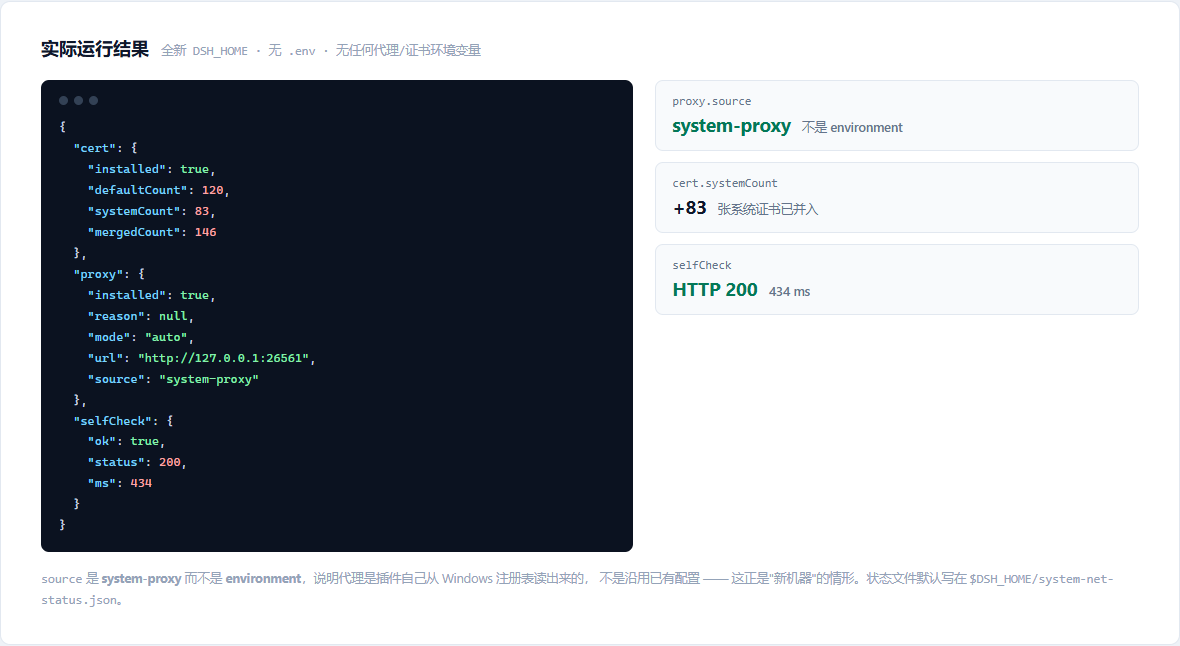
proxy.source— where the proxy came from:system-proxy/port-probe/environment(already configured, plugin stayed out of the way) /manual/not-foundcert.systemCount— how many certificates were read from the OS store (0means unsupported platform or empty store)selfCheck— one real request at load. A 200 here means the whole chain genuinely works
⚠️ A failed self-check does not mean the plugin failed. The most common cause is that the self-check URL is simply outside your accelerator's coverage — e.g. your accelerator covers Steam only, while the default self-check hits GitHub.
To tell whether the proxy is live, read
proxy.installed, notselfCheck. Ifinstalled: truebut the self-check failed, the proxy is installed and only that one URL is unreachable. PointselfCheckUrlat something you know is covered, or setselfCheck: false. When the self-check fails the plugin writes this same note into the status file'sselfCheck.hint.
That run happened with a fresh DSH_HOME, no .env, and no proxy or certificate environment variables — a "new machine". source being system-proxy rather than environment means the plugin read the proxy out of the Windows registry itself.
Requirements (read this first)
This plugin only applies to accelerators running in "system proxy" mode — the kind that writes a proxy address into Windows Internet Options → Connections → LAN settings.
A note on the word "accelerator" (加速器). Throughout this README it means a network-boosting tool — Watt Toolkit, Steam++, dev-sidecar and the like — not a hardware accelerator. The rest of this document also calls them "proxy tools" where that reads more clearly.
| Acceleration method | Examples | This plugin |
|---|---|---|
| System proxy + self-signed CA (TLS interception) | Watt Toolkit (Steam++), dev-sidecar | ✅ built for these |
| hosts / local DNS rewriting + local reverse proxy | FastGithub, UsbEAm Hosts Editor, SwitchHosts | ❌ they never write a system proxy, so it cannot be read |
| TUN virtual adapter | Clash / v2ray TUN, most game accelerators | ⭕ not needed (fully transparent — the official recommendation) |
| Web-based reverse proxy (URL rewriting) | gh-proxy, ghfast.top | ⭕ unrelated (not a local proxy) |
Two further preconditions
- Start the accelerator before DSH. The plugin probes once at DSH startup. Wrong order is survivable — it retries every 10 seconds by default (
watchProxy) and installs as soon as it finds one. - The system proxy is a single global slot. dev-sidecar's own documentation asks users to run Watt Toolkit in hosts mode when combining the two. Two apps claiming the system proxy fight each other, and this plugin cannot arbitrate that.
When the conditions are not met, it says so
It never fails silently. The reason lands in the status file, and the log carries an actionable message:
| Detected | proxy.source |
Message |
|---|---|---|
| system proxy present | system-proxy |
— |
| PAC auto-config | pac-unsupported |
this plugin does not parse PAC; switch to system-proxy mode |
| proxy address unparsable | unparsable |
check the accelerator's settings, or use proxyMode: manual |
| nothing found | not-found |
a checklist: ① start the accelerator first ② is it system-proxy mode? ③ use manual mode |
How it differs from other proxy plugins
There are a dozen DSH proxy plugins, and most of them replace undici's global dispatcher directly. That has a subtle hole:
dsh-web-fetch-http— the layer behindweb_fetch/web_search— does not consult the global dispatcher. It calls the official@deepseek-ai/dsh-http-proxyproxyRouteFor(url)to decide routing on its own. A plugin that only swaps the dispatcher leavesweb_fetchconnecting directly.
This plugin builds nothing of its own; it calls the official runtime entry point installProxyFromEnvironment(). Its implementation tells the story:
installGlobalProxy(policy) {
  applyPolicyEnv(policy);       // ① writes process.env → git / curl / npm children benefit too
  setGlobalDispatcher(agent);   // ② global dispatcher → model requests, MCP
  active = policy;              // ③ updates the policy → proxyRouteFor() follows
}                               //    → web_fetch / web_search route correctly too ✅
Step ③ is the one that matters. Going through the official entry point keeps the routing policy and the dispatcher permanently consistent, and never contends with another plugin for the same slot.
Configuration
Override in your profile's cordis.patch.yml:
- id: system-net
  name: dsh-system-net
  config:
    proxyMode: auto
    noProxy: 'internal.example.com'
    extraCaFiles:
      - 'C:/certs/corporate-ca.pem'
Proxy
| Field | Default | Description |
|---|---|---|
proxyMode |
auto |
auto: honour existing env → read system proxy → probe ports. manual: only proxyUrl. off: never touch the proxy |
proxyUrl |
'' |
proxy URL for manual, e.g. http://127.0.0.1:7890 |
probePorts |
common ports | local ports probed in auto |
probeTimeoutMs |
600 |
per-port probe timeout |
watchProxy |
true |
retry at an interval when no proxy was found at startup |
watchIntervalMs |
10000 |
retry interval (ms) |
noProxy |
'' |
extra bypass entries (comma separated). loopback is always guaranteed by the official library |
Certificates
| Field | Default | Description |
|---|---|---|
includeSystem |
true |
merge the operating system certificate store |
includeDefault |
true |
keep Node's bundled Mozilla root set (recommended) |
extraCaFiles |
[] |
extra PEM files to trust |
propagateToChildren |
true |
extend the same trust to Node child processes spawned later (appends --use-system-ca to NODE_OPTIONS). Only applies where Node allows that flag — see below |
Shared
| Field | Default | Description |
|---|---|---|
enabled |
true |
master switch |
statusFile |
'' |
status file path; empty means $DSH_HOME/system-net-status.json |
selfCheck |
true |
perform one real request after loading |
selfCheckUrl |
GitHub API | self-check target. If your accelerator does not cover GitHub, change this to something it does cover — otherwise the self-check fails (which does not mean the plugin failed; read proxy.installed) |
selfCheckTimeoutMs |
15000 |
self-check timeout |
Compatibility
| Item | Requirement |
|---|---|
| Node | 22.19+ or 24.5+ (23.x is not supported). tls.setDefaultCACertificates landed in v22.19.0 / v24.5.0; 23.x has getCACertificates but not it |
| DSH | 0.2.0-rc.2 (verified) |
| Platform | automatic proxy detection (reading the system proxy) is Windows only; other platforms can use manual. Certificate handling works everywhere |
On an unsupported Node version the plugin does not crash: it records a clear reason in the status file and points you at NODE_EXTRA_CA_CERTS.
What it does not do
- It is not TUN mode. If your proxy software offers TUN (virtual adapter) mode, enabling that solves both barriers and you do not need this plugin. It exists for system-proxy-only accelerators such as Watt Toolkit / Steam++.
- It modifies no configuration files. It does not write
~/.dsh/.env, touch the registry, or change system environment variables. Every change lives in the current process's memory and disappears when the process exits. - Certificates for child processes: Node children inherit, git/curl do not. The plugin appends
--use-system-catoNODE_OPTIONS, so Node children spawned afterwards (the pnpm behinddsh plugin add, HTTP MCP servers, …) receive the same trust.gitandcurlhave their own certificate logic and are unaffected. Proxy environment variables, by contrast, are inherited by every child.That flag only exists from Node v23.8.0 and was never backported to 22.x. On Node 22.x the plugin skips this step and records why in the status file's
cert.childEnvReason(such children need their own certificate environment variable). - It does not fix the proxy itself. If the accelerator is off, the port is wrong, or the proxy does not support the site you want, this plugin cannot help.
Security notes
Certificates: the plugin trusts the root certificates already present in your OS store. That is equivalent to Node's own --use-system-ca and adds no new trust anchor — but it does widen what DSH trusts. Therefore:
- if the machine carries a root certificate you do not recognise, investigate before enabling;
- to tighten it:
includeSystem: falseplusextraCaFilestrusting only the one you name; - uninstalling restores Node's default trust chain.
Proxy: the plugin reads the proxy settings already in effect on your system and relays them to DSH; it never points at a proxy out of nowhere. proxy.url in the status file is the address it actually used — verify it yourself.
Network behaviour: the plugin issues one HTTPS GET per DSH start as a self-check (default api.github.com/rate_limit). It sends no local data; it exists only to prove the whole chain really works. Set selfCheck: false to turn it off.
License
MIT · includes 19 unit tests, runnable with npm test.
⭐ If this solved your problem, a star is how the next developer finds it.
No comments yet. Be the first to write one.