

dsh-cost-guard
Know what every DSH task costs while it runs. dsh-cost-guard is a local-only Cordis plugin bundle for DeepSeek Harness that turns recorded token usage into a compact cost pill beside the composer, per-model totals, and editable pricing. Click the pill for the token mix and session total; the dock stays quiet.
It observes execution; it never blocks, reroutes, or changes the agent.
Visit the project website → — explore the cost pill and pricing screenshots, switch between English and Chinese, and copy the installation prompt. Hosted on GitHub Pages, with automatic deployment from main. See website maintenance and publishing.
[!IMPORTANT] Token counts come from DSH usage events. Currency amounts are local estimates calculated from your configured rates, not authoritative billing data. Provider prices can change—always treat the provider invoice as the source of truth.
See it in action
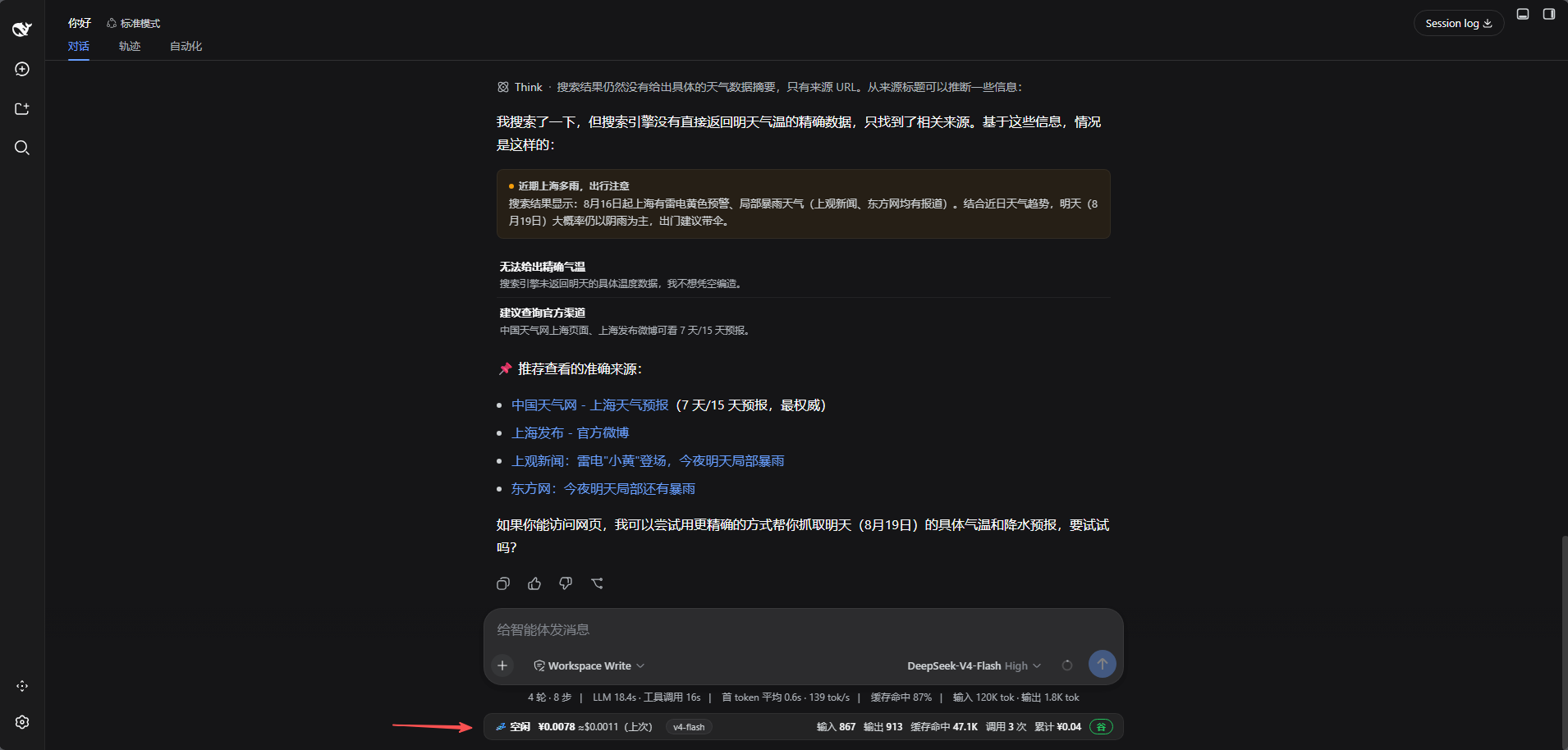
One quiet pill, details on demand
The composer dock shows a compact ¥ amount for the current or most recent task. Click it for the model, input/output/cache tokens, model-call count, rate window, and session total—without opening another panel or repeating the composer's existing token and cache readings.
Pricing and totals stay under your control
Edit model rates, add custom models, apply the official peak/off-peak schedule, inspect per-model totals, and export or import the configuration from Settings → Cost Guard.
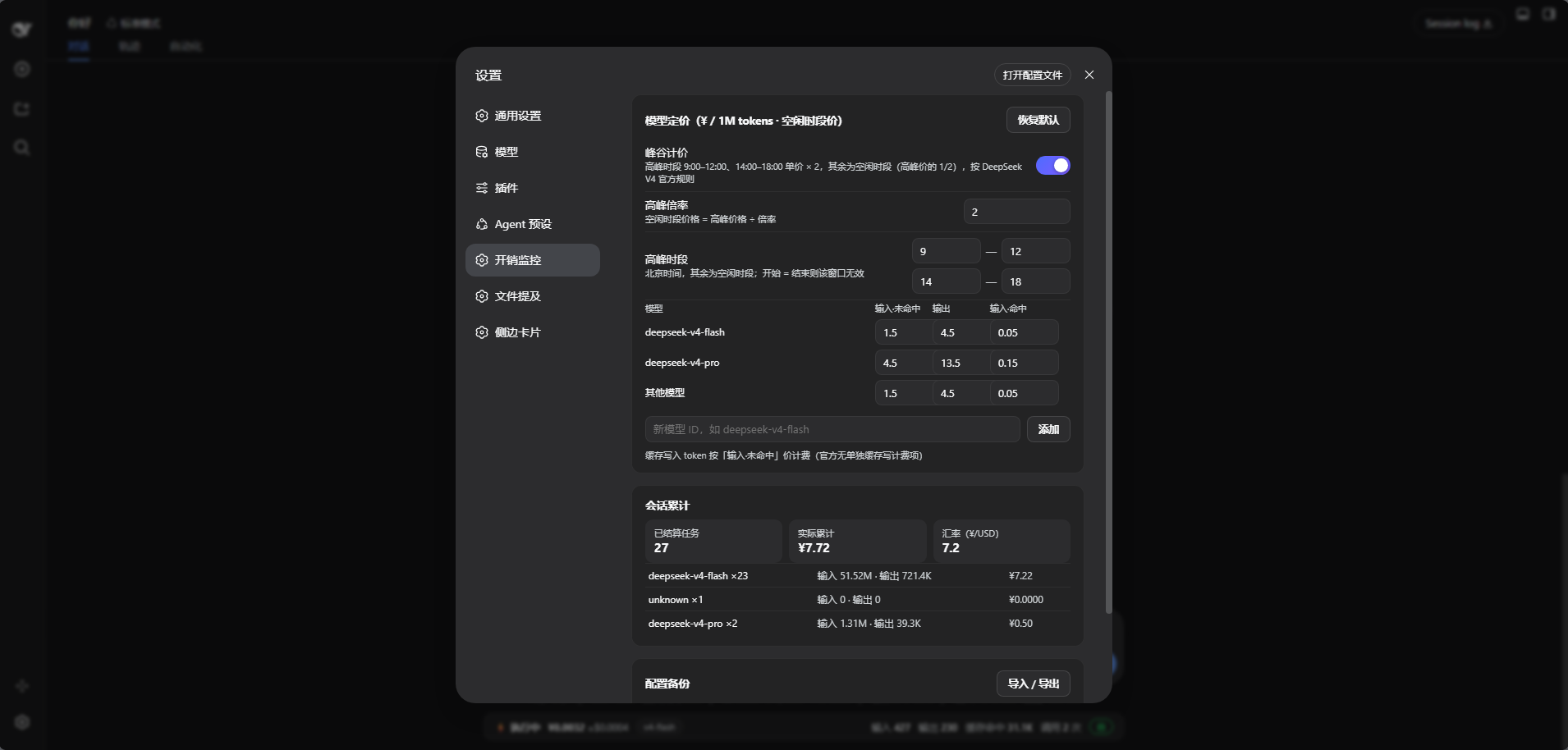
The screenshots were captured from an earlier v4.3 instance and still show the old full-width bar. Release
v5.1.0uses the compact pill and the 2026-10-28 official rates described below; the images will be refreshed after the next capture.
Why Cost Guard
- Actual usage, not prompt-size guessing — reads
inputTokens,outputTokens,cacheReadTokens, andcacheWriteTokensfrom DSH session events, including retried or interrupted attempts. - Live and glanceable — keeps the current task cost beside the composer; click for the token mix and session total.
- Subagent-aware — rolls subagent usage into the active root-session turn, priced with the model that actually served each call.
- Restart-resilient — rebuilds a session from its persisted log the first time it is viewed, so history survives plugin restarts.
- Pricing you can audit — all model rates and the peak/off-peak windows are visible and editable.
- Bilingual UI — the pill and settings page follow the DSH language setting (中文 / English) automatically.
- Local-only — no telemetry, external service, account access, or API key collection.
- Zero execution interference — no prediction gate, approval overlay, or model routing.
Quick start
Install into your current profile
dsh-cost-guard is a Cordis bundle: package.json declares dsh.bundle.patch (the Host row) and dsh.client (the browser half). Install it the way DSH installs any bundle:
Put this repository somewhere stable on disk, for example
D:\plugins\dsh-cost-guard.Open Settings → Plugins → Bundles (插件 → 组合包) in DSH and install from the local directory, or run the CLI equivalent:
dsh plugin --profile <profile> add "D:\plugins\dsh-cost-guard"Restart DSH when the installer reports
restart-required.
Ask your DSH agent instead, if you prefer:
Install the DSH bundle at D:\plugins\dsh-cost-guard into the current profile,
then confirm the cost-guard row is active in the plugin inventory.
The plugin then appears as Cost Guard in the plugin inventory and as a top-level Settings → Cost Guard page, with a compact cost pill below the composer. No build step is required: both halves are plain JavaScript.
For local development against a checkout, the same command accepts the checkout path directly and links it instead of copying it.
Requirements
- DeepSeek Harness
0.2.1+(Desktop ordsh web), with a profile that includes the Web app bundle. - DSH Web UI for the pill and settings panel.
- Node.js is only needed to run
npm run checkduring development.
Pricing model
The v5.1.0 defaults match the official DeepSeek V4.1 Flash / V4 Pro peak/off-peak pricing verified on 2026-10-28 against the DeepSeek API pricing page and the 2026-09-10 price update. Rates are CNY per 1M tokens, off-peak (valley) prices:
| Model | Input · cache miss | Output | Input · cache hit |
|---|---|---|---|
deepseek-flash |
¥1.00 | ¥4.00 | ¥0.02 |
deepseek-v4-pro |
¥4.50 | ¥13.50 | ¥0.15 |
default fallback |
¥1.00 | ¥4.00 | ¥0.02 |
Peak hours are 09:00–12:00 and 14:00–18:00 Beijing time, on Monday–Friday only, billed at ×2 the off-peak price. Weekends and Chinese statutory holidays are off-peak all day; the 2026 holiday dates are built in. Peak/off-peak pricing is on by default; toggle it and edit the windows from the settings page.
Cache-write tokens use the cache-miss input rate because the official table has no separate cache-write item. Old model names still found in session logs are mapped to the current rows: deepseek-v4-flash and deepseek-v4-flash-vision-exp → deepseek-flash, deepseek-reasoner → deepseek-v4-pro; the retired deepseek-chat alias also maps to Flash.
Search / Fetch calls are billed separately by DeepSeek (¥5 per 1,000 successful requests from 2026-11-01). Cost Guard does not include those request fees; its numbers cover model tokens only.
How it works
flowchart LR
    A["session/event<br/>turn/start · request/context"] --> B["session/event<br/>assistant/message · assistant/attempt"]
    B --> C["Configured rates<br/>calculate estimate"]
    C --> D["Turn and model totals"]
    E["Lazy backfill<br/>session snapshotEvents"] --> D
    D --> F["Host routes<br/>/cost-guard/live · /cost-guard/rpc"]
    F --> G["Composer cost pill<br/>Settings panel"]
- Host half (
index.js) injectswebServer, folds durable session events, attributes usage to turns, rolls up subagents, backfills a session from its log on first look, and serves two data routes plus a health probe. - Client half (
client.js) is awindow.__ModuleLoader__bundle that registers the cost pill inconversation.composer.dockand the configuration UI insettings.section, and reads the Host throughfetch. - Data flow stays inside the running DSH process; the routes are plain localhost HTTP with no network egress.
- Pricing state is persisted to
~/.dsh/cost-guard/config.json($DSH_HOMEaware), so rates survive restarts.
Configuration
Open Settings → Cost Guard to manage:
| Section | Controls |
|---|---|
| Model pricing | Cache-miss input, output, and cache-hit input rates; custom models; restore defaults (two-step confirm) |
| Peak/off-peak pricing | Weekday windows (09:00–12:00, 14:00–18:00 Beijing) at ×2, excluding built-in 2026 statutory holidays; weekends/holidays off-peak |
| Run totals | Settled turns, actual spend, editable CNY/USD rate, and per-model totals |
| Backup | Export or import the configuration as JSON |
The USD amount in the cost popover is an approximate conversion using the editable CNY/USD rate. All UI text follows the DSH language setting (中文 / English).
Updating
A bundle is replaced as a whole. Update by installing the new directory version:
- Replace the files in the directory you installed from (or pull the new release).
- Reinstall the bundle from Settings → Plugins, or run
dsh plugin --profile <profile> add <path>again. - Restart DSH when the installer reports
restart-required; the Host half and the browser bundle are both reloaded from the new files.
Security and privacy
- No outbound requests, telemetry, credential reads, or API key storage.
- The Host observes DSH session usage events and replays persisted session events to reconstruct totals.
- Imported configuration is validated before it replaces the active settings.
- Review third-party plugin source before installing it, especially because DSH plugin interfaces are still evolving.
See SECURITY.md for reporting guidance.
Project layout
| Path | Purpose |
|---|---|
index.js |
Host half: session folding, pricing, HTTP routes |
client.js |
Client half: cost pill and settings page bundle |
cordis.patch.yml |
Bundle patch that inserts the Host row |
locale/ |
Display metadata (title/description) for the plugin inventory |
icon.svg |
Plugin icon |
docs/install.md |
Installation, verification, and removal |
docs/index.html |
Bilingual project homepage on GitHub Pages |
docs/website.md |
Website preview, maintenance, and deployment |
scripts/check.cjs |
Bundle-layout, syntax, and release-invariant checks |
CHANGELOG.md |
Release history |

Development
npm run check
The check imports the Host module, compiles the Client bundle as a script, and verifies the bundle manifest, the patch, the exported display metadata, and the release facts. Install the checkout directly to try a change: reinstalling a linked bundle reloads both halves after a DSH restart.
Contributions are welcome—please read CONTRIBUTING.md. If the plugin saves you from token-bill surprises, consider starring the repository so other DSH users can find it.
Compatibility
This plugin depends on DSH services and UI slots (webServer, sessions, session/event, conversation.composer.dock, settings.section). They are not guaranteed stable APIs. Include your DSH version when reporting compatibility problems.
No comments yet. Be the first to write one.