dsh-desktop-pet
A configurable, interactive desktop pet for the DeepSeek Harness Web GUI.
本插件会在 dsh Web 页面右下角显示可互动的桌面宠物。当前内置三套宠物形象:
| 形象 | 资源目录 | 切换方式 |
|---|---|---|
| 小新 | assets/characters/shinchan/ |
默认形象 |
| 橘猫 | assets/characters/orange-cat/ |
右键 → 切换宠物 |
| 阿尼亚风格 | assets/characters/anya/ |
右键 → 切换宠物 |
每套角色均遵循相同结构:manifest.json 描述角色,九种状态图片统一放在 sprites/ 目录中。
Features
- Idle, walking, running, sleeping, thinking, celebrating, surprised, dragged, and talking states.
- Uses a distinct image for each state, with built-in artwork as a safe fallback.
- Context-sensitive speech for user activity and DSH response generation.
- Click, double-click, drag, keyboard, reduced-motion, and mobile support.
- Position, visibility, sound, and custom character images persisted locally.
- Right-click the pet to replace the current state's image or restore defaults.
- Runtime event API for switching a complete character pack without changing core code.
- Built-in Shin-chan, orange-cat, and Anya-inspired character packs, switchable from the pet's right-click menu.
Character packs
See assets/characters/README.md and copy assets/characters/example/manifest.json. Supported states are idle, walk, run, sleep, think, celebrate, surprised, drag, and talk.
The bundled default pack is assets/characters/shinchan/manifest.json. Its nine generated sprites are embedded into lib/client.js during pnpm build, so the installed plugin does not need a separate web server for the artwork.
Here is the bundled Shin-chan desktop pet sprite sheet. The states are arranged left to right and top to bottom as idle, walk, run, sleep, think, celebrate, surprised, drag, and talk.
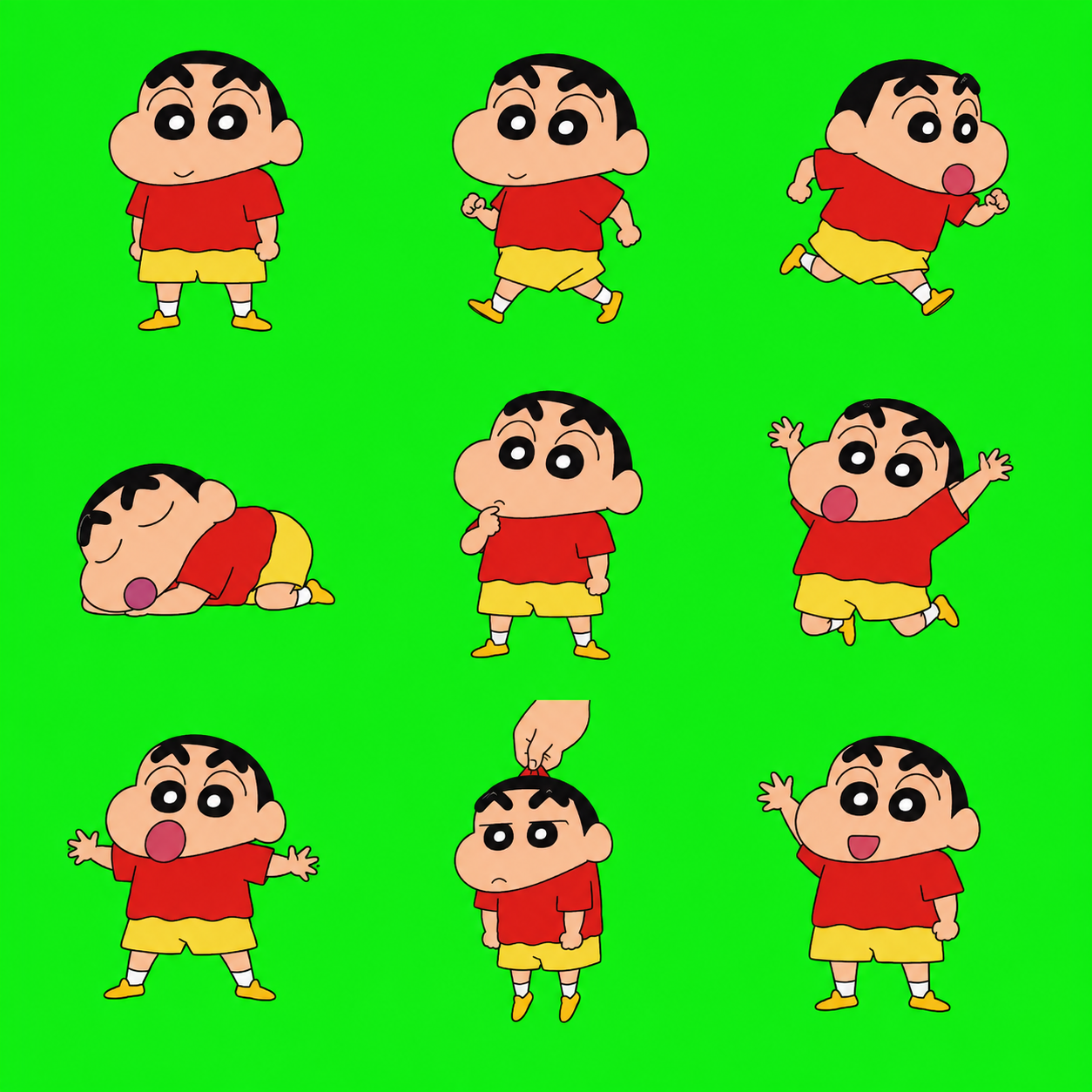
A host client can switch characters at runtime:
window.dispatchEvent(new CustomEvent("dsh-desktop-pet:set-character", {
  detail: {
    name: "My Pet",
    size: 150,
    assets: {
      idle: "/assets/my-pet/idle.png",
      walk: "/assets/my-pet/walk.png"
    }
  }
}));
Missing states fall back to the idle image, then to the built-in vector artwork.
Right-click the pet and choose 切换宠物 to cycle between the bundled 小新、橘猫和阿尼亚角色包。The selected pet is saved locally and restored when the Web GUI is reopened.
Sprite sheet workflow
Generate a square 3 by 3 sprite sheet in this order:
idle, walk, run
sleep, think, celebrate
surprised, drag, talk
Then split it with the bundled crop script (which uses explicit top-left coordinates):
pnpm split:sprites /path/to/sprite-sheet.png assets/characters/my-pet
Development
pnpm install
pnpm build
dsh plugin --profile web add link:$PWD
从 GitHub 安装发布版本:
dsh plugin --profile web add github:chengyingshe/dsh-desktop-pet#main
Git 安装会通过 prepare 自动生成 lib/ 发布产物。
也可以从 npm 官方源安装:
dsh plugin --profile web add @maximeshe/dsh-desktop-pet
发布由 GitHub Actions 自动完成。先在仓库 Actions secrets 中添加具有发布权限的 NPM_TOKEN,再创建与 package.json 版本一致的 GitHub Release(例如版本 0.1.0 对应标签 v0.1.0)。
Restart dsh web, refresh the existing GUI at http://127.0.0.1:3080, and look in the bottom-right corner.
Coding Agent 自动安装
将以下脚本交给 Coding Agent 执行即可完成安装。脚本会克隆仓库、构建插件、安装到 dsh 的 web profile,并检查插件是否已登记:
set -euo pipefail
PLUGIN_DIR="${PLUGIN_DIR:-$PWD/dsh-desktop-pet}"
if [ ! -d "$PLUGIN_DIR/.git" ]; then
  git clone https://github.com/chengyingshe/dsh-desktop-pet.git "$PLUGIN_DIR"
fi
cd "$PLUGIN_DIR"
pnpm install --frozen-lockfile
pnpm typecheck
pnpm build
dsh plugin --profile web add "link:$PWD"
dsh plugin --profile web list
安装后重启 dsh Web:
dsh web --no-open --port 3080
打开 http://127.0.0.1:3080 后,宠物应显示在右下角。右键宠物可切换形象、切换动作图片或隐藏宠物。若 dsh 已在运行,必须先停止旧进程再启动,确保加载最新 Bundle。
No comments yet. Be the first to write one.