DSH Desktop
A desktop product around the unmodified published DeepSeek Harness packages: the full Web UI running with no Node HTTP server and no port, composed entirely as Cordis plugins over the @deepseek-ai/* family. The desktop shell — the window, tray, and system integration — rides on Electron; every capability (the socketless webserver, the renderer connection, the shell itself) is a plugin row, so each is replaceable from configuration without touching a published package.
- Upstream project: DeepSeek Harness — the open-source agent harness this product wraps.
- Plugin store: dsh-market — the community plugin market, built in.
Features
Full Web UI with a zero-socket host
Runs the complete DeepSeek Harness Web UI (session log, tools, model route, agent loop) in a desktop window. The host never binds a socket: a virtual webServer interceptor provides the official route-registry contract without a port, the renderer wire client rides an Electron IPC bridge instead of HTTP/WebSocket, and every host route (the /api plane, the session-log download, and any plugin route) dispatches in-process. The official modules, ui-theme, web-runtime, and frontend-static rows activate unchanged. The interceptor reports a stable virtual port, and the host-side virtual-host transport serves plugins that read webServer.port and reach the harness from the main process (dsh-im and similar) in-process too.
Built-in plugin market
Ships dshmarket as the default plugin market: open Settings → Plugin Market, browse, search, and one-click install community plugins. The market's /dsh-market/* routes dispatch through the in-process host, and the desktop provides the market's host contract (desktopProfiles + desktopPnpm). Installs run the real dsh plugin --profile desktop … CLI, which drives pnpm from the system PATH — the desktop appends the standard user tool locations (Homebrew, ~/.local/bin, ~/.local/share/pnpm, ~/.npm-global, ~/.volta, and nvm) to that PATH, so installing plugins requires pnpm in one of those standard locations. Installed plugins load at the next boot through a profile-anchored loader hook.
System tray and close-to-tray
A system tray (show / restart host / quit) is always present, and its labels follow the app's actual display language. A General-settings preference controls what closing the window does: quit the app, or hide to the tray and keep the host running in the background.
In-process host reboot
Changes that cannot hot-load (for example a market install that needs a restart) apply through Restart host in the settings General section or the tray's Restart host item: the host disposes and re-boots in-process, the IPC bridge is re-installed, and the renderer reloads — the Electron process, window, and tray stay up.
Agent presets shipped
The desktop composes the shipped agent-preset root, so the roster matches dsh web: the standard, code, minimal, and cordis presets resolve at system trust and session start never fails with preset not found.
Boot self-healing
A broken plugin install never blocks the app from opening: bundles whose packages cannot be resolved are dropped from the profile manifest (with a warning) before mount, and the app recovers on the next clean boot.
Runtime modes
From source (development)
pnpm install         # resolves @deepseek-ai/* from the dist-tags recorded in upstream.json
pnpm build           # compile the TypeScript sources (tsc + esbuild + the verify:upstream gate)
pnpm check           # strict type-check + tests for every package
pnpm start           # build, then launch the Electron app
Packaged app
dsh-plugin-desktop ships installable artifacts through electron-builder:
pnpm package:dir      # unsigned unpacked app for the current host (dist/<platform>-unpacked)
pnpm dist:mac         # macOS DMG (on a macOS host)
pnpm dist:win         # Windows x64 NSIS installer (on a Windows host)
pnpm dist:linux       # Linux AppImage + deb + rpm (on a Linux host)
Headless boot proof
The transport is verified headless — a fake bridge and a profile boot run with no browser, no socket, and no window:
pnpm -r test # headless boot proof + client carrier tests
The Electron window is the runnable shell over the same in-process host the tests boot.
Continuous integration
GitHub Actions gates every commit and produces installers:
.github/workflows/ci.yml— on every push tomasterand every pull request:pnpm check(type-check, compile, and tests for every package) plus a headlesspackage:dirpackaging proof..github/workflows/build.yml— on av*tag, manual dispatch, or amasterpush touching packaging files: builds mac DMG, Windows x64 NSIS, and Linux AppImage + deb + rpm on native runners and uploads the unsigned artifacts.
CI installs the workspace the same way a local checkout does — resolving @deepseek-ai/* fresh from the dist-tags in upstream.json, since pnpm-lock.yaml is not committed.
Versioning and releases
Versions follow Semantic Versioning, and every release ships a GitHub Release with the installers attached. Commit messages follow Conventional Commits: feat bumps minor, fix bumps patch, a BREAKING CHANGE bumps major.
The flow is automatic:
- Merge to
master—.github/workflows/release-please.ymlinspects the commits since the last release and opens a release PR that bumps the version in everypackage.jsonand updatesCHANGELOG.md. - Merge the release PR — release-please creates the
vX.Y.Ztag and the GitHub Release. - The tag push triggers
.github/workflows/build.yml, which builds mac DMG, Windows x64 NSIS, and Linux AppImage + deb + rpm on native runners and attaches them (plus aSHA256SUMSchecksum file) to the Release.
Users download the app from the repository's Releases page: macOS picks the DMG, Windows the -Setup.exe, Linux the AppImage/deb/rpm.
Screenshots
Screenshots are added by the maintainer. The blocks below are placeholders — drop the images into
docs/screenshots/and update the paths.
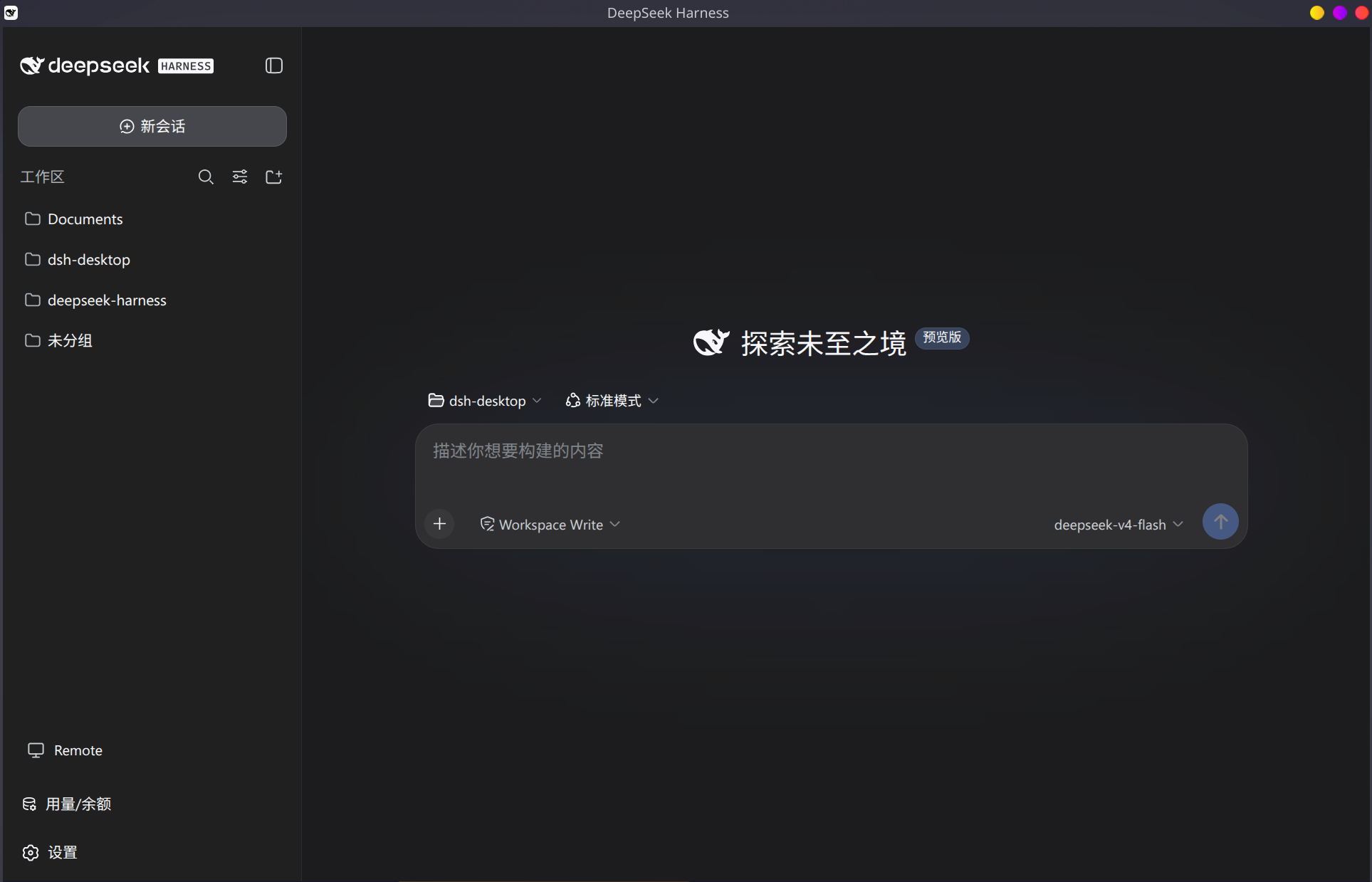
The main window: the full DeepSeek Harness Web UI in the desktop shell.
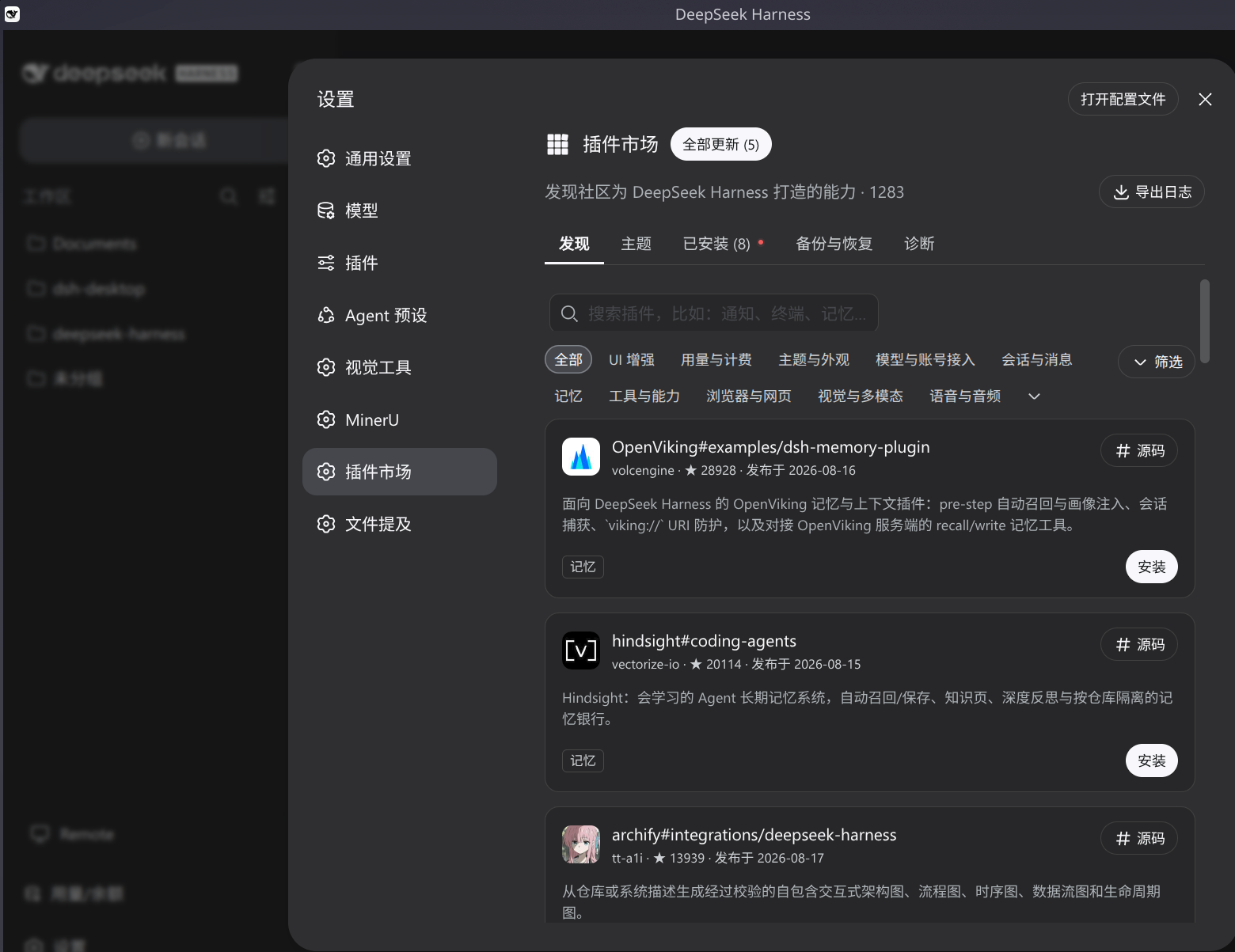
The built-in plugin market: browse, search, and one-click install.
References
- Upstream project — DeepSeek Harness (
dsh): the open-source agent harness this desktop wraps. This repository consumes the published@deepseek-ai/*packages resolved from the dist-tags recorded inupstream.json(nextfor the dsh family,latestfor the cordis framework); there is no upstream source checkout here. - Plugin store — dsh-market (
dshmarket): the community plugin market. The desktop ships it as the default market; third-party plugins published to the awesome-dsh-plugin registry appear there.
Technical overview
Zero-socket transport
| Piece | Row / package | Replaces |
|---|---|---|
| Socketless webserver | dsh-plugin-desktop/webserver |
the official webserver row (disabled) |
| Renderer wire client | dsh-plugin-desktop-connection |
the official connection row (disabled) — node half re-exports upstream, client half rides Electron IPC |
| Boot manifest | Electron preload (window.__DSH_BOOT__) |
the server index tap |
| RPC dispatch | ipcMain (connection.createSharedFetchHandler + apiProxy) |
the HTTP/WebSocket carrier |
| Virtual-host HTTP proxy | dsh-plugin-desktop-connection client + dispatchHttpRequest (main) |
the host HTTP surface — any webserver route dispatches in-process over IPC |
| Virtual-host WebSocket bridge | dsh-plugin-desktop-connection client + websocket-bridge (main) |
the host WebSocket surface — upgrade routes serve in-process over IPC |
| Host-side virtual-host transport | host-bridge (main) |
the host-side surface — plugins that read webServer.port and reach the harness with fetch/WebSocket are served in-process (dsh-im and similar) |
Repository layout
upstream.json                    upstream provenance (dist-tags + pinned-copy version/commit)
packages/
  dsh-plugin-desktop/             shell row, virtual webserver, Electron main, packaging
  dsh-plugin-desktop-connection/  renderer wire client over Electron IPC
docs/                            architecture map
.agents/notes/                   Agent Notes (decision records)
Model Experience
The desktop is a presentation and transport surface over the standard DeepSeek Harness agent. It changes no model-facing behavior: the same session log, tools, model route, and agent loop run underneath. The transport (Electron IPC instead of HTTP/WebSocket) and the socketless host are invisible to the model.
Known limitations
- The Electron shell is minimal: one window plus the IPC bridge. Terminal, profile management, updates, and signed releases are deferred.
- The host reboot is manual (a settings action and a tray item); auto-triggering waits on a durable host-readable signal.
- The renderer
ConnectionControlleris a pinned copy of the upstream source;verify:upstreamfails the build when the installed family differs, forcing a reapply from the recorded commit. - The desktop keeps a zero-socket host; the
deepseek-harness-desktopproject is the alternative loopback-carrier design for comparison. - The host-side virtual-host transport serves the standard web APIs (
fetch/WebSocket); a plugin that reaches the harness through rawnode:http/https(e.g. axios without the fetch adapter) has no intercepted path and would need a real socket.
还没有评论,来写第一条。