dsh-skills-manager
English | 中文
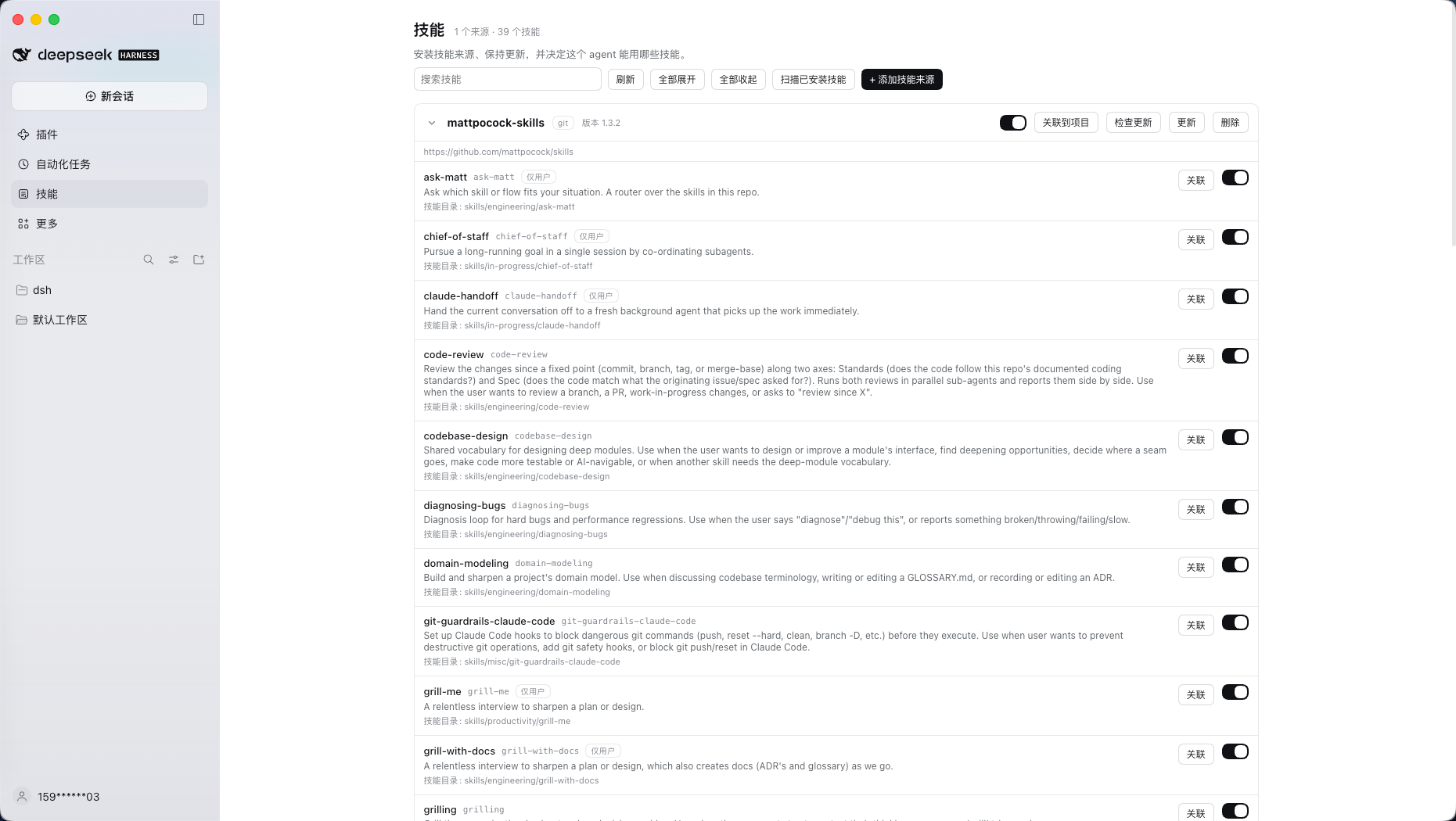
A skill library manager for DeepSeek Harness. Install skill sources from Git or a local folder, keep them current, import skills other agents already installed, and distribute them into projects as symlinks — for DSH itself and for the other coding agents a project uses.
Everything is available on a dedicated Skills page in the Harness sidebar, next to Plugins and Automation tasks.
What it does
- One library, many sources. Every source is a Git clone or a copied folder; a source may contain one skill or dozens.
- Version and update checks.
package.jsonversion when present, otherwisegit describe --tags --always --dirty; Check for updates fetches the remote and reports commits behind/ahead, local changes, and the upstream version label. Updating stays an explicitgit pull --ff-only. - Install from anywhere reasonable. Git (
https://,ssh://,scp-like), a local folder, or the scanner for skills already installed by DSH, Claude Code, Codex, Cursor, Gemini CLI, OpenCode, Windsurf and shared agents. - Project distribution by symlink. Link any number of projects at once; each project's agent directories point straight into the library, so one update reaches every project. Choose per project which agents to target (75 conventions plus
dsh). - Two switch levels. The library switch is the master (disabled skills leave the model catalog and the
/menu); the per-project switch only controls distribution into that project. - Collapsible lists, batch controls. Source cards and linked projects start collapsed; expand one row, or use Expand all / Collapse all.
Screenshots
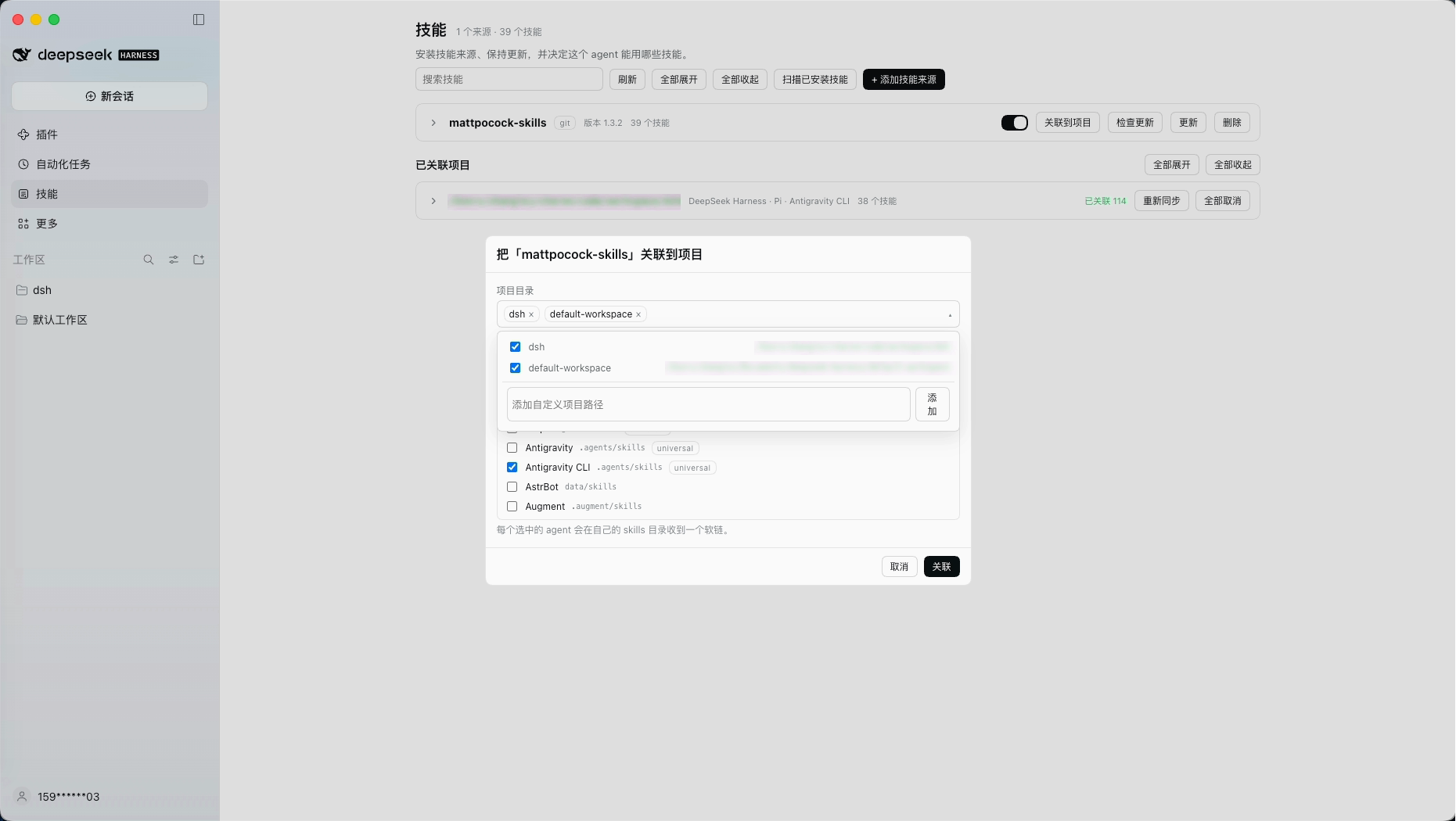
Link any number of projects and choose the agents to target. The project field is a multi-select dropdown; a single submit writes every selected project.
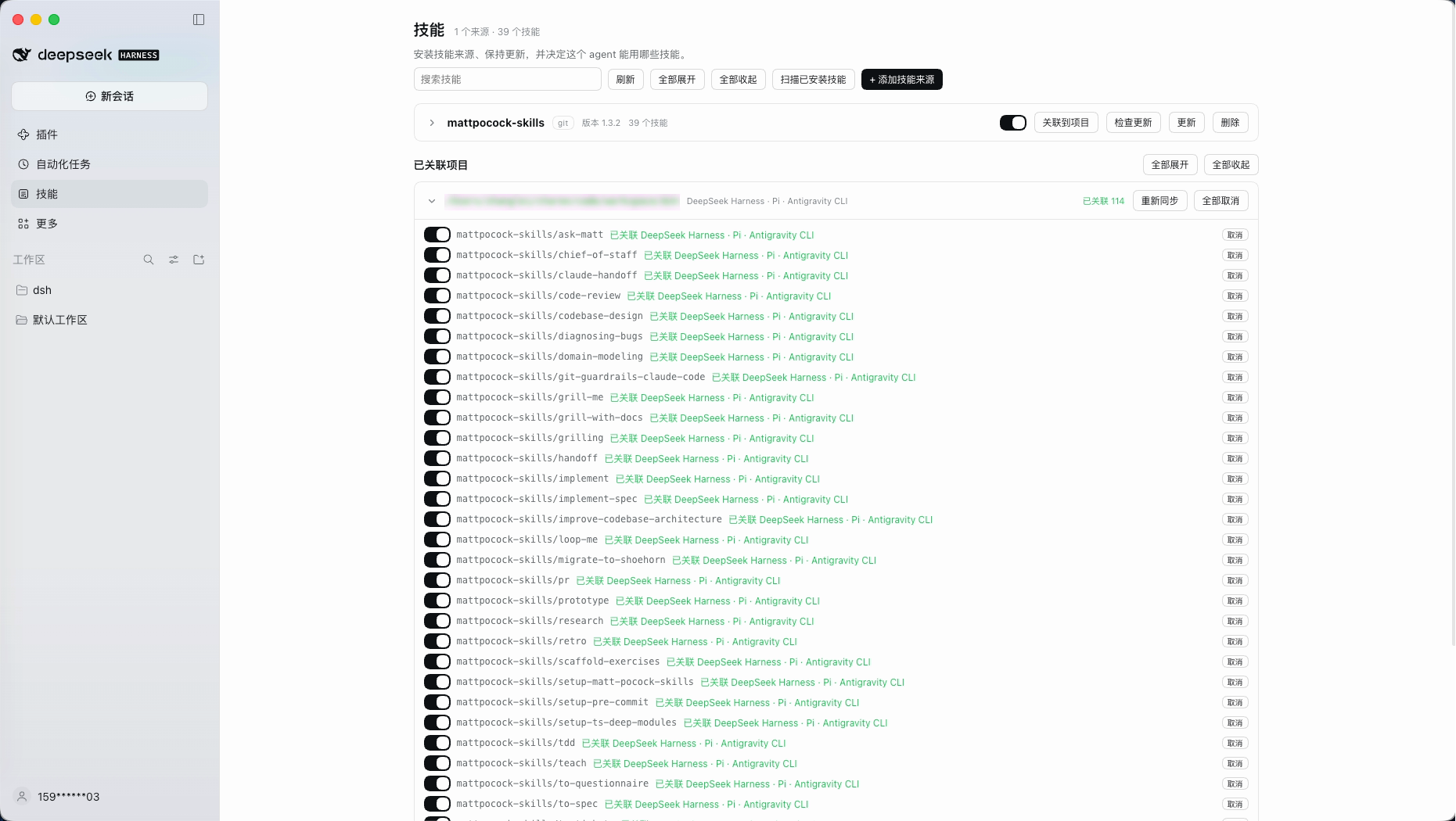
Every linked project keeps its own switches. Each row shows the state and the agents that hold the link, not file paths.
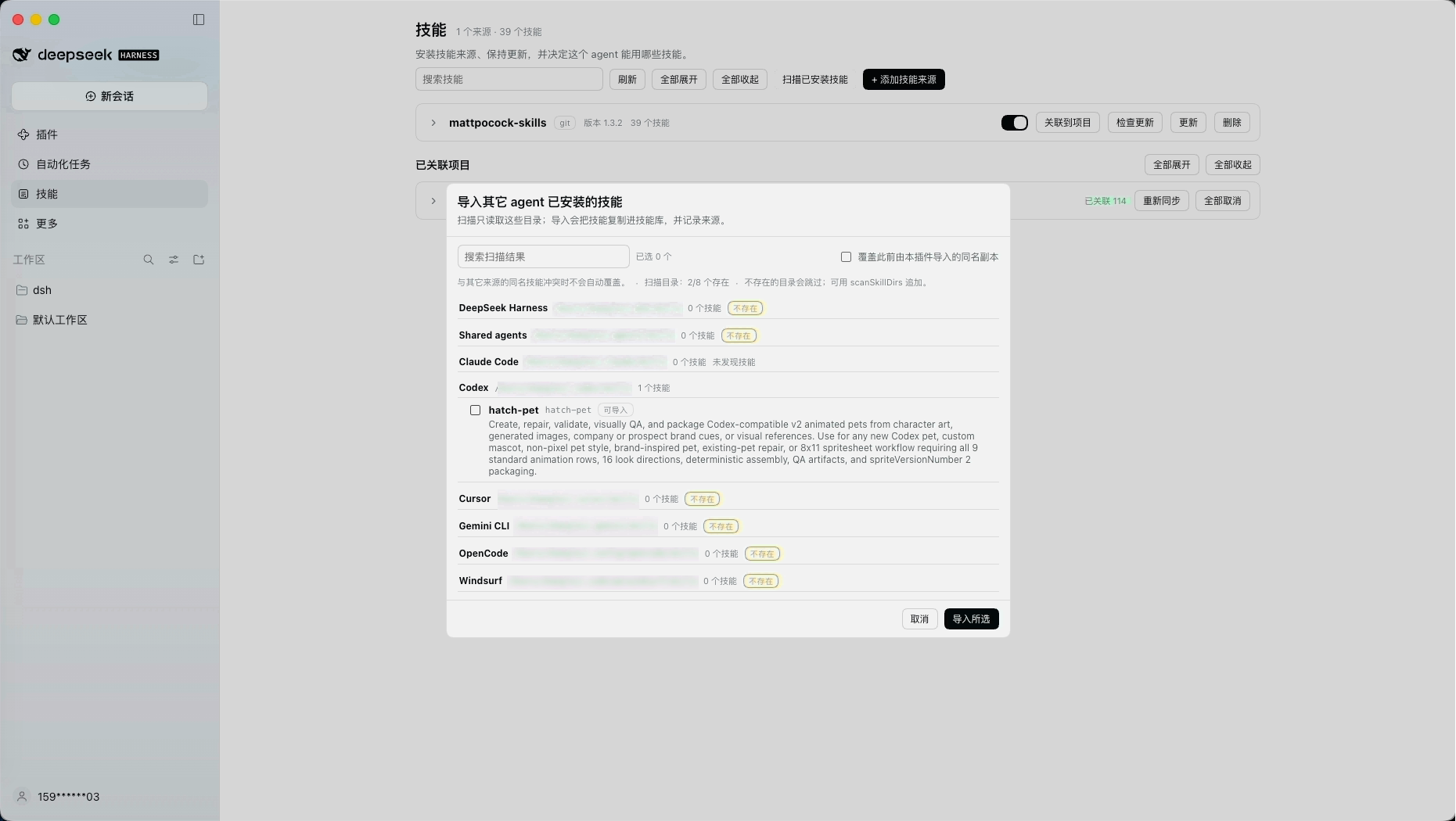
Import what other agents installed. The scanner groups results by origin; missing or empty directories show 0.
How it works
flowchart LR
  subgraph Library["Skill library (~/.dsh/skills-manager)"]
    S1["source A (git)"] --> K1["skills/<name>/SKILL.md"]
    S2["source B (local)"] --> K2["skills/<name>/SKILL.md"]
  end
  Library -->|"ctx.skills provider (rank 450)"| Catalog["model skill catalog + / menu"]
  Library -->|"symlinks"| P1["project A/.dsh/skills"]
  Library -->|"symlinks"| P2["project A/.claude/skills"]
  Library -->|"symlinks"| P3["project B/.agents/skills"]
  UI["Skills page"] -->|"same-origin HTTP"| Host["host routes"]
  Host --> Library
  Host -->|"install, update, check, scan, import"| Git["git / global skill roots"]
- The library lives outside every agent's scan path; only explicit links put a skill into a project.
- Skills reach DSH through a dedicated
SkillProvider, so the modelskilltool and the/menu work without extra wiring. - Project links are real symlinks into the library; a real file, a directory, or a foreign symlink at the target position is reported as a conflict and never touched.
Install
Requirements: Node.js ≥ 24.9, DeepSeek Harness 0.2.1-rc.5 or newer (tested on 0.2.1-rc.5 and 0.2.2-alpha.2), git only for Git sources.
As a profile bundle (the published shape). Install from the npm registry:
dsh plugin --profile skills-test add @charonx/dsh-skills-manager
Or from Git (the package builds itself through its prepare script):
dsh plugin --profile skills-test add git+https://github.com/charonX/dsh-skills-manager.git
The repository commits its build output (lib/ and client/), so Git installs need no build approval. A GitHub Release tarball works the same way:
dsh plugin --profile skills-test add https://github.com/charonX/dsh-skills-manager/releases/download/v0.1.1/charonx-dsh-skills-manager-0.1.1.tgz
Or pack it yourself:
npm pack                                                        # build + tarball
dsh --profile skills-test --from-default-profile web --dump-config >/dev/null
dsh plugin --profile skills-test add "$PWD/charonx-dsh-skills-manager-0.1.1.tgz"
dsh --profile skills-test --no-open --port 3099                 # open the token URL
dsh plugin --profile skills-test remove @charonx/dsh-skills-manager
The published name is @charonx/dsh-skills-manager; the unqualified dsh-skills-manager on npm belongs to a different project.
While developing, link the checkout instead of packing (dsh plugin add "$PWD"), and select the built entry with an overlay:
# dev/overlay.example.yml — replace the absolute paths
- insert:
    - id: skills-manager
      name: '/absolute/path/to/dsh-skills-manager/lib/index.js'
      config:
        libraryDir: /absolute/path/to/dsh-skills-manager/.dev/library
Desktop: Plugins → Add plugin → local path, then open Skills in the sidebar. Exact steps and troubleshooting: docs/INSTALL.md.
Use
Sources — add a Git repository or a local folder. Local folders are copied without their .git; Git installs stream git clone output. Removing a source deletes its directory and records, and removes every project link first.
Version and updates — the source card shows the version and, for Git, a Check for updates result (N new commits, local changes, last check time). Update runs git pull --ff-only; a failure keeps the raw Git output.
Link to a project — the project field is a multi-select dropdown: pick workspace directories or add custom paths, choose agents (dsh by default), then submit once for every selected project. A linked skill is visible in that project's sessions (project-dsh, rank 100) and in the other chosen agents' directories.
Linked projects — each project row lists its skills with a per-project switch and the state plus agent names (linked dsh · claude-code). Resync restores deleted links, repairs hand-repointed library links, and drops broken ones and stale records. Unlink all removes the links and the record.
Scan installed skills — the scanner reads existing global roots (~/.dsh/skills, ~/.agents/skills, ~/.claude/skills, ~/.codex/skills, ~/.cursor/skills, ~/.gemini/skills, ~/.config/opencode/skills, ~/.codeium/windsurf/skills, plus scanSkillDirs) and groups results by origin. Roots that are missing or empty show 0, so it is obvious what was scanned. Import copies the selected skills into imported-<origin> sources.
Import strategy and conflicts
Importing copies; it never symlinks to the original directory. External directories do not belong to this manager, so a link would hand their lifecycle to another tool. Conflicts are decided by skill name plus the sha256 of SKILL.md:
| Situation | Behavior |
|---|---|
| Same name, same content | Skipped as already imported |
| Same name, different content, library copy is local/Git-managed | Refused (SKILL_NAME_CONFLICT) |
| Same name, different content, library copy is an earlier import | Refused by default; overwrite replaces only that imported copy |
| Path outside the configured roots, or empty selection | Failed (IMPORT_PATH_INVALID, IMPORT_EMPTY) |
Provenance (originPath, originRoot, contentHash, importedAt) is recorded in imports.json.
Configuration
- id: skills-manager
  name: '@charonx/dsh-skills-manager'
  config:
    libraryDir: ~/.dsh/skills-manager/library            # default
    statePath: ~/.dsh/skills-manager/manager-state.json  # default
    linksPath: ~/.dsh/skills-manager/links.json          # default
    updatesPath: ~/.dsh/skills-manager/updates.json      # default
    importsPath: ~/.dsh/skills-manager/imports.json      # default
    scanSkillDirs: []                                    # extra global roots
    providerName: skills-manager
    rank: 450
    routePrefix: /dsh-skills-manager
    allowFileProtocol: true
| Field | Meaning |
|---|---|
libraryDir |
Managed library root; every direct child is a source |
statePath |
Enable flags, categories, notes (sparse JSON) |
linksPath |
Per-project link intent (agents + skills) |
updatesPath |
Last Git update check per source |
importsPath |
Provenance of imported skills |
scanSkillDirs |
Extra roots offered by the import scanner |
providerName / rank |
Provider registration; rank 450 sits between project skills (100/200) and user roots (500) |
routePrefix |
HTTP prefix for the Web Client |
allowFileProtocol |
Accept file:// Git identifiers |
HTTP API
All routes live under routePrefix; responses are JSON with cache-control: no-store.
| Method | Path | Purpose |
|---|---|---|
GET |
/api/library |
Sources, skills, enable flags, update checks, problems |
POST |
/api/sources/install |
{ sourceType: 'git' | 'local', identifier, force? } → 202 { jobId } |
GET |
/api/jobs/:jobId |
Job state and accumulated command output |
POST |
/api/sources/:slug/check |
Fetch and compare with upstream → { check } |
POST |
/api/sources/:slug/update |
git pull --ff-only → 202 { jobId } |
DELETE |
/api/sources/:slug |
Remove source, links, records |
PUT |
/api/sources/:slug |
{ enabled?, category?, note? } |
PUT |
/api/sources/:slug/skills/:skill |
{ enabled?, note? } |
GET |
/api/agents |
Agent directory registry |
GET |
/api/projects |
DSH workspaces as link targets |
GET |
/api/links |
Recorded projects with refreshed state |
POST |
/api/links |
{ project, source, skillName?, agents? } |
PUT |
/api/links |
{ project, source, skillName?, enabled } per-project switch |
DELETE |
/api/links |
Same body → unlink and drop the record |
POST |
/api/links/resync |
{ project } → repair |
GET |
/api/scan |
Scan global roots, grouped by origin |
POST |
/api/import |
{ paths, overwrite? } → import outcomes |
Errors use { "error": { "code", "message" } } with codes such as SKILL_SOURCE_INVALID, SKILL_SLUG_CONFLICT, SKILL_FETCH_FAILED, SKILL_UPDATE_FAILED, PROJECT_INVALID, AGENT_INVALID, SKILL_NAME_CONFLICT, IMPORT_PATH_INVALID, GIT_UNAVAILABLE, UNTRUSTED_REQUEST.
Security
- Mutating requests must be same-origin: a loopback or declared
trustedHostsauthority, nocross-sitefetch metadata, and a matchingOriginwhen one is present. - Git identifiers are restricted to non-executable transports;
ext::and option-shaped values are rejected before any process starts. - No shell: every child process is spawned with an argument array, and
--ends Git option parsing. - Slugs and skill names must be single directory names; composed paths are checked to stay inside the library. Project links only remove symlinks that resolve into the library.
- Import only accepts paths inside the configured scan roots.
Development
pnpm install
pnpm run typecheck          # host, client, and tests
pnpm test                   # 88 unit/integration tests (real git, symlinks, registry, HTTP)
pnpm run build              # tsc → lib/, tsdown → client/client.js
pnpm run smoke:client       # load the built bundle and assert its registrations
pnpm verify:local           # boot a real dsh web with an isolated overlay (8 checks)
pnpm verify:profile         # pack, install into an isolated profile, boot it (9 checks)
pnpm verify:profile -- --linked
Debugging (DevTools, curl, optional Playwright replay): docs/DEBUG.md. Verification matrix: docs/VERIFY.md. Design and phase plan: docs/DESIGN.md.
Known limitations
- No filesystem watcher: changes made outside the UI appear on the next manager operation or restart.
- Categories and notes are stored and exposed by the API but not edited in the page yet.
- Global (user-level) distribution to other agents is not implemented; links are project-scoped. DSH itself sees the library globally through the provider.
- Re-enabling a disabled skill or source does not restore links automatically; use Resync on the project.
- The Desktop shell (
dsh-app://) is verified manually; automated checks coverdsh web. - Harness plugin APIs are pre-stable;
engines.dshpins the tested range.
Credits
The agent directory snapshot in src/agent-registry.ts derives from the registry in vercel-labs/skills v1.5.20 (MIT), plus one local dsh row. Only the data is used — install, linking, repair, and import are implemented here. See THIRD_PARTY_NOTICES.md.
No comments yet. Be the first to write one.