dsh-better-markdown
Markdown where you actually use it: the composer and your own messages.
DeepSeek Harness renders assistant replies as Markdown, but the composer is a plain-text editor and sent user messages come back as plain text. This plugin closes that gap:
- Live preview above the composer. Type Markdown and the rendered result appears immediately — headings, bold/italic, inline code, lists, task lists, quotes, tables, fenced code with syntax highlighting, links, footnotes and math, all through DSH's own Markdown pipeline.
- In-place syntax highlighting. The composer itself dims
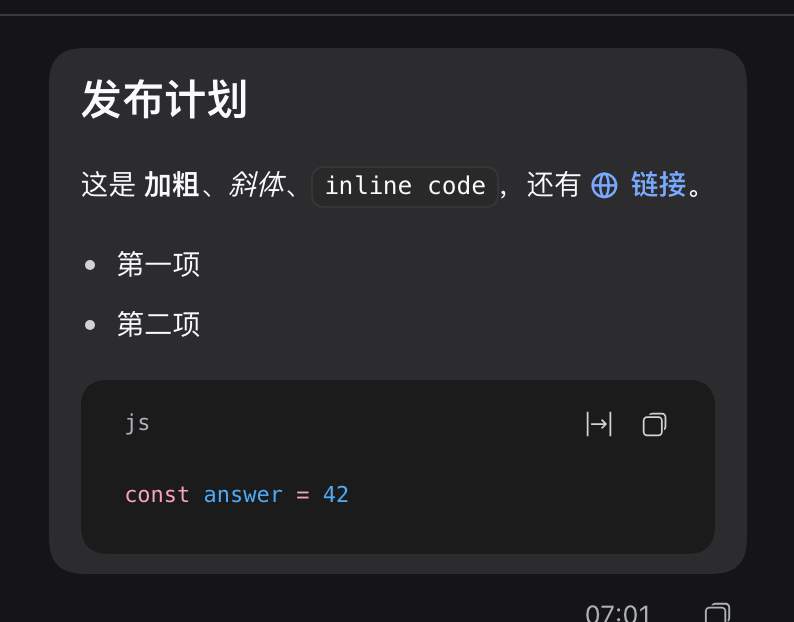
#,**,`and list markers, and paints emphasis, code, links and headings, so you can read the structure while typing. The draft text never changes. - User messages render as Markdown. Every sent message you wrote with Markdown shows as Markdown in the transcript — while the copy action, the session log, and the text the model sees stay byte-identical.
- One switch, remembered per browser. The
M↓button in the composer toolbar toggles the preview (⌘⇧M/Ctrl+Shift+Malso works); the choice survives reloads. The transcript rendering follows the plugin configuration, not the button.
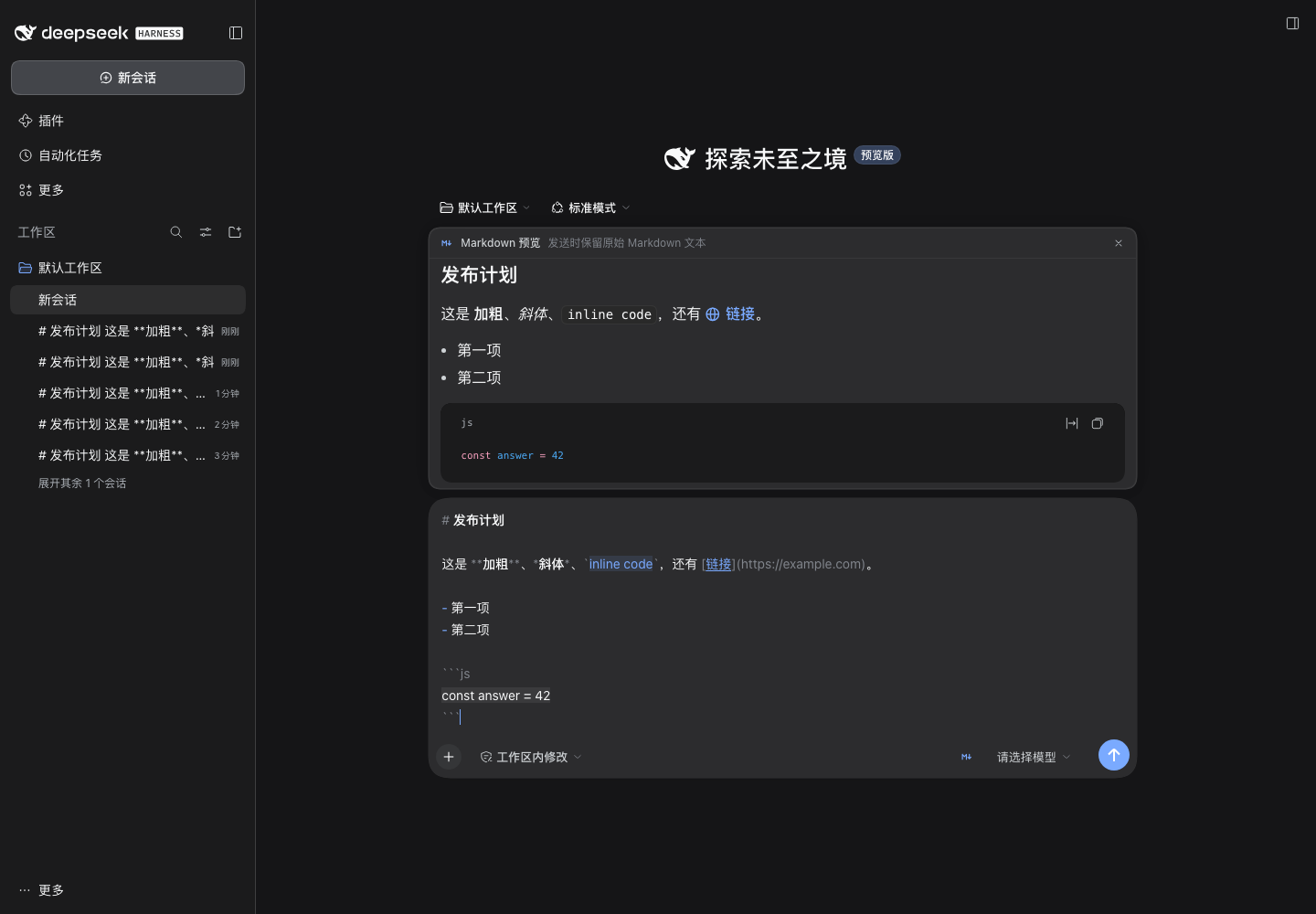
Live rendered preview above the composer; the raw draft keeps its Markdown markers, dimmed.
Third-party plugin. Not an official DeepSeek / DeepSeek Harness component.
Install
This plugin is distributed only through GitHub — it is not published on npm. Requirements: DSH 0.2.1-rc.5 or newer, below 0.3.0, with the Web or Desktop surface, and Node ≥ 22.
The install spec is the repository itself:
dsh plugin --profile <profile> add github:ceasarXuu/dsh-better-markdown
The same spec works in Plugins → Add in the app. A version tag pins a
release (github:ceasarXuu/dsh-better-markdown#v0.1.0), and a GitHub Release
tarball can be installed instead when your network setup prefers plain
artifacts:
dsh plugin --profile <profile> add https://github.com/ceasarXuu/dsh-better-markdown/releases/download/v0.1.0/ceasarxuu-dsh-better-markdown-0.1.0.tgz
Manual profile row (after the package is installed into the profile):
# profiles/<profile>/cordis.patch.yml
- insert:
    - id: better-markdown
      name: '@ceasarxuu/dsh-better-markdown'
      config:
        enabled: true
        transcript: true
        composer: true
        syntax: true
        preview: true
Disable the bundle and the shipped plain-text behavior returns immediately.
Switches
All switches are plain booleans on the plugin row; the browser reads them from
GET /plugin/better-markdown/config on page load.
| Switch | Default | What it does |
|---|---|---|
enabled |
true |
Master switch for every surface. Off restores shipped behavior while the plugin stays installed. |
transcript |
true |
Render sent user messages as Markdown in the conversation. |
composer |
true |
Enable the composer preview and its toolbar switch. |
syntax |
true |
Paint Markdown syntax inside the composer (CSS Custom Highlight API). |
preview |
true |
Show the preview by default when the draft contains Markdown. |
The toolbar switch is the per-browser override: pressing it off turns the
preview off on this browser only (localStorage key
better-markdown.prefs.v1); pressing it on shows the preview for any
non-empty draft. Clearing site data returns to the host default.
How it works
Everything runs in the browser half; the host half only publishes the switches, so there is no network traffic beyond the same-origin config read.
- Transcript. DSH parses user text into runs and reference chips and
renders each run through the keyed
conversation.user.text.nodeslot. This plugin registers thetextkey at a lower priority than the shipped cell and renders the run with the platform's ownMarkdownTextcomponent. Session@-mention chips keep their shipped renderer, and copy/quote behavior keeps reading the original text. - Preview. A normal
conversation.input.dockentry (the same flow the shipped queue and todo docks use) reads the live draft and renders it with the sameMarkdownTextcomponent. - In-place highlighting. A
conversation.input.rightcell provides the switch, and a small controller repaintsCSS.highlightsover the composer's text nodes. Highlights only change paint (color, background, underline, text-shadow) — never layout, never the draft, never IME composition.
Because rendering uses @deepseek-ai/dsh-client-ui-primitives from the
platform module table, user messages get exactly the GFM renderer assistant
replies use: sanitized links, highlighted code, tables, footnotes and math.
If that module is unavailable the plugin degrades to plain text instead of
breaking the page.
Markdown in a chat message
- Single newlines stay line breaks: outside code blocks, tables and indented blocks, a newline becomes a CommonMark hard break before rendering, so a multi-line message does not collapse into one paragraph.
- Plain prose stays byte-identical to the shipped bubble; Markdown rendering
only starts when the message contains Markdown syntax (
#, fences, lists, quotes, tables, emphasis, code, links, task items). - The queue dock's one-line preview renders the same content inline, clamped to a single line.
- The session title, sidebar rows and headers are host-generated plain text and are intentionally left alone.
Limitations
- DSH's composer is a shell-owned Lexical editor. A plugin can decorate it but cannot turn it into a WYSIWYG surface, so "Markdown in the composer" means a rendered preview plus paint-only syntax highlighting — editing, caret, undo and Chinese IME all stay with the shipped editor.
- Highlighting needs the CSS Custom Highlight API (Chromium 105+). On a browser without it the plugin simply skips that layer; the preview and the transcript keep working.
- The transcript renderer targets DSH 0.2.x slot contracts. A future change to
conversation.user.text.nodeorconversation.input.dockneeds a plugin update; the plugin never patches DSH source.
Development
npm test        # pure helpers: detection, hard breaks, spans, config, route
npm run check   # node --check on every shipped source
dev/ contains a dependency-free Chrome DevTools Protocol harness and a live
verification script. Point a throwaway DSH home at this checkout, boot
dsh web on a non-desktop port, then:
node dev/verify.mjs # 19 live checks + screenshots into docs/
The dev home, the server log, and the harness never touch the real ~/.dsh
or the desktop app.
License
MIT © ceasarXuu
No comments yet. Be the first to write one.