English · 简体中文 · 繁體中文 · 日本語 · 한국어 · Türkçe · Русский · Tiếng Việt · ไทย · Deutsch · Español · Français · Українська · Polski · Português (Brasil) · العربية · فارسی · Bahasa Indonesia · Italiano
DSH Host File Explorer
A DeepSeek Harness plugin that adds a left-sidebar entry for browsing the filesystem of the machine the Harness runs on.



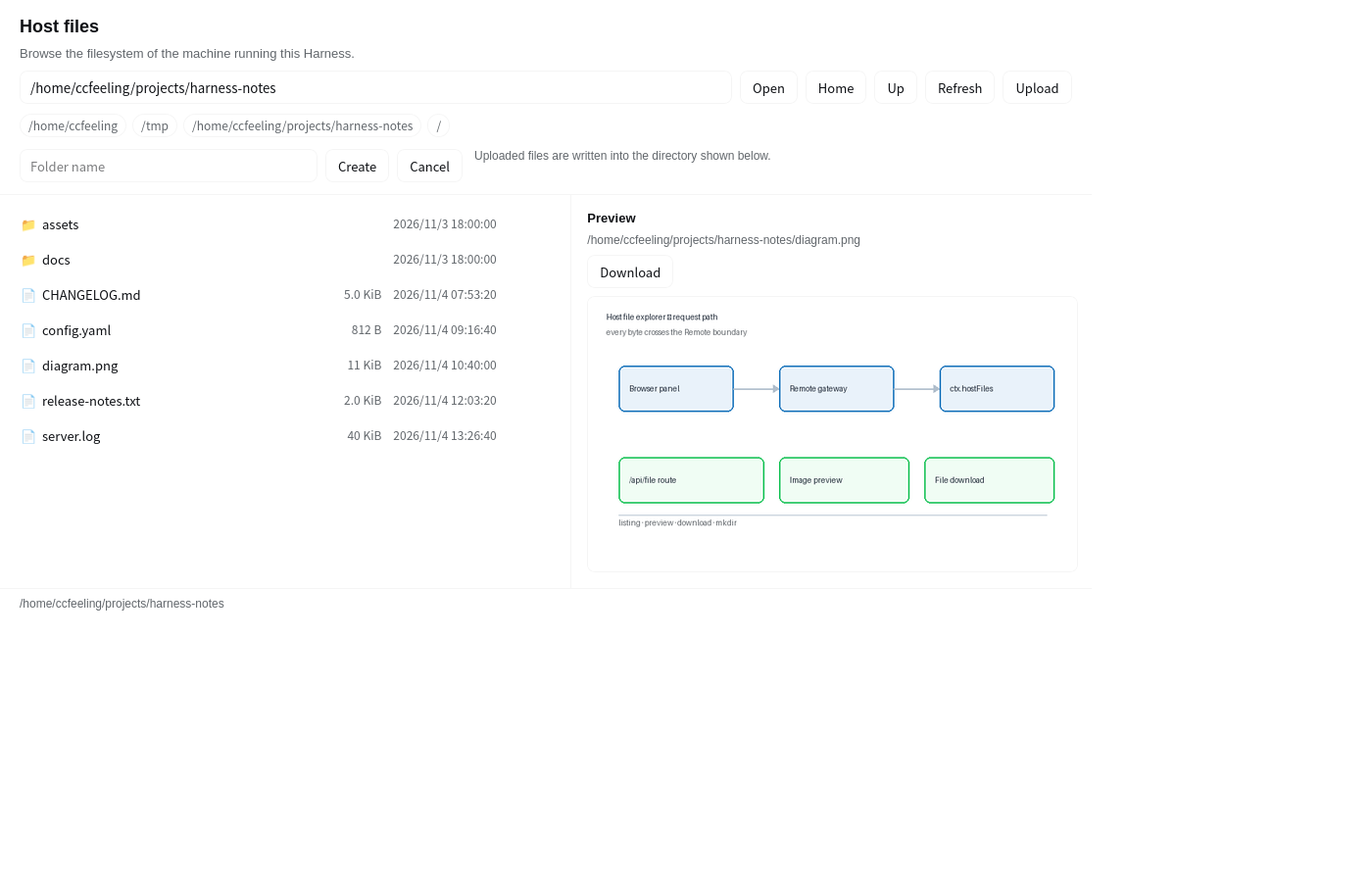
Browse the filesystem of the host machine from inside the Harness: directory listings with kinds, sizes, and modification times, text file previews, and folder creation. Every read goes through the Host/Client Remote channel, the same boundary the agent's own filesystem tools use. Files can be downloaded into the browser, and images are previewed inline. Files can be uploaded into the directory that is open.
Features
| Feature | Description |
|---|---|
| File download | Hands the file to the browser through the Harness's authenticated file route, under the file's own name |
| Image preview | Shows a PNG, JPEG, GIF, WebP, AVIF, or SVG image inline, instead of reading it as text |
| Directory listing | Directories first, then files, each with size and modification time; hidden entries are dimmed |
| Path navigation | Jump to an absolute path, go to the parent, or use the shortcuts for HOME, tmp, cwd, and the filesystem root |
| File preview | Reads the first 256 KiB of a text file and renders it; binary files report themselves instead of printing noise |
| Folder creation | Creates a single-segment subdirectory inside the current directory |
| Multilingual UI | Every visible string goes through ctx.locale; the panel ships twelve languages and follows the interface language |
| File upload | Sends a file from the browser to the directory that is open, as one Remote call carrying the bytes |
Install
With the plugin manager (recommended)
Clone this repository, then install it from the Harness plugin manager:
# clone
git clone https://github.com/ccfeeling/dsh-host-file-explorer.git

# install into a DSH profile (replace the profile name and path with yours)
dsh plugin --profile web add /path/to/dsh-host-file-explorer
The matching tool call is plugin_manager { action: 'install_bundle', target: '<local path>' }.
From the plugin market
The plugin is listed in the awesome-dsh-plugin list, so the marketplace can install it straight from GitHub:
dsh plugin --profile web add github:ccfeeling/dsh-host-file-explorer
As a profile dependency
// ~/.dsh/profiles/<profile>/package.json
{
  "dependencies": {
    "@local/dsh-host-file-explorer": "link:/abs/path/to/dsh-host-file-explorer"
  }
}
After installation a folder icon appears in the sidebar, after Plugins and Schedules. Click it to open the panel.
Note: if your profile has a dependency that ships agent skills (for example
dsh-answer-me-with-html), pnpm 10.11+ and 12.x refuse to install until the skills directory is declared, and fail withERR_PNPM_NO_AGENT_SKILLS_DIR. Turn off pnpm's own skill linking with one stanza in the profile'spnpm-workspace.yaml:skills: dirs: []
Architecture
The plugin is a standard DSH bundle with a Host half and a Client half:
index.js   (Host)    ctx.hostFiles  ——  seven verbs over node:fs/promises
client.js  (Client)  sidebar entry + main panel + Remote namespace mount
The Host half provides a ctx.hostFiles service and marks its verbs for the Remote transport with the prototype marker @deepseek-ai/dsh-typert-protocol/remote-methods, so the gateway can discover it in SRC mode:
| Method | Parameters | Returns |
|---|---|---|
roots() |
— | Well-known locations (HOME, tmp, cwd, filesystem root) |
list(path, signal) |
path |
{ path, parent, home, entries[{ name, path, kind, size, modified, mime, hidden }], truncated } |
stat(path, signal) |
path |
{ path, kind, size, modified, mime } |
read(path, signal) |
path |
{ path, size, modified, binary, truncated, text } |
mkdir(path, name, signal) |
path, name |
{ path } |
upload(path, name, data, signal) |
path, name, data |
{ path, size } |
limits() |
— | The largest file one download may carry |
signal has to be the last parameter: the gateway parses the method signature with Function.prototype.toString() to derive the wire parameters, and a broken signature makes the call fail.
How files reach the browser
The page never carries file bytes over the Remote channel. It asks the Host for the file's address on the Harness's own authenticated file route — the same route the shipped document preview uses for the images inside a Markdown document — and the browser fetches it with the session the page already holds. A download keeps the file's own name, and a preview gets the file's own content type, so a PNG renders as a PNG.
One response is bounded by the Harness's attachment byte limit (20 MiB by default). The page reads that number from the Host and refuses an oversized download with an explanation, instead of starting a transfer that would fail.
The Client half hand-writes a Typert Remote contribution, mounts it with ctx.remote.$mount(...), and then registers two slots:
sidebar.panellist: idhost-files, order30, with its own folder icon;main: keyhost-files, the panel the sidebar button opens.
Two traps worth knowing
The namespace cannot be declared as the plugin's own inject. The mounted
remote.hostFilesis a service in its own right, and it only appears after this plugin's mount has run — a fiber that waits for it would never wake up, so the plugin would never start. Read it withctx.get('remote.hostFiles')instead, the Cordis mixin entry point that reads a service straight from the shared store:const namespace = ctx.get('remote.hostFiles');Shipped plugins can write
inject: ['remote.agentPresets']only because another package mounts those namespaces, which leaves a consumer free to declare the dependency.The client half depends on no Harness client package. This plugin uses
reactandzodonly, styles itself with--dsw-alias-*theme tokens, and imports nothing from@deepseek-ai/dsh-client-ui-primitivesor its siblings.
Permissions and boundaries
- The plugin reads the host filesystem with the privileges of the Harness process itself: it can read everything the account running it can read. That is inherent to what a host file explorer is, so only enable it on machines and accounts you trust.
- The plugin is read-only plus folder creation and file uploads. It cannot modify, delete, or rename a file that is already there, and an upload never replaces one.
- One listing returns at most 2000 entries, and one preview reads at most 256 KiB.
- One download carries at most the Harness's attachment byte limit (20 MiB by default); the panel says so before it starts an oversized transfer.
Development
node --check index.js
node --check client.js
npm pack --dry-run      # inspect the file list that actually ships
During local development the profile points at the working directory with link:, so an edit is live after a browser refresh (the client module is versioned by content hash).
License
MIT, see LICENSE.
No comments yet. Be the first to write one.