
🍅 dsh-pomodoro
A Pomodoro plugin that adds focus and break cycles to the DeepSeek Harness Web UI.
English · 简体中文




Interface Preview · Highlights · Quick Start · Usage · Settings and Notifications
Compatibility: The current compatibility baseline is DeepSeek Harness
0.1.0-rc.6. Harness is still in developer preview, so recheck plugin compatibility after upgrading DSH.
Interface Preview
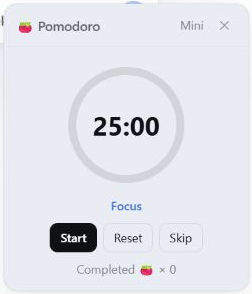
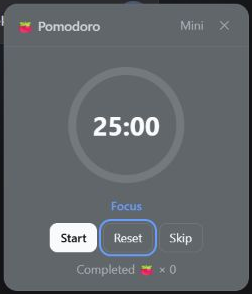
Supports light and dark themes, a compact mini mode, and configuration through DSH plugin settings.
| Light theme | Dark theme |
|---|---|
 |
 |
Mini mode
Settings
Highlights
- Native DSH integration: Open Pomodoro from the sidebar and manage its options from the DSH plugin settings page.
- Complete timer controls: Start, pause, reset, or skip a phase, with a circular progress indicator, phase status, and completed-focus count.
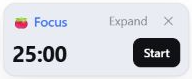
- Low-distraction mini mode: Collapse the panel to the phase, countdown, and primary control while retaining drag, expand, and close actions.
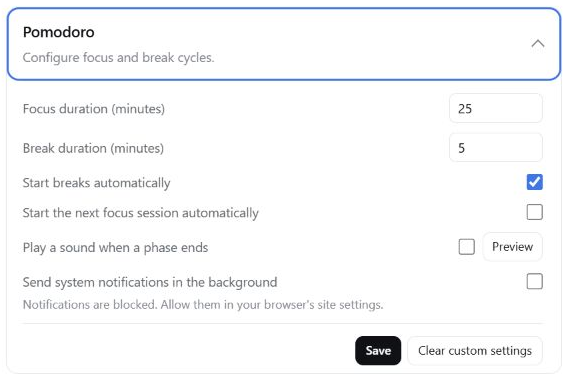
- Configurable cycles: Set focus and break durations independently, and choose whether breaks or the next focus session start automatically.
- Completion feedback: Always receive an in-app DSH reminder when a phase ends, with optional sound and background system notifications.
- DSH language support: Follows the DSH global locale for Chinese and English. Switching languages updates the mounted plugin UI without resetting the timer or unsaved settings draft.
- Interface-aware: Adapts to DSH light and dark themes, keyboard operation, and the reduced-motion preference.
Requirements
| Component | Requirement |
|---|---|
| DeepSeek Harness | Compatibility baseline 0.1.0-rc.6 |
| Node.js | ^22.19.0 or >=24.0.0 |
| DSH profile | web; headless profiles do not provide the UI |
| pnpm | Available from the command line |
Quick Start
Install the plugin into the web profile:
dsh plugin --profile web add dsh-pomodoro
Then start or restart DSH Web:
dsh web
The plugin is loaded when the 🍅 button appears at the bottom of the sidebar.
Usage
Click the sidebar 🍅 button to open or close the panel. Drag the title bar to reposition it. Use Mini in the title bar to hide secondary information, and Expand to restore the full panel.
| Control | Behavior |
|---|---|
| Start / Pause | Start or pause the current phase |
| Reset | Restore the current phase to its full duration and pause it |
| Skip | Move to the next phase and keep it paused |
| Mini / Expand | Switch between the low-obstruction layout and full controls |
Settings and Notifications
Open Settings → Plugins → Plugin configuration → Pomodoro in DSH to configure:
| Setting | Default | Behavior |
|---|---|---|
| Focus duration | 25 minutes | Full duration of each focus phase; accepts an integer from 1 to 240 minutes |
| Break duration | 5 minutes | Full duration of each break phase; accepts an integer from 1 to 240 minutes |
| Start breaks automatically | On | Start the break when a focus phase ends naturally |
| Start the next focus session automatically | Off | Start the next focus session when a break ends naturally |
| Play a sound when a phase ends | Off | Play the completion sound three times; a preview is available |
| Send system notifications in the background | Off | Send a browser notification while the DSH page is in the background |
If the current phase has not started, a new duration takes effect immediately. Once timing has started, the new duration applies from the next phase.
Completion feedback
- In-app DSH reminder: Always enabled. It appears when a focus or break phase ends naturally, even if the Pomodoro panel is closed, and indicates whether the next phase started automatically.
- Sound: Off by default. After enabling and saving it, each naturally completed phase plays the sound three times. Preview works without saving first.
- System notification: Off by default. When enabling it for the first time, allow notifications in the browser prompt and then select Save. Notifications are sent only while the DSH page is in the background or does not have focus.
System notifications require DSH to be served from localhost, 127.0.0.1, or HTTPS, and the DSH page must remain open. The in-app reminder continues to work if sound or system notifications are unavailable.
Updating and Removing
# Update the plugin
dsh plugin --profile web update dsh-pomodoro

# Remove the plugin
dsh plugin --profile web remove dsh-pomodoro
Restart dsh web after either command.
Links
License
MIT. See THIRD_PARTY_NOTICES.md for the licenses covering React/ReactDOM and third-party assets such as the CC0 completion sound.
Development and Maintenance
Show local development, project structure, and release workflowLocal development
git clone https://github.com/causebefore/dsh-pomodoro.git
Set-Location dsh-pomodoro
dsh plugin --profile web add .
npm run check
npm pack --dry-run
The project has no build step: lib/client.js is the browser bundle that is published directly. Daily development happens on dev; main only receives versions that have completed release checks.
Project structure
| Path | Responsibility |
|---|---|
lib/index.js |
Node/Cordis entry point, configuration schema, and loopback RPC |
lib/client.js |
Browser timer engine, React UI, slot registration, locale messages, and settings synchronization |
assets/sounds/deep-ding.mp3 |
Source for the CC0 completion sound; its runtime bytes are embedded in the client bundle |
docs/images/ |
Chinese and English README screenshots plus the GitHub Social Preview image |
cordis.patch.yml |
Inserts the plugin service into the DSH Web composition |
package.json |
Exports, peer ranges, bundle declaration, and npm publication allowlist |
.github/workflows/publish.yml |
Trusted Publishing workflow from a GitHub Release to npm |
Release workflow
- Complete development and validation on
dev, then update the version inpackage.json. - Merge
devintomainthrough a release pull request. - Create a stable GitHub Release from the corresponding
maincommit with a name matchingvX.Y.Z. - The publish workflow validates the version, tag, and
mainancestry, runs syntax and package checks, and publishes through npm Trusted Publishing.
No comments yet. Be the first to write one.