dsh-work-log



A daily work log for DeepSeek Harness — one npm-style bundle with two surfaces and one data source.
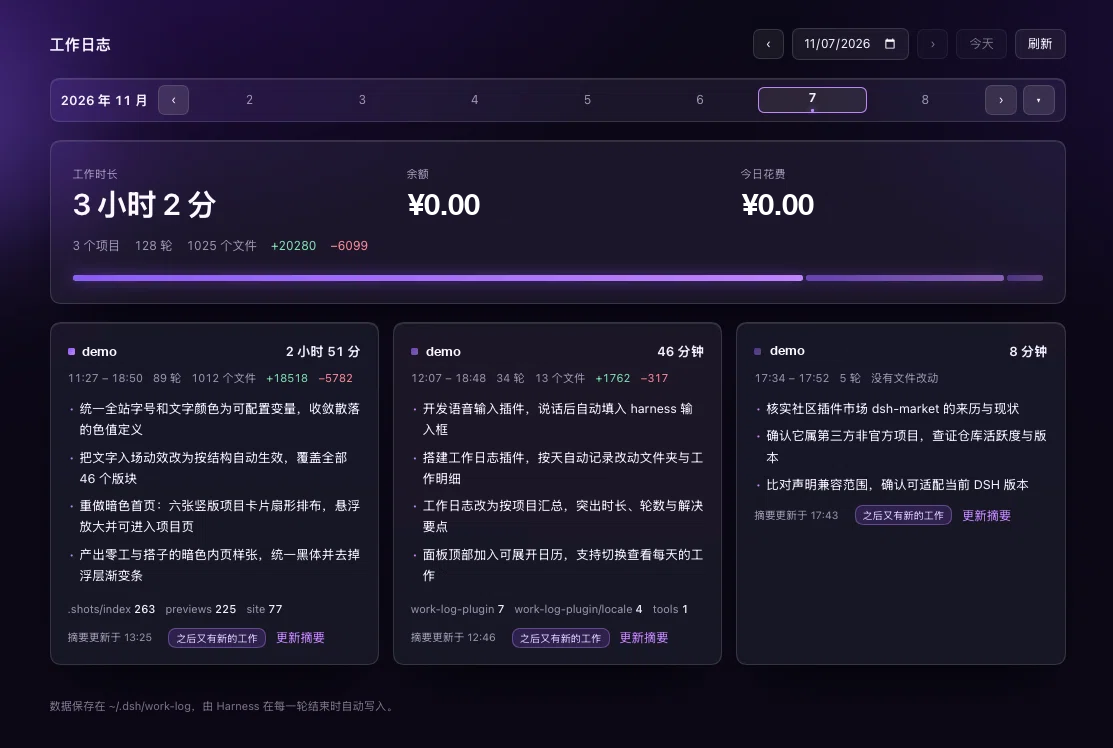
- Full panel (sidebar entry → main column): the day's work time, wallet balance and spend, a month calendar, and one card per project with a model-written summary of what got solved.
- Floating pill (
shell.overlay): always visible in the top-right corner, draggable, shows today's work time and current balance, with a jump button to the panel. It keeps showing while you switch Sessions and panels.
Screenshots
Report panel — a day of work grouped by project: total time, balance, today's spend, and what each project solved.
Floating pill — always-on HUD, draggable, shows today's work time and balance; › opens the panel.

非官方插件。Not affiliated with DeepSeek.
中文说明
它是什么
一个工作日志插件。整页面板看统计和历史,右上角胶囊随时看今天的时长和余额。两个形态读同一个接口,数据永远一致。
- 每轮对话自动折成一条记录:你的请求、助手的收尾结论、这一轮动过的目录、改动文件数与增删行数、起止时间
- 按工作目录聚成项目;时长按区间并集计算(同项目合并重叠、跨项目不重复计时、单轮封顶 3 小时、空闲不计)
- 每个项目每天用默认模型压出 1–4 行「今天解决了什么」,缓存在当天数据里,有新工作会标「之后又有新的工作」
- 另有日历(默认收起为一行周条,可展开整月)、手工备注,以及给 agent 用的
work_log工具(read / record / summarize)
安装(当前只支持 clone)
git clone https://github.com/callmenightmare/dsh-work-log.git
然后在 Harness 里把这个目录装成 bundle(把路径换成你 clone 下来的绝对路径):
install_bundle /absolute/path/to/dsh-work-log
或者打开侧边栏「插件」→ 添加 → 选择本地目录。安装后刷新页面。
要求:DeepSeek Harness >= 0.2.1-rc.1(Web / Desktop profile)。
数据存在哪
~/.dsh/work-log/YYYY-MM-DD.json
一天一个文件,可读、可备份、可手改。插件被卸载后这些文件仍然保留。
隐私
- 数据只在你本机:写本地文件,经
127.0.0.1上的路由给页面读,不发往任何第三方 - 余额通过宿主自带的账号服务(
deepseekAccount.getBalance())读取,不保存凭证 - 生成摘要会用你自己的模型额度(每项目每天一次调用)
- HTTP 路由只在回环地址上监听(宿主默认绑定
127.0.0.1)
已知限制
- 面板是固定暗色(自带调色板),不跟随宿主明暗主题
- 「今日花费」= 当天第一次读到的余额 − 当前余额;插件安装当天从第一次读取开始算,之前的花费拿不到
- 项目时长按轮计算,等待你回复的时间不计入
English
What it does
A work log plugin with two surfaces over one data layer:
- Panel: per-day, per-project work time, wallet balance and spend, a month calendar, and model-written summaries of what each project solved.
- Pill: a small draggable HUD in the top-right corner with today's work time and balance.
It records one entry per conversation turn (request, closing reply, changed folders, file/line counts, start and end), groups entries by working directory into projects, and computes duration as the union of active intervals.
Install (clone only)
git clone https://github.com/callmenightmare/dsh-work-log.git
Then install that directory as a bundle in your profile:
install_bundle /absolute/path/to/dsh-work-log
Requires DeepSeek Harness >= 0.2.1-rc.1.
Data and privacy
Everything stays local: ~/.dsh/work-log/YYYY-MM-DD.json, served to the page over 127.0.0.1. The balance is read through the host's own account service; no credentials are stored. Summary generation spends your own model quota (one call per project per day).
Development
node test/host.test.mjs
The test runs the host half against a fake Cordis context: event folding, durations, persistence, the three HTTP routes, model summarization (with a stub stream), and the agent tool.
Changelog
See CHANGELOG.md.
License
MIT
No comments yet. Be the first to write one.