description: "dsh Web 客户端的提示音插件:在回答完成与需要授权的事件边上响铃并弹出右下角卡片;支持内置铃声、文字转语音或自定义音频文件,在 General 设置行配置。" kind: "package-reference"
@deepseek-ai/dsh-client-ui-notify
English | 中文
概述
DeepSeek Harness(dsh)网页端的铃声提醒插件:当 AI 回答完成、或需要你授权确认时,自动响铃提醒并弹出右下角提示卡片,让你可以切到别的窗口干别的事,不用担心错过关键节点。
目录
✨ 功能
- 回答完成提醒 —— AI 回答结束时响铃,切窗口干活也不会错过
- 需要授权提醒 —— AI 等待你确认(执行命令、提问等)时响铃
- 三种提醒声音:
- 🔔 内置铃声:双音铃声,开箱即用
- 🗣️ 文字转语音:朗读你配置的文字(如"回答完成了")
- 🎵 自定义音频:上传自己的音频文件(≤1MB),或直接填一个音频链接
- 右下角弹窗:每次响铃时弹出提示卡片,标明哪个会话、什么事件
- 浏览器系统通知(可选):标签页在后台也能收到系统级通知
📦 安装
前提
已安装 dsh(dsh --version 能正常输出版本号),并至少运行过一次 dsh web。
方式一:dsh 安装用户(npm)
dsh plugin --profile web add github:byh819-png/dsh-client-ui-notify
方式二:deepseek-harness 仓库安装用户
pnpm dsh plugin --profile web add git+https://github.com/byh819-png/dsh-client-ui-notify.git
两种方式均要求仓库中包含构建产物(lib/ 目录)。
安装后
- 重启 dsh web(Ctrl+C 停掉再重新运行
dsh web) - 刷新浏览器页面
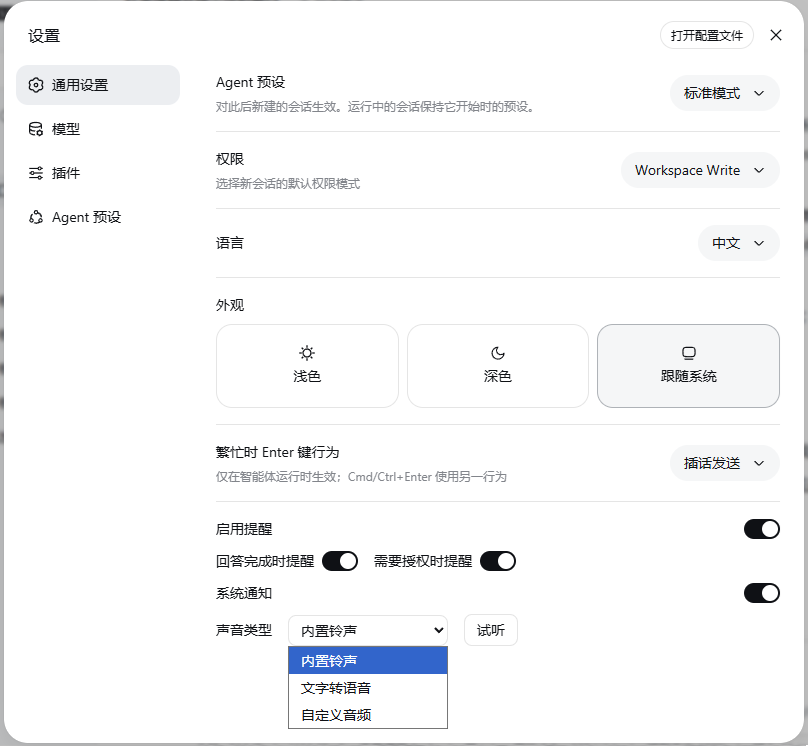
- 打开 设置 → 通用设置,找到"通知"配置行
dsh plugin add 会自动把插件写入 profile 的依赖并在重启后挂载,无需手动编辑任何配置文件。
⚙️ 使用
打开 设置 → 通用设置,在"通知"一行中:
- 打开启用提醒总开关
- 按需勾选提醒时机:回答完成 / 需要授权
- 选择声音类型并配置:
- 内置铃声:无需配置
- 文字转语音:填写要朗读的文字
- 自定义音频:上传本地文件(≤1MB),或填一个 http(s) 音频链接
- 可选:打开系统通知开关(浏览器会请求通知权限)
- 点击试听按钮可立即播放当前配置的声音(不受总开关影响)
🗑️ 卸载
dsh plugin --profile web remove @deepseek-ai/dsh-client-ui-notify
然后重启 dsh web 即可。该命令会同时移除 profile 依赖与插件挂载配置。
如果想清理上传过的自定义音频文件,删除目录
~/.dsh/storages/ui-notify/即可。
❓ 常见问题
Q: 设置里看不到"通知"这一行? 确认插件已安装(dsh plugin --profile web list)、dsh web 已重启、浏览器页面已刷新。插件版本需要与 dsh 核心版本匹配(当前适配 0.1.5-rc.2)。
Q: 事件发生时没有声音? 浏览器的自动播放策略要求页面先有过用户交互(点击一下页面即可)才会出声。刚打开页面就触发的提醒可能被浏览器静默拦截。
Q: 系统通知开关不生效? 需要浏览器授权通知权限。如果权限被拒绝或浏览器不支持,该开关会静默失效(不影响铃声)。
Q: 启动时报 "does not provide an export named ..." 错误? 插件版本与 dsh 核心版本不匹配。请将两者更新到互相匹配的版本(本插件当前适配 dsh 0.1.5-rc.2)。
开发备注
构建、版本对齐与实现要点——点击展开构建
本包通过仓库共享的客户端预设 ../tsdown.client.ts 使用 tsdown 构建,需在 monorepo 内执行:
pnpm run bundle
产物:lib/index.js(Host 半区)、lib/client.js(浏览器半区)、lib/types/(类型声明)。
版本对齐
本包版本与 dsh 核心版本保持一致。升级核心后需复核本包触及的 API 面;以下变更发生在 0.1.2-alpha.1 → 0.1.5-rc.2 之间:
dsh-settings去掉了settingsNamespace()包装——settings.register()直接收命名空间字符串,且需要import type {} from '@deepseek-ai/dsh-settings'来激活ctx.settings的合并。- 信任围栏不再是
dsh-client-connection导出的裸函数isTrustedApiRequest——路由注册方注入connection服务并调用requestRejection(req),由它把 Host/Origin 校验与浏览器认证应用到另一条 Web 路由上。 - 客户端运行时 share 新增了
usePanelInfo与useResource;组件测试需要同时桩这两者。 - 空的
./invariant伴生入口会被拒绝——没有可观测分叉关系的包改为在本 README 里写明理由。 - 样式 gate:满圆角必须与
corner-shape: round配对,中性实心描边为0.5px,带阴影的浮起表面不得再带中性描边。
实现要点
本包只实现一条所有权规则:运行时持有 durable 分区与全部播放决策,设置行只是同一份配置的镜像,Host 持有该接缝中唯一的字节存储。
- 边沿检测:
NotifyRuntime接管设置作用域,并对会话列表与 pending 交互映射做逐会话 diff。running → idle 触发"回答完成";出现 pending 交互触发"需要授权"。首个快照只记录(加载时已经空闲的会话不响铃),connection/reset时重新基线,使重连状态重放无法伪造边沿。 - 用户音频存储:自定义方法的文件经 webServer 前缀路由(
/_dsh-ui-notify/audio/<uuid>.<ext>)落入$DSH_HOME/storages/ui-notify/audio,该路由的注册方先应用 connection 的信任围栏。URL 尾部在任何文件操作之前就被钉死为规范 UUID 加白名单扩展名;上传上限 1 MB,且因为 id 即内容,响应带 immutable 缓存头。Host 激活时的保留清扫会删除设置不再引用的文件,且只动符合规范 id 模式的文件。 - 设置行与弹窗:设置行注册进 General 分区的 item 槽位,store 镜像运行时配置,并由运行时的单调 revision 把关,避免过期重复渲染。弹窗注册进 shell 的浮动 overlay 座位;最新告警胜出(替换当前卡片)、保持、淡出,然后自行消失或由用户关闭。卡片经 body portal 渲染并保持点击穿透,因此告警不会挡住下面的应用;它停在距视口底部 4px 处,以让开 composer 的授权 action row。
- 系统通知点击:发送方先聚焦 harness 标签页、关掉通知,再把被提醒的会话切为当前会话——用户顺着通知回来时,告警所指向的授权提示就在屏幕上。
- 弹窗计时:
NotifyToast.tsx的HOLD_MS/FADE_MS与NotifyToast.module.css中dsh-notify-toast-fade动画的延迟/时长必须一致,否则会截断淡出或留下不可见卡片。 - 相关包:ui-settings 持有设置行传输所依赖的设置命名空间作用域;ui-settings-general 承载 General 分区;ui-session 持有运行时观察的 pending 交互根;settings 持有 durable 用户设置接缝及其文件提供方。
许可证
模型体验
无:本包是浏览器侧的通知界面,不注册任何面向模型的内容。
KV Cache effect
无;本插件不组装任何 provider 请求,也不新增自己的会话事件。
已知限制与待办
- 弹窗只保留最新一条告警——连续触发时每次都响铃,但弹窗只显示最新事件
- 自定义音频单文件上限 1 MB,仅支持常见音频格式(wav/mp3/ogg/mp4/webm/aac/flac/m4a 等);更大的文件请改用音频链接
- 两种事件共用同一种铃声,弹窗以颜色区分事件类型
运行时不变式: 不发布伴生入口。设置作用域是 durable 分区的唯一权威,浏览器运行时在自身变更的同一同步步骤中 emit notify/config,因此不存在会与之分叉的独立观测。
No comments yet. Be the first to write one.