DSH OVERDRIVE
少走弯路,火力全开。 技术包名保持为
dsh-turbo,以兼容现有安装和社区链接。
中文说明
DSH OVERDRIVE 是一个面向 DeepSeek Harness 的原生双档执行引擎。它在输入区提供按会话生效的 Turbo 开关与两档滑块,并在 Host 运行阶段应用可撤销的执行策略,用来减少不必要的步骤和等待时间。
- 已在 Windows 桌面版 DSH
0.2.0-rc.2(build04f392c9)实测。 - 每个会话独立保存开关状态;新会话默认关闭 Turbo。
- 关闭后不注入 Turbo 提示词,也不会改变上游请求。
- 不替换 Agent 循环,不修改权限、审批、沙箱或模型内部实现。
- Host 仍保留耗时、步骤、工具调用和验证记录;普通用户的
?弹窗只展示易懂的效果说明。
主要功能
| 功能 | 作用 |
|---|---|
| 原生 Web UI 开关与滑块 | Turbo 可关闭;开启后可拖动选择 极速 或 极限,只影响当前会话。 |
| Host 权威状态 | 状态保存在 Host,多个标签页发生冲突时以 Host 记录为准。 |
| 运行期策略 | 通过 DSH 支持的提示词与请求生命周期接口影响下一次执行。 |
| 推理强度控制 | 可在 Turbo 开启时使用更低的 reasoningEffort;模型路由拒绝时会安全撤销并重试。 |
| 极限并行策略 | 愿意多花 Token/工具预算时,一次发出互不依赖的读取、搜索、工具和可用子任务,压缩等待时间。写操作不会重复并发。 |
| 可观测数据 | 记录轮次耗时、模型步骤、工具调用及是否运行过验证命令。 |
| 完整回退 | 关闭或卸载插件后恢复默认执行路径,不修改 DSH 上游源代码。 |
用户同题实测
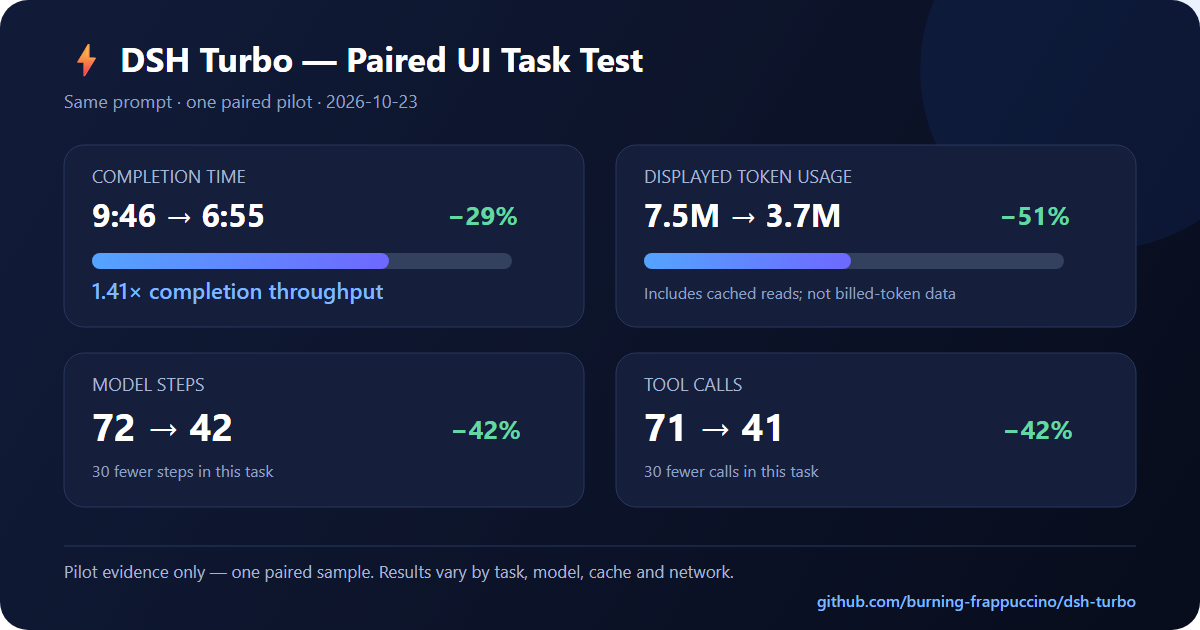
一次相同提示词的单文件 HTML 任务对照结果:
| 指标 | Turbo ON | 默认模式 | 相对变化 |
|---|---|---|---|
| 完成耗时 | 6 分 55 秒 | 9 分 46 秒 | 减少 29%,完成速度约 1.41× |
| 界面显示 Token | 3.7M | 7.5M | 减少 51% |
| 模型步骤 | 42 | 72 | 减少 42% |
| 工具调用 | 41 | 71 | 减少 42% |
这是一次用户场景的配对试验,不是对所有任务的性能保证。界面显示的 Token 包含缓存读取,不能直接
等同于新增 Token 或账单用量;任务、模型、缓存、网络和服务状态都会影响结果。完整方法和更大范围的
基准测试请查看 PERFORMANCE.md,机器可读数据位于
benchmark/paired-ui-sample.json。
安装
git clone https://github.com/burning-frappuccino/dsh-turbo.git
cd dsh-turbo
pnpm install --frozen-lockfile
pnpm run build
pnpm test
powershell -ExecutionPolicy Bypass -File scripts/install.ps1 -Profile desktop
安装后刷新 DeepSeek Harness 页面;如果此前运行过旧版本,请完整重启 DeepSeek Harness,让 Node/Cordis 重新载入模块。
也可以从 GitHub Release
下载预构建的 dsh-turbo.tgz。
使用方法
- 打开任意会话,在输入框旁点击 Turbo。
- 开启后拖动两档滑块:
极速控制 Token 成本,极限允许更多并行开销来换取更短等待。 - 点击旁边的
?可以看到效果说明和同题测试建议。 - 再次点击 Turbo 即可恢复默认模式;正在执行的请求不会被中途改写,新模式从下一次组装请求开始生效。
极限 只会加速能并行拆分的任务,不保证所有任务都更快;串行依赖、网络瓶颈和模型排队仍可能成为限制。
健康检查:
Invoke-RestMethod http://127.0.0.1:19387/api/dsh-turbo/health | ConvertTo-Json -Depth 5
卸载:
powershell -ExecutionPolicy Bypass -File scripts/uninstall.ps1 -Profile desktop
测试与资料
- 自动测试:44 项全部通过。
PERFORMANCE.md:性能测试、用户同题对照与局限说明。compatibility-report.md:DSH API、Hook 和兼容性核查。STATUS.md:开发状态与文件清单。CHANGELOG.md:版本更新记录。
请作者喝杯咖啡
如果 DSH Turbo 帮你节省了时间,可以通过 **TRON(TRC20)**支持作者:
TX7iacb1LVD3sYMTeqrWwjYnSje2Yyi4qv
请确认使用 TRON(TRC20)网络并核对地址;链上转账无法撤销。
English documentation
DSH OVERDRIVE — Dual-Gear Execution Engine for DeepSeek Harness.
Session-scoped low-latency execution mode for DeepSeek Harness, as a native plugin: a Web UI toggle with Fast/Max gears in the composer, Host-authoritative per-session state, and a real runtime policy applied at the harness' own lifecycle boundary.
- Tested against DSH
0.2.0-rc.2(desktop build04f392c9) on Windows. - No dependency on any
@deepseek-ai/*package at runtime — the Host half is a plain Cordis plugin and the client bundle onlyrequires the platform baseline (react,react/jsx-runtime). - Turbo OFF is not a different code path: the plugin's prompt section renders the empty string, so behaviour is byte-identical to not installing it.
Read compatibility-report.md for the verified
host facts this is built on (and what Turbo deliberately cannot control).
Measured user result
One same-prompt paired UI task completed in 6:55 with Turbo versus 9:46
with Default: 29% less elapsed time (1.41× throughput), 51% lower displayed
token usage, 42% fewer model steps and 42% fewer tool calls. This is a single
pilot sample, not a universal guarantee. The UI token counter includes cached
tokens, and task/model/network conditions can change the result. Full methods,
the machine-readable sample and the broader benchmark are in
PERFORMANCE.md and
benchmark/paired-ui-sample.json.
What it actually does
| Mechanism | Where | Effect |
|---|---|---|
| Prompt policy | ctx.systemPrompt.section({ name: 'turbo:execution-policy', order: 700, text }) |
Renders the selected Fast or Max policy only for sessions in Turbo; '' otherwise. |
| Per-step policy stamp | agent/pre-step waterfall |
Records the effective mode and gear per step and writes one evidence line; it never blocks a step. |
| Turn/tool metrics | session/event (turn/start, turn/end, tool/call) |
Wall-clock turn time, steps, tool calls, whether a verification command actually ran. |
| Reasoning effort | agent-scoped agent/request waterfall, registered prepend |
Each gear can select its own reasoningEffort; Turbo OFF returns the upstream request unchanged. A refused id disables the lever and retries the turn. |
| Max parallel policy | prompt policy | Spends extra token/tool budget on independent reads, searches, tools and available subagents in the same turn. Mutating operations are never duplicated. |
| Delivery discipline | prompt policy | Requires the reply to state whether the result was verified, and forbids claiming tests passed when none ran. |
It does not: block tools by name/argument, replace the agent loop, touch
permissions/approval/sandbox, or modify the model's internals. Where a control
does not exist, the UI says unavailable instead of pretending.
The toggle
- OFF →
Turbo - ON / Fast →
⚡ 极速 - ON / Max →
🔥 极限 - drag the two-position slider to change gear
- in flight →
Switching… - bridge unreachable →
Turbo unavailable
It sits in the official conversation.input.right slot (compact controls left of
the submit button). The brief's first choice, conversation.input.activity, is a
single-occupant slot that renders the submit button itself, so it cannot host an
extra control — see report §2.2. ? opens a user-facing result summary with the
rounded benefit figures and an invitation to run the same-task ON/OFF test.
Technical diagnostics stay available through the Host API instead of being
shown to ordinary users.
Install
1. Build (once)
git clone https://github.com/burning-frappuccino/dsh-turbo.git
cd C:\path\to\dsh-turbo
pnpm install --frozen-lockfile
pnpm run build     # writes lib/index.js + lib/client.js
pnpm test          # 44 tests: state, gears, policy, toggle, compatibility
lib/ is generated; the package ships it so consumers do not need a toolchain.
2. Add the bundle to the profile that is actually running
This machine runs the desktop profile. Two equivalent ways:
# (a) scripted, uses the CLI bundled with the desktop app
powershell -ExecutionPolicy Bypass -File scripts/install.ps1 -Profile desktop

# (b) the harness' own plugin manager (Web: Plugins → install → local path,
#     or the plugin_manager tool with target = the plugin directory)
dsh plugin --profile desktop add link:C:\path\to\dsh-turbo
Both do the same two things: install the package into the profile and select it
in dsh.profile.bundles (the bundle patch then inserts the row):
- id: dsh-turbo
  name: dsh-turbo
  config:
    sectionOrder: 700
    reasoningEffort: inherit
    maxReasoningEffort: low
    evidenceLog: true
    storageDir: dsh-turbo
    defaultMode: default
Profile configuration reloads live, so the Host half mounts immediately; the
client bundle appears in the boot graph and needs one page refresh (F5) to be
materialized in the already-booted shell. A full dsh restart also works.
Rebuilt the plugin? A running process keeps the already-imported module (Cordis/Node cache by resolved path), so
lib/changes need a process restart — disabling and re-enabling the row is not enough. This is a harness fact, not a plugin bug; seecompatibility-report.md§9.
3. Verify
# Host half alive + capabilities
Invoke-RestMethod http://127.0.0.1:19387/api/dsh-turbo/health | ConvertTo-Json -Depth 5

# Per-session state (use the id of an open session)
Invoke-RestMethod "http://127.0.0.1:19387/api/dsh-turbo/state?sessionId=<sessionId>" | ConvertTo-Json -Depth 5
In the GUI: open a conversation, click Turbo in the composer, then ? — the
panel explains the measured user benefit and invites a same-task ON/OFF test.
Technical capability state remains available through the Host health/state API,
and the Host log must show dsh-turbo: session … mode=turbo.
4. Uninstall (fully reversible)
powershell -ExecutionPolicy Bypass -File scripts/uninstall.ps1 -Profile desktop
# or, with the harness' own manager:
dsh plugin --profile desktop remove dsh-turbo
The manager deselects the bundle, unloads the rows and runs pnpm remove; the
inserted row disappears with the bundle layer, so no profile patch edit is
left behind. -Purge additionally deletes $DSH_HOME/storages/dsh-turbo*
(the stored modes, metrics and evidence) and the benchmark profile.
Manual equivalent:
- delete
"dsh-turbo"fromdsh.profile.bundlesin$DSH_HOME/profiles/desktop/package.json; pnpm remove dsh-turboin that directory;- restart
dsh(or let the reload settle).
Rollback without uninstalling: set the row to disabled: true in the profile's
cordis.patch.yml — the Host half stops applying any policy and the toggle
disappears.
Using it
- New session → Turbo OFF.
- Re-opened session → restores the last accepted mode (persisted).
- Two tabs → the Host revision guard wins; a stale tab shows the Host value and a short notice instead of flipping the mode back.
- Mid-turn toggle → applies from the next prompt assembly; no in-flight request is rewritten.
- Plugin enabled with an open conversation → the existing Agent is discovered through the Host registry; duplicate lifecycle events do not stack request hooks.
Cost of switching (honest accounting)
- Turbo ON adds one ordered prompt section (~200 tokens) to every request in that session. If the policy removes even one step, that is a net token saving; if it removes none, it is a small net increase — trading tokens for latency is the point.
- Toggling changes the system prompt, so the DSH loop reconciles it at the next
step: an
in-historyroute appends the new prompt (prefix cache preserved), an incapable route consolidates it (one cache miss from the first changed token). Same trade-off plan mode already makes. - Turning Turbo off contributes nothing again: the section renders empty and is dropped during assembly.
What "verified" means here
The Host's verification metric is an observation of the session log: did any
shell tool call in the last turn look like npm test, pnpm build, pytest,
cargo test, tsc, …? It remains available through the Host API, but is not
shown in the public ? panel. It is not a claim that the code works, and Turbo
never blocks such a command. The prompt requires the model to disclose in prose
whether verification happened, because a checker cannot read intent.
Configuration
| Key | Default | Meaning |
|---|---|---|
sectionOrder |
700 |
Prompt section placement (unowned gap between plan/team policy and tool guidance). |
reasoningEffort |
inherit |
Request-level reasoning while Turbo is ON: off/minimal/low/medium/high/max, or inherit to leave the route alone. The route decides what exists — the shipped DeepSeek Messages adapter accepts only off/low/high/max, so minimal is refused. A refusal disables the lever for that Agent and retries the turn rather than failing it, and the capability row says so. |
maxReasoningEffort |
low |
Request-level effort for the Max gear. Max spends more through parallel breadth, while keeping per-request deliberation latency low. |
evidenceLog |
true |
Append one JSON line per applied step to evidence.jsonl. |
storageDir |
dsh-turbo |
Subdirectory of $DSH_HOME/storages. Remove evidenceLog to go without a log. |
defaultMode |
default |
Mode a never-toggled Session reads as. turbo makes Turbo the deployment default; the benchmark harness uses it to pick an arm. |
Unknown keys are rejected at load so a typo fails loudly instead of silently doing nothing.
Where the policy applies: the Host half has no hard service dependency, so
the same bundle works in Web/Desktop, in the headless one-shot runner
(dsh --profile headless "…"), and in SDK/ACP profiles. Only the HTTP bridge and
the composer toggle need the Web surface; everywhere else the policy, metrics and
evidence still run and the capability list says http-bridge: unavailable.
Troubleshooting
| Symptom | Cause / fix |
|---|---|
Turbo unavailable in the composer |
Host bridge not mounted. Check /api/dsh-turbo/health; if 404, the row is not active (dsh-turbo missing from dsh.profile.bundles, or disabled: true). |
| Toggle never appears, no error | Client bundle not in the boot graph: refresh the page (F5) after install; confirm dsh.client.platform: "web" and exports["./client"] still resolve. |
single slot ... already has a registration at load |
Another plugin took a slot this plugin uses; check the browser console — the plugin logs a warning and skips registration instead of breaking the composer. |
Switching… never settles |
The bridge timed out (4 s). Check the Host log for dsh-turbo: lines; the mode was not changed. |
| Mode reverts right after clicking | A revision conflict — another tab changed the session. The Host value wins by design. |
prompt-policy unavailable in details |
The profile has no @deepseek-ai/dsh-system-prompt row; Turbo cannot add prompt text and says so. |
Nothing in evidence.jsonl |
evidenceLog: false, or the directory is unwritable (a warning is logged once per failure). |
Development
pnpm exec tsc --noEmit      # strict typecheck
pnpm run build              # lib/index.js + lib/client.js (+ maps)
node scripts/build.mjs --check   # CI gate: lib/ matches src/
pnpm test                   # node --test tests/*.test.mjs
node scripts/benchmark.mjs --help
Benchmarking ON vs OFF
scripts/benchmark.mjs runs the same 0.2.0 runtime the GUI uses, through the
headless one-shot runner, on a machine-checked task set (benchmark/tasks.json):
- one fresh workspace per run, seeded from the task's
seedbytes; - the only difference between arms is
dsh-turbo.config.defaultModepassed as a--patchoverlay — same profile, model, tools and safety; - arms interleaved per task, order flipped on odd tasks, so cache warm-up and drift do not favour one arm;
- metrics come from the runner's event stream (wall clock, first token, steps, tool calls, tokens, whether verification ran) plus a Node assertion per task.
A dedicated profile keeps the GUI untouched:
# one-time: profiles/turbo-bench = dsh-base + dsh-headless + dsh-turbo
node scripts/benchmark.mjs --profile turbo-bench --limit 4     # pilot
node scripts/benchmark.mjs --profile turbo-bench --out PERFORMANCE-bench.md
Measured numbers live in PERFORMANCE.md.
Layout:
src/host/      plugin row, session store, metrics, evidence, runtime adapter
src/client/    slot registration, toggle component, bridge controller
src/shared/    wire types + ExecutionPolicy vocabulary
src/prompts/   the single prompt section
tests/         state, runtime policy, toggle, compatibility contract
scripts/       build + benchmark harness
See PERFORMANCE.md for the measured Turbo ON/OFF data.
Deliverable map (brief §11)
| Requirement | Where it lives | How it was verified |
|---|---|---|
| Installable plugin | package.json (dsh.bundle.patch, dsh.client), cordis.patch.yml, lib/ |
plugin_manager.install_bundle → application: applied |
| Full TypeScript source | src/** |
pnpm exec tsc --noEmit (strict) |
| Native Web UI toggle | src/client/turbo-toggle.tsx |
Slot inspect shows dsh-turbo active in conversation.input.right |
| Persistable session state | src/host/session-store.ts |
state.json on disk + reopen restores; revision-conflict tests |
| Runtime execution policy in effect | src/host/runtime-adapter.ts |
evidence.jsonl shows policy flipping at agent/pre-step |
| Restorable default mode | prompt section renders '' when off |
test "turning Turbo off restores the untouched prompt" |
| Supported hooks & limits | compatibility-report.md §3, §5 |
each row cites the DSH source line |
| Build & install instructions | this file, scripts/install.ps1 |
exercised on the live desktop profile |
| Uninstall & rollback | this file, scripts/uninstall.ps1 |
bundle/link/row removal paths documented |
| Minimal automated tests | tests/*.test.mjs (40) |
pnpm test |
| Turbo ON/OFF performance report | PERFORMANCE.md + benchmark/ |
scripts/benchmark.mjs on the same 0.2.0 runtime |
License
MIT — see LICENSE.
Support the author
If DSH Turbo saves you time, you can buy the author a coffee using TRON (TRC20):
TX7iacb1LVD3sYMTeqrWwjYnSje2Yyi4qv
Only send assets supported on the TRON (TRC20) network. Blockchain transfers cannot be reversed, so verify the address and network before sending.
No comments yet. Be the first to write one.