
DSH Memory Vault · 长期记忆
Long-term memory for DeepSeek Harness, stored as a plain Markdown vault you own.
A first-level sidebar page, four model tools, token-budgeted recall, and a durable
history journal — no database, no telemetry, no cloud. Your memories stay as
Obsidian-compatible .md files on disk.





Install · Features · Configuration · Data safety · Privacy · Development · 简体中文
Project status (2026-10-19).
dsh-longterm-memory@0.1.3is published on npm and attached to the latest GitHub Release. The desktop-app plugin entry is now verified end-to-end in the running desktop app (61/61 real-browser checks over all five tabs, real vault, restored afterwards); the earlier "desktop path unverified" caveat is resolved. See Install, What's new in 0.1.3 and Project status & limitations.
What's new in 0.1.3
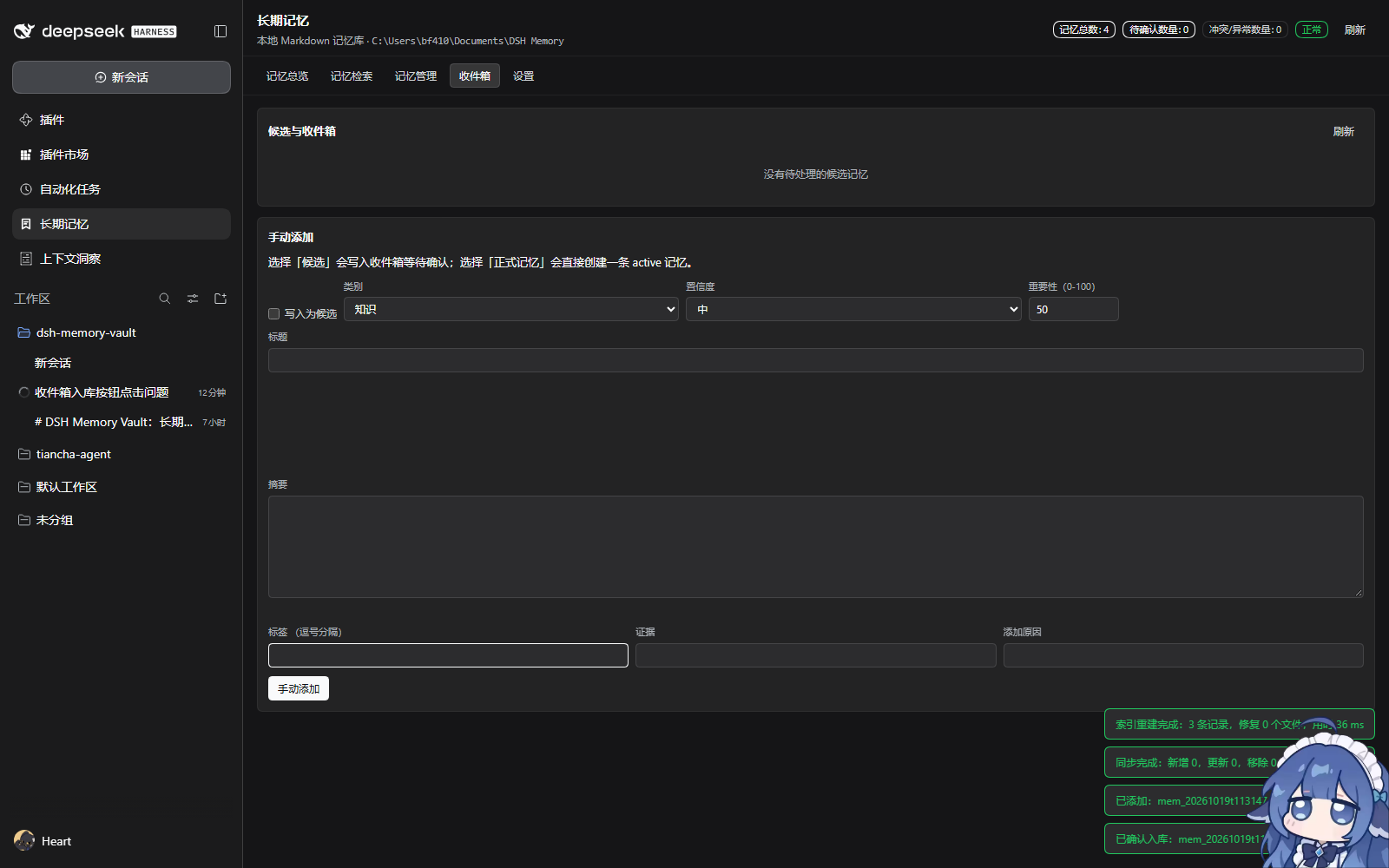
- Inbox is actionable. 确认入库 / Confirm and 拒绝 / Reject now work for
in-memory candidates. Confirming writes an active memory (
lowconfidence is raised tomedium), folds a duplicate/supplement into the existing memory instead of duplicating it, and keeps both sides of a contradiction. Rejecting writes no file. - Status changes on extracted memories work. A multi-line
evidence:block scalar no longer blocks saves withunsafe-edit. - The UI language setting works (it previously lost to the host locale).
- No more permanent "unsaved changes" hint on the settings page.
- New real-browser E2E suite (
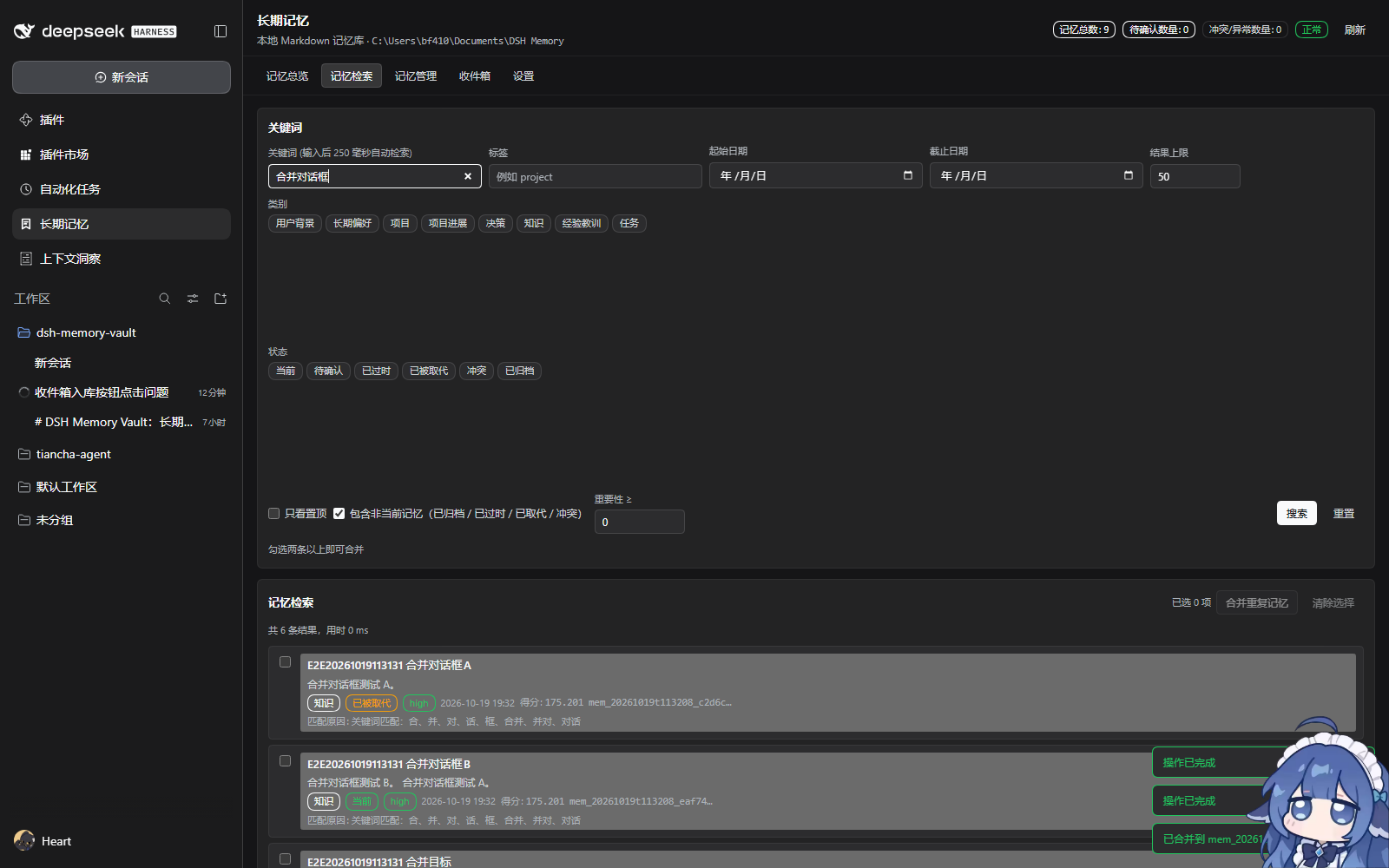
npm run verify:e2e) covering all five tabs, including the Inbox, detail, settings, batch and merge flows.
Full details: CHANGELOG.md · latest release
Why DSH Memory Vault?
Most "agent memory" features are a vector store or a black-box service. DSH Memory Vault makes the opposite trade-off:
- Markdown is the only source of truth. Each memory is a human-readable note with YAML frontmatter. Read, edit, link and back it up in Obsidian or any text editor. There is no proprietary format and no export step.
- The index is disposable.
.dsh-memory/index.jsonis derived data; delete it and the plugin rebuilds it from Markdown. Losing the index never loses a memory. - Recall is budgeted and transparent. Injection is computed per assembly from the current index with explicit token/item caps; the page shows exactly what the model would receive.
- History is durable. Every change is recorded in a journal with before/after digests, reasons and timestamps. A write-ahead outbox keeps history safe across crashes — including the verified window where the Markdown is committed but the journal append has not happened yet.
- Local by default. No network requests, no model calls, no telemetry; the only traffic is the local RPC between the management page and the DSH host.
Features
| First-level sidebar page | Registers a sidebar.panellist entry and a full management page (overview, search, detail, manage, inbox, settings) — not a chat tab. |
| Four model tools | memory_search, memory_get, memory_save, memory_forget (save refuses credential-like content). |
| Automatic extraction | Rule-based, fully local candidate extraction at the real turn/end boundary. Optional model-assisted extraction is off by default. |
| Ranked recall | BM25-style lexical ranking over Markdown, with type/status/tag filters and a token budget. |
| Memory lifecycle | pending → active → stale / superseded / archived / conflict, plus low/medium/high confidence. Low confidence and sensitive content wait in the Inbox for human confirmation. |
| Safe updates | Deterministic dedupe/merge rules: duplicates merge, additions update while keeping sources, contradictions keep both sides, low confidence goes to Inbox. |
| Conflict handling | Conflicting facts are kept side by side, never silently overwritten; a conflict-resolution page supports keep / merge / both. |
| Crash-safe writes | Single-file atomic replace, per-file lock, optimistic checksum concurrency, durable journal outbox with idempotent recovery. |
| Obsidian compatible | The vault carries .obsidian/, [[wikilinks]], stable frontmatter and a human-readable Index/. |
| Bilingual UI | Chinese and English (`language: zh |
No runtime dependency on @deepseek-ai/* |
The host half only uses the Cordis context passed in, so DSH internals can change without breaking the bundle. |
Interface
Real acceptance screenshots (headless Chrome, real host data — no mocks):
| Sidebar entry | Management page |
|---|---|
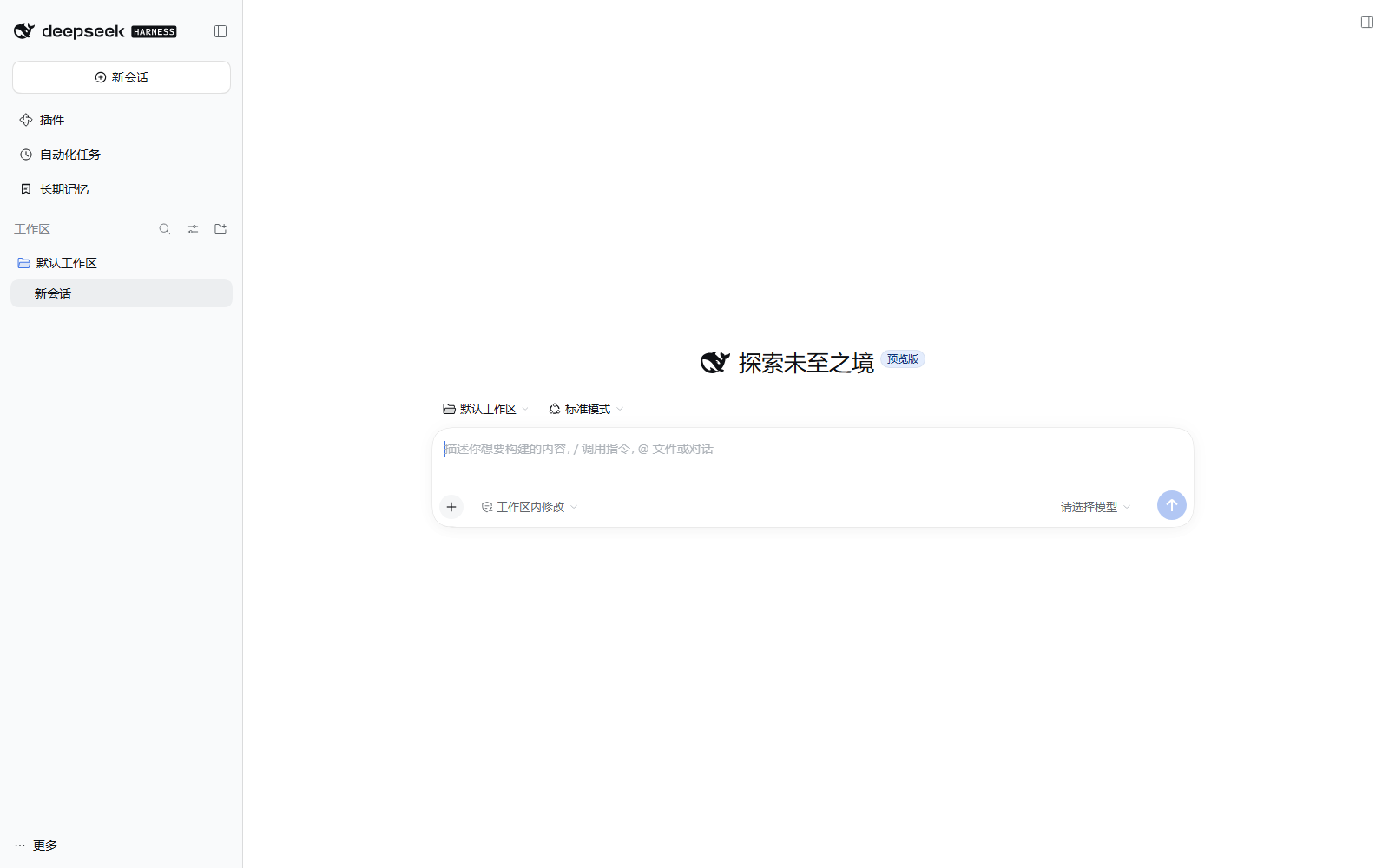 |
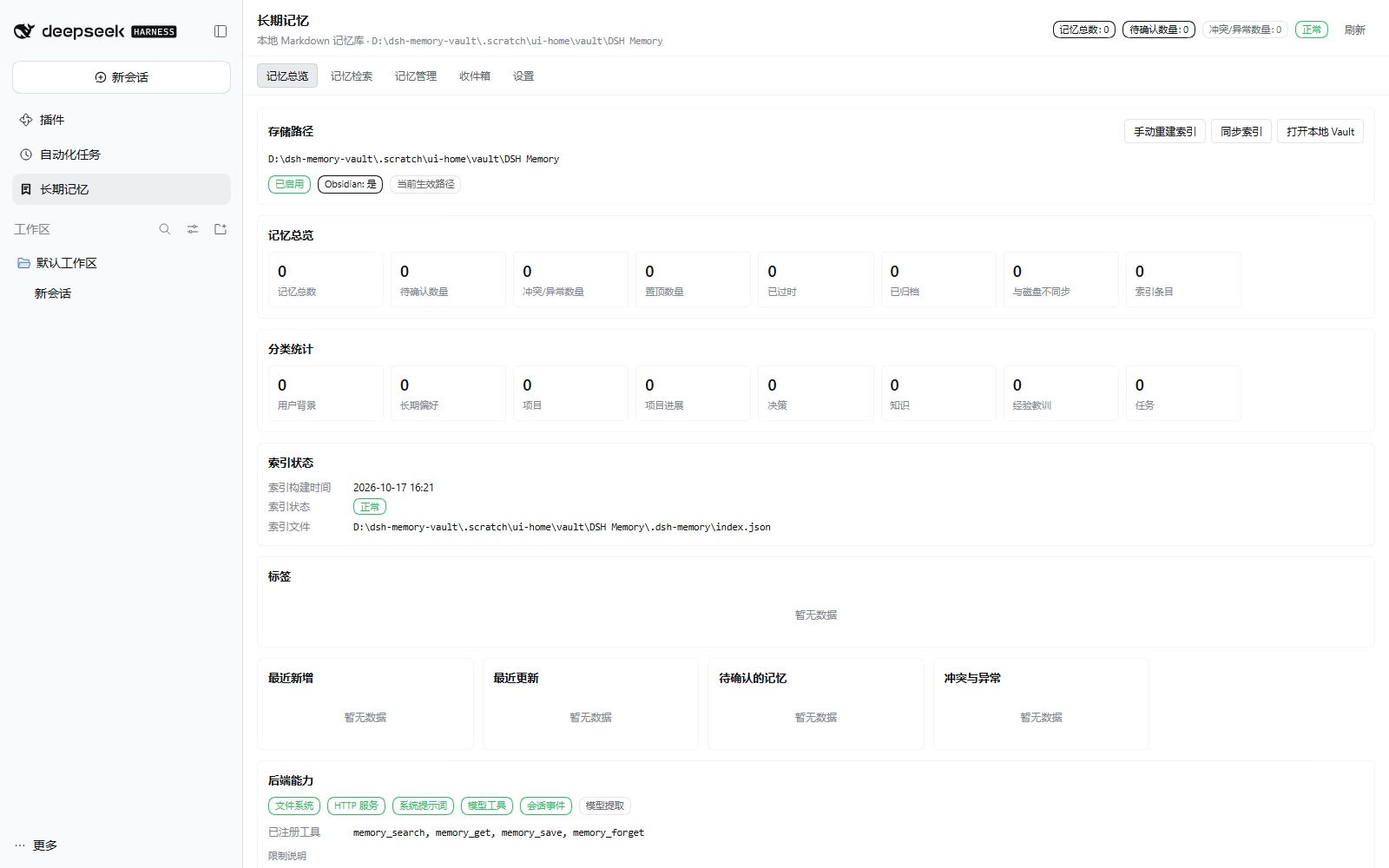 |
More: overview · search · manage · inbox · settings · dark theme


How it works
flowchart LR
  A[DSH host] -->|tools / prompt section| P[Memory Vault host plugin]
  U[Sidebar page] -->|local HTTP RPC| P
  P --> V[(Markdown vault<br/>source of truth)]
  P --> I[(index.json<br/>derived)]
  P --> J[(journal outbox<br/>history)]
  P --> Q[(quarantine<br/>unreadable notes)]
  V -. rebuild .-> I
  J -. recover .-> V
- The host owns the vault, index, journal and extraction; it never calls a model unless you explicitly enable model-assisted extraction with your own provider.
- The management page reads and writes through a loopback-only RPC surface
(
POST /dsh-longterm-memory/api/<method>, 27 methods) guarded by a browser-trust fence (loopback / trusted hosts,Origin,sec-fetch-site). - Recall:
memory_searchand automatic injection share one engine; explicit recall may include retired memories (labelled history), injection only uses current facts.POST /api/previewStandingandPOST /api/previewRecallreturn the exact text that would be injected.
Install
Option A — install the latest from npm (recommended)
dsh plugin --profile web add dsh-longterm-memory@latest
Latest release:
dsh-longterm-memory@0.1.3. Use@latest(or omit the version) so an installation always fetches the newest published version. Inside the official desktop app, install or update the plugin from 插件 / Plugin manager or 插件市场 / Plugin Market, then restart the app when prompted. The desktop path is verified end-to-end in 0.1.3.
Option A2 — download the latest packaged tarball (no build required)
The newest .tgz (and its .sha256) is attached to every GitHub Release:
# Download the latest release asset into the current directory
gh release download --repo bufan528/dsh-longterm-memory --pattern "*.tgz" --dir .
dsh plugin --profile web add .\dsh-longterm-memory-0.1.3.tgz
No gh? Open
https://github.com/bufan528/dsh-longterm-memory/releases/latest and download the
asset manually.
Option B — build this repository and install the tarball (verified)
Requires Node.js ≥ 20 and a DSH CLI. Use an isolated DSH_HOME so the test
profile cannot touch your daily DSH profile:
# 1. Build and pack
npm install
npm run build
npm pack                     # -> dsh-longterm-memory-0.1.3.tgz

# 2. Install into an isolated profile
$env:DSH_HOME = "<temporary dir>"                # PowerShell
# export DSH_HOME="<temporary dir>"              # bash
dsh plugin --profile lmv add .\dsh-longterm-memory-0.1.3.tgz

# 3. Start
dsh --profile lmv --no-open --port 0
Open the Web UI, click 长期记忆 / Long-term Memory in the sidebar, and choose a vault directory (or let the plugin initialize one). You can also pre-set it:
# <DSH_HOME>/profiles/lmv/cordis.patch.yml
- id: longterm-memory
  name: dsh-longterm-memory
  config:
    vaultPath: 'D:/path/to/DSH Memory'
    language: zh
Data-location warning. If
vaultPathis unset, the plugin initializes the default location (~/Documents/DSH Memoryon Windows).DSH_HOMEisolates the profile, not the vault. Always setvaultPathwhen testing.
Quick start
- Install as above and open the page.
- Click 初始化 / Initialize and pick a folder (an existing Obsidian vault works).
- Create a memory with 新建 / New, or let automatic extraction collect candidates at the end of a turn; low-confidence items appear in 收件箱 / Inbox.
- Ask the model something related; the plugin injects the standing section and the tools return ranked hits from the vault.
- Open 设置 / Settings to tune budgets, per-step recall, extraction and language.
Vault layout
DSH Memory/
├── README.md                  # generated; user edits are preserved
├── Memory Home.md             # entry page
├── .obsidian/                 # makes Obsidian treat it as a vault
├── Profile/  Preferences/     # profile, long-term preferences
├── Projects/  Projects/State/ # projects and project state
├── Decisions/  Knowledge/     # decisions, knowledge
├── Experiences/  Tasks/       # lessons, tasks
├── Inbox/                     # candidates awaiting confirmation
├── Archive/  Conflicts/       # retired / contradictory memories
├── Index/                     # human-readable index (regenerated)
├── History/                   # change-history notes
└── .dsh-memory/               # config.json, index.json, journal/, quarantine/
Memory types: profile, preference, project, project-state, decision,
knowledge, experience, task. Status: active, pending, stale,
superseded, conflict, archived. Format details:
docs/storage-format.md.
Configuration
All settings are optional; defaults live in src/host/config.ts and can be overridden
from your profile's cordis.patch.yml.
| Key | Default | Meaning |
|---|---|---|
vaultPath |
auto-discover / initialize | Absolute memory vault path |
language |
zh |
UI language (zh / en) |
enableTools |
true |
Expose the four model tools |
enablePromptSection |
true |
Inject the standing memory section |
standingBudgetTokens |
700 |
Token cap for the standing section |
standingMaxItems |
12 |
Item cap for the standing section |
recallBudgetTokens |
600 |
Token cap for one recall answer |
recallMaxItems |
8 |
Item cap for one recall answer |
enablePerStepRecall |
false |
Splice retrieved memory into each step (replayed for the rest of the session) |
enableAutoExtraction |
true |
Rule-based extraction at turn end (local) |
enableLlmExtraction |
false |
Optional model-assisted extraction (sends turn text to your provider) |
redactSecrets |
true |
Refuse credential-like candidates |
sensitiveNeedsConfirmation |
true |
Health/finance/identity content waits for confirmation |
maxCandidatesPerTurn |
5 |
Extraction cap per turn |
Data safety
- Atomic single-file writes (temp file + rename) and a per-file lock with stale-lock detection; the lock is released on failure, never leaked.
- Optimistic concurrency: edits carry the expected checksum; a stale edit is rejected with a reload hint instead of overwriting someone else's change.
- Index is rebuildable:
rebuildIndex/syncIndexrecover from a deleted or corrupt index. Corruption diagnostics are surfaced, not hidden. - Durable journal: every change gets a before/after digest, reason and timestamp. A write-ahead outbox recovers when the monthly archive fails, with idempotent re-archiving and content-conflict detection (same event id + different payload is an explicit integrity error, never a silent merge).
- Crash-window tests: commit boundaries are exercised with real child-process SIGKILLs, not simulated exceptions — including "Markdown written, commit marker not yet persisted" and "recovery itself interrupted".
- Quarantine: notes that cannot be parsed safely are isolated, never deleted.
Privacy
- No telemetry and no outbound network calls by default. Host-side acceptance runs showed zero network calls; the only client request target is the local DSH RPC. The 0.1.3 desktop E2E run exercised the real page and asserted zero page errors / uncaught exceptions; it is not a packet-level network audit.
- Model use is opt-in: automatic extraction is rule-based and local; model-assisted
extraction (
enableLlmExtraction) is off and, when enabled, uses the provider you configured in DSH. - Secrets are refused: credential-like content (passwords, API keys, tokens, private keys) is blocked before it reaches the vault; sensitive categories require explicit confirmation.
- Injection is data, not instructions: memories are wrapped and labelled as untrusted data for the model. See docs/privacy.md.
Compatibility
| DSH runtime | >=0.2.1-rc.2 <0.2.2 (engines.dsh; 0.2.0-rc.2 is not supported) |
| Verified DSH version | 0.2.1-rc.2 (host + real headless Chrome acceptance) |
| Node.js | >=20 |
| Platform | Windows (primary), Node path rules elsewhere |
| npm package | dsh-longterm-memory — 0.1.3 published (latest) |
| Downloads | npm @latest, or the tarball on the latest GitHub Release |
The dsh.compatibility field is informational; engines.dsh is the only decision
source. Details and evidence: docs/compatibility.md.
Development
npm install
npm run build        # tsc -> lib/host, esbuild -> lib/client.js
npm run typecheck    # tsc --noEmit
npm run lint         # contract checks + version-consistency check
npm test             # full suite (currently 41 files / 595 cases)
npm run check        # build -> typecheck -> lint -> test (clean checkout safe)
npm run pack:plugin  # build + npm pack
npm run verify:e2e -- --url "http://127.0.0.1:<port>/?token=..."   # real-browser E2E (61 checks)
verify:e2e drives a real Chrome over CDP, clicks the real management page and checks
every effect through the plugin RPC and the Markdown files on disk. For a token-guarded
desktop listener, mint the desktop launch cookie for the current machine and pass it
with --cookie-file <name=value file>.
Tests cover unit, integration, packaging, real HTTP-route validation, and deterministic
fault injection (including real subprocess kills). The browser acceptance scripts are
zero-dependency CDP clients using Node's built-in WebSocket.
Project status & limitations
- Preview: API and storage format may still change;
0.1.0was the first public version,0.1.3is the current release. - npm published:
dsh-longterm-memory@0.1.3(2026-10-19); registry installation verified. The npmlatestdist-tag and the GitHub Release always point at the newest version. - Desktop verified: the full real-browser E2E suite passes against the running desktop app (61/61 checks, all five tabs, real vault restored afterwards).
- Known follow-ups: in-memory Inbox candidates are drafts — they are not counted in
待确认数量/ theInbox/folder until confirmed; they leave the Inbox when confirmed or rejected. A few concurrency and move-atomicity edge cases remain open; frontmatter and lock regressions found in review were fixed in0.1.0and are locked by tests. - Vault location: with
vaultPathunset the plugin initializes~/Documents/DSH Memory. Set it explicitly to keep test data isolated.
Documentation
| Doc | Contents |
|---|---|
| docs/architecture.md | Architecture, DSH API usage, prompt assembly |
| docs/storage-format.md | Markdown / frontmatter / index / journal formats |
| docs/privacy.md | Privacy and threat model |
| docs/compatibility.md | Compatibility contract and evidence |
| docs/verification.md | Verification log and acceptance evidence |
| CHANGELOG.md | Release notes for every published version |
| docs/troubleshooting.md | Recovery and FAQ |
| docs/evidence/ | Screenshots and raw acceptance data |
No comments yet. Be the first to write one.